

AGENTS.md: La configuración que puede arruinar tu agente
Los datos muestran que AGENTS.md mal hechos reducen éxito 2% y aumentan costes 20%. Aquí cómo escribir el tuyo correctamente.
Contributors: Ivan Garcia
If you’ve set up a coding agent, you’ve probably created an AGENTS.md thinking more context means better performance. I used to believe that too, until I saw the data: an auto-generated AGENTS.md can reduce your success rate by up to 2% while shooting costs up 20%. In this post, I explain what research says about these configuration files and how to write yours so it actually helps.
Note on conventions: Claude Code uses CLAUDE.md, while Cursor, Zed and OpenAI Codex use AGENTS.md. The principles in this post apply to both formats.
Why AGENTS.md files usually fail
Recent research on context files reveals a counterintuitive pattern: auto-generated files worsen agent performance. The data is clear:
According to [1]:
- LLM-generated AGENTS.md files reduce success rates by 0.5% to 2%
- Increase inference costs by 20% to 23%
- Add 2.45-3.92 extra steps per task without improving results
The problem isn’t the concept, but the implementation. Auto-generated files tend to duplicate information that already exists in project documentation, creating noise instead of clarity.
In most tools, agents read the entire AGENTS.md in every conversation — though exact behavior varies by client; check your tool’s documentation — so every unnecessary line dilutes the instructions that actually matter.
What does work in an AGENTS.md?
Human-written files improve performance in a range of 2-6% (average 4%) for most agents, but also increase inference costs up to 19%. Important note: Claude Code shows marginal improvements but not consistently superior to other agents according to [1]. It’s crucial they follow the WHY-WHAT-HOW framework to justify this trade-off:

The WHY: Purpose and architecture
Explain why your project exists and how main components relate. Don’t list directories, but provide architectural context:
// ❌ Bad: directory listing
// src/
//   components/
//   services/
//   utils/

// ✅ Good: architectural context
// This is a multi-tenant SaaS platform where:
// - Each tenant has isolated data (tenant_id scoping)
// - Background jobs handle document processing
// - Real-time updates use WebSockets for collaboration
The WHAT: Stack and specific structure
Document your tech stack and non-obvious decisions. This is critical in monorepos:
# Tech stack the agent needs to know
Runtime: Bun
Database: PostgreSQL with Drizzle ORM
Testing: Vitest (not Jest)
Linting: Biome (not ESLint/Prettier)
Deployment: Render with Docker
The HOW: Tools and verification
Include build, test, and verification commands. Mentioning specific tools dramatically increases their usage by agents in our experience:
# Build & test workflow
bun install           # Never use npm
bun run build         # Builds all packages
bun test              # Runs Vitest across monorepo
bun run typecheck     # TypeScript validation
What NOT to include in your AGENTS.md
Detailed code overviews
Agents can discover the structure themselves:
| Include | Don’t include |
|---|---|
| ”auth/ handles JWT authentication" | "auth/controllers/, auth/models/, auth/views/" |
| "Background jobs in workers/" | "workers/email.js, workers/pdf.js, workers/…” |
| Purpose of each module | Detailed file structure |
Code style guidelines
Use linters and formatters instead of instructions. They’re faster, cheaper, and deterministic. If you have Biome configured, you don’t need to explain style in AGENTS.md.
Task-specific instructions
Since AGENTS.md goes in every session, only include universal instructions. Specific ones dilute focus:
❌ "For WebSocket debugging, check logs in /tmp/socket.log"
✅ "Application logs in logs/ directory"

❌ "When updating schema, run migrations in staging first"
✅ "Database changes require migrations (see docs/database.md)"
How to structure AGENTS.md for maximum impact
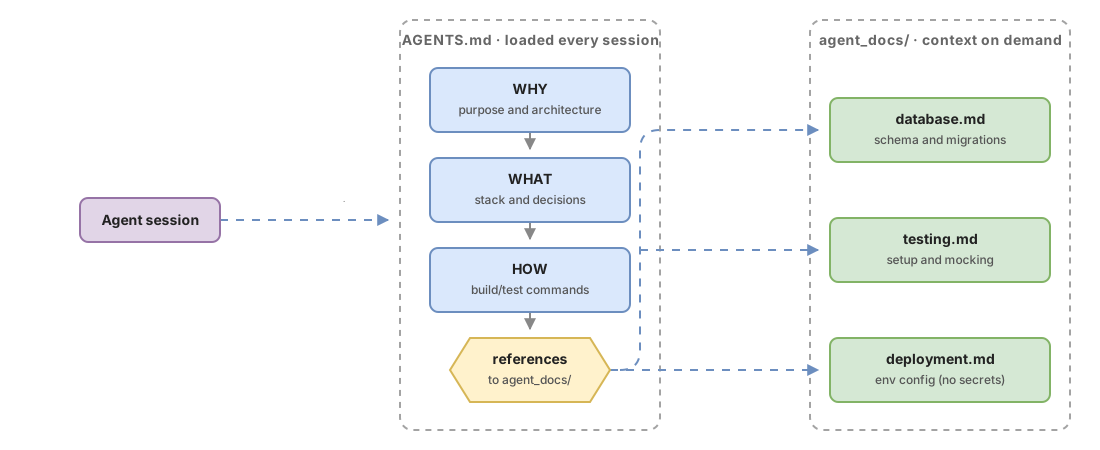
Keep it short
The general consensus is under 300 lines. HumanLayer keeps theirs under 60 lines. Every line goes in every session - make it count.
Progressive disclosure
Don’t put everything in AGENTS.md. Create specific files in agent_docs/:
Note: behavior varies by tool. Some clients open referenced files automatically; others require the agent to request them explicitly or for you to indicate it in the prompt.
# In AGENTS.md (references, not complete content)
## Documentation Structure
- `agent_docs/database.md` - Schema and migration workflow
- `agent_docs/testing.md` - Test setup and mocking patterns
- `agent_docs/deployment.md` - Environment config (no real credentials; use .env.example)

## Quick Start
bun install && bun dev
Pointers instead of copies
Reference file:line locations instead of embedded code snippets that become obsolete. When possible, prefer referencing by function or class name instead of line number:
❌ Copy 20 lines of TypeScript configuration
✅ "TypeScript config in tsconfig.json:12-25"
Common mistakes
The auto-generated AGENTS.md
If you use /init in Claude Code (generates CLAUDE.md) or equivalent commands in other tools, you’re sabotaging performance. Data shows it reduces success and increases costs with no benefit.
How to detect: If your AGENTS.md has extensive file listings or documentation that duplicates existing READMEs.
How to fix: Complete rewrite, focusing on the 3-5 things the agent really can’t infer.
Treating AGENTS.md as linter substitute
Putting style rules in AGENTS.md is sending an LLM to do a linter’s job.
How to detect: Instructions like “use single quotes”, “don’t use var”, “prefer arrow functions”.
How to fix: Configure Biome/ESLint and remove all style rules from AGENTS.md.
Contradictory instructions with tools
If your AGENTS.md says “use npm” but your package.json has bun lockfiles, it creates confusion.
How to detect: Verify commands in AGENTS.md match tools in package.json/composer.json/requirements.txt.
The bloated context file
Including information the agent can discover by navigating the codebase.
How to detect: If your AGENTS.md has more than 300 lines.
How to fix: Reduce to essentials, move details to separate files in agent_docs/.
Implementation checklist
- AGENTS.md written manually (never auto-generated)
- Under 300 lines total
- Includes WHAT (stack), WHY (purpose), HOW (commands)
- Doesn’t duplicate information available in existing documentation
- Build/test/verification commands specified
- Uses progressive disclosure with agent_docs/ files for details
- All mentioned tools match actual configuration
- No style guidelines (use linters instead; do include architectural conventions that linters can’t verify)
- Universal instructions only (not task-specific)
Sources
- Research on Context Files for Code Agents — ArXiv — performance and cost data for auto-generated vs human-written context files.
- Writing a good CLAUDE.md — HumanLayer — WHY/WHAT/HOW framework and progressive disclosure strategies.
Frequently Asked Questions
What happens if my AGENTS.md has more than 300 lines?
Every extra line dilutes important instructions. LLMs have practical limits on followable instructions, and Claude Code already includes significant internal instructions in every session. Your AGENTS.md should use the remaining space wisely, prioritizing information the agent can’t infer from the codebase.
Should I include code examples in AGENTS.md?
No. Prefer file:line references that point to real code in your base. Code snippets in AGENTS.md become obsolete and waste valuable space. If you need to show patterns, create separate files in agent_docs/ with complete examples.
What tools should I mention in the HOW section?
Only non-standard or non-obvious tools. If you use npm, don’t mention it - it’s the default. If you use bun, uv, or poetry, definitely include it. Mentioning specific tools dramatically increases their usage by agents in our experience.
How do I know if my AGENTS.md is working?
Measure success rate on repetitive tasks and the number of steps it takes to complete them. An effective AGENTS.md should reduce unnecessary steps (like using wrong tools) without significantly increasing total task time.
Can I have different AGENTS.md for different projects in a monorepo?
Technically yes, but behavior varies by tool — Claude Code reads from current directory upward; other tools may have different behavior. If you have very different needs per project, consider using progressive disclosure: a root AGENTS.md that references projects/api/agent_docs/ and projects/frontend/agent_docs/ for specific context.