
Architecture of an Enterprise Agent: The 6 Decisions That Matter
The 6 architectural decisions for your first production AI agent: precise objective, memory, tools with minimum privilege, and human oversight.
Contributors: Carlos Hernandez Prieto, Ivan Garcia Villar

You have a language model, you have your company’s documents, you have a list of tools you want to connect. The problem isn’t having the ingredients. The problem is not knowing in what order to combine them so the result is something that works in production without breaking anything.
These are the six architectural decisions that determine the success or failure of an enterprise agent. They’re not in alphabetical order or by popularity: they’re in the order I would make them.
Before we continue: this post assumes you know what an AI agent is (a model that can make decisions and use tools autonomously) and that you have a basic understanding of what tool calling is (when the model can execute functions from your code, not just respond with text). If that’s still unclear, start there.
Decision 1: Define the objective with real precision
Before you write a single line of code, you need to answer this question: what exactly does your agent do?
It seems obvious. It’s not.
Poorly formulated objective:
“The agent helps with customer support operations.”
Well-formulated objective:
“The agent receives a support ticket with ID, retrieves the customer history from the database, classifies the issue by category and urgency, and returns a structured response with the category, urgency, and recommended next step. If urgency is high, it automatically escalates to the human team.”
The difference isn’t cosmetic. The second one has defined inputs (ticket with ID), verifiable outputs (category + urgency + next step), and a measurable success criterion (does the classification match what a human would do?). The first is a chatbot with aspirations.
An agent with a vague objective becomes an agent that “usually works.” In production, that’s not enough.
A useful test: if you can’t write five test cases with input and expected output before building it, the objective isn’t defined well enough.
Decision 2: Single agent or multi-agent system?
A single agent is exactly what it sounds like: a model with tools that completes a task from start to finish. A multi-agent system is a set of agents where one coordinates (the orchestrator) and others execute specialized parts (the workers).
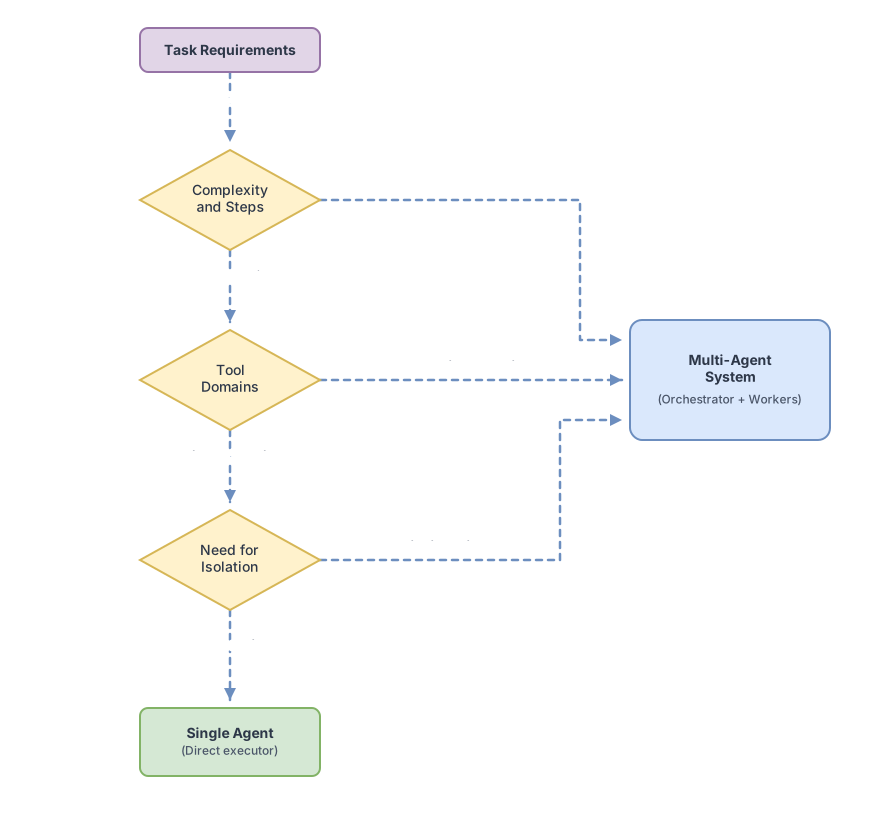
The temptation to jump straight to multi-agent is real. It seems more powerful, more scalable. But it adds a huge layer of operational complexity: more failure points, more latency, more debugging.
Use this criterion to decide:
| If your use case needs… | Use |
|---|---|
| Fewer than 10 steps to complete the task | Single agent |
| Tools from a single domain (only database, or only email) | Single agent |
| More than 15 steps with decisions that can run in parallel | Multi-agent |
| Tools from radically different domains with different risks | Multi-agent |
| Error isolation where a sales mistake can’t affect billing | Multi-agent |
Most first enterprise projects fit perfectly in a single well-designed agent. Multi-agent makes sense when that single agent has already proven its value and you need to scale or isolate responsibilities. When complexity or reliability requirements increase steadily, the single agent reaches its natural limit: it’s usually not a design flaw, it’s the signal that you’ve validated the use case and have real arguments for adding the operational complexity of multi-agent.
Decision 3: Tool design is not a detail
Every tool you give your agent is an attack surface and an error vector. If you give it write access to the entire database when it only needs to read customers, you’ve created a risk you didn’t have before.
The principle of least privilege applies here: each tool accesses only what it needs to do its job, nothing more.
Here’s the structure of a well-designed tool:
// Customer search tool — read-only
const searchCustomersTool = {
  name: "search_customers",
  // The model reads the description to decide when to use this tool
  // If it's vague, the model will use it poorly or at the wrong times
  description: "Search for customers by name or email. Read-only. Does not modify data.",
  // Custom field — Anthropic's API doesn't process it; apply it in your backend authorization layer
  permissions: ["customers:read"],
  input_schema: {
    type: "object",
    properties: {
      query: {
        type: "string",
        // Validation: prevents empty or too-long queries
        description: "Name or email to search for. Minimum 2 characters.",
        minLength: 2,
        maxLength: 100
      },
      limit: {
        type: "number",
        description: "Maximum number of results.",
        default: 10,
        maximum: 50
      }
    },
    required: ["query"]
  }
};
Two things about this code. The description isn’t documentation for you: it’s the instruction the model reads to decide whether to use this tool. If it’s vague, the model will use it at the wrong times. And the input_schema with minLength and maxLength is not just best practice: it’s your first line of defense against unexpected inputs that could cause weird behavior. The Anthropic TypeScript SDK accepts inputSchema in camelCase and normalizes it internally, but the official documentation uses input_schema in snake_case: use whichever version fits your setup, but be consistent.
The permissions field in the example is your own convention, not part of Anthropic’s API schema. The SDK will silently ignore it. Real permission validation must be applied in your backend before executing the tool: verify that the agent is authorized for the operation before calling the database or external service, don’t rely on the tool description being sufficient control.
One additional risk that few implementations consider: prompt injection. A malicious input can manipulate the agent into using tools outside the intended flow, for example making a search tool end up writing data if the model interprets an instruction embedded in the results. Validate inputs before passing them to the model and never execute tools with parameters you haven’t sanitized in the backend.
Decision 4: The three types of agent memory
An agent without memory treats each conversation as if it were the first. One with poorly designed memory accumulates noise that degrades its performance. To understand the difference, here’s a concrete example.
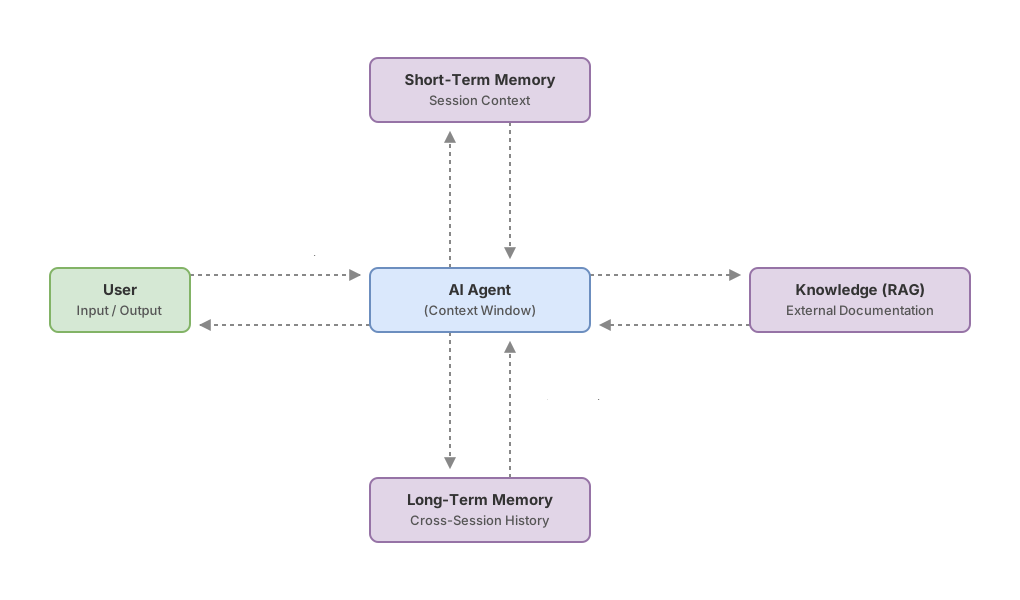
Marta works in operations at a logistics company and uses an agent to manage shipping incidents.
Short-term memory (session context)
Marta writes: “Shipment ENV-4821 has been stuck in Zaragoza for three days.” The agent remembers that fact throughout the entire conversation. When Marta later asks “What’s the transporter’s phone number?”, the agent knows which shipment she’s referring to without her repeating anything.
This is session context. It lives in the model’s context window (the context window is the model’s “active memory” space, the text it can read at any given moment). When the session ends, that context disappears.
Long-term memory (relevant history)
The next day, Marta opens a new session. The agent no longer remembers ENV-4821. But when Marta mentions it, the system retrieves from a database that this shipment already had an incident last month with the same transporter. That’s long-term: persistent information that’s saved between sessions and retrieved when relevant.
Knowledge (RAG over documentation)
Marta asks: “What’s the company protocol for shipments stuck longer than 72 hours?” The agent doesn’t have that answer in context or in Marta’s history. But it can search for it in internal documentation using RAG. RAG, or Retrieval-Augmented Generation, is when the agent searches external documents before answering, rather than making up the answer. The post on enterprise RAG goes into technical detail on how to build that pipeline.
The three types work together. If you eliminate any of them, the agent seems clumsy in some concrete and predictable aspect.
Decision 5: Human oversight: not everything needs approval
Two opposite mistakes: putting the human in the loop for absolutely everything (the agent becomes a complicated form) or giving it total autonomy (and one day it modifies something it shouldn’t). The solution is to classify actions by reversibility and risk.
| Level | Type of action | Examples | Mechanism |
|---|---|---|---|
| No oversight | Reversible, low risk | Read data, generate drafts, search information | Agent acts alone |
| Confirmation | Moderate impact, recoverable | Send an email, create a ticket, update preferences | Agent shows what it will do and waits for confirmation |
| Explicit approval | Irreversible or high risk | Delete records, transfers, permission changes | Agent shows full context and consequences, requires manual OK |
In a contract management agent I built for a client, over 90% of actions were read-only queries without oversight. But any modification of contract terms required explicit approval with the complete diff of what was going to change. That granularity prevented several costly errors in the first few months.
Design all three levels from day one, even if the “explicit approval” screen is very basic initially.
Decision 6: Observability from day one
An agent without traceability (a record of every step of reasoning and every tool called) is impossible to debug when it fails. And it will fail. Not because the model is bad, but because real systems have edge cases (edge cases that tests didn’t anticipate) that only appear in production with real traffic.
The minimum you need to instrument from the start:
- Every tool call: which tool, with what parameters, what it returned
- Every model response: how many tokens it used, whether it called tools or responded directly
- The final result of each conversation: completed the task, asked for human help, or failed with what error
- The token cost of each model call, to detect conversations that spike in consumption before they affect your budget
Without that instrumentation, when something fails in production you can only guess what happened. A warning for enterprise environments: those logs may contain sensitive customer data. Observability must comply with your company’s data privacy policies: redact sensitive fields before persisting, control access to logs, and set bounded retention periods. The post on evaluating agents in production details what metrics to monitor and how to build evals that detect regressions before they reach users.
Common mistakes
The objective that seems concrete but isn’t
“The agent manages HR requests” seems specific. What types of requests? With what information? What does it do when it lacks context to respond? Vagueness in the objective becomes unpredictable behavior in production, and the team ends up saying the “agent sometimes fails” without knowing why.
Tools with broader permissions than necessary
In a system I reviewed, the agent had write access to the entire users table when it only needed to update the last_seen field. Technically it worked. But a bug in the prompt or unexpected input could have overwritten data across the entire database. Every extra permission that isn’t necessary is a risk that adds nothing.
Memory without an expiration policy
If you store the complete transcript of all conversations in session context, you’ll eventually fill the context window and the model will start “forgetting” the beginning of the conversation to make room for new information. Define from the start what gets saved long-term and what gets discarded when you close the session. Compressed summaries work much better than full transcripts.
Implementing human oversight as a “future improvement”
In an internal agent project that started without that layer, adding it three months later forced redesigning half the conversation flow because every action already assumed total autonomy. Build all three levels in your first sprint, even if the initial implementation is basic.
Architecture checklist
This blueprint integrates the six decisions into a single reference view. Before you connect your agent to any real system, verify:
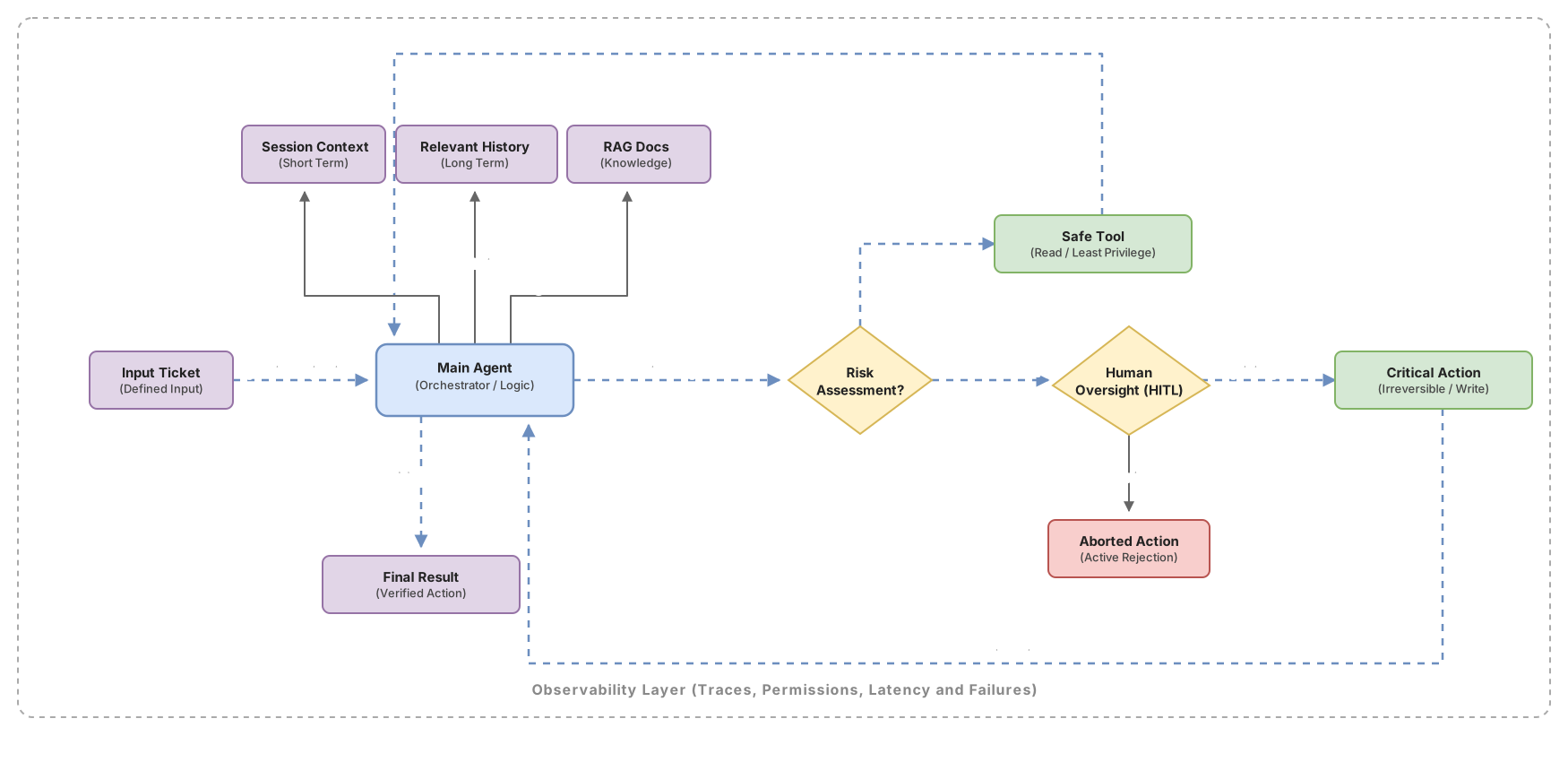
- The objective has defined inputs, verifiable outputs, and measurable success criteria
- You’ve decided on single agent or multi-agent with documented reasoning
- Each tool has minimum permissions and parameter validation in the schema
- The three types of memory are designed: what lives in session, what persists, what comes from RAG
- You have a classification table of actions by oversight level
- The system logs every tool called, every response, and every result
- Logs redact sensitive fields, have access control, and defined retention policy
- You have at least five test cases with input and expected output before going to production
Frequently asked questions
When does it make sense to add RAG to an agent and when not?
Add RAG when the documentation is too large to fit in the system prompt or changes frequently. If it fits in the system prompt and is stable, use it there directly: less latency, less complexity. Quick criterion: if you can paste the documentation in the prompt and it’s still manageable, you don’t need RAG yet. And if you add RAG in an environment with regulated data, make sure to filter retrieved fragments by user permissions before injecting them into context: a RAG pipeline without access control can surface sensitive documents the user shouldn’t see.
My agent’s memory grows over time and uses more tokens each time. How do I manage that?
Don’t save everything. Define a retention policy: what information is useful for future conversations and what is noise. A pattern that works well is saving compressed summaries of past conversations instead of the full transcript. Another is filtering by relevance: before injecting history into context, retrieve only what’s relevant to the current query. The post on enterprise RAG explains how to do that filtering by semantic similarity.
My agent needs to access a legacy system without an API. What are my options?
You have three real options, ordered from most to least stable.
The first: build your own adapter, a service that wraps the legacy system and exposes an API your agent consumes. More upfront work, but the agent stays decoupled from the system’s details.
The second: if the legacy system exports data in some format (CSV, flat files, periodic exports), that’s usually the most stable option even if slower. The agent consumes the exported data instead of integrating directly.
The third: browser automation, where the agent controls a browser to interact with the system’s web interface. It works, but any UI change breaks the integration. Use it as a last resort and with visual regression tests to detect breaks quickly.
How do I version my agent’s behavior when I update the underlying model?
Treat model changes like dependency updates: with regression tests before deploying. Keep a set of test cases with inputs and expected outputs and run them against the new model before updating it in production. Agent behavior can change between model versions even though the system prompt is identical, and some changes are subtle but have real impact on specific use cases.
When should I NOT use an AI agent?
When you need total determinism, exact auditability, or predictable cost per operation. A rule engine or traditional workflow is more appropriate if the logic is fixed and doesn’t change with context, if every decision must be 100% traceable for regulatory compliance, or if operation volume makes token cost prohibitive compared to simple automation.
Agents add value when there’s variability in inputs, when logic depends on context, or when you need the system to adapt to cases you can’t anticipate. If your problem has a single correct answer for each input, you probably don’t need an agent.
Related articles
Programmatic Tool Calling : Step-by-Step Implementation
Hay una técnica que permite ejecutar docenas de herramientas en paralelo sin que el modelo vea ningún resultado intermedio. Nadie habla de ella porque está enterrada en la especificación. Cuando la descubras, vas a replantear cómo diseñas cualquier pipeline de agentes.

Enterprise RAG: the complete pipeline that actually works
How to build a production RAG with semantic chunking, hybrid search and reranking. The real decisions that determine whether your system retrieves well or fails silently.

How to evaluate AI agents in production: metrics, evals, and observability
Technical guide to measuring the real reliability of AI agents in production: task completion rate, deterministic evals, LLM-as-judge, and silent degradation detection.