
What is MCP: the protocol connecting AI agents with tools
MCP (Model Context Protocol) standardizes how AI agents connect to external tools. Explanation with line-by-line commented Python examples.
Contributors: Ivan Garcia Villar, Esther Aznar
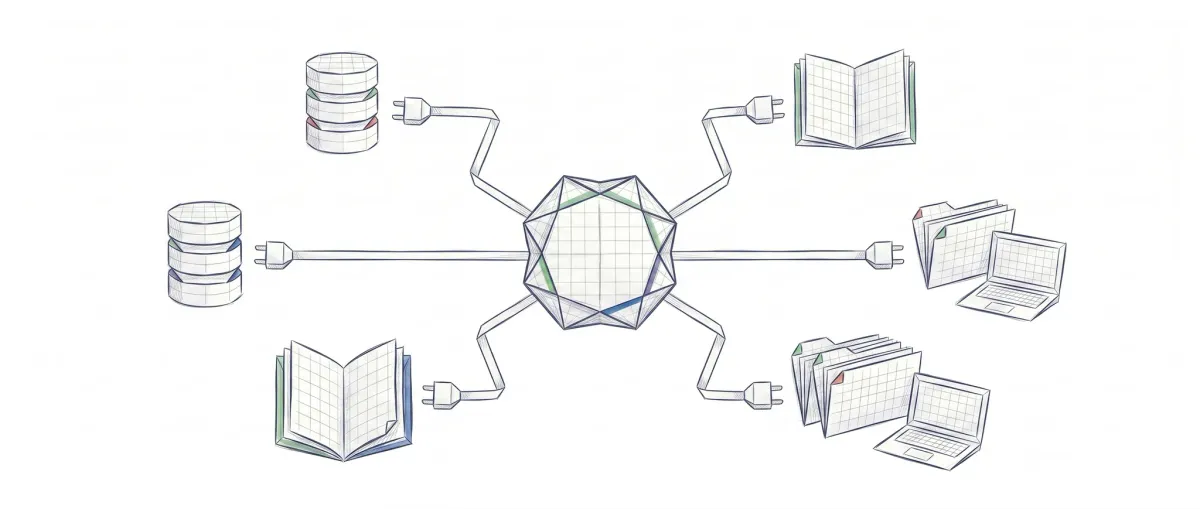
You’ve been using the same USB cable for your phone, keyboard, and external hard drive for years. You never had to think about compatibility. Before USB, every manufacturer used their own connector. It was total chaos. MCP is, for AI agents, exactly what USB was for peripherals: a standard that eliminates the chaos of custom integrations.
The problem MCP solves
Imagine you want to build an AI assistant that can do three things:
-
Search for information in GitHub (where your project code lives)
-
Review notes in Notion (your personal task manager)
-
Ask questions to a database (where you store customer data)
The problem: Without a standard, you’d have to create a different “communication bridge” for each connection. One for GitHub, another for Notion, another for the database. These bridges are complicated, custom code.
And here’s the worst part: If you switch AI assistants (use a different model instead), you have to rewrite all those bridges from scratch. It’s like having to redecorate your house every time you change furniture.
Before MCP (before November 2024): Every programmer building an AI assistant wrote their own custom bridges. Nobody could share the code, because each bridge was unique. The result was a mess: code that broke easily, was hard to fix if something failed, and nobody else could reuse it.
| Before MCP (Chaos) | With MCP (Order) |
|---|---|
| 🔴 Create a different bridge for GitHub, Notion, and database | 🟢 One bridge for GitHub that works everywhere, one for Notion, one for the database |
| 🔴 If you use Claude, you write bridges X. If you use another model, you write completely different bridges Y | 🟢 You write the bridges once. They work with Claude, Cursor, your own program, whatever |
| 🔴 If something breaks, you have to review and fix it in multiple places | 🟢 You fix the bridge once and everyone using it benefits automatically |
| 🔴 Confusing code that only its creators understand | 🟢 A standard format: we all speak the same language |
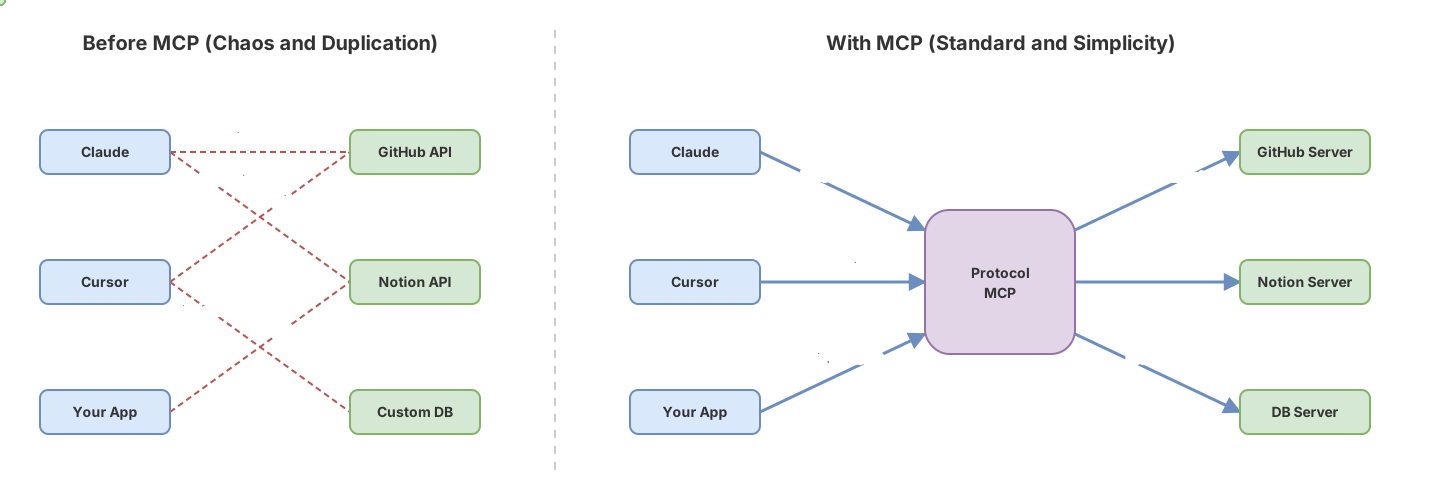
That’s what MCP solves. Instead of each programmer creating their own bridges, MCP establishes a “universal language” that all AI assistants understand. So you create the bridge once and it works with any assistant that speaks MCP. It’s not just an idea, it’s a concrete, specific protocol you can use today.
What is the Model Context Protocol?
MCP is an open protocol created by Anthropic and published as an open standard in November 2024 [1].
Put simply: MCP is a “common language” that AI agents use to talk to tools. It’s as if a tool “speaks MCP” and an agent also “speaks MCP”, so they understand each other without problems.
A protocol is simply a set of rules that two programs agree to follow to communicate. For example, HTTP is the protocol your browser uses to request web pages from the internet.
What’s important about MCP: if you write a tool in MCP today, any agent (Claude, Cursor, or your own script) that also understands MCP can use it without you changing anything.
It’s like having a universal outlet: once you have it, it works with any device that also uses that outlet.
How does MCP work? The client-server architecture
Imagine MCP is a conversation between two characters:
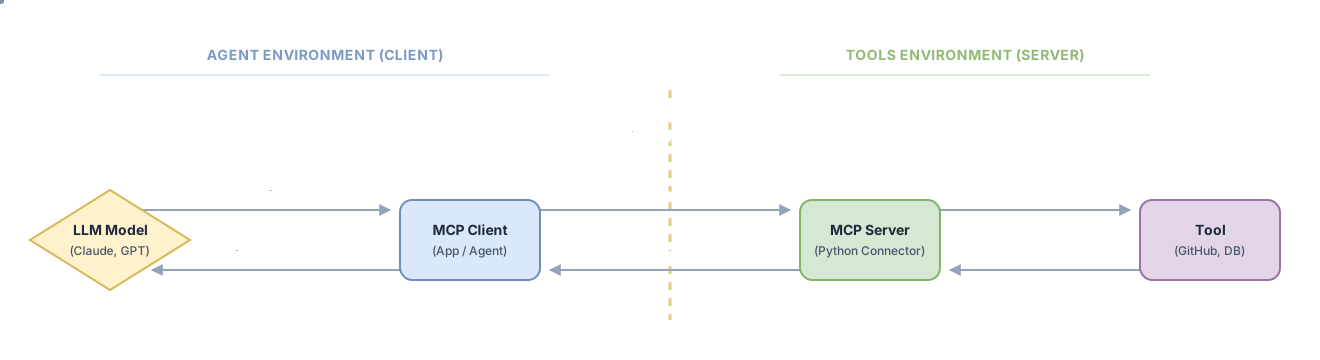
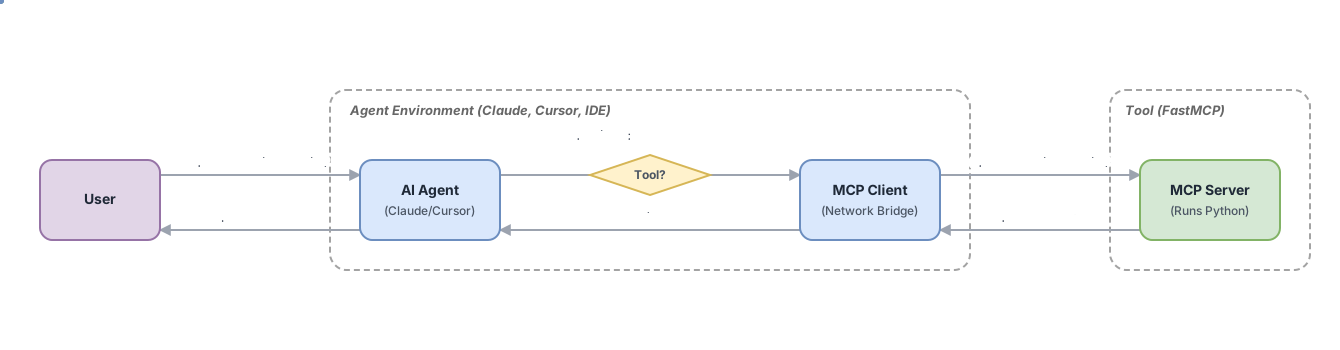
The MCP client is who asks the question. It could be Claude, Cursor, or a program you wrote yourself.
The MCP server is who answers. It’s the tool you built. Written once, but able to respond to any client that understands MCP.
Example of how it works step by step:
- The user asks: “What’s the weather in Madrid?”
- The AI agent thinks: “I need weather information”
- The MCP client asks: “Server, do you have the weather for Madrid?”
- The MCP server responds: “Yes, the weather is sunny, 22°C”
- The agent answers: “In Madrid it’s sunny and 22 degrees”
The USB analogy: The MCP server is like having a universal device that works in any compatible outlet. No matter what city you’re in (what client you use), the device works the same.
Your first MCP server in Python
What you need before starting:
-
Python 3.10 or higher (if you don’t have it, download it from python.org)
-
Run
pip install mcpin your terminal -
Know what a function is in Python (a function is a set of instructions that does something)
How do we create an MCP server? We use FastMCP, which is a tool that comes in the mcp library. The good thing about FastMCP is that it’s very simple: you just write a normal Python function, and FastMCP automatically converts it into a tool that AI agents can use.
from mcp.server.fastmcp import FastMCP

mcp = FastMCP("weather-server")

@mcp.tool()
def get_weather(city: str) -> str:
    """Gets the current weather for a city"""
    return f"The weather in {city} is sunny, 22°C"

if __name__ == "__main__":
    mcp.run(transport="stdio")
Save this file as weather_server.py. You don’t need to run it directly. The client will start it automatically.
The client that calls that tool
Now we’ll write the program that uses that tool. Normally it would be Claude or Cursor doing this, but we’re writing it ourselves so you understand how it works.
Important note: The code uses words like async and await. Don’t be scared: they’re just Python keywords for waiting for responses. You don’t need to understand the details. Just copy the code and run it.
from mcp import ClientSession, StdioServerParameters
from mcp.client.stdio import stdio_client
import asyncio

async def main():
    server_params = StdioServerParameters(
        command="python",
        args=["weather_server.py"],
    )

    async with stdio_client(server_params) as (read, write):
        async with ClientSession(read, write) as session:
            await session.initialize()

            response = await session.list_tools()
            print("Available tools:")
            for tool in response.tools:
                print(f"  - {tool.name}: {tool.description}")

            result = await session.call_tool("get_weather", arguments={"city": "Madrid"})
            print("\nResult:")
            for content in result.content:
                print(content.text)

if __name__ == "__main__":
    asyncio.run(main())
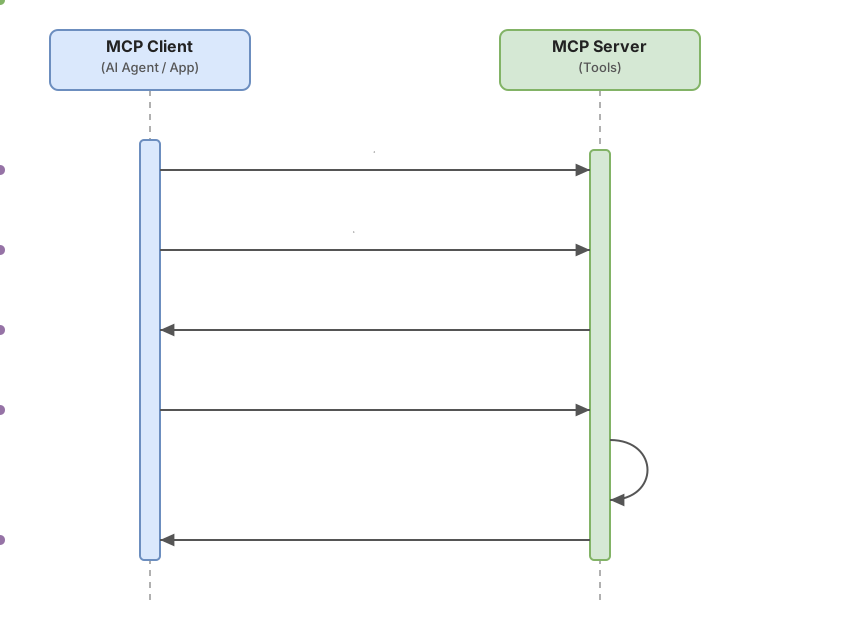
Communication flow between client and server
Steps to test the example
Step 1: Create a new folder on your computer (for example, my-mcp)
Step 2: Open your favorite code editor (VS Code, Notepad, whatever) and copy the first code (the server). Save it as weather_server.py in that folder.
Step 3: Copy the second code (the client). Save it as weather_client.py in the same folder.
Step 4: Open a terminal in that folder and type:
python weather_client.pyIf it doesn’t work, try:
python3 weather_client.pyStep 5: If everything goes well, you’ll see this on your screen:
Available tools:
  - get_weather: Gets the current weather for a city

Result:
  The weather in Madrid is sunny, 22°C
If it doesn’t work:
-
Check that both files are in the same folder
-
Check that you have Python 3.10 or higher: type
python --versionin the terminal -
Check that you installed MCP: type
pip install mcpin the terminal
Why does MCP matter now?
Less than a year ago, in November 2024, MCP was a new idea. Today, almost a year later, the protocol is already integrated into tools you use every day:
-
Cursor and Zed (code editors) support it natively
-
Continue (AI plugin for editors) also uses it
-
Claude Desktop includes it
-
The official repository has ready-to-use servers: GitHub, Slack, file systems, databases
What’s important: if you build an MCP server today, it works with any of these clients without you changing anything. You don’t need to rewrite anything. You don’t need to create different versions.
That’s what explains why engineering teams are using MCP: standardization is what allows agents to go from being an interesting experiment to being a productive tool in your company. Without MCP, each new tool costs you rewriting integrations. With MCP, you write it once and it works everywhere.
What MCP is not
Before we continue, it’s worth clarifying some common misconceptions.
MCP is not an agent
MCP is the protocol that connects agents to tools. The agent is the model that decides what to ask and what to do with the response. The MCP server doesn’t make decisions: it simply executes what it’s asked and returns the result.
Does MCP make your agent smarter?
No. Having a perfect MCP server doesn’t make your agent smarter. The quality of responses depends on the model, the prompt, and how the system is designed. MCP only standardizes the communication part.
MCP is not exclusive to Claude and doesn’t require the cloud
It’s an open standard that works with any compatible client. And it can run completely locally: you don’t need any external service to develop and test your server.
MCP is not always necessary
If you’re building a tool that only you’ll use in your own script, a direct API call is more than enough. MCP makes sense when you want your tool to be reusable by multiple different agents or clients. The added complexity of the protocol is justified when the server is used in more than one context.
Where to go from here?
Build your first MCP server with the code from the earlier examples adapted to a tool you actually use: an API, a local database, a script you run frequently.
If you want to understand what happens when a model calls a tool without MCP, read tool calling step by step. MCP is the standardized version of the same mechanism.
When you have your agent working with MCP, use how to evaluate agents in production to measure whether it does what it should.
Just as USB made any peripheral work with any computer, MCP makes any tool work with any agent.
Checklist to get started with MCP
-
Python 3.10+ installed and
pip install mcpexecuted -
Server created with
FastMCPand at least one tool registered with@mcp.tool() -
Server tested with the example client (
weather_client.py) -
The tool returns a readable result in plain text
-
The client can list available tools with
session.list_tools() -
The client can call the tool with
session.call_tool()and get a response -
Identified a real use case where MCP makes sense (tool reusable by more than one client)
Sources
- Model Context Protocol — Announcement (Anthropic, November 2024) — publication date as an open standard and protocol description.
- MCP Servers Repository — modelcontextprotocol/servers (GitHub) — official reference implementations of MCP servers for the most common integrations (GitHub, Slack, file systems, databases).
- Official MCP Documentation — modelcontextprotocol.io — protocol specification, client-server architecture, and implementation guides.
- Official Python SDK MCP — modelcontextprotocol/python-sdk (GitHub) — source code and documentation of the
mcplibrary, including FastMCP andClientSession.
Frequently Asked Questions
What’s the difference between MCP and simply calling an API directly?
Calling an API directly works well when you control the client code and the code making the call. MCP adds a useful standardization layer when you want your tool to be accessible by multiple different agents or clients without having to adapt anything. If your tool is only used by your own scripts, a direct call is simpler. If you want Claude Desktop, Cursor, and your own agent to use it without changing anything, MCP makes sense.
Do I need to know what an AI agent is to use MCP?
Not to get started. You can build an MCP server with the examples in this post without ever building an agent. The server is simply a Python function that responds to requests with a standard format. The agent is who decides when to call it, but that’s not your responsibility when writing the server.
Why does the client code use async and await?
Because the client waits for responses from the server without blocking the program. It’s a standard pattern in Python. You don’t need to understand the details: just copy the pattern async def main() / asyncio.run(main()).
Can I use MCP with a model other than Claude?
Yes. MCP is an open standard and several clients implement it: Cursor, Zed, Continue, and others. The MCP server you build will work with any client that supports the protocol, regardless of which AI model it uses underneath.
What happens if the MCP server returns an error?
The MCP protocol includes an error handling mechanism: the server can return an error result instead of a valid result. In production, the agent receiving that error decides what to do (retry, inform the user, use another tool). In the examples in this post, if there’s an error in the server you’ll see an exception in the client terminal with the corresponding message.
Two concrete scenarios that appear when running the example for the first time: if the args value in StdioServerParameters points to a nonexistent file or incorrect path, the server process doesn’t start and the client throws a subprocess exception (usually FileNotFoundError) before reaching initialize(). If the @mcp.tool() decorator is applied incorrectly—for example, placed on a class instead of a function—the tool is not registered and list_tools() returns an empty list instead of showing get_weather.
Related articles

Programmatic Tool Calling : Step-by-Step Implementation
Hay una técnica que permite ejecutar docenas de herramientas en paralelo sin que el modelo vea ningún resultado intermedio. Nadie habla de ella porque está enterrada en la especificación. Cuando la descubras, vas a replantear cómo diseñas cualquier pipeline de agentes.

40% of AI Agent Projects Will Be Canceled Before 2027. Here's Why
Gartner predicts over 40% of enterprise AI agent projects will be canceled before 2027. Tool loop, prompt injection, and MCP explained without the hype.

How to evaluate AI agents in production: metrics, evals, and observability
Technical guide to measuring the real reliability of AI agents in production: task completion rate, deterministic evals, LLM-as-judge, and silent degradation detection.