
AI Automation Without Code: 5 Real Workflows to Get Started
How to build AI automations using Zapier, Make, or n8n. Five real workflows, comparison table, and a framework for choosing your first automation.
Contributors: Carlos Hernandez Prieto

I know someone who spends forty minutes every Monday moving data between contact forms and their CRM. By hand. Because “there are more urgent things.” In a year that’s over thirty hours on a task that requires zero human judgment: just connections between tools and some basic logic. Exactly what AI automation workflows solve.
What’s interesting isn’t just that these tools connect apps. It’s that they can now make decisions in the middle: classify an email by intent, extract entities from free-form text, evaluate whether a brand mention deserves real attention. Things that previously required custom code and a hand-integrated LLM.
Trigger, steps, AI: the pattern that repeats
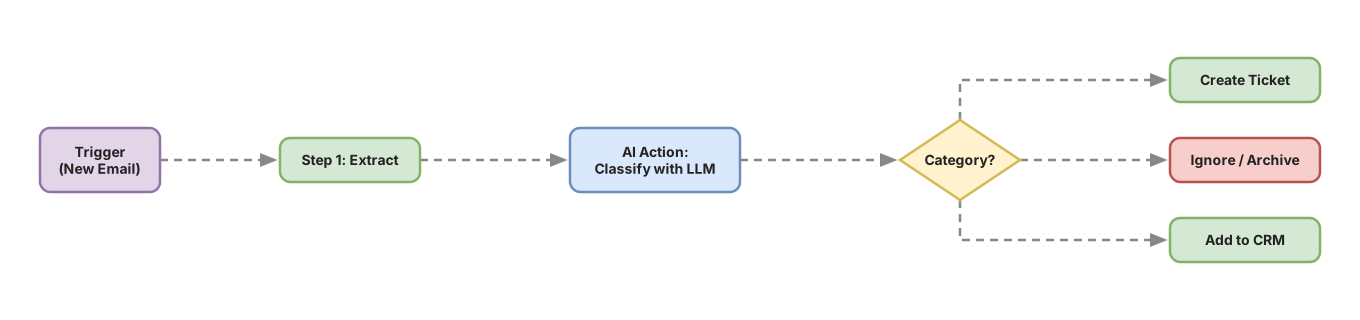
Every automation, regardless of tool, works the same way. A trigger is the event that starts the workflow: a new email, a form submission, a specific time of day, a file appearing in a folder. When it happens, the workflow executes a series of steps: fetch data, transform it, call external services (an API is how you talk to another service via HTTP). Somewhere in those steps there might be an AI action: you send text to an LLM with specific instructions and use its response to continue the workflow. The pattern is always the same: trigger → steps → AI action → output.
The AI part isn’t especially complicated to integrate. It’s just another step: text in, text out. What changes is that the text can be a classification, a summary, a drafted response, or a sentiment analysis. The LLM processes natural language better than any regex or boolean condition you could write by hand.
The guiding question for when to use it is simple: is there natural language interpretation in this step? If not, you don’t need it.
The three tools
| Dimension | Zapier | Make | n8n |
|---|---|---|---|
| Ease of use | Very high (guided interface, few concepts) | High (steeper initial curve, more visual) | Medium (requires basic technical comfort) |
| Complex workflows | Limited. Linear logic only | Good. Routers, iterators, and conditions | Excellent. JS code in any node |
| LLM integration | Good (OpenAI and Anthropic native) | Good (OpenAI native, HTTP for the rest) | 70+ native AI nodes: LangChain, RAG, LLMs |
| Entry price | Free: 100 tasks/month | Free: 1,000 operations/month (free plan: 2 active scenarios simultaneously) | Free: self-hosted with unlimited executions |
| Best for | No technical background, simple workflows | Medium workflows with several conditions | Full control, more technical profile |
For someone already writing APIs, n8n is the most interesting option long-term. What I see work best for getting started is Make: you can validate the idea in an afternoon without installing anything, and it has just the right balance between accessibility and power.
One thing that matters long-term: with Zapier you accumulate platform dependency and advanced logic gets complicated fast. n8n gives you total control, but means managing updates, backups, and potential server downtime. It’s not a blocker for getting started, but worth knowing before you build something critical.
The five workflows
Workflow 1 — Email classifier
Tool: Make. Trigger: New email in a Gmail or Outlook folder. Difficulty: Easy. Time: 30-45 minutes.
The steps are straightforward: read the email body, send it to the LLM with a prompt that defines possible categories (technical inquiry, complaint, sales opportunity, after-sales support), receive the classification, and move the email to the correct folder or notify Slack.
The prompt can be as simple as this:
Classify this email into one of these categories: technical inquiry, complaint, sales opportunity, after-sales support.
Respond with only the category name, no explanation.

Email: {EMAIL_BODY}
AI adds value here because determining the real intent of a message can’t be done with simple rules. “I’m very happy with your service, but something doesn’t work well” is a complaint. An LLM classifies it correctly; a keyword filter doesn’t. It’s the workflow with the fastest return and the best starting point if you’ve never automated anything.
Workflow 2 — Contact form processor
Tool: Make. Trigger: New submission in Typeform, Tally, or any form via webhook (a URL that receives data automatically when something happens). Difficulty: Medium. Time: 1.5-2 hours.
The workflow receives form data, the LLM analyzes the free-form message and extracts intents and categories, the contact gets created in the CRM with the correct tags, and a personalized auto-response is sent.
Without an LLM, the auto-response is generic and the tag depends on a selection field the user fills out. With an LLM, the tag comes from analyzing the text and the response mentions exactly what that person asked for. Configuration time goes mostly into writing the extraction prompt well. To get the most out of it, the post on prompt engineering for developers covers the concrete patterns that work here.
Workflow 3 — Daily industry news digest
Tool: Make or n8n. Trigger: Daily schedule at 7:00 AM. Difficulty: Easy. Time: 45-60 minutes.
The workflow calls a news API or RSS feeds from sources you define, filters articles from the last 24 hours, sends titles and excerpts to the LLM with instructions to select the most relevant ones for your context, and sends the summary to email or Slack.
AI does two things: filters noise and compresses. Instead of forty headlines without context, you get six useful paragraphs. The main challenge is defining the relevance criteria well in the prompt, which is basically a description of your interest profile.
Workflow 4 — Drafts from notes or audio
Tool: n8n. Trigger: New file in Google Drive or new note in Notion. Difficulty: Medium. Time: 2-3 hours.
If the file is audio, it first goes through a transcription service. Then the LLM receives the raw content with instructions for the output format: blog post, email, Twitter thread. The draft gets saved to Notion or Google Docs.
AI turns raw material into a functional first draft. It doesn’t eliminate human review; it eliminates the blank page. n8n is the best option here because the conditional logic (audio or text?, what output format?) is cleaner to model with its nodes than in Zapier or Make.
Workflow 5 — Mention monitor with relevance filtering
Tool: n8n. Trigger: Search results via API (Serper, Brandwatch, or Reddit searches) every few hours. Difficulty: Advanced. Time: 3-4 hours. Requires: access to at least one search/monitoring API already configured.
The workflow gets new mentions, sends each one to the LLM to evaluate sentiment and actual relevance (does it talk about your product or is it a name coincidence?), filters those above a defined threshold, and notifies with context.
This workflow fails in two predictable ways: it notifies about everything because the threshold is too low, or it notifies nothing useful because it’s too high. The solution is to include two or three real examples in the prompt of mentions you actually want to receive and others you don’t. The LLM uses them as reference before evaluating each new mention, and the difference in precision is notable. The time estimate assumes external APIs are already configured, which is usually the slowest part of this phase.
What should your first automation be?
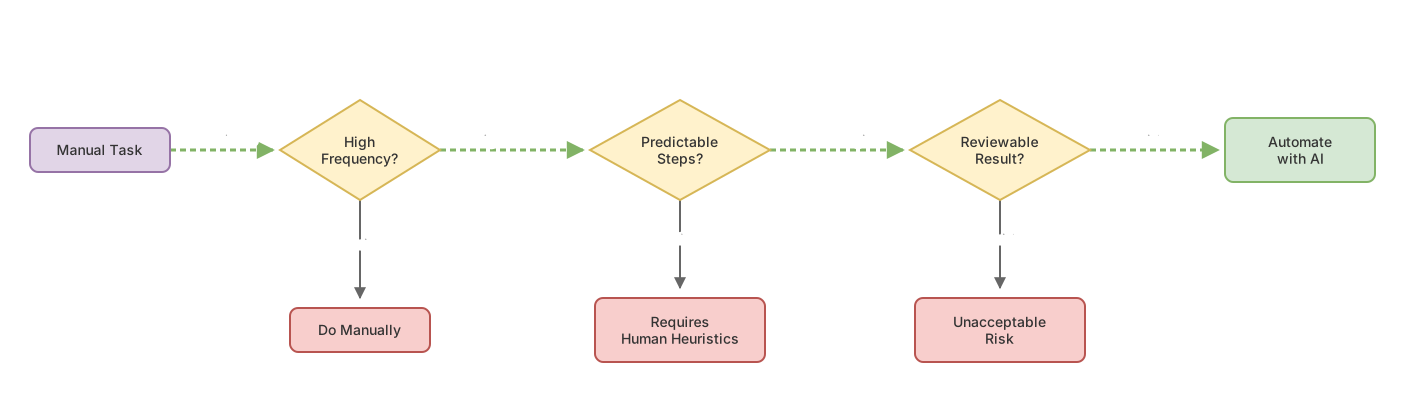
Before opening any tool, answer these questions about a specific task in your work:
Do you do it more than three times a week? If not, setup time won’t pay back in reasonable timeframes.
Do you always follow the same steps? If there are frequent unpredictable variations, the automation needs so many special cases it stops being worth it.
Could a human review the result instead of generating it? Automating a draft is different from automating a final decision. In the first case, a human reviews before the output goes anywhere. In the second, the human disappears from the process. The second level needs more attention and care. Review isn’t optional: LLMs make classification errors and generate incorrect text with complete confidence; the human checkpoint is what keeps those errors from reaching the final destination.
If all three answers are yes, you have a real candidate. I’d start with the email classifier: the benefit is immediate, the risk if it fails is low, and with that workflow running you’ll have the complete pattern clear in your head. After that, the form processor is the natural next step.
Frequently Asked Questions
Do you need to know how to code to use these tools?
No. Zapier and Make are designed to work without code. n8n doesn’t require coding for most workflows either, though basic JavaScript knowledge helps when you need to transform data in ways the standard nodes don’t cover.
How much does it cost to get started?
All three have functional free plans. Zapier gives 100 tasks a month, though workflows from this post with more than two steps (like the email classifier) require a paid plan on Zapier. Make gives 1,000 operations a month. n8n is free if you host it yourself, on your own server or a cheap VPS (Hetzner, Fly.io).
The cost of the automation tool can be zero initially, but each LLM call has a per-token cost that adds up with volume. The order of magnitude is cents per call, but it adds up if the workflow processes hundreds of emails a day. Also, free LLM tiers have very low quotas or don’t exist for real use; for production workflows you’ll need paid credits from day one.
What’s the first workflow someone who’s never automated anything should build?
The email classifier. It sets up in under an hour, the trigger is simple, the impact is noticeable from day one, and if something fails there are no serious consequences. It’s the workflow that best teaches the complete pattern at once.
Are the data safe with these tools?
Zapier and Make are cloud services: data passes through their servers and, if you use OpenAI or Anthropic integration, theirs too. For sensitive or regulated data (GDPR, medical information, customer data with contractual restrictions), self-hosted n8n is the only option with full control of the orchestration infrastructure. Using self-hosted n8n with a commercial LLM API still sends data to the AI provider; for complete control, consider models you can host yourself. Review each platform’s terms before connecting sensitive data. It’s not a minor detail.
Related articles

Prompt Engineering for Developers: 5 Patterns With Code
The 5 prompt engineering patterns: zero-shot, few-shot, CoT, role prompting, and structured output with real TypeScript code.

Architecture of an Enterprise Agent: The 6 Decisions That Matter
The 6 architectural decisions for your first production AI agent: precise objective, memory, tools with minimum privilege, and human oversight.