
AI Use Cases in Business: Which Ones to Prioritize
A framework for knowing which of your tasks are a good fit for AI and which ones are money down the drain: AI use cases in business, no hype.
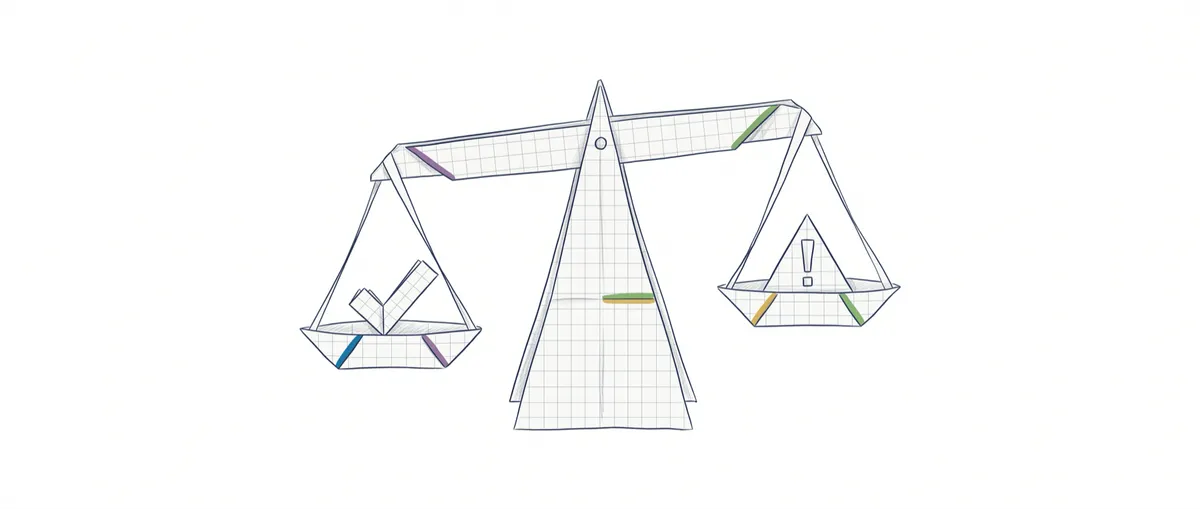
Every few weeks someone shows me an AI demo and asks the same question: “will this work for me?” The demo is almost always slick, and my honest answer is almost always “it depends,” because the question is framed wrong. Most lists of AI use cases in business start with the technology (“look what this chatbot can do”) instead of your problem. That makes it impossible to decide anything: you end up with fifty trendy ideas and not a single reason to pick between them.
The question that actually helps isn’t what AI can do, but which of your tasks have the shape that AI is good at. There’s a specific task profile that fits, and choosing among the ones that fit is a simple exercise: weigh how much impact a task has on your business against how much it costs you if the AI gets it wrong. With those two ideas, you can look at your own company and separate the real opportunities from the flashy demos.
What tasks is generative AI actually good at (and which ones not)?
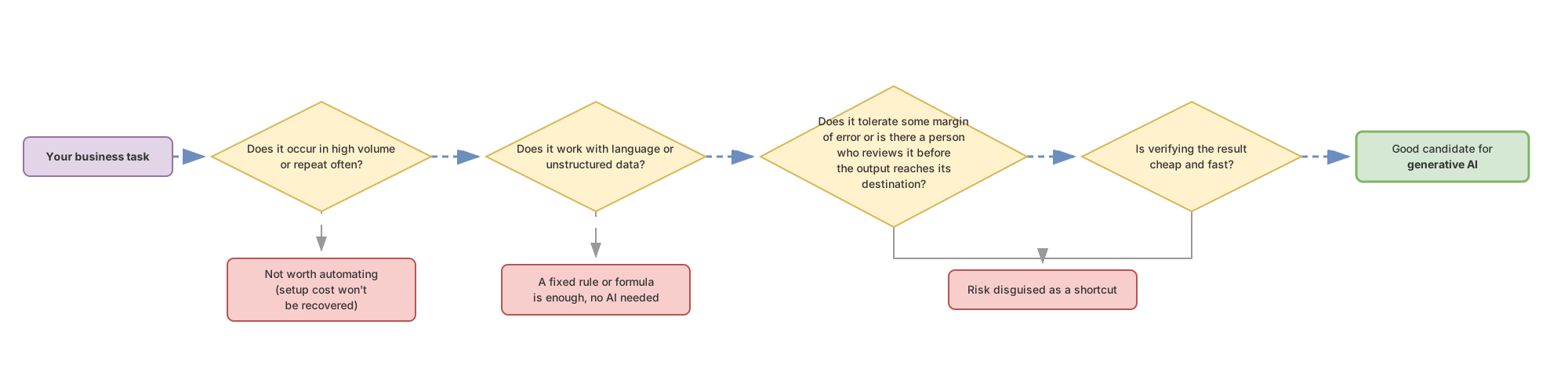
Generative AI performs well on high-volume tasks that involve interpreting or producing language, tolerate some error, and can be reviewed quickly. Outside that profile, it’s almost always throwing money at something that causes trouble.
Two quick definitions, in business terms. Generative AI is a type of program that, given a text instruction, produces new content: almost always text (a summary, an email draft), sometimes images or audio. Under the hood it runs on a language model (LLM): a system trained on huge amounts of text that, given a fragment, predicts how it would continue. It doesn’t look up a database of facts; it generates whatever statistically fits. That’s where its biggest risk comes from, hallucination: the model invents a fact, a figure, or a clause with total confidence, with the same ease as when it gets it right. It doesn’t flag when it’s wrong.
With that in mind, here’s the profile of a task that AI handles well. Four conditions:
- High volume or repetition. If a task happens once a year, the time you invest in setting up the AI never pays off. The value shows up when something repeats hundreds or thousands of times.
- It involves language or unstructured data. Emails, documents, free-text forms, transcripts. A task is “structured” when it fits into a spreadsheet with fixed columns; it’s “unstructured” when the information is in prose, messy, different in every case. That messiness is exactly where a fixed rule fails and a language model shines.
- It tolerates a margin of error, or someone reviews it. If an occasional mistake doesn’t sink the process, or if a person validates the output before it reaches its destination, AI is a fit. If you need absolute accuracy with no review, it isn’t.
- Verifying the result is cheap and fast. This is the condition almost everyone forgets. It doesn’t matter how well the AI generates if checking that it got it right costs as much as doing the task by hand. When you can validate at a glance (do the totals add up, is the tone right), AI multiplies your capacity. When you can’t, it creates a new problem for you.
The anti-profile is the mirror image of all this: one-off tasks, ones that demand perfect accuracy with no review, or ones where a mistake is extremely costly and there’s no cheap way to catch it before it does damage. That’s where AI turns into a risk disguised as a shortcut.
If you want the details on how to score a specific task against these four conditions, I go deeper in how to know if a task is a good fit for AI. Here I’ll stick to the core idea: profile first, list of ideas second.
The three ways AI creates value
Once you know how to recognize a task that fits, the opportunities fall into three buckets. Careful, these aren’t the same idea told three times: each bucket is a distinct type of value, and it’s worth knowing which one you’re in.
Automating what wasn’t worth doing before. There’s work you never did, not because it lacked value, but because paying a person to do it at that volume cost more than the benefit. Reading and classifying every single customer review one by one. Checking every supplier invoice for discrepancies. Answering repetitive queries at three in the morning. When the cost of processing language collapses, tasks that sat in the “someday” drawer become viable today. This is the biggest bucket and the one people look at least, because you’re not competing with anyone: you’re doing something that simply wasn’t done before.
Making new services or businesses viable. Some things weren’t expensive to do: they were impossible at a reasonable price. An advisor who gives every client a personalized report, when before that only made sense for big clients. A product that translates and adapts content into dozens of languages instantly. Here AI doesn’t save you work, it opens up a line of business that didn’t exist before.
Gaining productivity on work you already do. The most immediate and the most modest bucket. Your team already writes emails, summarizes meetings, drafts first versions of documents. AI doesn’t eliminate that work; it removes the blank page. The draft appears in seconds and the person edits instead of starting from scratch. This is the bucket with the fastest return and the lowest ceiling: it speeds things up, it doesn’t transform them.
I break down all three categories, with sector examples and nuances, in the real AI opportunities in a business. What matters now is that you can tell them apart, because an opportunity from the first bucket and one from the third are justified very differently in front of your team or your board.
Examples by industry, no hype
Generic “use case” examples all sound equally great in a brochure. What separates a real opportunity from a demo is the honest limit: what happens when it fails. This table lays out, by industry, the specific task, why it fits the profile, and where the risk is that nobody mentions in the sales pitch.
| Industry | Typical task | Why it fits | The honest limit |
|---|---|---|---|
| Customer support | Classifying tickets and drafting response replies | High volume, free-form language, an agent reviews before sending | If you auto-respond without review, a made-up answer or an unfortunate tone lands straight in front of the customer. Start with assisted drafts, not autonomous replies. |
| Sales and marketing | First drafts of descriptions, emails, and call summaries | Repetitive text production that always passes through a person | AI invents product features or prices with total confidence. Nobody publishes without review. |
| Operations and admin | Extracting data from invoices and forms into a system | High volume, unstructured documents, and checking the total is cheap | A misread number slips through without warning. You need an automatic check (do the totals add up) or a reviewed sample. |
| Legal and documentation | Summarizing long contracts and locating clauses | Lots of repetitive text that a professional can validate quickly | High error cost and confidential data. AI speeds up the reading; it doesn’t replace the judgment of whoever signs. |
| Product and engineering | Drafting code, tests, and technical documentation | The result verifies quickly: it compiles, it passes tests or it doesn’t | Without that verification, code with subtle bugs costs more to fix than to write. |
Notice the pattern running through the right-hand column: in every case that works, there’s a person or an automatic check between the AI and the final result. That review gap isn’t bureaucracy. It’s what turns an unreliable output into a reliable process.
Treat any specific number you see out there (“cuts X time by 40%”) as illustrative until you measure it in your own setting. Brochure numbers come from a context that isn’t yours.
How to prioritize: the risk-impact matrix
Not every valid use case deserves to go first. Even if a task fits the profile, order matters, and that order comes from weighing two axes: how much business impact it has if it goes well, and how much risk or cost there is if it goes wrong. With those two axes, you get four quadrants.
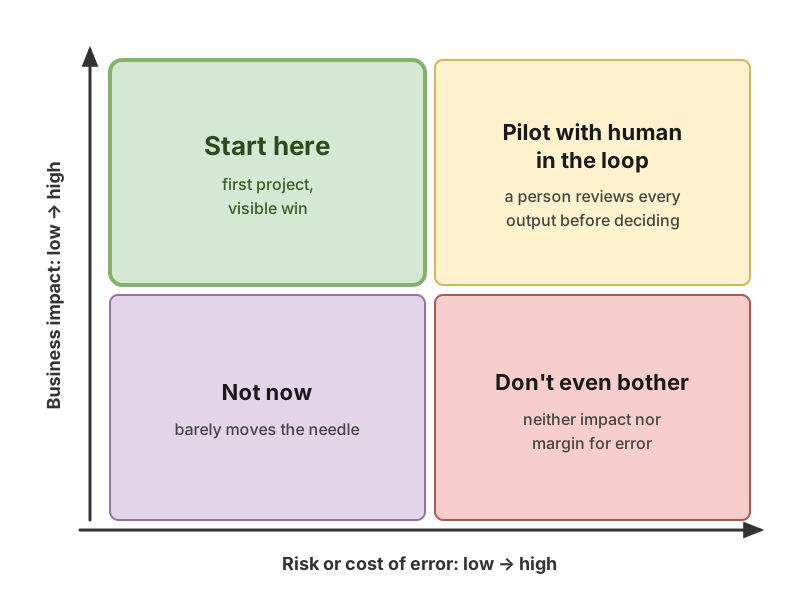
High impact, low risk: start here. This is your first project, almost without question. It moves the needle, and if it fails, nothing terrible happens. Inbox classifiers or internal document summarizers usually land here. Get a visible win before touching anything sensitive.
High impact, high risk: pilot with a human in the loop. This is where the big value lives, but a mistake causes real damage. Don’t leave it on autopilot. Set it up with a person reviewing every output before it reaches its destination, measure how accurate it is over time, and only then decide whether to loosen the supervision. Never start your AI adoption in this quadrant.
Low impact: not now. It doesn’t matter if the risk is low. If it barely moves the needle, every hour you spend on it is an hour you’re not spending on what actually matters. Note it down and move on. And if the risk is also high, don’t even look at it.
This approach of weighing impact against risk is exactly what we work through with real cases in the AI Without the Hype course: you take your own tasks and place them on the matrix until it’s clear which one to start with on Monday. If you want the step-by-step version, including how to score each axis without fooling yourself, it’s in the risk-impact matrix explained.
Before green-lighting any use case, run through this quick four-question check:
- Does this task happen often enough to make setting it up worthwhile?
- Can I cheaply check whether the AI got it right, without redoing the work?
- Is there a person reviewing before the output reaches a customer or a critical system?
- If this fails at the worst possible moment, is the damage manageable?
If all four are a yes, you have a candidate. If any one is a no, you know exactly what to fix before you invest a single euro.
The mistakes that make AI projects fail
This is where I start with the NO, because most AI projects don’t fail because of the technology. They fail because of decisions made before a single line gets written.
Starting with the technology instead of the problem. This is the mother mistake, the one almost all the others descend from. Someone sees a demo, gets excited, and sends down the order “we need to do something with AI.” From there the team goes looking for a problem to justify the tool, instead of the other way around. The symptom is easy to spot: if you don’t know which number in your business is going to change, you don’t have a use case, you have a whim.
Automating without a cheap way to check the result. If verifying the output costs the same as producing it by hand, you haven’t automated anything, you’ve just swapped one job for another.
Ignoring the hidden cost of reviewing unreliable output. Say the AI gets it right eight times out of ten, that sounds great on a slide. In practice, if a person has to read all ten to find the two bad ones, the savings evaporate and sometimes go negative. What a use case really costs you is the review hours it demands while you can’t trust the output, not the model’s bill. The less reliable the output, the more expensive the review, and that cost never shows up in the demo.
Mistaking a demo for production. A demo works because someone picked the example that turns out well. Production is the weird edge case on a Tuesday afternoon, the badly written email, the format nobody anticipated. What holds up in a demo and what holds up in daily reality are two different things.
Not measuring. Without a before-and-after metric, you don’t know whether the project works, you only know whether you like it. Define what you’re going to track (for example, time per task and how many errors reach the customer) before you switch anything on. A use case you don’t measure is a use case you can’t defend or improve.
If you look closely, all these mistakes share one root: skipping the task profile and the result check out of eagerness to have something with AI in it. Going slow on the decision is what lets you go fast on the execution.
Frequently asked questions
Do I need a technical team to start with AI use cases in my company?
For the simplest cases, no. Today there are automation tools that connect your applications and call an AI model without writing code, and they’re enough for classifying emails or summarizing documents. A technical team becomes necessary when you want to integrate AI into your own product, connect internal systems, or handle sensitive data with proper guarantees. The practical rule: the more custom and the more critical, the more you need someone technical.
Is it safe to feed my company’s data into an AI?
It depends on the provider, the plan you’re on, and the type of data. Many paid services commit by contract not to use your data to train their models, but that needs to be verified in their terms, not assumed. If you work with personal or regulated data, GDPR (Europe’s data protection regulation) and the EU’s AI regulation, the so-called AI Act, come into play; for sensitive cases, many companies choose providers with servers in the EU or models they can host themselves. This isn’t legal advice: before connecting customer data, check with whoever handles your legal compliance.
How much does it really cost to apply AI in a business?
Less than people fear on the model’s bill, and more than they expect on everything else. Using the model usually costs fractions of a cent per operation, though it adds up with volume. The cost that surprises people is the other one: building and maintaining the use case, and above all the time people spend reviewing outputs while the process isn’t yet trustworthy. Budget for review from day one, not just for the technology.
Is AI going to replace my team?
In most small and medium businesses, no. It changes how work is distributed before it changes headcount: your team spends less time producing first drafts and more time reviewing, deciding, and handling the cases AI doesn’t cover. The pattern that works puts people where they add the most value, which is judgment, not the mechanics of typing.
Where do I start if I can only pick one AI use case?
Pick one that’s high-impact and low-risk, with a cheap way to check the result. In practice that’s usually classifying or summarizing text you already handle daily, with a person reviewing at the start. Get that one working end to end before you open a second front: it’ll give you the mental pattern for judging all the rest.
Related articles

Ideal tasks for AI: the profile you should look for
Not every task fits AI. There is a four-trait profile and a simple way to score yours before you spend a single euro.
Risk-impact matrix: which AI project to start with
How to prioritize AI projects by crossing business impact with risk of error. Start with high-impact, low-risk work, without burning your budget.