
Guardrails for AI Agents: How to Implement Them (With Code)
Implement guardrails in your AI agent step by step: input/output validation, action limits, and loop control. Real, copy-ready code examples.
Contributors: Esther Aznar
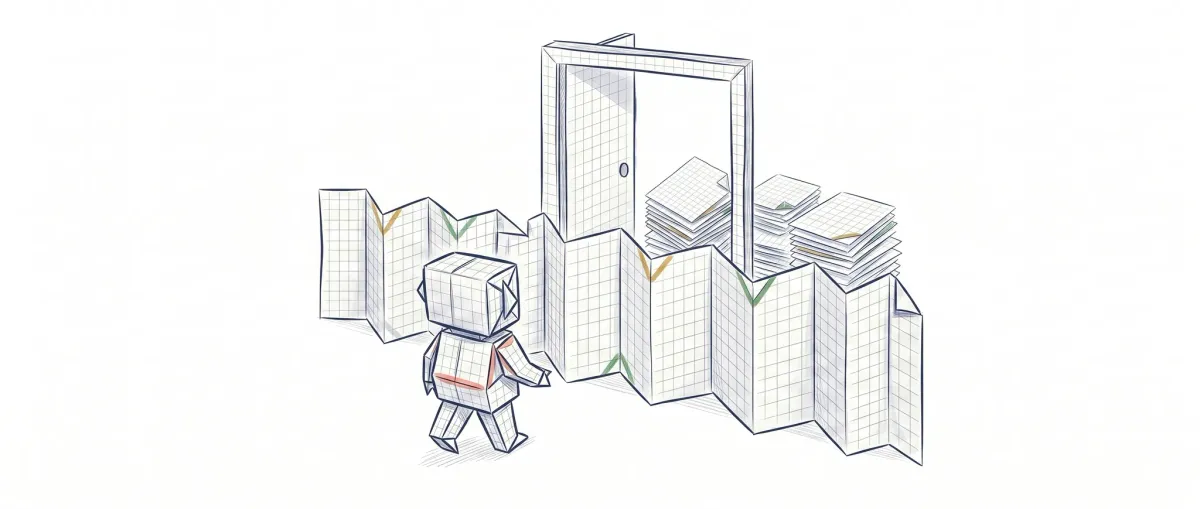
Imagine asking an AI assistant: “delete the project’s temporary files.” The assistant thinks it knows which ones they are, but it’s wrong… and deletes an important file (.env.local) with configuration data you need. The data is lost.
Why did it happen? Because the assistant did exactly what it understood from your order, without thinking about whether it was safe to do so.
Guardrails are safety boundaries that prevent this from happening. They’re like fencing off a dangerous zone: the assistant keeps working, but can’t enter areas where it might cause harm.
Want to understand what a guardrail is and why you need one first, with analogies and no code? Start with the conceptual guide. Here we go straight to implementing them.
Before you start
What is an AI agent? It’s a program that uses artificial intelligence (like ChatGPT) to:
- Receive your instruction
- Decide what to do
- Execute actions (delete a file, send an email, etc.)
The code examples are in TypeScript, but you can follow along even if you’re not a heavy programmer—I’ll explain them in simple terms.
What is a guardrail
Think of a fenced-in playground. The fence doesn’t decide where kids go or how they play. It just prevents them from running off toward the road.
An AI guardrail is basically a boundary you define in advance. The assistant stays intelligent and makes decisions, but there are certain actions it cannot do, no matter what you ask.
Examples:
-
“You can’t delete configuration files”
-
“You can’t access the customer database”
-
“You can’t transfer money from the account”
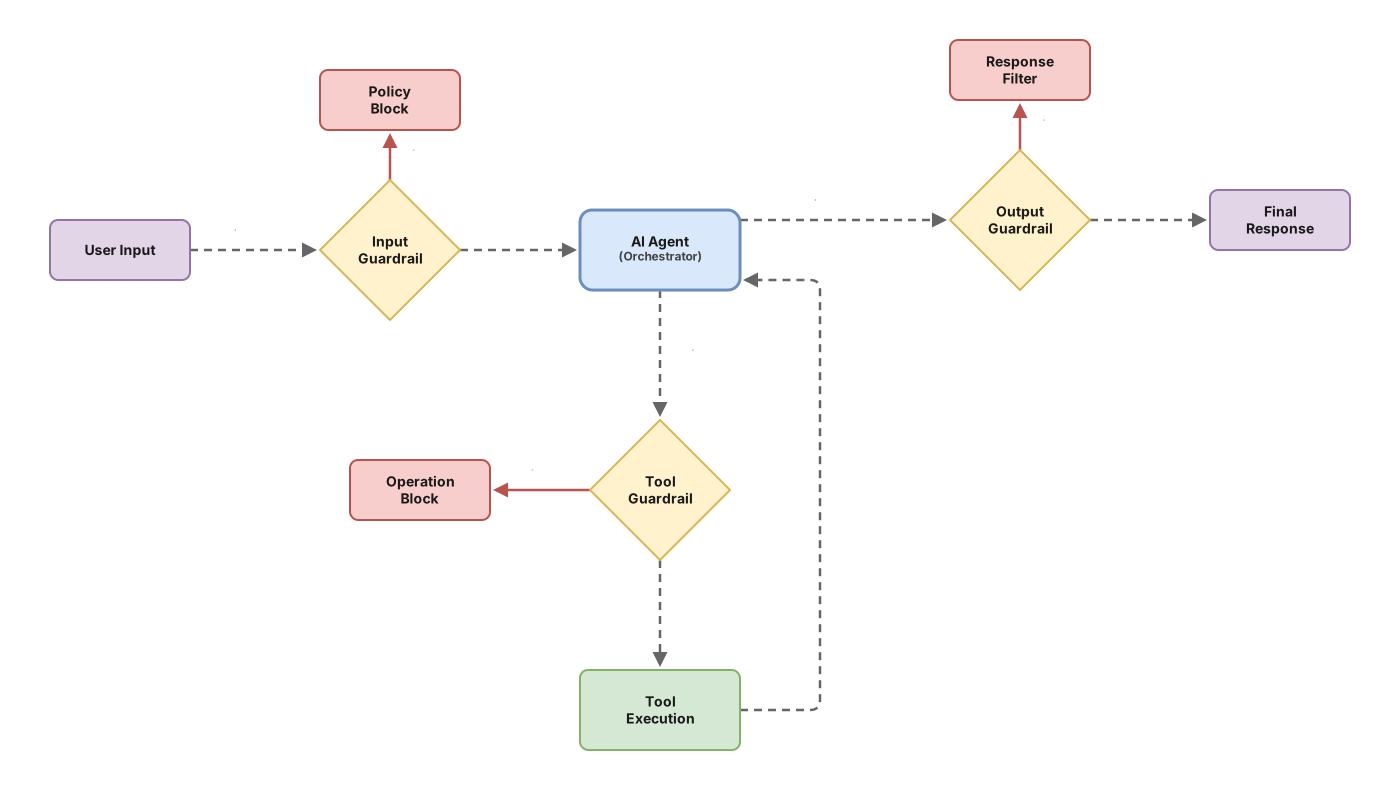
There are three places where you can put guardrails:
1. Before (input): You review what the user asks before passing it to the assistant.
- Example: If someone writes “delete everything,” the system blocks it before the assistant tries.
2. During (execution): Limits on the actions the assistant can execute.
- Example: The assistant can read files, but when it tries to delete one, the system checks: “Is this file in the allowed folder? Isn’t it a protected file?”
3. After (output): You review what the assistant returns before using it.
- Example: If the assistant generates a command to run, you verify the command is safe before executing it.
Why agents without guardrails fail
The problem isn’t that AI is bad. The problem is that it does exactly what it understands from your orders, without questioning whether it’s safe.
Example: You tell it “make the application faster” and the assistant deletes the database because it thinks it’s slow. Technically it obeyed your order. But the result is disastrous.
Three common problems:
1. Irreversible actions without confirmation The assistant executes dangerous orders immediately (delete a file, change settings) without asking for confirmation. It’s like a worker who executes every order without checking if it’s safe.
2. Sharing information that shouldn’t be shared The assistant has access to sensitive information (passwords, customer data) and shares it in its response, even though it shouldn’t. It’s not malice—it just uses all the information it has to answer.
3. Infinite loops The assistant detects an error, tries to fix it, that generates another error, tries again… and enters an infinite cycle that doesn’t stop on its own.
The root reason: Without guardrails, the assistant doesn’t know what’s allowed and what isn’t in your specific situation.
How to implement them in practice
There are four levels of protection, from simplest to strongest. Start with the first ones—you don’t need all of them from the beginning.
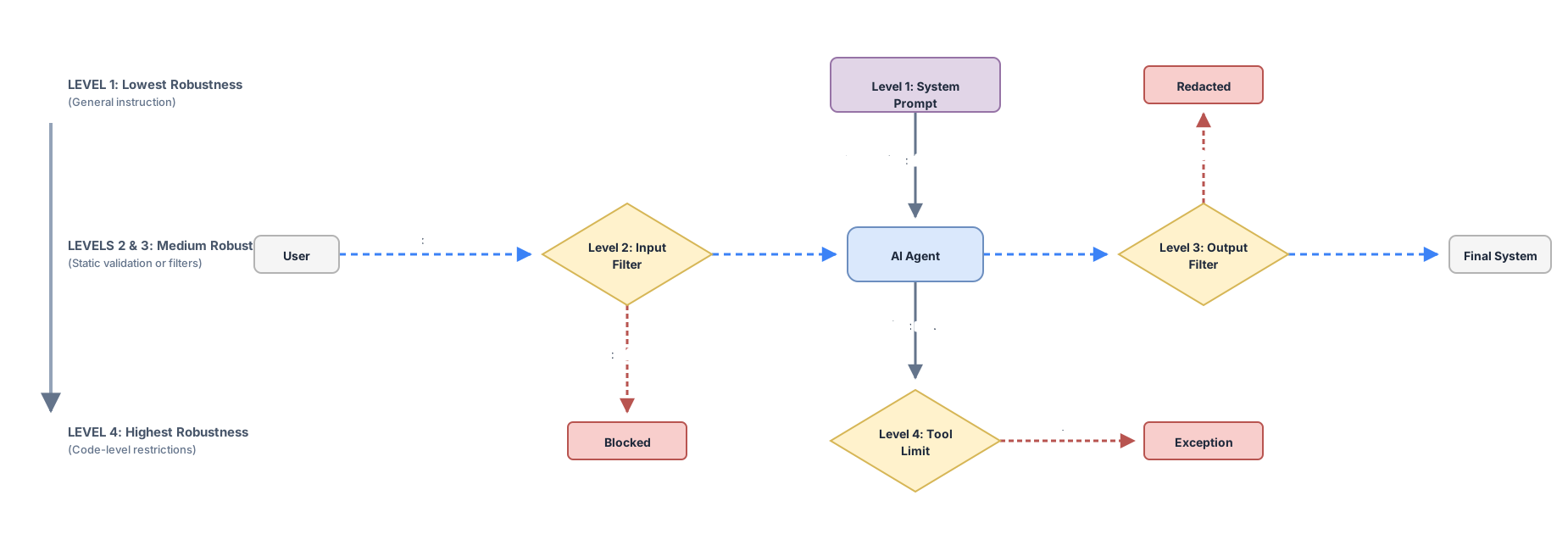
Level 1: The rulebook 📋
What is it? It’s the initial instruction you give the agent. Like a manual that says “this yes, that no.” It goes at the beginning of the system prompt and sets expectations from the start.
Real-world example: It’s like telling a worker: “you can read the documents, but never touch the safe.” It’s the golden rule that guides all their decisions.
const systemPrompt = `
You are a code assistant.

✅ I CAN:
- Read files
- Suggest improvements
- Explain errors

❌ I CAN NEVER:
- Delete files
- View .env files
- Touch the database
`;
The agent uses these instructions to interpret each request it receives. If someone says “delete everything,” the agent should reject it because it knows it can’t delete files.
Pro: Fast to implement. With this you block almost all common accidents. It’s the agent’s psychological filter.
Con: A persistent user might try to get you to ignore these rules. The agent is trained to be obedient, and with the right words it might try to follow orders that contradict the manual. That’s why the other levels exist.
Level 2: The safety filter 🛡️
What is it? Before the agent receives the user’s message, your code checks: “Does this seem safe?” This filter runs between the user and the agent, analyzing dangerous text patterns.
Real-world example: It’s like having a guard at the door checking if someone tries to enter with a weapon. If someone says a dangerous keyword, they never enter the building.
function isSecure(message: string): boolean {
  const dangers = [
    /delete.*database/i,
    /drop.*production/i,
    /DELETE FROM/i
  ];

  for (const danger of dangers) {
    if (danger.test(message)) {
      return false; // blocked here, agent never sees it
    }
  }
  return true;
}
The advantage is that the agent never processes dangerous messages. If the message is blocked here, the AI model never tries to process it or justify why it should do it anyway.
Customization options:
You can also implement a lightweight classification model to evaluate messages before they reach the main agent. Small, fast models can be used to:
- Intent classification: Determine if the request is asking for an allowed action
- Safety scoring: Assign a risk level (low, medium, high) to each message
- Content filtering: Detect sensitive topics or patterns more accurately than regex patterns
import Anthropic from "@anthropic-ai/sdk";

async function classifyMessage(message: string): Promise<{
  safe: boolean;
  riskLevel: "low" | "medium" | "high";
  reason: string;
}> {
  const client = new Anthropic();

  const response = await client.messages.create({
    model: "claude-3-5-haiku-20241022", // Fast, small model
    max_tokens: 100,
    system: `You are a security classifier. Analyze if a message is safe for an AI agent to process.
    Respond with JSON: {"safe": boolean, "riskLevel": "low|medium|high", "reason": "brief explanation"}`,
    messages: [
      {
        role: "user",
        content: message
      }
    ]
  });

  const content = response.content[0];
  if (content.type === "text") {
    return JSON.parse(content.text);
  }

  return { safe: true, riskLevel: "low", reason: "Could not classify" };
}

// Use it before sending to the main agent
const classification = await classifyMessage(userMessage);
if (classification.safe && classification.riskLevel !== "high") {
  // Send to main agent
  await mainAgent.process(userMessage);
} else {
  console.log(`❌ Blocked: ${classification.reason}`);
}
This approach is more accurate than pattern matching but slightly slower. Choose:
- Pattern-based filtering (regex) for speed and simplicity
- Model-based classification (lightweight AI model) for accuracy and nuance
Pro: The agent never sees malicious messages. It can’t try to interpret them weirdly because the input never reaches it. Model-based classification catches sophisticated attempts to bypass simple pattern rules.
Con: It’s a list of patterns (if pattern-based). There’s always someone who finds a new way to write the same thing without triggering any pattern (for example, “remove production data” instead of “delete production”). Model-based classification adds latency and cost, though using a small, fast model minimizes both.
Level 3: Limits on each tool 🔒
What is it? Every action the agent can take has its own guardrail in the code. The agent asks for something, and before executing it, we verify if it’s allowed. It’s function-level protection.
Real-world example: It’s like having a waiter who can serve water, but the bottle system only allows water, not alcohol. Even if the waiter asks for something from the bar, the machine only gives water.
async function deleteFile(path: string) {
  // Is it in the allowed folder?
  if (!path.includes('/tmp/')) {
    return '❌ I can only delete in /tmp/';
  }

  // Is it a special file we don't touch?
  if (path.endsWith('.env') || path.endsWith('.config')) {
    return '❌ This file is protected';
  }

  // If it passed both checks, ok
  delete(path);
  return '✅ File deleted';
}
This level is the most robust because the limits are in the code, not in the agent’s interpretation. Even if the agent tries to bypass the rules, the code itself prevents it.
Pro: The agent can try whatever it wants; the code won’t allow it. It’s very hard to circumvent because it doesn’t depend on words or patterns, but on pure logic.
Con: You need to write this code for each important action. It’s more work, but it’s the one that works best in practice.
Level 4: Output review 👀
What is it? Before using the response or commands the agent generates, your code reviews them. If the agent generates a dangerous SQL command, you block it before executing it. It’s the final filter.
Real-world example: It’s like an editor reviewing a document before publishing it: “this paragraph doesn’t get published.” Or a security director validating each action before it happens.
function isSQLSafe(sql: string): boolean {
  if (sql.includes('DROP') || sql.includes('TRUNCATE')) {
    return false; // blocked before executing
  }
  return true;
}

// Before executing:
if (isSQLSafe(agentSQL)) {
  execute(agentSQL);
} else {
  display('❌ This command is not safe');
}
This level is especially useful when the agent generates code or commands that will be executed. Even if the agent passed all previous filters, this is the last one checking that what’s about to happen is really safe.
Pro: You’re the final filter. Even if everything else fails, this catches it. It’s especially important if the agent generates SQL commands, executable code, or actions that affect real systems.
Con: If you’re generating a lot of content to review, the user waits longer. Also, it requires extra effort to analyze each output before executing it.
Quick summary:
| Level | Think of it as | Speed | Security |
|---|---|---|---|
| 1️⃣ Manual | A sign that says “don’t touch” | Very fast | Basic |
| 2️⃣ Filter | A guard at the door | Fast | Medium |
| 3️⃣ Tools | A technician who checks each tool | Medium | High |
| 4️⃣ Output | A final editor | Medium | Very high |
How many do you need? Start with the first two. If the agent does dangerous things (delete, send emails), add the 3rd. If the result is used to execute code, add the 4th.
Common mistakes
Trusting only the system prompt
The system prompt is the starting point, not the complete system. If the agent has tools that can delete data, instructions saying “don’t delete anything” aren’t enough. Code-level limits don’t depend on model interpretation and are harder to bypass.
Guardrails that block too much
An agent that rejects almost every request because filters are too aggressive is useless. The goal isn’t to make the agent useless: it’s to make it predictable. Start with few guardrails and add only those that address problems you’ve actually seen.
Not logging rejections
When a guardrail blocks something, keep a log. That record tells you what the agent (or user) tried to do, how often it happens, and whether your guardrail is well-calibrated or being too restrictive. Without logs, you’re flying blind. When logging rejections though, avoid saving the complete user message if it might contain sensitive data. Save only the pattern that blocked it and the timestamp.
Guardrails only on the client
If your agent calls an API or executes code on the server, guardrails need to be on the server too. A client-only guardrail can be bypassed by directly calling the endpoint.
Implementation checklist
For infinite correction loops, attempt limit is the simplest thing that works:
// Attempt limit to prevent infinite correction loops
const MAX_RETRIES = 3;
let attempts = 0;

while (attempts < MAX_RETRIES) {
  const result = await agent.execute(instruction);
  if (result.successful) return result;
  attempts++;
}

throw new Error(`Agent didn't complete the task in ${MAX_RETRIES} attempts`);-
The system prompt explicitly lists what the agent can and cannot do
-
There’s input validation before sending requests to the model
-
Each tool with destructive effects (delete, modify, send) has its own guardrail in its implementation
-
Guardrail rejections are logged
-
Critical validations are on the server, not just the client
-
There’s an attempt limit to prevent infinite correction loops
Frequently asked questions
Do guardrails slow down the agent?
The ones in the system prompt and input validation have almost no performance impact: they’re local checks that execute in microseconds. What can add latency is using a second model to classify intentions or validate outputs. To start, stick with pure code validations.
What if a user tries to bypass guardrails with an elaborate instruction?
It’s possible. Text pattern-based guardrails have blind spots. For systems where this is critical, the most robust approach is combining tool-level guardrails (hardest to bypass) with human review before executing irreversible actions. Without that second level, there will always be edge cases.
Do I need guardrails if the agent only answers questions and doesn’t execute actions?
The risk is lower, yes. But output validation is still useful to prevent the agent from including in its responses data it shouldn’t share: fragments of configuration files it has in context, for example.
How many guardrails are enough?
One irreversible action, one guardrail. An agent that only reads and responds needs few. An agent that writes to a database, sends emails, or modifies files needs guardrails on each of those actions. Start with actions that can’t be undone.
Related articles

What Is an AI Guardrail? Definition, Types, and Examples
An AI guardrail is an external check that keeps an agent from deleting data, leaking information, or looping forever. Clear definition, types, and real examples.

Architecture of an Enterprise Agent: The 6 Decisions That Matter
The 6 architectural decisions for your first production AI agent: precise objective, memory, tools with minimum privilege, and human oversight.
Programmatic Tool Calling : Step-by-Step Implementation
Hay una técnica que permite ejecutar docenas de herramientas en paralelo sin que el modelo vea ningún resultado intermedio. Nadie habla de ella porque está enterrada en la especificación. Cuando la descubras, vas a replantear cómo diseñas cualquier pipeline de agentes.