
Loop engineering: the loop is the product, not the code
Loop engineering: designing the loop in which your agent writes, tests, and self-corrects. Context, verification, feedback, and stopping condition.
Contributors: Ivan Garcia Villar
For years my job was writing the code. Now I describe a goal, and an agent writes it, runs the tests, reads the error, and tries again. The real work has moved up one level: I no longer write the code — I design the loop in which the agent writes it. I call this loop engineering. And the idea that organizes everything else is uncomfortably simple: the loop is the product, not the code.
If you’ve already built an agent with Claude Code or your own orchestrator, this will ring a bell. It works, but you iterate by gut feel. You tweak a prompt, run it, see if the result looks better, repeat. The quality leap almost never comes from a smarter prompt. It comes from designing a better loop.
What is “the loop,” exactly?
The loop is the cycle an agent repeats until it finishes a task: it receives context, decides on an action, observes the result, compares it against what you wanted, and decides whether to try again or stop. It’s the classic perception-decision-action of agents, with one addition that almost everyone skips: the explicit comparison against an objective.
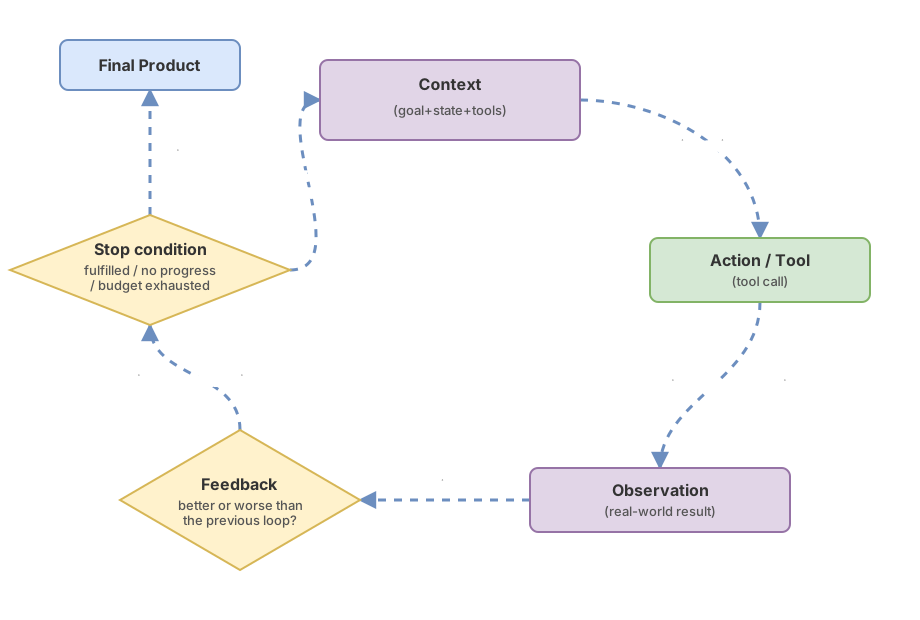
Five pieces make up each iteration.
Context is everything the model can see at that moment: the objective, the code state, the error from the previous iteration, the available tools. What’s not in the context doesn’t exist for the agent, so managing it well is half the battle. If you’ve never thought of context as a scarce resource, start with context window best practices.
The action is the tool the model chooses and executes: writing a file, running a test, querying the database. That’s tool calling.
The observation is the result the system feeds back into the context after executing the action. An important detail: the model reads the observation, it doesn’t invent it. It’s produced by the real world (the test runner, the compiler, the API), which is why the observation is the only part of the loop that the agent cannot fabricate.
Feedback is the signal that says whether this iteration is going better or worse than the previous one. Observing is not the same as knowing whether you’re making progress. A failing test is an observation; that the failure count is one fewer than the previous iteration is feedback.
The stopping condition decides when the loop halts: objective achieved, budget exhausted, or lack of progress.
If you want the full breakdown, you’ll find it in what exactly is an agentic loop and in the AI agent cycle explained step by step. What I’m interested in here is what happens when you scale that simple cycle: does this loop live inside a single task, or does it govern the entire system?
Inner loop and outer loop: two loops, two jobs
In an agentic system, two loops are operating at the same time, and confusing them is the primary source of poor design. The inner loop is the short cycle within a task. The agent generates a piece of code, runs the test, sees it fail, and corrects itself — all within the same reasoning session. It’s the try-and-fix that Claude Code runs on every turn without you doing anything.
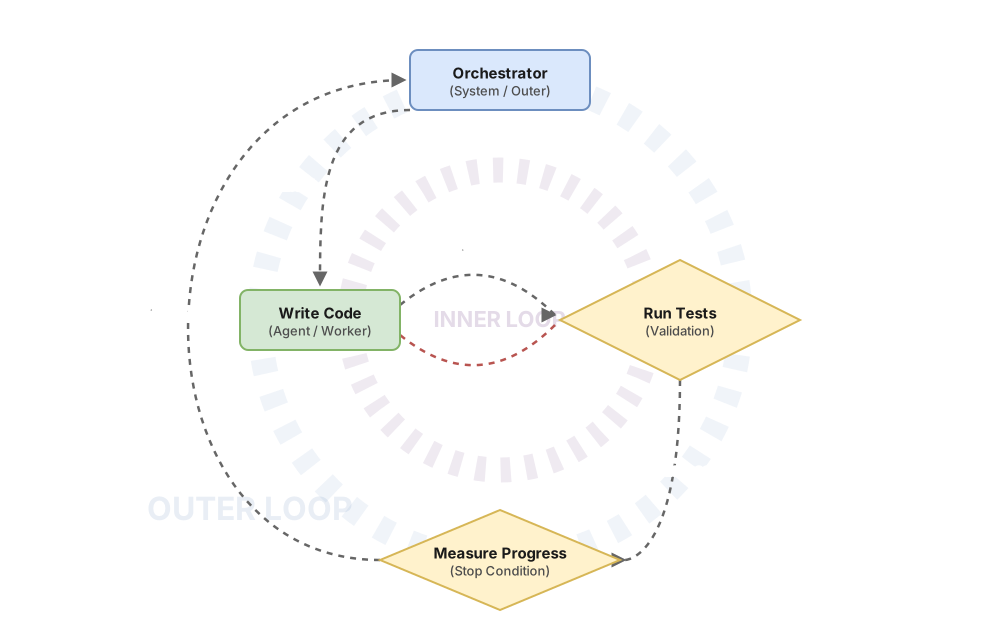
The outer loop is the long cycle. It’s the system that launches that inner loop over and over: it gives it work, reviews the result, decides what comes next, and starts again — without you typing each prompt. This is where improvement between runs lives, the part that turns an agent that solves a task into an agent that solves tasks increasingly well.
The distinction isn’t academic — it changes where you optimize. Improving the inner loop means faster, more readable feedback within the session: tests that run in seconds, errors the model can understand. Improving the outer loop is about orchestration, budget, and memory between runs. And there’s a rule you learn the hard way: when the inner loop gets stuck, the outer loop must rethink the entire strategy, not repeat the same step hoping for a different result. Feedback loops in AI agents deserve their own article, because they’re the mechanism that connects the two.
Both loops share one requirement. Without a good feedback signal, neither converges. It doesn’t matter how elegant your orchestration is.
What makes a loop converge
A loop converges when each iteration brings it closer to the objective, and that only happens if it has a feedback signal that distinguishes between better and worse. There are two ways to get that signal, and choosing well between them is a significant part of the design.
The first is deterministic feedback: tests, linters, type-checkers, gates. Pass or fail. It’s cheap, unambiguous, and non-negotiable. A red test is a red test, and the agent can’t argue with it. When the problem can be reduced to a checkable rule, this is always the best signal. Claude Code hooks for deterministic quality are exactly this: walls the loop cannot jump over. And if the agent is writing code, the testing strategy when AI codes fast is what gives the loop a reliable signal.
The second is model judgment: one LLM evaluates what another produces. It covers what no test captures — things like “is this response clear?” or “does this text sound natural?” It’s more expensive and noisier, but it covers the territory that deterministic verification can’t reach. The pattern is in a model as judge.
| Dimension | Deterministic feedback | Model judgment |
|---|---|---|
| What it measures | Anything reducible to a rule: compiles, passes the test, matches the type | Qualitative aspects: clarity, tone, whether the solution makes sense |
| Cost per iteration | Low | High: it’s another model call |
| Reliability | High and repeatable | Variable; needs calibration to avoid scoring everything the same |
| When to use it | Whenever the problem allows it | Only for what can’t be reduced to a rule |
The practical rule is to prefer deterministic feedback whenever you can and reserve model judgment for what genuinely cannot be turned into a rule. A loop with ambiguous feedback doesn’t converge — it spins because the signal doesn’t tell it which direction to go. Designing that signal is such a big topic that I dedicate an entire article to it: how to evaluate AI agents in production.
A reliable signal tells you which direction to go. It doesn’t tell you when to stop. And that’s a different problem.
Why a loop doesn’t terminate
A loop without an explicit stopping condition doesn’t terminate: it keeps repeating the same state or burns through its budget until someone kills it. Unchecked autonomy isn’t autonomy — it’s a runaway.
Every loop needs a budget (a maximum number of iterations or tokens) and a definition of “done” that the loop itself can verify. But the most insidious failure is different: the lack of no-progress detection. If two consecutive iterations produce the same diff or the same error, the agent isn’t advancing — it’s stuck. Retrying the same thing expecting a different result isn’t iterating. When that happens, the right move is to reframe or escalate, not take another identical turn. The extreme case, an AI agent stuck in an infinite loop, is almost always exactly this, without a brake.
// El bucle para por objetivo cumplido, presupuesto agotado o falta de progreso
async function runLoop(agente: Agent, objetivo: Objetivo, budget: Budget) {
  let estado = estadoInicial(objetivo);
  for (let vuelta = 0; vuelta < budget.maxVueltas; vuelta++) {
    const accion = await agente.decidir(estado);
    const observacion = await ejecutar(accion);
    const señal = await verificar(observacion, objetivo); // tests, lint o juez
    if (señal.cumplido) return observacion;
    if (sinProgreso(estado, observacion)) break; // mismo diff/error: atascado
    estado = actualizar(estado, observacion, señal.feedback);
  }
  return escalarAHumano(estado); // el bucle no decide solo cuándo rendirse
}
The guardrails that prevent a loop from going off the rails have their own name and their own design: guardrails for AI agents. Setting a limit is the easy part. The hard part is that each iteration has a cost, and deciding how many iterations are worth it is part of the design.
The cost of each iteration
Each loop iteration costs tokens, latency, money, and the risk of breaking something that was already working — so designing the loop also means deciding how many iterations are worth it. A loop that iterates twenty times to fix a typo is worse than one that stops at three and hands it back to you. More iterations don’t mean a better result. Past a certain point, a loop with no new signal just burns budget.
The tradeoff shows up in every decision. Richer feedback per iteration — like running the full test suite — costs more per iteration but tends to converge in fewer iterations. Cheap feedback, like running only the linter, is fast but may need many more. And there’s a cost that grows on its own: context accumulates with each iteration, more history means more tokens per call, and past a certain size the model starts losing track of what you originally asked for.
The iteration budget is a business decision disguised as a technical parameter. And like any costly decision, it shouldn’t be made by the agent alone.
Where the human belongs in the loop
The human shouldn’t be on every iteration of the loop, but at the costly, irreversible decision points. Reviewing every iteration turns the agent into a slow and expensive autocomplete: you lose the advantage of automation and keep doing the tedious work by hand.
Your place is where mistakes are expensive to undo: approving a hypothesis before spending to implement it, or authorizing a merge to main that the agent can’t revert without consequences. The best example I know of this done right is the how I make my agents improve themselves methodology, where the only human intervention point is approving each hypothesis before it’s implemented. Everything else runs on its own.
That pattern — human at the hypothesis, machine at the iteration — has a name when you take it to the extreme.
A loop that improves itself
The outer loop taken to the extreme is a loop that doesn’t just solve the task — it improves the way it solves it. Instead of iterating over the code, you iterate over the system that writes the code.
The complete case study is the experiment-driven optimization methodology: measure against a frozen baseline, propose a hypothesis, implement it, validate whether the number improves, and document the experiment even when you discard it. Each run doesn’t just produce a result — it produces information about how to produce better results. That’s the ceiling of loop engineering: the system optimizes itself, and you only approve hypotheses.
Common mistakes
Iterating because “it looks better”
Without a signal that compares against the previous iteration, “looks better” is an opinion, and opinions don’t converge. A number or a test that says why this iteration beats the previous one is the only way to know whether you’re actually iterating.
The runaway loop
A loop without a budget or no-progress detection is a runaway waiting to happen. Set an iteration limit before you add anything else.
The human reviewing every iteration
If you approve every step, you haven’t automated anything — you’ve just added latency to your own work. Save your attention for decisions that are expensive to undo and let the loop run on everything else.
Confusing more iterations with higher quality
Past a certain point, each additional iteration without a new signal only adds cost and the risk that the agent breaks something that was already working. A loop that converges in a few iterations and stops is better than one that takes twenty and keeps going.
Feedback that doesn’t discriminate
The most subtle of all. A judge that scores everything a 7, or a test suite that always passes, gives the illusion of a signal without actually being one. Before trusting your feedback mechanism, verify that it genuinely separates good output from bad. If it can’t tell the difference, the loop is blind even when it appears to see — and no number of iterations will fix that.
Checklist for designing your loop
- Each iteration has a feedback signal that says whether it’s going better or worse than the previous one
- The signal is deterministic (tests, lint, type-check) whenever the problem allows it, and model judgment is reserved for what can’t be reduced to a rule
- The loop has an explicit stopping condition, with at least two exits beyond “objective achieved”: budget exhausted and no-progress detected
- There is an iteration budget (maximum iterations or tokens) defined before launching
- The human only intervenes on costly or irreversible decisions, not on every iteration
- When the loop gets stuck, it escalates or reframes instead of repeating the same step
Frequently Asked Questions
Is loop engineering the same as prompt engineering?
No: prompt engineering fine-tunes a single model call; loop engineering designs the complete cycle surrounding it, including what context goes in, how the output is verified, and when it stops.
What’s the difference between inner loop and outer loop?
The inner loop is the short cycle of testing and correcting within a single task — like when an agent writes code, runs the test, and corrects itself in the same session. The outer loop is the long cycle that launches that task many times, reviews the result, and decides what comes next — and it’s where the system improves between runs.
How many iterations are too many?
It depends on the cost of each iteration and the value of getting it right, but the alarm bell isn’t the number — it’s the lack of progress. If two consecutive iterations produce the same result or the same error, you’ve over-iterated even if you’re only on iteration three. Set a maximum budget as a safety net and no-progress detection for the normal case.
Does loop engineering apply to any agent?
It applies to any agent whose task has a quality metric you can calculate, even if that metric requires a model as a judge. The problem appears with tasks that have no definable metric: “write an email that convinces this client” has no test and no clear success criterion — and without a way to say whether one draft beats another, the loop has nothing to hold on to. That’s usually the first piece of work before automating anything: turning “make it good” into something you can measure.
Related articles

How to Make Your Agents Improve Themselves With This Skill
The methodology I use to make Claude Code improve itself through measuring, proposing hypotheses, iterating, and validating results

How to evaluate AI agents in production: metrics, evals, and observability
Technical guide to measuring the real reliability of AI agents in production: task completion rate, deterministic evals, LLM-as-judge, and silent degradation detection.

Guardrails for AI Agents: How to Implement Them (With Code)
Implement guardrails in your AI agent step by step: input/output validation, action limits, and loop control. Real, copy-ready code examples.