
Shadow AI: Your Team Already Uses AI Without You Knowing
What shadow AI is, why your team already uses AI tools without permission, and how to govern it by sorting each use into allow, condition, or prohibit.

Someone on your team pasted a client list into a free artificial intelligence tool yesterday to get a quick summary. They did not do it out of malice. They wanted to finish sooner and get home at a reasonable hour. And chances are you never found out. That is shadow AI, and it is not a problem for the future: it is already happening inside your company.
In this article I explain it without drama and without guru promises. What it is exactly, why your team already does it, which risk actually matters, and what you can do this week without needing a technical department.
What exactly is “shadow AI”?
Shadow AI is the use of artificial intelligence tools by employees without the company knowing about, approving, or controlling it. The word “shadow” means exactly that: the activity exists and produces results, but it happens out of sight of whoever is in charge.
If the term rings a bell, it is because it has an older sibling: shadow IT. For years, employees installed programs or opened accounts on online services on their own, bypassing IT, to get their work done faster. Shadow AI is the same thing, but with a difference that makes it more delicate: here what leaves the company is not an application, it is your data.
An AI tool like the ones your team uses every day (a writing assistant, a text generator, a document summarizer) works by sending whatever you type to a computer that is not in your office. That computer, owned by another company, processes the text and returns an answer. When an employee pastes a client contract into it, that information has traveled beyond your control. That is the heart of the matter.
Why your team already does it (and it is not rebellion)
Your team uses AI on its own because it works for them. It saves them real time on tasks that used to eat up the whole morning: drafting a difficult email, summarizing a long document, translating a proposal, sorting out some notes. It is not a fad or a prank. It is people trying to keep up with everything.
And here comes the uncomfortable part: if the company does not offer an approved tool, the employee uses whatever they find for free online. They do not ask for permission, because to them it feels like using a calculator. The consequence is that the decision about which technology touches your data is being made, unknowingly, by the person with the least information about the legal and commercial risk.
That is why the first mistake is assuming that “nobody uses AI at my company because no one has told me so.” Silence is not an answer. It almost always means they do use it and see no reason to mention it.
The risk that really matters: where your data goes
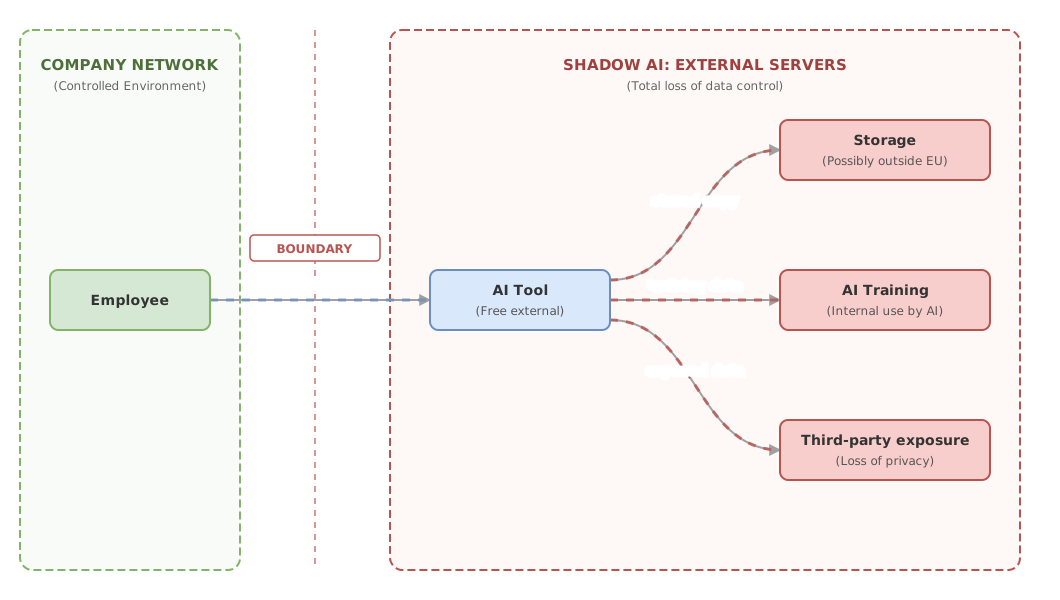
The biggest risk of shadow AI is data leakage. When an employee pastes confidential information into a free tool, that information leaves your company and reaches a third party’s server. From there you lose control over three concrete things.
First, where it is stored. Many of those servers sit outside the European Union, in countries with different data protection rules. If that text contained personal client data, you may be breaching your obligations without knowing it.
Second, what it is used for. Some free tools keep what you type and use it to improve their own systems. In other words, the draft of your commercial strategy can end up as part of the material another company uses to train its product. Not because there is a spy, but because nobody read the terms.
Third, who can see it. Once it is out, you do not know which people at that other company have access, nor for how long it is kept.
A legal clarification is worth making here. In Europe, the General Data Protection Regulation (GDPR) requires you to know where the personal data you handle is and how it is processed, and there is also a specific European framework for artificial intelligence, the AI Act. I cover the details of both in the article on AI, GDPR and the AI Act for companies. This text is not legal advice: for your specific case, consult a professional.
Banning everything does not work (and why)
Banning any use of AI in writing and calling it a day is the most tempting option and the least effective. If you ban it without providing an alternative, the use does not disappear. It hides better. The employee who used to tell you about it now does it from a personal phone and leaves no trace. You have turned a visible problem into an invisible one, which is worse.
The reason is simple: AI keeps saving them time, and their boss keeps asking for results. Between an abstract rule and the work they have to deliver today, the work wins. Your goal is not to chase people. It is to govern the use so it happens where you can see it and with the right tools.
Governing does not mean saying yes to everything. It means deciding, consciously, which uses you allow, which you place under conditions, and which you shut down entirely.
How to govern it: allow, condition, or prohibit
The most practical way to govern shadow AI is to sort each use into three groups: allow, condition, or prohibit. Instead of one sweeping rule that is impossible to enforce, you make concrete decisions about concrete situations. The question that decides which group each use falls into is always the same: what data goes into the tool?
- Allow: uses with no sensitive data. Drafting a generic email, brainstorming ideas for a campaign, summarizing a public article. If what goes into the tool would not reveal anything serious if published in a newspaper, go ahead.
- Condition: useful uses but with delicate data, which you only authorize with a company-approved tool and clear rules. Analyzing internal figures, writing about a project in progress, working with anonymized client documents.
- Prohibit: uses where the data is too sensitive or the risk too high. Pasting identifiable personal client data, confidential financial information, passwords, or material covered by a confidentiality agreement.
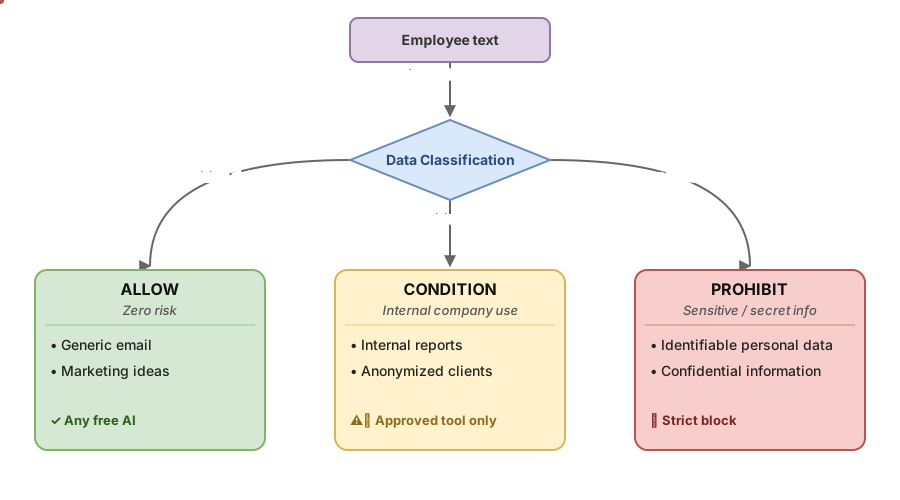
The table below sums it up with examples you will recognize from your day to day.
| Use | Example | What data goes in | Decision |
|---|---|---|---|
| Draft a general email | Reply to a standard sales inquiry | None sensitive | Allow |
| Generate marketing ideas | Brainstorm for a campaign | Already public information | Allow |
| Summarize an internal report | Condense the minutes of a team meeting | Internal data, not personal | Condition (approved tool) |
| Analyze client data | Pull patterns from a sales sheet | Client data | Condition (anonymize first) |
| Review a signed contract | Search clauses in an agreement with names | Personal and confidential data | Prohibit in open tools |
This classification is the skeleton of what later becomes a simple document everyone understands. How to write it without falling into the twenty pages nobody reads is what I explain in how to write an internal AI usage policy. And the best antidote against shadow AI is not a rule, it is giving your team a good alternative and teaching them to use it, something I cover in training your team in AI.
This judgment about what to govern and what to let go is exactly what we work through calmly in the no-hype AI course, designed so that a manager understands the technology just enough to decide well, without becoming a technician.
Common mistakes when tackling shadow AI
Banning without offering an alternative. We have already seen it: it pushes the use underground. A ban with no approved tool beside it is an invitation to hide.
Believing the paid version protects you automatically. Paying often improves the privacy terms, but not always, and not on every plan. Protection comes from reading what the tool does with your data, not from the price.
Treating it as an IT-only problem. Who can use what with your clients’ data is a business decision and a legal responsibility. IT helps apply it, but the decision is yours.
Writing a huge policy nobody reads. A twenty-page document in legal language does not change what people do. A clear three-group rule with concrete examples does.
Realistic first steps this week
You do not need a six-month project or an expensive consultant to start. You need half an hour and honesty. This is the order that works:
- Ask your team, without any hint of reproach, which AI tools they already use and for what
- Make a list of the three or four most frequent uses that come up
- Sort each use into allow, condition, or prohibit based on the data that goes in
- Choose an approved tool for the uses you want to condition
- Write the decision on a single page with concrete examples
- Communicate that the goal is to use AI sensibly, not to chase anyone
Frequently asked questions
Is it illegal for my team to use ChatGPT or another AI tool?
Using an AI tool is not illegal in itself. The problem appears when personal client data or confidential information is entered into it without the right safeguards, because that is where your data protection obligations can come into play. What makes the difference is which data you enter and under what conditions, more than the tool itself.
Is it enough to ban AI use in writing?
No. A written ban with no alternative tends to push the use underground, where you can no longer see or control it. It works much better to decide which uses you allow, which you condition, and which you shut down, and to offer an approved tool for the useful cases.
Are paid versions safer than free ones?
They often offer better privacy guarantees, such as not using your data to train their systems, but it is neither automatic nor universal. What matters is reading the specific terms of the plan you sign up for and confirming where the data is stored and what it is used for.
Should the IT department handle this?
IT helps you choose and configure the tools, but the decision about which data AI can touch is a business and legal responsibility. Handing it off entirely to the technical team leaves out the person who best knows the value and sensitivity of each piece of data.
Where do I start if we are a small business with no technical team?
Start by asking your team what they already use, without reproach, to get a real picture. With that list, sort the uses into allow, condition, or prohibit and write the decision on a single page. It is an afternoon’s work that spares you much bigger scares.
Related articles

AI, GDPR and the AI Act: what your business needs to know in Europe
If your business uses third-party AI, the AI Act barely applies to you, but the GDPR does. A hype-free guide for decision-makers: what you can do, what you can't, and what gets you fined.

Internal AI use policy: a one-page template
Write an internal AI use policy that fits on one page: allowed tools, forbidden data, human review, training and an owner. Template ready to copy.

Training your team in AI (without gurus): where to start
Where to start training your team in AI without getting sold hype: what each role needs to know and how to tell serious training from guru promises.