
Temperature in LLMs: What It Is and What Value to Use for Your Case
What temperature is in language models, how it affects responses, and how to choose the right value for your task. Examples with the same prompt.
Contributors: Ivan Garcia Villar, Esther Aznar

Have you ever asked ChatGPT or Claude the same question twice and gotten different answers? That’s not a bug. It’s because of something called temperature. It’s a dial you can control to decide whether the AI model is more predictable or more creative.
Before we start
This post is for you if:
- You’ve used an AI model (like ChatGPT, Claude, etc.) even from a program or app
- You know that things called “APIs” exist (connections between programs)
You don’t need to know much else. You just need to understand that tokens = words or small chunks of text that the model processes.
What is temperature?
Think of it this way: imagine you ask someone to make a sandwich. A very strict person makes the same sandwich every time, with no changes. Another person is more creative: they use the same base, but sometimes add different things depending on what they feel like.
Temperature is a dial: it lets you choose how “creative” or how “predictable” the AI model will be.
Temperature dial visualization:
DETERMINISTIC                                           CREATIVE
     0.0 ├────────┬────────┬────────┬────────┬────────┤ 1.0
         │        │        │        │        │        │
         │  SAFE  │ NEUTRAL│ NATURAL│CREATIVE│ CHAOTIC│
         │        │        │        │        │        │
      └─────────────────────────────────────────────────┘
    Identical      Varied         Unpredictable
    Responses     Responses        Responses
When an AI model generates a response, it’s choosing word by word. For each word, it has a list with thousands of possibilities and assigns scores:
- “Paris” has a very high score for “capital of France”
- “Lyon” has a medium score
- “Mars” has an almost zero score
How temperature affects word selection:
QUESTION: "What is the capital of France?"

Model scores:
  Paris      ████████████████░░ 95%
  Lyon       ███░░░░░░░░░░░░░░░  3%
  Brussels   ██░░░░░░░░░░░░░░░░  1%
  Mars       ░░░░░░░░░░░░░░░░░░  0.5%

┌─────────────────────────────────────┐
│ Temperature 0.0 → ALWAYS Paris      │
│ Temperature 0.7 → Probably Paris    │
│                   Maybe Lyon        │
│ Temperature 1.0 → Anything          │
│                   (even Mars)       │
└─────────────────────────────────────┘
Temperature changes how the model uses those scores:
- Temperature 0.0 (PREDICTABLE): always chooses the most probable option. If you ask the same question 10 times, you get 10 identical responses.
- Temperature 0.3 (SAFER): a little bit of variety, but no surprises.
- Temperature 0.7 (BALANCED): mixes probable options with less obvious ones. Real variety starts to show up.
- Temperature 1.0 (CREATIVE): chooses less probable options. Very original, but sometimes it can make up incorrect things.
The normal range is 0.0 to 1.0. Above 1.0, responses become strange and unpredictable.
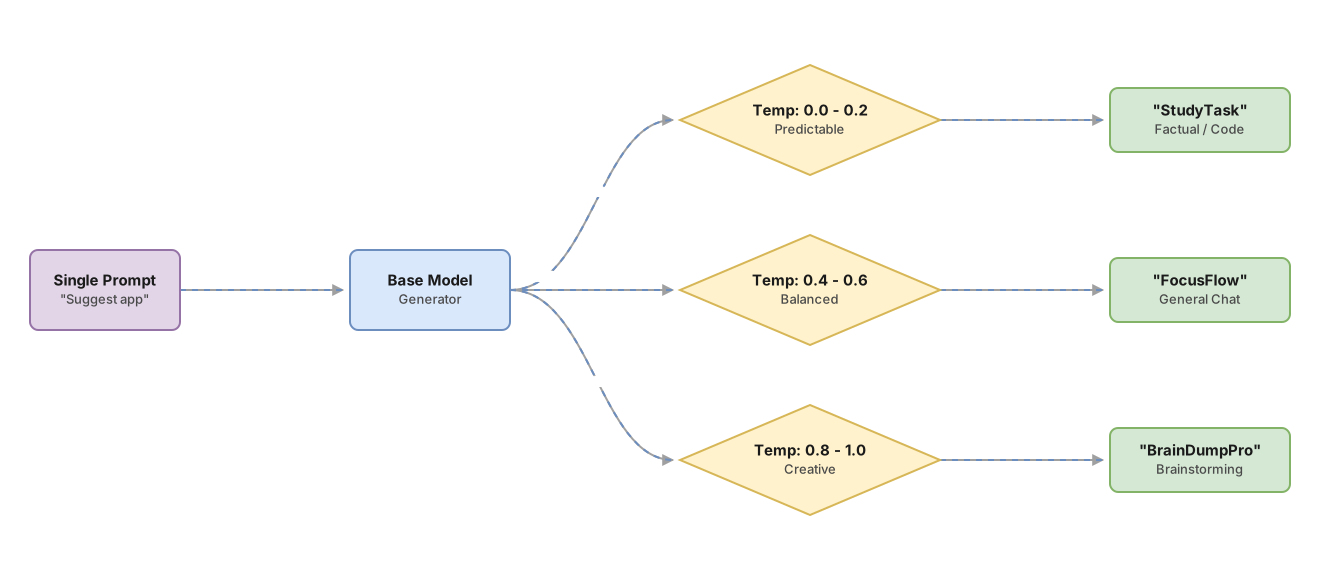
The same prompt, three different responses
The best way to understand this is to see it in action. The prompt is exactly the same in all three cases. Only the temperature changes.
Prompt: “Suggest a name for a task list app for students”
With temperature 0.1:
“StudyTask”
Direct, functional, predictable. The model chooses the statistically safest option. In a task management agent I built last year, I used exactly this prompt as part of onboarding, and “StudyTask” was almost always the first suggestion. Predictable to the point of being useful for tests.
With temperature 0.7:
“FocusFlow”
Still coherent and usable, but with more personality. The model explored options it would normally discard.
With temperature 1.0:
“BrainDumpPro” or sometimes “ZenBubbleStudyZone”
More original. Or more weird, depending on the moment. With temperature 1.0, running the same prompt five times can give you five completely different names.
Now the same experiment with a factual question:
Prompt: “What is the capital of France?”
With temperature 0.1: “Paris”. Always.
With temperature 1.0: almost always “Paris”, but sometimes it might make up information or give strange answers. This is called hallucination: when the model invents something that sounds real but is false. With high temperature, the model chooses less probable words, and that increases the risk of errors.
The practical rule: if the task has a correct answer, use low temperature. If the task is open and there’s no wrong answer, use high temperature.
How to pass temperature in code
Temperature is a number you tell the AI model before asking it something. It’s like saying: “I want you to be predictable (0.0)” or “I want you to be creative (0.8)”.
A very simple example
Imagine you have a program that talks to the AI. Here’s what it looks like:
// Step 1: Connect to the AI (like opening WhatsApp)
const anthropic = new Anthropic();

// Step 2: Ask the AI for something
const respuesta = await anthropic.messages.create({
  model: "claude-sonnet-4-6",      // Which AI I want to use
  max_tokens: 256,                  // How much text it can write (limit)
  temperature: 0.0,                 // TEMPERATURE GOES HERE ← This is the important part
  messages: [
    {
      role: "user",
      content: "Extract the name and email from: 'Contact Ana López at ana@empresa.com'"
    }
  ]
});

// Step 3: See what it answered
console.log(respuesta.content[0].text);
What do I change to be more creative?
If you want the AI to be more creative, you just have to change this number:
temperature: 0.0 // Change thisTo this one:
temperature: 0.8 // To thisThat’s literally it. The rest of the code stays the same.
An important tip
If you don’t write temperature in your code, the AI will use temperature 1.0 by default (very creative). For jobs where you need exact responses (like extracting data), that’s not what you want. Always explicitly write the temperature value so your code does what you expect.
If you use other languages like Python, the name is the same: temperature. Only how you write the code changes, not the idea.
Temperature configuration template for different APIs:
# Python + Anthropic Claude
response = anthropic.messages.create(
    model="claude-opus",
    max_tokens=1024,
    temperature=0.7,  # ← It's here
    messages=[{"role": "user", "content": "..."}]
)

# Python + OpenAI
response = openai.ChatCompletion.create(
    model="gpt-4",
    temperature=0.7,  # ← It's here
    messages=[{"role": "user", "content": "..."}]
)

# Python + Google Gemini
response = genai.GenerativeModel(
    model_name="gemini-pro",
    generation_config={"temperature": 0.7}  # ← It's here
)
Note: The parameter is called the same thing everywhere, even though its location in the code changes.
Common mistakes when setting temperature
Matrix of common errors:
                    LOW TEMP      HIGH TEMP
                    (0.0-0.2)     (0.8-1.0)
┌──────────────────────────────────────────┐
│ Extract data     │  ✅ CORRECT  │  ❌ Error  │
│ Generate ideas   │  ❌ Error    │  ✅ CORRECT
│ Summarize texts  │  ✅ CORRECT  │  ⚠️ Variable
│ Write code       │  ✅ CORRECT  │  ❌ Error  │
└──────────────────────────────────────────┘
❌ Mistake 1: Using high temperature when you need accuracy
The problem: It sounds reasonable to think “more temperature = better result”. But that’s not how it works.
If you ask the AI to extract names and emails from a document, with high temperature the AI can:
- Make up fields that don’t exist
- Change the format in strange ways
- Include information that’s not in the document
The solution: If the response needs to be exact, use temperature 0.0 or 0.2.
❌ Mistake 2: Using temperature 0 when you need ideas
The problem: Want 10 names for your product? With temperature 0, you get 10 almost identical names, very boring.
The solution: For brainstorming and creative ideas, use temperature 0.7 or 0.9.
❌ Mistake 3: Forgetting to pass temperature in the code
The problem: If you don’t write temperature: XXX in your code, the AI uses temperature 1.0 by default (very creative). This can cause unexpected behavior.
The solution: Always explicitly write what temperature you want. Don’t let it use the default value.
❌ Mistake 4: Thinking temperature fixes a bad prompt
The problem: Temperature only controls how the model responds, not what it understands. If your instructions are confusing, no temperature will fix it.
The solution: First make sure your instructions are clear. Then adjust the temperature.
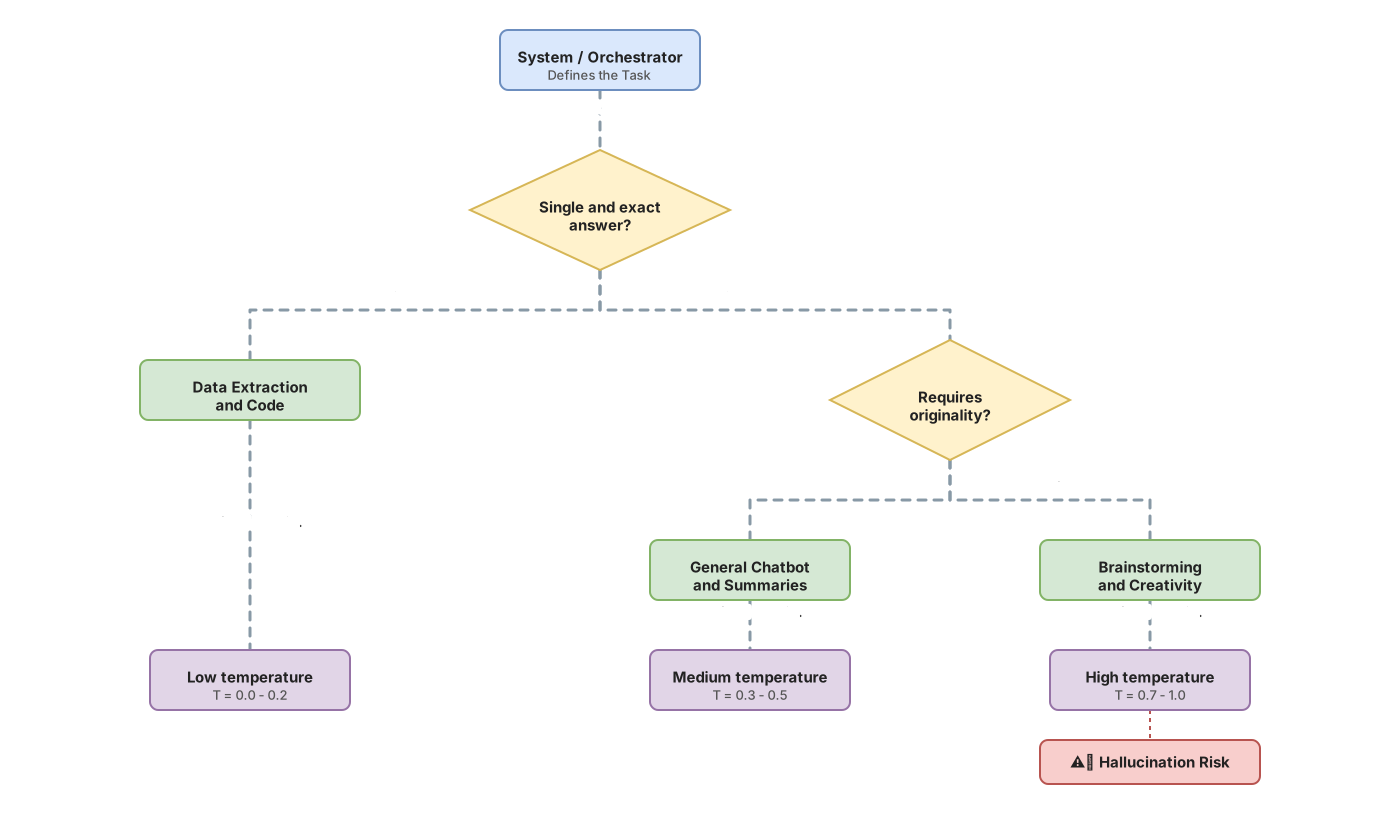
What temperature should you use? A quick guide
Quick decision flow:
              Do you need exact responses?
                        │
                  ┌─────┴─────┐
                 YES           NO
                  │             │
            ┌─────▼──────┐    ┌─▼─────────────────┐
            │ Temp: 0-0.2│    │Do you want variety?│
            │            │    │                   │
            │ Extract    │    └─────┬─────────────┘
            │ Summarize  │          │
            │ Classify   │      ┌───┴────┐
            └────────────┘     YES       NO
                               │         │
                    ┌──────────▼──┐   ┌─▼──────────┐
                    │ Temp: 0.7-0.9│ │ Temp: 0.3-0.5
                    │              │ │
                    │ Brainstorm   │ │ Natural
                    │ Creativity   │ │ responses
                    └──────────────┘ └───────────┘
Here’s the short answer. Choose based on what you want to do:
| What do I want to do? | Temperature | Example |
|---|---|---|
| Extract exact information (names, dates, numbers) | 0.0 | ”Extract all emails from this document” |
| Generate code (that works well) | 0.1 | ”Write a function that calculates the average” |
| Summarize text | 0.3 | ”Make a summary of this article in 3 lines” |
| Answer questions naturally | 0.5 | ”How do I make a chocolate cake?” |
| Generate ideas (brainstorming) | 0.8 | ”Give me 10 names for my app” |
| Write stories or creative texts | 0.9 | ”Write a short story about a robot” |
What if I don’t know which to choose?
Start with the middle: use 0.5. Then:
- If responses are too identical and boring → go up to 0.7 or 0.8
- If responses are strange or have errors → go down to 0.2 or 0.3
After a couple of tries, you’ll find the number that works best for your case.
Sources
-
Anthropic. Messages API — temperature parameter. Official documentation of the
temperatureparameter in Claude’s API, including valid range (0.0–1.0) and default value. https://docs.anthropic.com/en/api/messages -
OpenAI. Chat Completions API — temperature. Reference for the parameter in OpenAI’s API, where the allowed range goes up to 2.0. https://platform.openai.com/docs/api-reference/chat/create
Frequently Asked Questions
Does changing temperature cost me more money?
No. Temperature doesn’t affect the price. What costs is how much text you request and how much text it generates. You can change the temperature freely without paying more.
Do I always get the same response with temperature 0?
Almost always yes. With temperature 0, responses are very similar, but there’s no guarantee they’re 100% identical each time. For most practical uses, it’s similar enough.
What’s the difference between temperature 0 and 0.1?
Very little. With 0.1 there’s a small change in variety, but in most cases you won’t notice it in the response.
High temperature = more errors?
Yes, especially if there’s no correct answer. With high temperature, the AI chooses less probable options. Sometimes that’s fine (for creativity), but for exact data, it introduces errors. It’s the trade-off: creativity vs. accuracy.
How do I get started with no experience?
Experimentation checklist:
┌─ STEP 1: Initial test
│  ☐ Write your prompt clearly
│  ☐ Set temperature to 0.5
│  ☐ Run 3–5 times
│  ☐ Observe the results
│
├─ STEP 2: Diagnosis
│  ☐ Are all responses identical and boring?
│     → Go up to 0.7–0.8
│  ☐ Do responses have errors or are they weird?
│     → Go down to 0.0–0.2
│  ☐ Does it look fine as is?
│     → Stay at 0.5
│
├─ STEP 3: Fine-tuning
│  ☐ Change the value to the new temperature
│  ☐ Run 3–5 times again
│  ☐ Compare with the previous attempt
│
└─ STEP 4: Lock in the value
   ☐ Save the temperature that works
   ☐ Always use that value in production
Here’s how:
- Test your task with temperature 0.5 (middle ground)
- If you need “more varied and creative” responses → go up to 0.7 or 0.8
- If you need “exact and identical” responses → go down to 0.0 or 0.1
- Run your prompt several times with the new temperature and observe
There’s no magic number. The one that works for you is something you discover by trying.
Related articles

Prompt Engineering for Developers: 5 Patterns With Code
The 5 prompt engineering patterns: zero-shot, few-shot, CoT, role prompting, and structured output with real TypeScript code.

Programmatic Tool Calling : Step-by-Step Implementation
Hay una técnica que permite ejecutar docenas de herramientas en paralelo sin que el modelo vea ningún resultado intermedio. Nadie habla de ella porque está enterrada en la especificación. Cuando la descubras, vas a replantear cómo diseñas cualquier pipeline de agentes.

Architecture of an Enterprise Agent: The 6 Decisions That Matter
The 6 architectural decisions for your first production AI agent: precise objective, memory, tools with minimum privilege, and human oversight.