
Tool use: how an LLM accesses external tools
LLMs can't see the current time or your database. Tool use gives them that access. I explain the loop, tool definition, and the most common mistakes.
Contributors: Manu Rubio, Ivan Garcia Villar
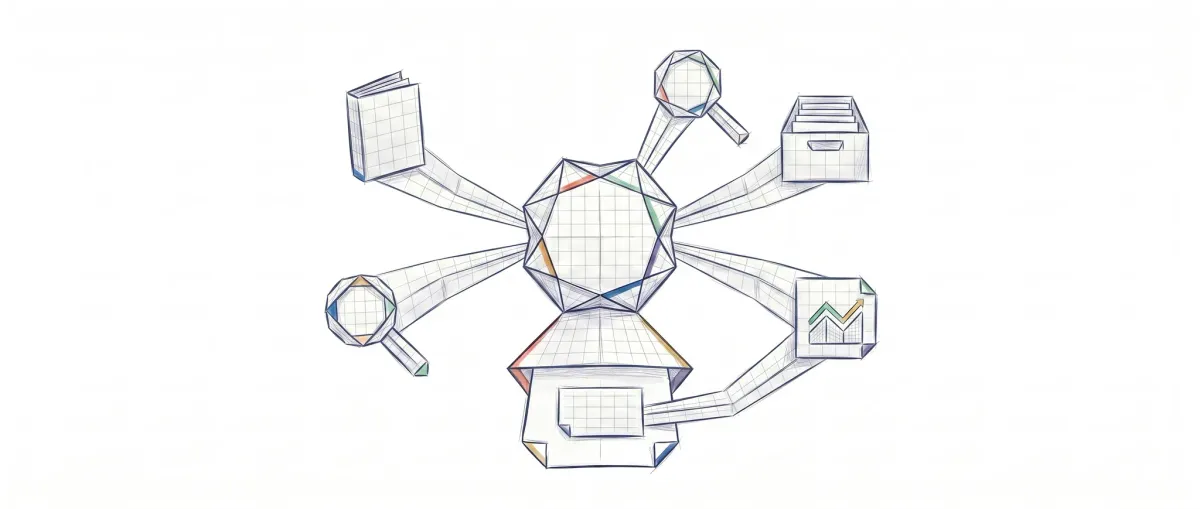
Ask an LLM what the weather is right now in Madrid. The answer will come from its training data, not from real-time weather. It can’t make any external queries. Tool use is the mechanism that breaks that isolation: it gives the model the ability to ask you to execute real functions on its behalf.
To follow this post you need to know how to create functions in TypeScript and have made an API call before. You don’t need prior experience with LLMs or agents.
Why the LLM can’t search Google
Think of someone who’s been disconnected from the world for years. They know a lot from what they learned before, but if you ask them the current price of something, they can only give you an estimate based on what they remember.
An LLM works the same way. It was trained on data up to a specific date and hasn’t “seen” anything new since then. When it generates text, it only has access to what’s in the active conversation. Nothing else.
The model processes tokens (the minimal unit of text it handles internally, roughly a word or word fragment) and predicts the next one based on the context it has. Without external tools, if you ask it the value of the euro today, the model can only try to guess or admit it doesn’t know. Neither option works in a real system.
Tool use doesn’t change how the model works internally. What it does is add a protocol so the model can ask your code to execute things and then receive the results.
The tool loop: how information flows
Before we see code, let’s understand the mechanics. A tool call (the act of invoking a tool) always follows these steps:
- Your code sends the user’s question along with a list of available tools. Each tool has a name, description, and a schema that defines what arguments it accepts.
- The model reads those descriptions and decides if it needs any. If it can answer without them, it does so directly.
- If it needs a tool, it returns a
tool_useblock with the name and arguments. It doesn’t execute anything: it just formulates the request. - Your code executes the tool with those arguments and gets the result.
- You send that result back to the model in a
tool_resultblock. The model incorporates it and generates the final answer.
The model never executes anything on its own. This separation is intentional: your code maintains control over what gets executed, with what permissions, and in what environment.
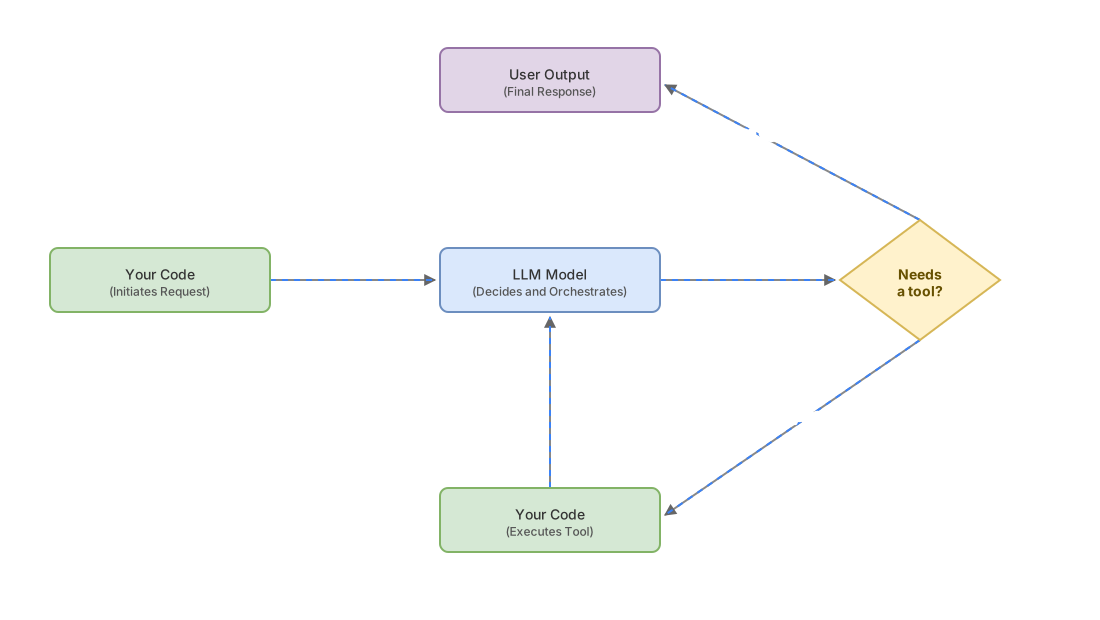
This pattern has a name in software architecture: Agent Adapter, a layer that translates the LLM’s intent into the format the external system requires [2]. The tool_use block acts as a Command object from the GoF catalog: it encapsulates all the information to execute an action, and the handler (your code) decides whether to proceed. You can see the complete mapping in the post about GoF patterns in AI agents.
Your first tool in TypeScript
A tool definition has three required fields: name, description, and input_schema [1].
// The definition tells the model WHAT it can ask you to do
const tools = [{
  name: "get_weather",
  // The description is the only thing the model reads to decide whether to use this tool
  description: "Returns the current weather for a city. Use it when the user " +
    "asks about the climate or temperature. It doesn't work for future forecasts.",
  input_schema: {
    type: "object",
    properties: {
      city: {
        type: "string",
        description: "City name, for example: Madrid, Barcelona"
      }
    },
    required: ["city"]  // required fields for the tool to work
  }
}];
Now the loop. The Anthropic SDK returns stop_reason === "tool_use" when the model wants to invoke a tool:
// We send the question with the available tools
const messages = [{ role: "user", content: "What's the weather like in Madrid?" }];

const response = await client.messages.create({
  model: "claude-opus-4-7",
  max_tokens: 1024,
  tools,      // list of available tools
  messages
});

if (response.stop_reason === "tool_use") {
  // The model wants to use a tool: we extract name and arguments
  const toolCall = response.content.find(b => b.type === "tool_use");

  // YOUR code executes the real function with the arguments the model requested
  const result = await getWeather(toolCall.input.city);

  // We send the result back so the model completes the answer
  messages.push({ role: "assistant", content: response.content });
  messages.push({
    role: "user",
    content: [{ type: "tool_result", tool_use_id: toolCall.id, content: result }]
  });
  // Here you'd make a second API call to get the final answer
}
The tool_use_id field links the result to the original request. Without it, the model doesn’t know which result corresponds to which call.
If you want to see this pattern complete with multiple tools and error handling, the post on Programmatic Tool Calling goes into more detail.
Function calling vs MCP: which do you need?
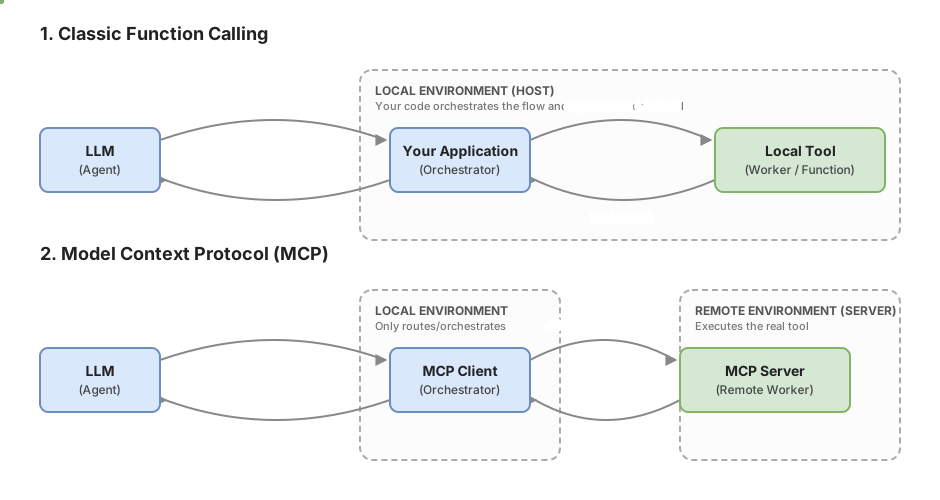
There are two ways to connect tools to an LLM. The first is function calling (also called client tools): you define the schema, you execute the function, you return the result. It’s exactly what you just saw in the code above.
The second is MCP (Model Context Protocol, an open standard launched by Anthropic and donated to the Linux Foundation — what is MCP). MCP defines how an agent connects to external tools in a standardized way, without writing a custom adapter for each integration.
| Function calling | MCP | |
|---|---|---|
| Who executes the tool | Your code | An external MCP server |
| When to use it | Your own tools, internal logic | Integrate third-party tools with MCP server already available |
| Initial setup | Define the schema in the prompt | Configure the connection to an MCP server |
| Flexibility | Maximum, you control everything | Depends on what the MCP server exposes |
To get started, function calling is enough. MCP makes more sense when you want to connect tools that already have compatible servers (databases, code managers, popular APIs) and you don’t want to write the adapter from scratch.
The description is the contract
The model can’t see your code. It doesn’t know what get_weather does internally. All it has is the description you give it in the schema.
If you write description: "gets the weather", the model has to guess when to use it, what parameters make sense to pass, and what it returns. If you have two tools with equally vague descriptions, the model will pick one without real criteria. Anthropic’s official documentation recommends at least three or four sentences for non-trivial tools, answering: what it does, when to use it, what it returns, and when not to use it [1].
A description is either useful or a trap. There’s no middle ground.
Common mistakes when starting
Description too short
“Searches for information” is not a functional description. If your tool searches a product database but you describe it that way, the model will use it for any search. The result is wrong calls that produce incorrect answers with no visible technical error. The bug isn’t in the code: it’s in the text.
Too many tools at once
If you inject fifteen tools with similar names, the model has to choose between them each time. The selection degrades with no obvious errors: the model simply uses the less precise tool more often. What works better: group related operations into a single tool with an action parameter (for example, a catalog_query tool with action: "search" | "get_detail" instead of two separate tools).
Side effects without human confirmation
Deleting a record, sending an email, making a transfer. These actions have consequences outside the system. If the model can invoke them directly, any hallucination (when the model generates incorrect information with apparent confidence) or misinterpretation can cause real harm. For any irreversible action, your code must ask for confirmation before executing, regardless of what the model decided.
Not returning the error to the model
When your function fails (timeout, invalid parameter, API down), if you simply return nothing or throw a silent exception, the model tries to continue with incomplete information. The right approach is to send the error message as a tool_result so the model can decide whether to retry with different parameters, or explain to the user that something failed.
Implementation checklist
-
Each tool has
name,description, andinput_schemacorrectly defined -
The description answers what it does, when to use it, what it returns, and when NOT to use it
-
The loop handles
stop_reason === "tool_use"and sendstool_resultback to the model -
Execution errors are returned to the model as
tool_result, not silenced -
Actions with irreversible effects have human confirmation before execution
-
The number of simultaneously active tools is manageable (not dozens of tools with similar names)
-
Each
tool_resultincludes the correspondingtool_use_id.
Frequently Asked Questions
What exactly is tool use?
Tool use is a mechanism by which an LLM can request that your code execute external functions during a conversation. The model doesn’t execute anything directly: it generates a structured request (a tool_use block) with the tool name and arguments, and your code decides whether to execute it and how.
Can the model execute malicious code through tools?
Not directly. The model generates a request, but your code is what executes the real tool. If the model asks to invoke something with dangerous parameters, your handler can reject it, validate the arguments, or ask for confirmation. The risk is in implementing handlers that execute without validating what the model asked for, not in the mechanism itself.
Can I use tool use with any LLM?
Not all models support it with the same format. Anthropic, OpenAI, and Google have similar implementations but with differences in the exact fields. The examples in this post use the Anthropic API. If you switch providers, the loop logic is the same, but you’ll need to adjust the field names.
What’s the difference between tool use and asking the model to respond in JSON?
With free-form JSON, you parse the text and there’s no format guarantee. With tool use, the model returns a structured object that follows exactly the input_schema you defined. You don’t need regex or manual parsing, and if the model gets a required field wrong, the error is clearer and more manageable.
Related articles

Programmatic Tool Calling : Step-by-Step Implementation
Hay una técnica que permite ejecutar docenas de herramientas en paralelo sin que el modelo vea ningún resultado intermedio. Nadie habla de ella porque está enterrada en la especificación. Cuando la descubras, vas a replantear cómo diseñas cualquier pipeline de agentes.

What is MCP: the protocol connecting AI agents with tools
MCP (Model Context Protocol) standardizes how AI agents connect to external tools. Explanation with line-by-line commented Python examples.

GoF Patterns in AI Agents: The Complete Map
GoF patterns don't disappear in agentic systems—they transform. Command=tool call, Mediator=orchestrator, Adapter=MCP. The complete map with code.