
Context Window and Best Practices
What a language model's context window is, how it's measured in tokens, and concrete practices to leverage it from day one.
Contributors: Ivan Garcia Villar, Manu Rubio

Prerequisite: To follow this post you only need to know what a prompt is (the text you send to the model to ask it something). You don’t need to know how to code yet.
When I started working with language models, I made one specific mistake: I believed that the more context I gave the model, the better it would respond. I’d paste complete emails, entire documents, pages of specifications. The results were mediocre. The model would sometimes ignore important instructions, mix information from different sources, or respond as if it hadn’t read half of what I sent.
The problem wasn’t the quantity. It was that I didn’t understand how the model’s memory works.
What is a token (you need to understand this first)
Before talking about context window, I need to explain what a token is, because everything else depends on this concept.
A token is not a complete word. It’s a text fragment, something like a syllable but without following the syllabic rules of the language. The word “programming” might be one token or it might split into two (“program” + “ming”), depending on the model and context. Short words are usually one token. Longer ones get split.
Why does this exist? Because models don’t read text the way we do. They work with numbers, and tokens are the minimal unit they use to convert text into numbers. You don’t need to worry about the exact mechanism: what matters is that model limits are measured in tokens, not words or characters.
As a practical reference: a normal paragraph of about 80-100 words is roughly equivalent to 130-160 tokens in Spanish, according to OpenAI and Anthropic’s tokenizers, which you can test directly in their playgrounds. Don’t try to memorize any numbers, because it varies quite a bit depending on the text.
The model’s short-term memory
The context window is the limit of how much text the model can read, process, and keep “in mind” in a single interaction.
An analogy: imagine you give someone a stack of cards to read and then they answer your questions. They can only hold a fixed number of cards at a time. If the stack exceeds that limit, they’ll have to drop the first ones to read the last ones. What they dropped, they forgot.
That’s what happens when you exceed the context window. The model doesn’t read everything: it gets as far as it can, and the rest doesn’t exist for it.
Modern models have large context windows, some with hundreds of thousands of tokens. But “large” doesn’t mean “unlimited.” And here comes something that surprises many people when they start: even when you have plenty of space, how you organize the information matters as much as how much information you include.
The “Lost in the Middle” Effect
There’s a known problem in how models process long texts: they pay more attention to the beginning and end of the context, a behavior that researchers formally documented in 2023. Content that ends up in the middle tends to receive less attention, even if it’s within the window limit.
Important instructions go at the beginning. Your specific question goes at the end. Reference material (documents, data, examples) goes in the middle.
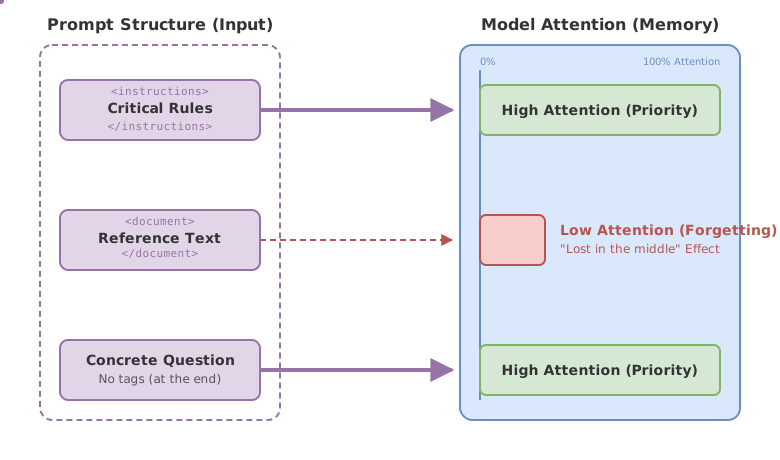
This is the structure I use for long prompts:
// Prompt structure that respects the "lost in the middle" effect
const prompt = `
<instructions>
Always respond in Spanish.
Use only information from the document below.
If you don't know the answer, say "I don't know".
</instructions>

<document>
${referenceText}
</document>

What is the main point of the document?
`;
// Critical instructions: at the beginning, inside <instructions>
// Reference material: in the middle, inside <document>
// The actual question: at the end, outside any tags
Tags like <instructions> or <document> are not mandatory standards. They’re simply delimiters that help the model understand what part of the text is what, just like headings help a human reader navigate a document.
Quality Over Quantity: Context Is Not a Junk Drawer
This was my main mistake when starting. Putting in a lot of information doesn’t make the model smarter. What it does is add noise.
Every token you include in the context competes with all the others for the model’s attention. An irrelevant document is not neutral: it can make the model give less weight to the document that actually matters. The response becomes vaguer, mixes things it shouldn’t, or directly ignores instructions you buried between pages of irrelevant text.
The question to ask before including something is simple: does the model need this to respond well? If the answer is “it might help,” it probably doesn’t need it.
This is especially important when you automate model calls from code. The natural temptation is to pass everything you have. Resist that temptation.
Few-shot: Teaching with Examples in the Context
Prompt engineering (the art of giving the model precise instructions to get better answers) has many techniques, but this is one of the most useful for beginners.
Few-shot consists of including a few examples within the prompt of what you want the model to do. Instead of just describing the format you expect, you demonstrate it directly.
// Few-shot: the model learns the pattern by seeing the examples
const prompt = `
Classify the tone of these messages.
Respond with only one word: formal, informal, or technical.

Message: "Dear Mr. García, I am writing to inform you of the project status."
Tone: formal

Message: "hey man how's it going, wanna hang out?"
Tone: informal

Message: "${newMessage}"
Tone:
`;
// With 2 examples it already understands the pattern.
// The response will come with just the word, no explanations.
Two examples are usually enough for simple tasks. What matters is that the examples cover representative cases, not that there are many.
If the model doesn’t understand the pattern with three examples, the problem is probably how you describe the task, not how many examples you give. Adding more examples rarely solves that kind of problem.
When Context Isn’t Enough: RAG
What happens when you have a huge knowledge base, hundreds of documents, or a complete code repository? None of that fits in any model’s context window.
This is where RAG (Retrieval-Augmented Generation) comes in. The post on enterprise RAG goes into the complete technical detail, but the idea is this: instead of trying to fit all the information in the context, RAG uses a search mechanism first. When you ask a question, the system first finds which fragments of your documentation are relevant to that specific question, and only those fragments go into the model’s context.
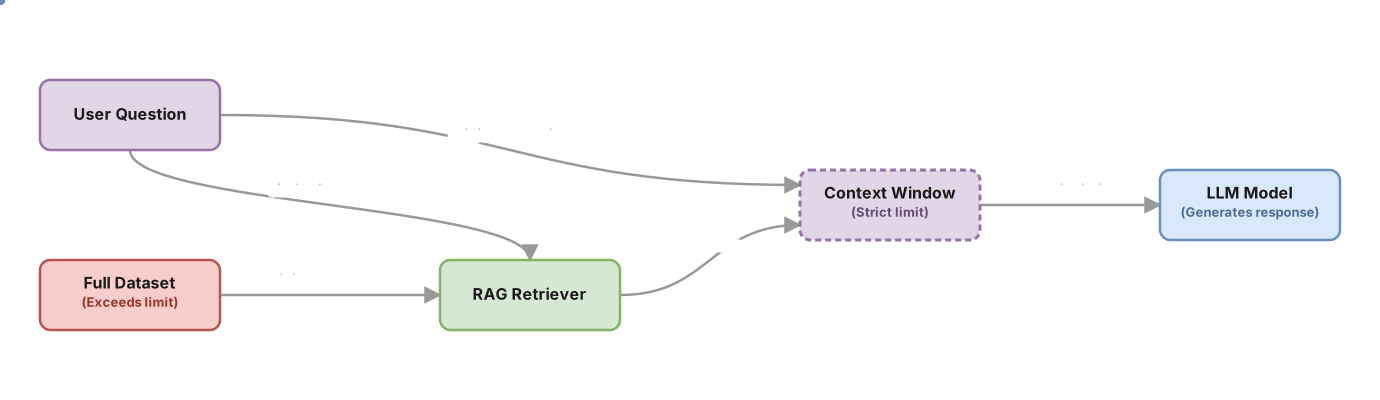
It’s like instead of giving someone an entire library to read, you give them just the 4 books that answer your question.
To understand how that search mechanism works under the hood (the embeddings that let it find fragments by meaning, not exact words), the post on semantic search and embeddings has the visual explanation you need.
Common Mistakes
Putting instructions in the middle of the prompt
If you describe important rules after the reference document and before the question, the model processes them with less attention. Instructions at the beginning, always.
Assuming more context always helps
A very common mistake is including the complete thread of a conversation, all previous messages, when what matters is the last two or three. Historical context that doesn’t actively contribute takes up space and adds noise. Stick with what the model needs to know to answer now.
Describing the format instead of showing it
“Respond in table format with Name, Date, and Status columns” sounds clear. But if you include an example of how you want that table, the result is almost always better. Describing and showing at the same time is more effective than just describing.
Not using delimiters when the prompt has different parts
If you put instructions, data, and the question all together without separating them, the model has to guess where one thing ends and another begins. Sometimes it does it right. Sometimes it doesn’t. Delimiters (<instructions>, ---, or just line breaks with tags) eliminate that ambiguity.
Implementation Checklist
-
Critical instructions are at the beginning of the prompt
-
Reference material goes between instructions and the final question
-
I’ve removed information the model doesn’t need to answer
-
I use clear delimiters to separate prompt parts (
<instructions>,<document>,---) -
If I want a specific format, I include at least 2 few-shot examples instead of just describing it
-
If information exceeds the context window, I evaluate RAG before trying to force it all in
Frequently Asked Questions
What exactly happens when I exceed the context window?
It depends on the model and how it’s configured. Some reject the call with an error. Others truncate the text silently: they keep the beginning or the end, and the rest disappears without warning. Either way, the model doesn’t process what doesn’t fit.
Is the context window the same as the model’s “memory”?
No. The context window is specific to each call: when you make a new call, the model starts from scratch. It doesn’t remember what you talked about before unless you yourself include that conversation in the context of the new call. That’s why chatbots with “memory” work by storing the history and including it in each new prompt.
How many tokens does my prompt have?
Most model APIs return the number of tokens used after each call. If you want to estimate it beforehand, there are specific libraries for that (each provider usually has their own). As a starting point: a normal page of text in Spanish is usually in the range of a few hundred tokens, but it varies quite a bit depending on text density.
Do few-shot examples work for any type of task?
For classification, output formatting, and tasks with clear patterns they work very well. For complex reasoning or open-ended questions, they help less. If the task is ambiguous in itself, examples don’t resolve the ambiguity: you need to reformulate the instructions first.
Related articles

Enterprise RAG: the complete pipeline that actually works
How to build a production RAG with semantic chunking, hybrid search and reranking. The real decisions that determine whether your system retrieves well or fails silently.

Prompt Engineering for Developers: 5 Patterns With Code
The 5 prompt engineering patterns: zero-shot, few-shot, CoT, role prompting, and structured output with real TypeScript code.

Introduction to Embeddings and Semantic Search
How to transform text into numerical vectors and build real semantic search. From cosine similarity to RAG, with diagrams, TypeScript code, and interactive exercises.