
When to use skills in Claude Code: the complete map
Skills, hooks, CLAUDE.md: the complete map of Claude Code's 8 tools and when to use each one. A practical guide for beginners.
Contributors: Ivan Garcia Villar

You’ve spent weeks creating skills for everything.
One for code review, another to follow the project’s DDD architecture, another to make Claude pass tests before committing.
Until Claude commits without passing tests and you wonder: why isn’t it listening to me?
What went wrong? I used a skill for something that needed a hook.
Skills are probabilistic: Claude reads their description and decides whether to activate them based on conversation context. Sometimes it gets it wrong, or simply doesn’t connect the pieces. Hooks are deterministic: they execute whenever the event you configured occurs, without Claude “deciding” anything.
Until you understand that difference, your Claude Code setup is a game of Russian roulette.
Why does everyone use skills but nobody talks about hooks?
On LinkedIn, the week skills appeared, everyone was posting their “productivity setups” with twenty skills for everything imaginable. Sharing a skill is easy: you copy the file, paste it in a thread, get likes.
Hooks are JSON files and bash scripts. They don’t look good in a screenshot.
Before, everything went in CLAUDE.md. When someone posted that a 500-line CLAUDE.md “destroys context,” everyone started putting everything in skills. Without exploring hooks. Without exploring subagents. Without asking when each tool makes sense.
This post is the map missing from that conversation.
The complete map: 8 Claude Code tools
| Tool | When does it load? | Deterministic? | Token cost |
|---|---|---|---|
| CLAUDE.md | Login, always | No (model interprets) | High (every request) |
| .claude/rules/ | When opening files with match | No | Low |
| Skills | Descriptions at start + content on invoke | No, probabilistic | Low until invoked |
| Hooks | Only when event occurs | Yes, always | Zero |
| MCP | Login, always | No | High (loads schemas) |
| Subagents | On demand | No | Isolated from main context |
| Agent Teams | On demand | No | High (separate instances) |
| Plugins | On install | Depends on content | Variable |
And the directory structure where each lives:
.claude/
├── settings.json        ← hook configuration and project permissions
├── rules/               ← conditional rules by file type
├── agents/              ← subagents (one .md file per agent)
└── skills/              ← local skills for this project
    └── pr-review/
        └── SKILL.md     ← each skill is a folder with its SKILL.md

~/.claude/
└── skills/              ← global skills (available across all your projects)
MCP deserves its own post, we won’t say much about it today, but if you want to learn more here’s this post: What is MCP: the protocol that connects AI agents with tools.
The decision tree: which tool should I use?
Every time you’re about to configure something new in Claude Code, ask yourself this: does it need to happen 100% of the time, without Claude deciding?
If the answer is yes, it’s a hook. If it’s permanent context, it’s CLAUDE.md. If it’s a flow you invoke when you need it, it’s a skill. Here’s the complete tree:
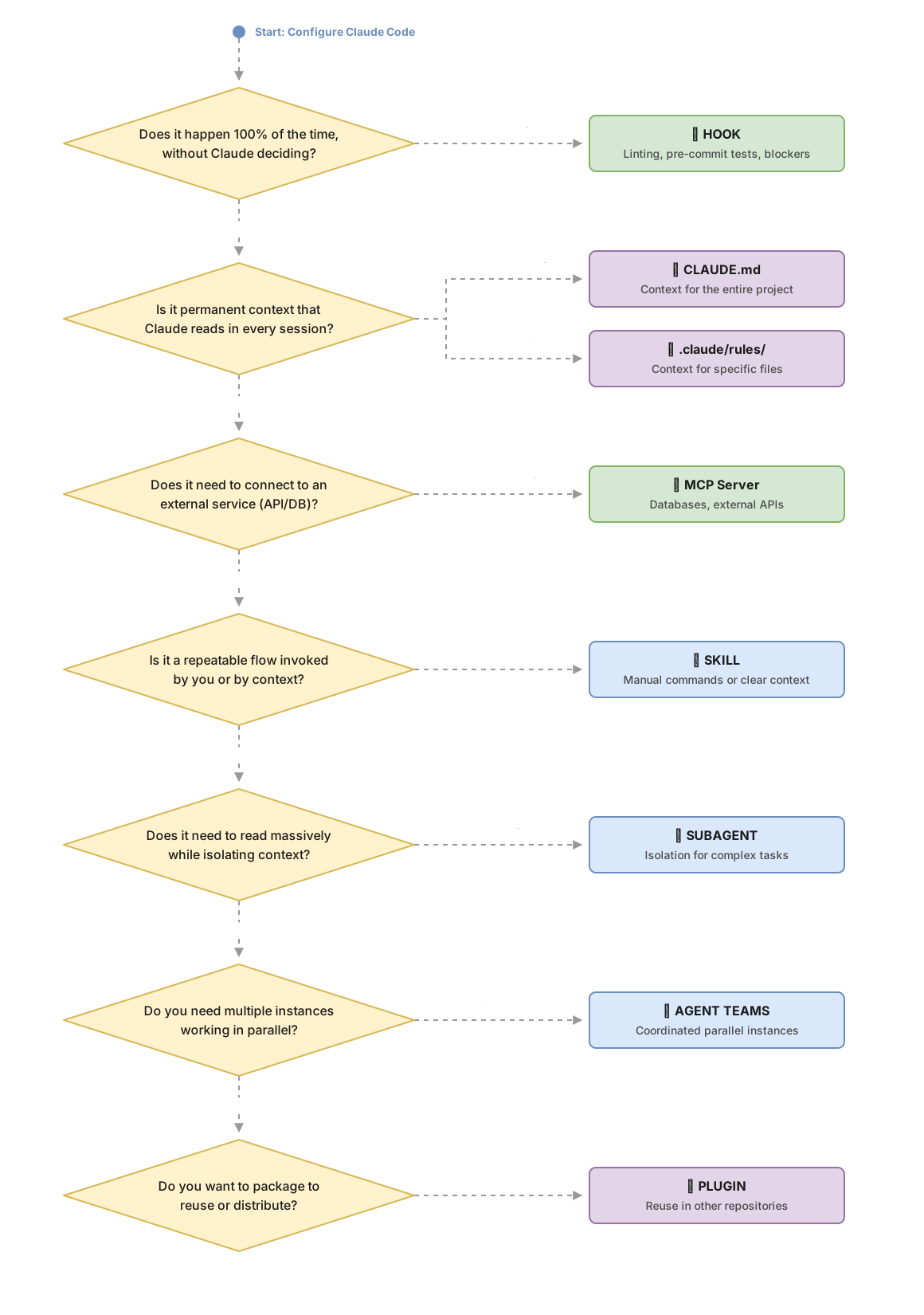
One new concept every week
The difference that matters: probabilistic vs deterministic
Imagine you tell a coworker the instruction “always run tests before committing.” That coworker might forget. They might interpret that in this specific case it doesn’t apply. They might be distracted. That’s probabilistic: it depends on someone remembering and deciding to do it.
Now imagine you configure your version control system to block any commit if tests haven’t passed. No exceptions. No interpretation. No “well, this time…” That’s deterministic.
Skills work like the human coworker. Claude reads the skill description at the start of the session and decides whether to activate it based on conversation context. If you’re talking about CSS files and you have a skill for “pass tests before commit,” Claude might not connect the two things. In projects where I’ve monitored activations, a skill with a well-written description can fail to trigger when the conversation comes from an unexpected angle.
Hooks don’t interpret anything. When Claude tries to execute a commit, the pre-commit hook runs. Period.
The difference isn’t about quality of instruction: it’s architectural.
The 3 essential tools in detail
CLAUDE.md: the employee manual
CLAUDE.md is the file Claude reads at the start of each session. Think of it as the welcome manual you give to someone new on the team: project conventions, technology stack, important restrictions.
What goes here: architecture conventions, the stack, build and test commands, permanent project restrictions.
What doesn’t go here: step-by-step workflows, long reference documentation, instructions that only apply in specific situations. That goes in skills or in rules.
The tokens CLAUDE.md uses are subtracted from the space available for code and conversation in each session. Plus, language models have difficulty with instructions buried in very long texts: they tend to follow what appears at the beginning and end, and ignore what’s in the middle. A 500-line CLAUDE.md can make Claude follow the first instructions and forget the rest without you noticing [3].
Here’s a well-structured example:
# Project: Invoicing API

## Stack
- TypeScript + Node.js 20
- PostgreSQL 16 (no ORMs, direct queries with pg)
- pnpm as package manager

## Architecture
- DDD: domain/, application/, infrastructure/
- One use case per file in application/
- Never business logic in infrastructure/

## Commands
- Tests: pnpm test
- Build: pnpm build
- Lint: pnpm lint

## Permanent restrictions
- Never modify src/legacy/ under any circumstances
- Tests go in __tests__/ next to the module they test
For a deeper dive on how to avoid the anti-pattern of the bloated CLAUDE.md, the post AGENTS.md: The configuration that can ruin your agent goes into much more detail about what happens when the file grows unchecked.
Skills: the macros of your workflow
A skill lives in its own folder inside .claude/skills/ of the project, or in ~/.claude/skills/ if you want it available across all your projects. Inside that folder is a SKILL.md file with the content and the frontmatter (the configuration lines between --- at the start of the file).
The most important piece of the frontmatter is the description. It’s what Claude uses to decide whether to automatically activate the skill. If it’s vague, Claude won’t connect it with your intention:
# ❌ This description almost never triggers
---
name: analyze-sales
description: Helps with data tasks
---

# ✅ This one triggers when it makes sense
---
name: analyze-sales
description: >
  Analyzes CSV sales files when the user mentions revenue data,
  margins, churn or business KPIs. Invoke with /analyze-sales for manual control,
  or let Claude activate it automatically in analysis context.
---
The disable-model-invocation: true field tells Claude to never try to activate the skill on its own. It only runs when you write /analyze-sales. Useful for deployments or other actions you don’t want Claude to activate by mistake.
When to use skills: repeatable workflows you invoke when you need them (/deploy, /pr-review, /changelog). When not to: for behavior that must happen 100% of the time. That’s what hooks are for.
Skills can also have executable scripts that allow them more deterministic behavior, but that doesn’t mean that automatically loading the right skill at the right time based on Claude’s interpretation always works.
Hooks: the security guards
A hook is an external script that runs automatically when an event occurs in Claude Code. They’re configured in .claude/settings.json and don’t consume tokens because they execute completely outside the model’s loop.
Claude Code fires hooks at different moments in the cycle. The four most relevant to start:
-
PreToolUse: before Claude uses a tool (ideal for blocking actions) -
PostToolUse: after Claude uses a tool (ideal for validations) -
Notification: when Claude needs your attention or is waiting for permission -
Stop: when Claude finishes responding
Let’s see how to configure the ESLint hook (ESLint is a tool that checks for errors and style in your JavaScript or TypeScript code). First, the entry in .claude/settings.json:
{
  "hooks": {
    "PostToolUse": [
      {
        "matcher": "Edit|Write",
        "hooks": [
          {
            "type": "command",
            "command": "bash .claude/hooks/eslint-check.sh"
          }
        ]
      }
    ]
  }
}
And the script that executes it. Note that hooks receive event information as JSON through standard input (stdin), and we use jq (a tool to read JSON from the terminal) to extract the file path:
#!/bin/bash
# .claude/hooks/eslint-check.sh

# Read the JSON that Claude Code sends through stdin (standard input)
INPUT=$(cat)

# Extract the path of the file Claude just edited
# jq -r reads the file_path field from the received JSON
FILE=$(echo "$INPUT" | jq -r '.tool_input.file_path')

# Only run ESLint on JavaScript or TypeScript files
if [[ "$FILE" == *.js || "$FILE" == *.ts || "$FILE" == *.tsx ]]; then
  npx eslint "$FILE"
  # If ESLint fails, Claude Code sees the error and can fix it
fi
The hook to block rm -rf works similarly but with PreToolUse. The configuration in .claude/settings.json:
{
  "hooks": {
    "PreToolUse": [
      {
        "matcher": "Bash",
        "hooks": [
          {
            "type": "command",
            "command": "bash .claude/hooks/block-dangerous.sh"
          }
        ]
      }
    ]
  }
}
The block is communicated via the script’s exit code: exit 2 cancels the action and Claude receives the error message as feedback:
#!/bin/bash
# .claude/hooks/block-dangerous.sh

INPUT=$(cat)

# Extract the command Claude wants to execute
COMMAND=$(echo "$INPUT" | jq -r '.tool_input.command')

# If the command contains rm -rf, block it
if echo "$COMMAND" | grep -q "rm -rf"; then
  # >&2 sends the message to the error channel (stderr)
  echo "Blocked: rm -rf is not allowed in this project" >&2
  # exit 2 cancels the action; Claude sees the message and adjusts its approach
  exit 2
fi

# exit 0 allows the command to execute normally
exit 0
For a complete deep-dive into hooks with more patterns, the post Claude Code Hooks: deterministic quality to guarantee maintainable projects has all the details.
A real combined example
Here’s how the configuration would look for a backend team with TypeScript and PostgreSQL. Each tool does one thing:
CLAUDE.md (~100 lines): technology stack, DDD conventions, folder structure, “use pnpm,” test naming in English. Nothing else.
Hooks: ESLint after each .ts file edit; tests before commit (if any fail, commit doesn’t happen); blocking rm -rf and other destructive commands.
Skills: /pr-review with the team’s review checklist; /deploy with the deployment pipeline steps; /changelog that generates the changelog entry in the team’s format.
MCP (advanced): PostgreSQL server so Claude can query the database schema in production when needed. See the post about MCP.
Notice the distribution: permanent conventions go in CLAUDE.md. What must always happen goes in hooks. What you invoke when you need it goes in skills. No overlap.
Common mistakes
The 1000-line CLAUDE.md
Every line of CLAUDE.md consumes part of the tokens available in each session. When the file exceeds a certain size, Claude starts ignoring instructions. Not because they’re bad, but because language models have difficulty with very long texts: they pay attention to the beginning and end, and ignore the middle [3]. The alarm signal is when Claude starts to “forget” conventions you’ve already given, or when it asks you for information that’s already in the file.
Solution: stay under 200-300 lines. Reference documentation or specific workflows go in skills or in .claude/rules/.
The skill for permanent behavior
“Always use DDD.” “Always pass tests before commit.” If you put this in a skill, you’re betting that Claude will connect the skill to every relevant action. The odds aren’t 100%, which means sooner or later Claude will commit without tests. Permanent conventions go in CLAUDE.md. Guaranteed actions go in hooks.
The skill with vague description
"Helps with data tasks" doesn’t trigger. Claude can’t know what “tasks” means in this context or when it should activate this skill. A good description names concrete situations, specific keywords, and the manual command as an alternative. If your skill has been installed for weeks and you never see it activate, the description is the first place to look.
Third-party skills copied without review
The public ecosystem has skills of highly variable quality. Some add unnecessary tokens. Others include instructions that make Claude execute things you didn’t ask for. That’s called prompt injection: hidden instructions in the skill’s content that redirect the model’s behavior. Before installing a third-party skill, review it to ensure it doesn’t include malicious instructions hidden in the content, doesn’t request access to files outside the project, and doesn’t use external URLs without your permission.
Implementation checklist
-
CLAUDE.md has fewer than 300 lines and contains only permanent conventions and stack
-
Actions that must happen 100% of the time are in hooks, not skills
-
Each skill has a description with concrete situations and specific keywords
-
Sensitive skills (deploy, data deletion) use
disable-model-invocation: true -
Hook scripts are executable (
chmod +x .claude/hooks/your-script.sh) -
Third-party skills always pass a review
Sources
- Hooks Guide: Claude Code Docs: official format for hook configuration in
.claude/settings.json, lifecycle events, stdin input and exit codes. - Skills: Claude Code Docs: SKILL.md frontmatter,
disable-model-invocationfield, how automatic activation works. - Best Practices: Claude Code Docs: official recommendation to keep CLAUDE.md below a manageable size.
Related articles

Claude Code Hooks: calidad determinista para garantizar proyectos mantenibles
Cómo usar Claude Code Hooks para añadir gates de calidad que el modelo no puede saltarse: lint, tests, OpenAPI y seguridad antes de cada commit.

AGENTS.md: The Configuration That Can Break Your Agent
Data shows poorly written AGENTS.md files reduce success rates by 2% and increase costs by 20%. Here's how to write yours correctly.

What is MCP: the protocol connecting AI agents with tools
MCP (Model Context Protocol) standardizes how AI agents connect to external tools. Explanation with line-by-line commented Python examples.