
Git with AI: Worktrees, Checkpoints, and Reviewing Diffs
How to use Git with AI when the agent writes the code: worktrees for parallelism, commits as a safety net, and reviewing diffs without trusting blindly.
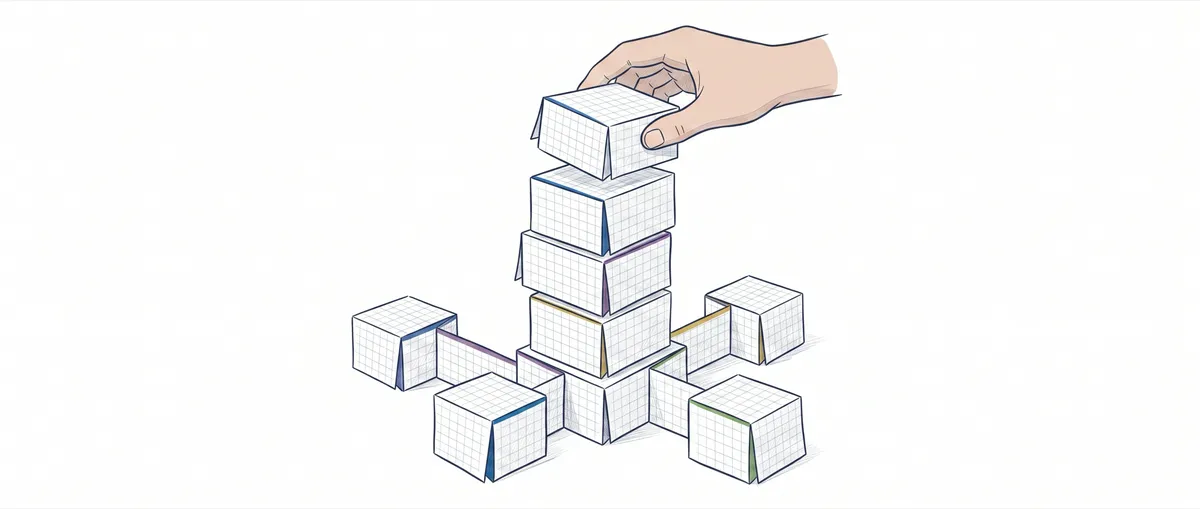
The agent spent forty minutes doing decent work. It refactored a service, added tests, touched three files with good judgment. Then, on the last batch, it decided to “simplify” the router and wiped out half an hour of good changes that weren’t in any commit yet. With no save point in between, there’s no clean way back: either you rescue the good parts by hand from the wrecked working tree, or you lose all of it.
That’s the new problem. It’s not that the agent writes badly. It’s that it writes fast, and when it gets something wrong, it does so at the same speed it was getting things right ten seconds earlier. Git stops being end-of-day bureaucracy and becomes the only thing standing between you and losing good work. If you already use Claude Code, Cursor, or Codex daily, your Git workflow has to change. Here’s how I structure it when the model is the one typing and I’m the one deciding what stays.
Why Is Git Your Safety Net When AI Writes the Code?
Because the cost of getting it wrong stops being symmetric. When you write the code, you generate changes at the pace you understand them, and a mistake is local: you know exactly what you just touched. When the agent writes, it can touch fifteen files in a single response, and the mistake it introduces in file twelve gets buried under the good work in the other fourteen. Here’s the asymmetry: discarding bad work is free if you have a commit to fall back to, but recovering good work that was lost without a commit costs hours, or is flat-out impossible.
The discipline that solves this is boring and it works: commit before you let the agent loose, commit after every batch that leaves the tree in a state that compiles and passes tests. Before, to have a known anchor. After, to freeze what just worked. If the next batch breaks it, git reset --hard HEAD takes you back to the last good state with no ceremony.
And when you really mess up, when you reset to the wrong reference, there’s the reflog. The reflog records every movement of HEAD, including the ones a reset --hard seems to have erased. Watch out for the retention window, because it’s not what people assume: the commit a reset --hard orphaned (with no branch pointing at it) is governed by gc.reflogExpireUnreachable, whose default is thirty days, not ninety. The ninety days of gc.reflogExpire only apply to HEAD movements that are still reachable. In practice you have about a month of margin to rescue what a reset wiped out, until git gc runs. That’s the net beneath the net.
# Deshacer un reset --hard equivocado: el commit "perdido" sigue en el reflog
git reflog                    # localiza la posición previa, p.ej. HEAD@{2}
git reset --hard HEAD@{2}     # HEAD vuelve a esa entrada del reflog
HEAD@{2} means “where HEAD was two movements ago.” As long as a commit has an entry in the reflog, it’s recoverable. Internalize this and you let go of the fear of experimenting with what the agent proposes, because no screwup from the model is final as long as you’re committing.
What Is a Checkpoint, and Why Does Every Agent Batch Deserve One?
A checkpoint is a commit whose only purpose is to mark “this far, it worked.” It doesn’t have to be pretty, or have a message that would pass review, or represent a complete feature. It represents a state of the tree you want to be able to return to. When the agent works in batches, every batch that leaves the code green deserves one.
In practice these are disposable WIP commits. A git add -A && git commit -m with an honest message about what you were doing, and you keep going:
git add -A && git commit -m "wip: punto de control antes de que el agente toque el router"Note that it’s git add -A, not git commit -am. The -a flag only captures modifications and deletions to already-tracked files; it leaves new untracked files alone. And the agent creates new files all the time (tests, modules), which is exactly the work this checkpoint is meant to protect. With -am, those files stay out of the commit, and the reset --hard ten minutes from now takes them down with it.
That commit is worth exactly as much until you decide the line of work is good. Nobody else is going to see it. Its value is in existing: it’s the anchor for the reset --hard you’ll need ten minutes from now.
The important thing is not to confuse the working history with the history you share. While you iterate with the agent, you generate fifteen WIP commits full of “not this,” “back up,” “okay now.” Before that goes into a PR, you collapse it. git commit --amend for the last one, or git rebase -i to squash the whole series into the handful of atomic commits that actually tell the story. The agent iterated fifteen times; your shared branch tells two conceptual changes, each working on its own.
This split between “working commits” and “publishable commits” isn’t new. What changes with AI is the frequency. Before, you’d squash an afternoon of your own work. Now you squash a burst of twenty model responses, and without checkpoints in between you have nothing to pull from when response twelve was better than response twenty.
How Do Several Agents Run in Parallel Without Stepping on Each Other?
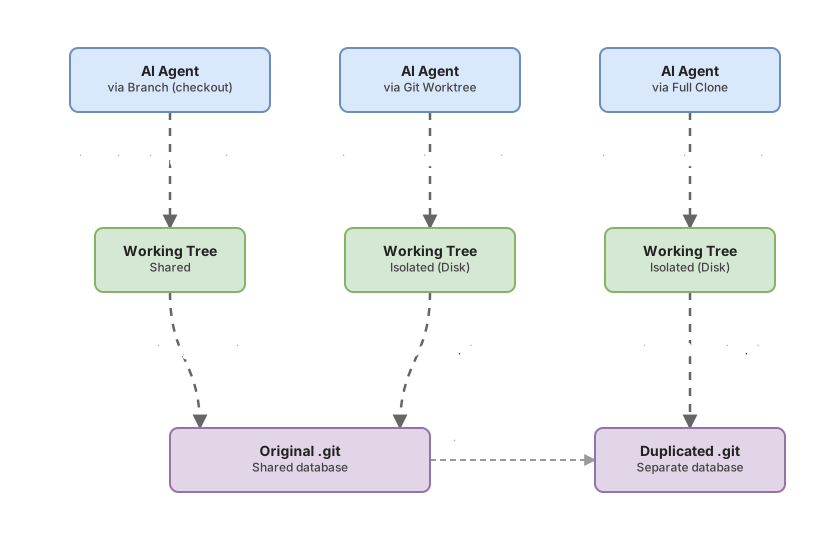
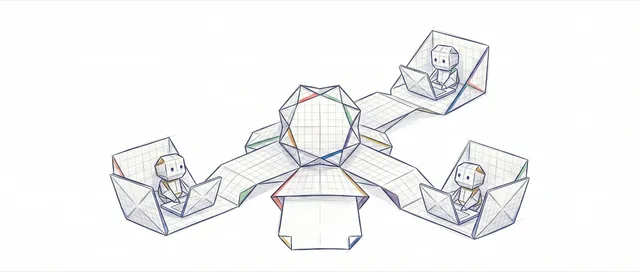
With git worktrees. A worktree is an additional working tree, with its own HEAD, its own index, and its own files on disk, but hooked up to the same .git as the original repository. All worktrees share the same object database. You don’t clone anything: you create a second folder where a different branch is checked out, and that’s where you launch the second agent.
# Un working tree nuevo en ../repo-agente-b con la rama feature/pagos checked out
git worktree add ../repo-agente-b feature/pagos
The problem it solves is concrete. If you launch two agents in the same folder, they step on each other’s files: one saves while the other reads, the index turns into a minefield, and you end up with intermixed changes that neither of them understands. With one worktree per agent, each has its own folder and branch, isolated on disk, without duplicating history or having to sync two repos. Git won’t even let you check out the same branch in two worktrees at once without -f, precisely so you don’t shoot yourself in the foot.
Which one to use depends on what you’re isolating:
| Isolation method | Disk cost | Isolates the working tree | Shares history/objects | Best for |
|---|---|---|---|---|
Branch (checkout) | Zero | No: a single working tree | Yes | One agent at a time, switching context serially |
Worktree (git worktree add) | Low: just the tree’s files | Yes | Yes, same .git | Several agents in parallel on the same repo |
| Full clone | High: entire copy of .git | Yes | No: independent repos | Total isolation, destructive experiments, another machine |
A branch alone doesn’t isolate the working tree: you only have one copy of the files, so two agents get in each other’s way. A full clone isolates everything but duplicates the entire .git and forces you to sync changes between repos as if they were separate remotes. The worktree is the middle ground you almost always want for parallelism: file isolation with shared history.
Cleaning up matters as much as creating. When the agent finishes and you merge its branch, don’t leave the dead folder lying around:
git worktree list      # ver todos los working trees y en qué commit está cada uno
git worktree remove ../repo-agente-b   # eliminar uno de forma ordenada
git worktree prune     # limpiar referencias a worktrees cuya carpeta ya borraste a mano
git worktree remove is the clean way. git worktree prune is for when you deleted the folder with rm -rf like an animal and Git still thinks it exists: it removes the orphaned metadata. The concrete how-to for setting this up with Claude Code, with branch names and folder structure, is in the Claude Code worktrees guide, and a step-by-step deep dive in how to set up worktrees for agents.
How Do You Review an AI-Generated Diff Without Trusting It Blindly?
By reading it. All of it. This is the skill that pays off most in the craft when the model writes the code: you don’t trust the diff, you read it. And you read it with calibrated suspicion, because the agent doesn’t lie, but it also doesn’t share your judgment about what’s out of scope.
Passing tests don’t save you from this. A green test tells you what it covers still works. It doesn’t tell you the agent didn’t delete the function nobody was testing, didn’t sneak a new dependency into package.json to solve something you’d already solved, didn’t leave an API key hardcoded in a “temporary” config file, or touch five files when the task called for one. Only a pair of eyes on the diff catches that.
There are four things I always look for, and none of them get flagged by the linter:
- Out-of-scope changes. You asked it to touch the payments service and there’s a change in the auth module. Sometimes that’s correct. It almost always deserves a question.
- New dependencies. An
importof a package that wasn’t there before, or a new line in the lockfile. The agent solves problems by pulling in libraries; you decide whether that library gets into your tree. - Secrets and credentials. A key, a token, a URL with a password in it. Models generate these as plausible-looking placeholders and leave them there. A committed secret doesn’t get undone by reverting: it has to be rotated.
- Silent deletions. The most dangerous kind, because it doesn’t jump out at you. A guard clause that disappears, a
switchcase that’s no longer there, a validationifthe agent decided was “redundant.”
The tool for this is git add -p. Instead of accepting the whole diff, Git presents it to you hunk by hunk and you decide on each one: approve it, skip it, split it into smaller pieces. Reviewing by hunks forces you to look at every change instead of doing a blind-faith git add ..
git add -p # revisa y stagea hunk a hunk; y=incluir, n=saltar, s=dividirIt’s slow on purpose. That’s the point. If the agent generated three hundred lines and you review them in twenty seconds, you haven’t reviewed them: you’ve accepted them. Start with the files you weren’t expecting to see in the diff, because that’s where the weird stuff lives. I go deeper into what to look for and how to structure a review of AI-generated code in reviewing AI-generated code with Git.
Before moving on, put it to the test. In this exercise you review an AI-generated diff by stepping into Carlos’s shoes as he looks at a teammate’s commit: it compiles, the tests pass, but there’s something in the diff you shouldn’t let through. Find it.
Loading exercise...
How Do You Keep Diffs Reviewable?
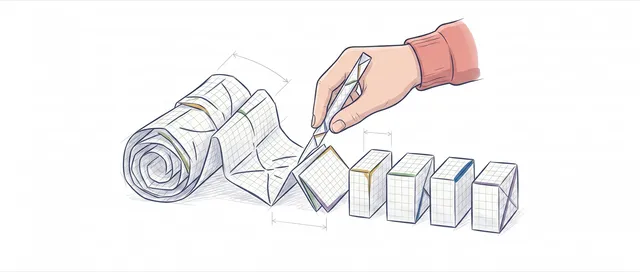
With atomic commits: one conceptual change per commit. A diff is only reviewable if every commit does one thing and does it completely. The moment a commit mixes a refactor with a feature with a formatting change, review becomes impossible, because you can’t tell the change that matters apart from the noise around it.
The anti-pattern is the mega-commit “agent changes” with eight hundred lines. It’s indefensible for two reasons. It can’t be reviewed, because nobody reads eight hundred mixed lines with real attention. And it can’t be reverted piece by piece, because if the refactor was good but the feature was broken, a git revert on that commit takes both down with it. A history of atomic commits is reversible with a scalpel; a mega-commit is reversible with an axe.
Always separate the refactor from the feature. If the agent does both in one batch, that’s exactly the situation where git add -p earns its keep: stage the refactor in one commit, the feature in another. And when the agent’s series of WIP commits is a mess, git rebase -i against your branch’s base lets you reorder, squash, and rewrite messages until the history tells the story you want reviewed, not the sequence of fumbling attempts the model left behind.
The mental rule is simple: you write the history you share, even if the agent wrote the code. The model produces the content; you produce the narrative of the diff. That narrative is what makes it possible for another human, or you six months from now, to understand why the code is the way it is.
Atomic commits and hunk-by-hunk review are trained by doing them, not by reading about them. If you want to move from “add, commit, push, and pray” to a Git workflow that can keep up with an agent’s pace, the course Git from Zero to Professional walks through this flow visually and interactively, from the reflog to the rebase.
How Do You Publish Without Destroying the Team’s Work?
With git push --force-with-lease, never plain --force. The moment you rewrite history (and with AI you rewrite it constantly: amends, squashes, rebases to clean up WIP commits), a normal push fails because your branch is no longer a descendant of what’s on the remote. The temptation, the one the agent itself will happily suggest, is to fix it with --force. And --force on a shared branch is how you overwrite someone else’s work without even knowing it.
The difference is a single flag, and it’s the one that decides whether or not you overwrite someone else’s work:
git push --force            # pisa el remoto sin mirar qué hay ahí. Peligroso en rama compartida
git push --force-with-lease # solo pisa si el remoto está donde tú crees. Aborta si no--force-with-lease, with no arguments, compares the remote’s current state against your remote-tracking ref, your local idea of where the remote branch is. If they match, the push proceeds. If they don’t match, it means someone pushed something you haven’t seen, and the push aborts instead of overwriting it. It’s the difference between “overwrite this no matter what” and “overwrite this only if nobody has touched it since the last time I looked.”
There’s a nuance worth knowing. The guarantee depends on your remote-tracking ref reflecting reality. If you have a git fetch running in a cronjob or in the background, that fetch updates your remote-tracking ref without you integrating anything, and --force-with-lease compares against that already-updated value instead of against what you actually saw. The lease goes stale and the protection evaporates. That’s what --force-if-includes exists for as a complementary option: it verifies that any updates that arrived behind your back are integrated into your local branch before allowing the forced push. In a normal flow, without weird automatic fetches, plain --force-with-lease has you covered.
An End-to-End Git Workflow with AI
Put all of the above together and the workflow falls into place on its own. One branch per task, a worktree if there’s parallelism, checkpoints per batch, diff review, squash into atomic commits, push with lease, PR. In a real session it looks like this:
git switch -c feature/checkout            # rama por tarea, siempre
git worktree add -b feature/precios ../repo-agente-b   # segundo agente en paralelo (-b crea la rama)

# ... por cada tanda verde del agente: git add -p para revisar, luego commit del punto de control ...
git add -p                                # revisas hunk a hunk lo que la tanda tocó
git commit -m "wip: checkout con el nuevo gateway"

git diff main...HEAD                      # relees el acumulado de la rama antes de reescribir historia
git rebase -i main                        # squash de los WIP a commits atómicos
git push --force-with-lease -u origin feature/checkout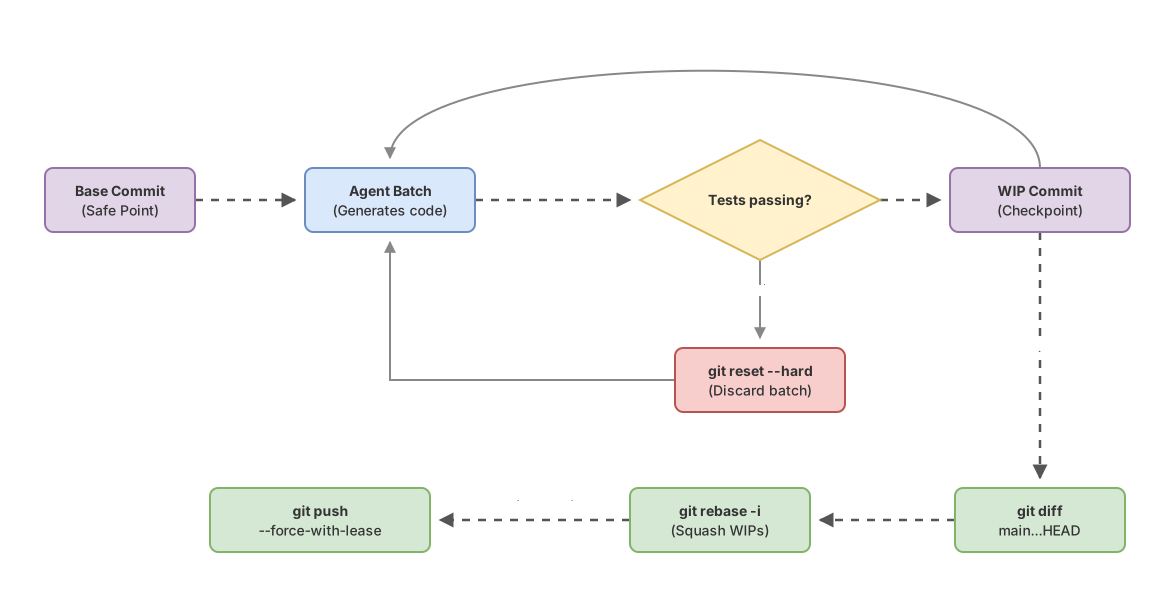
The order matters. Checkpoints happen during the work, not at the end, because their value is serving as a net while you iterate. Review happens before the squash, because you want to read what the agent actually did, not the already-reordered version. And --force-with-lease happens at the end, once you’ve rewritten history with the rebase and need to update the remote branch without overwriting anyone.
None of this depends on the tool. It’s plain Git. It works the same with Claude Code, with Cursor, with Codex, or with whatever agent comes out next month, because the practice lives in Git, not in the agent. If you truly know Git, none of these workflows will feel new to you: only the frequency you use them at changes. If your Git is “add, commit, push, and pray,” AI is going to expose that gap very fast, and it’s worth closing it before you let a model write for you at full speed.
Common Mistakes
Letting the Agent Pile Up 300 Lines Without a Single Commit
The most expensive and the most common one. The agent gets on a roll, you get distracted reviewing something else, and when you come back there are three hundred lines with no checkpoint in between. If any of it is wrong (and something usually is), you have no good state to fall back to with reset --hard. You have to rescue it by hand. Rule: if the agent has gone more than one batch without you committing, stop and commit before continuing.
Accepting the Diff Because “the Tests Pass”
Green tests are a necessary condition, not a sufficient one. They don’t cover the silent deletion of a guard nobody was testing, the hardcoded secret, or the unnecessary new dependency. Green only guarantees you didn’t break what was already covered; what the agent introduced that’s new is something no test sees. Read the diff regardless.
git push --force on a Shared Branch
A rebase by the agent on a branch shared by four people, followed by --force, wipes out the commits the others pushed while you were iterating. And the worst part is you don’t find out: the push succeeds, and the disaster surfaces later. Use --force-with-lease and the push aborts on its own whenever it was about to overwrite something.
The “Agent Changes” Mega-Commit
Eight hundred lines in one commit with a generic message. It can’t be reviewed and it can’t be reverted piece by piece. It’s the Git equivalent of a try/catch that swallows every error: it looks like it works until you need to know exactly what happened. Break the work into atomic commits before sharing, even if the agent generated it all in one go.
Two Agents in the Same Working Tree
Two processes writing files to the same folder corrupt the index and intermix changes that nobody can untangle afterward. That’s what worktrees are for: one folder and one branch per agent. If you’re going to parallelize, parallelize properly.
Implementation Checklist
- You make a commit before letting the agent loose, and another after every batch that leaves the tree green
- You know how to recover from a wrong
reset --hardvia the reflog withgit reset --hard HEAD@{n} - Every parallel agent has its own worktree, never two in the same folder
- You clean up finished worktrees with
git worktree remove(andpruneif you deleted the folder by hand) - You review the AI-generated diff hunk by hunk with
git add -pbefore staging - The commits you share are atomic: one conceptual change each, refactor kept separate from feature
- You publish history rewrites with
git push --force-with-lease, never with--force
Frequently Asked Questions
Is a Worktree the Same as a Clone?
No. A clone copies the entire object database and creates an independent repository that you have to sync like a separate remote. A worktree shares the same .git and the same objects as the original repository: it just adds a new working tree with its own HEAD and index. It takes up far less disk space and there’s nothing to sync, because the history is literally the same.
Should I Commit Every Agent Response?
During the work, yes: disposable WIP commits as checkpoints, so you always have a good state to fall back to. Don’t worry about the message or about tidiness at that stage. Before sharing the branch, you collapse that whole series with git rebase -i into the handful of atomic commits that actually tell the story. Your working history and the history you publish are two different things.
Is --force-with-lease Always Safe?
It’s much safer than --force, but it’s not foolproof. It aborts the push if the remote isn’t where your remote-tracking ref thinks it is, which protects you from overwriting others’ work in the normal case. The nuance: if something updates your remote-tracking ref behind your back (a git fetch in a cronjob, for example) the lease gets compared against that already-moved value and loses its guarantee. To fully lock it down in those scenarios:
git push --force-with-lease --force-if-includesHow Do I Realistically Review a Huge Diff from the Agent?
In pieces, never in one sitting. Start with the files you weren’t expecting to see in the diff, since that’s usually where the weird stuff hides. Use git add -p to go hunk by hunk instead of reading a wall of text, and treat each file as a unit. If the diff is too large to review with real attention, that’s almost always a sign the agent did too much in one batch and you should have split it into smaller commits earlier.
Does This Work with Any Agent: Claude Code, Cursor, Codex?
Yes. Everything here is plain Git and the practice is tool-agnostic. Worktrees, checkpoints, git add -p, and --force-with-lease work the same no matter which agent is writing the code, because they operate on the repository, not on the model. The only thing that changes between tools is how you launch the model; what you do with Git around it stays the same.
Mastering Git is what separates “letting the agent write” from “directing the agent with a safety net.” The course Git from Zero to Professional builds that judgment step by step, exercise by exercise, so you can hand a model the keys to the keyboard without fear of losing good work.
Related articles
Claude Code worktrees nativos: el antes y después de la programación paralela
Cómo el soporte nativo de worktrees (-w) marca el cambio de Claude Code de herramienta secuencial a infraestructura de orquestación de agentes paralelos.
Git Worktrees and Claude Code: Parallel Agents Without Conflicts
How to use git worktrees to run multiple Claude Code instances in parallel on isolated checkouts: set up, integrate, and clean up without branches stepping on each other.
Reviewing AI-Generated Code with Git as a Safety Net
A Git workflow for reviewing AI-generated code: checkpoint before the agent runs, read the diff, small commits, and cheap reverts to undo without drama.