
Reviewing AI-Generated Code with Git as a Safety Net
A Git workflow for reviewing AI-generated code: checkpoint before the agent runs, read the diff, small commits, and cheap reverts to undo without drama.
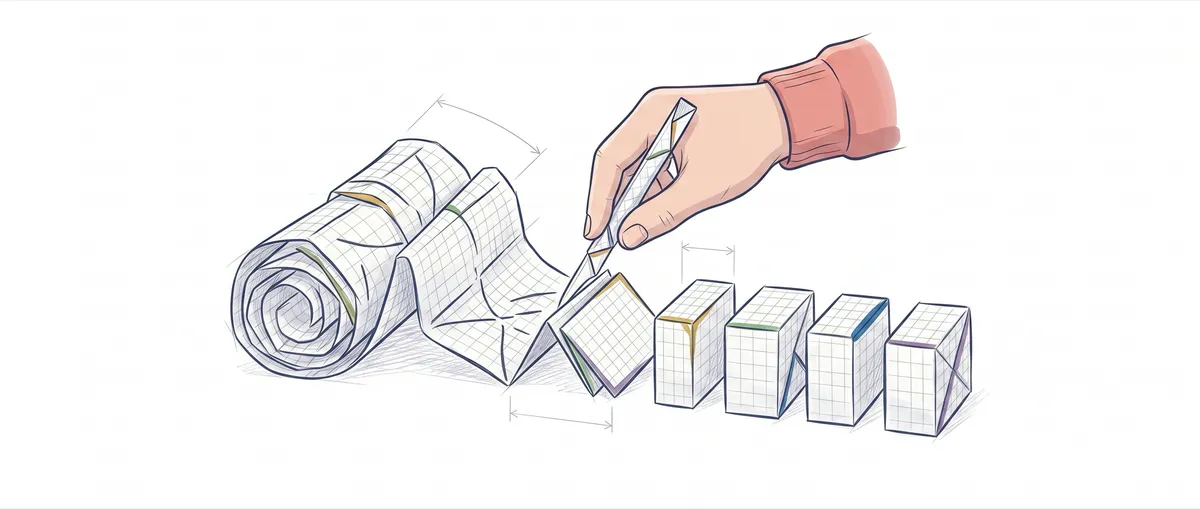
The agent replies “done, it works now” and has touched fourteen files. You can read all fourteen diffs, or you can take its word for it. The second option is the most expensive mistake being made in AI-assisted development today, and reviewing AI-generated code with Git is what makes it cheap. Git doesn’t stop the model from getting things wrong. It turns your distrust into something nearly free: a checkpoint to fall back on, a diff that doesn’t lie, and a revert that’s a single command.
Why is reviewing the AI’s diff the highest-impact skill today?
Because the model already writes syntax faster than you do. What it can’t do for you is decide whether that change belongs in your codebase. That judgment call is your job now.
The agent tells you a story: “I refactored the auth middleware and updated the tests.” Sounds good. But the narration and the actual change are two different things, and only one of them compiles. An agent that says it touched the session token may have also changed the default timeout along the way because it seemed “more consistent.” The summary won’t mention that. The diff will.
When the cost of typing trends toward zero, the bottleneck shifts to review. A senior with good judgment who reads diffs fast outperforms one who types fast. That’s the full pattern behind Git in AI-assisted development: the model produces, you verify, and Git keeps every state in case you need to roll back.
Why commit before launching the agent?
Because a clean tree is the only known point of return. If the agent breaks something, you want to get back to a state you trust, and that state has to exist before the damage starts.
The ritual is two commands:
git status                          # nothing to commit, working tree clean
git add -A && git commit -m "checkpoint antes del refactor de auth"
Notice the git add -A. A git commit -am isn’t enough here: -a only stages modifications and deletions to files Git already tracks, never new untracked ones. If you had a half-finished file you hadn’t added, -am would leave it out and your “checkpoint” wouldn’t be complete. With -A everything goes in, and git status confirms the tree is clean.
Launching the agent on a dirty tree means starting with debt. If you begin with your own uncommitted changes, the diff you read afterward will mix your work with the agent’s, and you won’t be able to tell who touched what. Commit or git stash first. Always.
How do you read what the AI actually changed, not what it says it changed?
With git diff, which compares your unstaged changes byte for byte against what Git already has recorded in the index, with no filter from the agent’s narration. Right after a clean checkpoint, that index matches the last commit, so you read exactly what the agent touched. If you’ve already staged hunks with git add, use git diff HEAD to see everything changed since the checkpoint (staged and unstaged). Start with the big picture and drill down:
git diff --stat                     # qué archivos y cuántas líneas por archivo
git diff                            # el cambio real, hunk a hunk
git diff src/auth/                  # acota la lectura a una carpeta
git diff --stat tells you at a glance whether “a small tweak” was 12 lines or 800 spread across fourteen files. That number alone tells you how much to distrust. Then you read the hunks. A hunk you don’t understand is a hunk you can’t approve, no matter how convincing the summary sounds.
One concrete trap: git diff doesn’t show new files the agent created if they’re still untracked. It compares against what Git already knows, and a brand-new file isn’t in that index. That’s why git status is your first check: it lists untracked files separately. If you also want to see that file’s content inside the diff, git add -N archivo.nuevo registers it as “to be added” (with empty content in the index), and from there git diff shows it in full.
And one temptation to cut off: don’t use git blame to reconstruct “what the agent meant.” git blame gives you the hash, author, date, and line, never the commit message or the intent behind it. For the why of a change, git show <hash> or git log give you the full message.
Why do small, reviewable commits beat one mega-commit from the agent?
Because the surface you can actually review well is small, and a commit that mixes six intentions doesn’t respect that. When the agent delivers 300 lines in one block, reviewing it in full is exhausting, so most people don’t review, they approve. That’s where the bugs get in.
The tool for splitting it up is git add -p. It walks you through the change hunk by hunk and you decide which one goes into each commit:
git add -p                          # y para cada hunk: y / n / s (split) / q
git commit -m "auth: extrae validación de token a un helper"
git add -p
git commit -m "auth: sube el timeout de sesión a 30 min"
The result is a history where each commit tells one story and can be reverted on its own. If the session timeout turns out to be a mistake tomorrow, you throw it out without dragging the helper refactor along with it. This discipline deserves its own space; I cover it in atomic commits and best practices. Applied to AI diffs, its value is twofold: it narrows what you review and it narrows what you can undo.
Try it yourself: read an agent’s diff and decide what goes into each commit.
Loading exercise...
How do you undo what the AI broke without drama?
With the right command for where the work sits: on your disk, in staging, or already shared. The cost of throwing away what the agent did is nearly zero if you pick the right one.
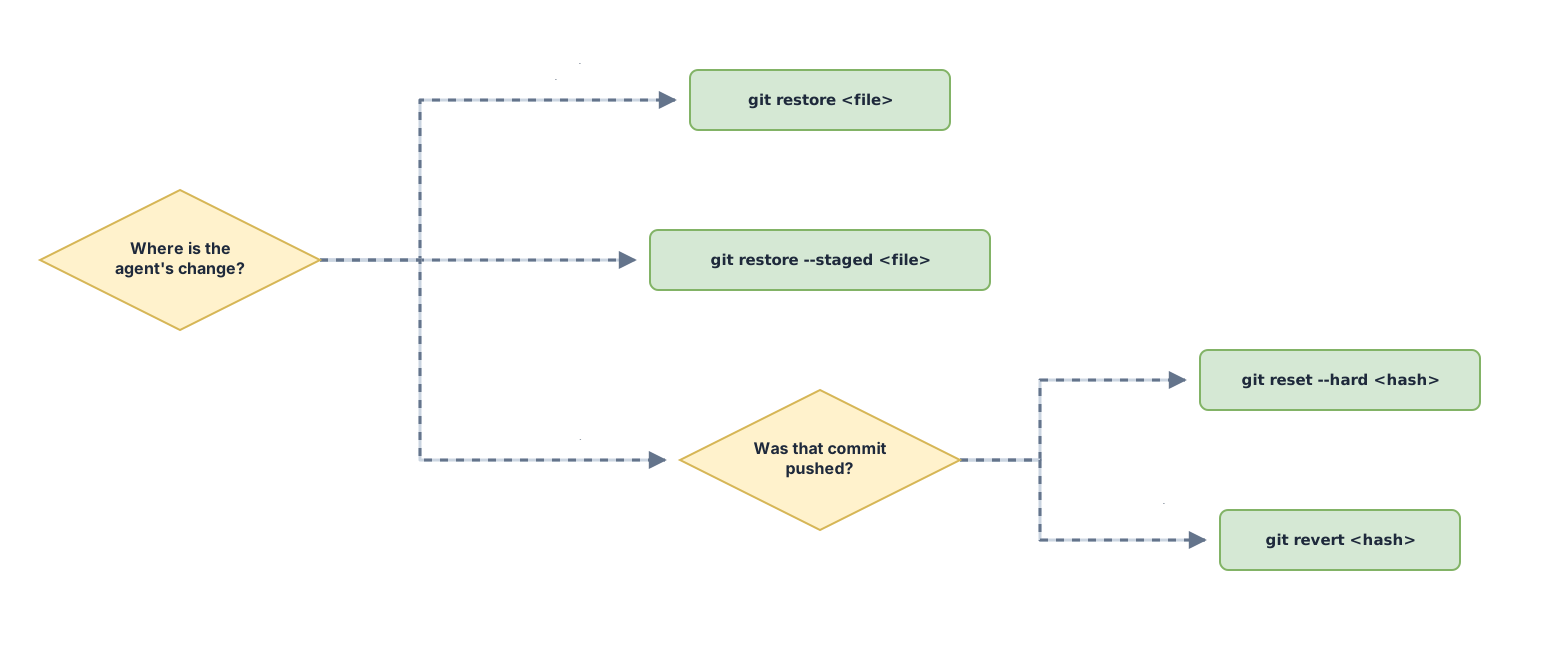
| Command | What it undoes | When to use it | Safe after sharing? |
|---|---|---|---|
git restore <archivo> | Discards the unstaged changes to that file in the working tree | The agent touched a file and you want the state from the last commit | Yes, it’s purely local |
git restore --staged <archivo> | Removes the file from staging but keeps the change on disk | You staged something with git add and want to leave it out of the next commit | Yes, it’s local |
git reset --hard <hash> | Moves the branch to <hash> and discards everything after it in the index and working tree | Returning to the clean checkpoint from before the agent ran, discarding its work entirely | No: it rewrites history; dangerous if you’ve already pushed |
git revert <hash> | Creates a new commit that inverts the changes from <hash> | Undoing a commit that’s already on the remote | Yes, it doesn’t rewrite history |
The mental rule is simple. If the agent’s work is still only on your machine, git reset --hard a1b2c3d takes you back to the checkpoint and it’s the cleanest option there is. If those commits already went out in a push, reset --hard would rewrite a history your teammates already have, and their next pull would break. That’s what git revert is for: it records a commit that inverts the change, without erasing anything from the past.
How do you isolate the agent with git worktrees?
With git worktree, which gives you multiple working directories on the same repository, each on its own branch. The agent works in one while your main directory stays exactly where you left it.
git worktree add -b agente-refactor ../repo-agente-refactorThat command creates the agente-refactor branch and checks it out in the sibling directory ../repo-agente-refactor. You point the agent there, and no matter what happens to those files, your main folder never knows: no git stash, no branch switching, no stepping on your own toes. When the diff convinces you, you merge; when it doesn’t, you delete the worktree with git worktree remove and nothing happened. This pattern pays off a lot when you’re running several agents in parallel, and I go into detail in worktrees with Claude Code.
The five-step review workflow
All of this boils down to one habit you apply every time you hand work to an agent:

- Checkpoint: a clean
git statusand a commit before the agent writes a single line - Launch: a scoped task, not “fix everything at once”
- Diff:
git diff --statfor the big picture andgit diffto read hunk by hunk what actually changed - Split:
git add -pto break the change into small commits, each with its own message - Verify or revert: run the tests; if something smells off,
git reset --hardback to the checkpoint orgit revertif you’ve already shared it
Five steps that, with practice, take less time to run than it takes to read the agent’s summary. If you want to internalize it with real exercises, I cover it in full in the course Git from Zero to Professional.
Common mistakes
Accepting the agent’s summary without reading the diff
The agent narrates what it meant to do. The diff shows what it actually did. When they diverge, the diff wins.
Launching the agent on a dirty tree
You start with your own uncommitted changes, and the resulting diff mixes your work with the agent’s. You can no longer tell who touched what, which is exactly what you needed to tell apart. Commit or stash before you start.
One giant commit with six intentions crammed inside
If the commit touches auth, logging, a README typo, and two features, you can’t revert one without taking the others with it. Split it up with git add -p.
git reset —hard on something you’ve already shared
reset --hard rewrites local history. If those commits are already on the remote, your teammates’ next pull will collide with a history they don’t recognize. To undo something you’ve already pushed, git revert creates a commit that inverts the change without touching the past.
Trusting git blame to figure out what a change was meant to do
git blame gives you the hash, author, date, and line, and nothing else. You won’t find the commit message or the agent’s reasoning there. For that, use git show <hash>.
Frequently Asked Questions
When reviewing AI-generated code with Git, does git diff show me the agent’s new files?
Not while they’re still untracked. git diff compares against what Git already tracks, so a file the agent just created won’t show up until you register it. git status does list those separately. If you also want to see its content inside the diff, git add -N archivo.nuevo marks it as pending to be added, and then git diff shows it.
Should I use git reset —hard or git revert to undo the agent?
It depends on whether the commit has already left your machine. If the agent’s work is still local, git reset --hard <hash> takes you back to the checkpoint and is the cleanest option. If you’ve already pushed, use git revert, which inverts the change with a new commit without rewriting a history others already have.
Worktree or a regular branch to isolate an agent?
A regular branch is enough if you work on one thing at a time and don’t mind switching context. The worktree wins when you want the agent to operate in its own directory while you stay in yours without switching branches or stashing, and especially when you’re running several agents at once, each with its own isolated file tree.
How often should I commit when reviewing AI-generated code with Git?
One commit per complete intention you’ve already validated with the diff. In practice, after every scoped task the agent finishes and you approve by reading the hunks. Frequent, small commits are what makes this whole safety net cheap: the finer you slice it, the less it hurts to throw away what doesn’t work.
Related articles

Git with AI: Worktrees, Checkpoints, and Reviewing Diffs
How to use Git with AI when the agent writes the code: worktrees for parallelism, commits as a safety net, and reviewing diffs without trusting blindly.
Git Worktrees and Claude Code: Parallel Agents Without Conflicts
How to use git worktrees to run multiple Claude Code instances in parallel on isolated checkouts: set up, integrate, and clean up without branches stepping on each other.
Atomic Commits: Best Practices for a Clean History
What an atomic commit is, why it speeds up code review and makes revert and bisect easier, and how to split your work with git add -p step by step.