
OpenAI Privacy Filter: Detect PII Without Sending Data to the Cloud
Detect names, emails, and passwords in text without sending data to the cloud. Learn how it works and how to use it from Python.
Contributors: Manu Rubio, Ivan Garcia Villar

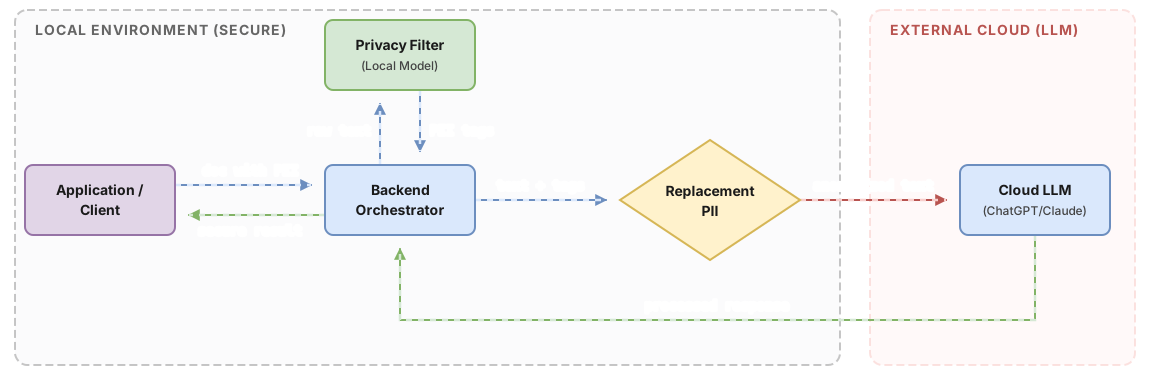
Imagine you’re building an application that analyzes employment contracts. A user uploads a PDF, your code extracts the text, and sends it to a language model to find important clauses. The problem: that contract contains the employee’s full name, address, and account number. Sending it without cleaning first is a bad practice that could get you into legal trouble.
The OpenAI Privacy Filter is a model designed exactly for that problem: detect and mask personal information in text, locally, without sending data to any external server. They released it on April 22, 2026 under Apache 2.0 license.
To follow this post you’ll need: prior Python experience and know how to install libraries with pip. No prior experience with AI models is required.
What is PII and why your app needs to filter it
PII stands for Personally Identifiable Information. It’s any data that allows you to identify a real person: their name, phone number, email address, password.
Think of it this way: when you fill out an online banking form and it asks for your name, ID, and address, that’s PII. If that data appears in text you’re going to process with an LLM (a language model, like ChatGPT or Claude), you need to decide what to do with it before sending it.
There’s a two-fold reason. Sending your users’ personal data to external services can create legal issues in many contexts, especially in Europe. And external models may use that data in ways you don’t control. Filtering before sending is the cleanest solution.
What exactly the filter detects
The model recognizes eight specific categories of sensitive data:
| Category | What it detects | Example |
|---|---|---|
private_person | People’s names | ”Ana García” |
private_address | Physical addresses | ”Calle Mayor 23, Madrid” |
private_phone | Phone numbers | ”+34 612 345 678” |
private_email | Email addresses | ”ana@gmail.com” |
account_number | Account or card numbers | ”ES12 1234 5678…” |
private_url | Private or personal URLs | ”https://drive.google.com/file/d/abc123” |
private_date | Dates associated with people | ”1990-01-02” |
secret | Passwords and keys | ”mi_contraseña_123” |
Just those eight. If you need to detect something different, like car license plates or internal incident numbers, you’d need to do fine-tuning: train the model with your own labeled examples. For those specific cases with fixed formats, a simple regular expression is usually sufficient and much faster.
How it works: reading and highlighting, not generating
There’s an important difference here from models like ChatGPT. Generative LLMs write new text word by word, like they’re dictating aloud. The Privacy Filter doesn’t generate anything: it reads the entire text at once and marks which parts are sensitive data.
It’s like handing someone a document and a highlighter. It’s not writing anything new. It’s just marking what’s already there.
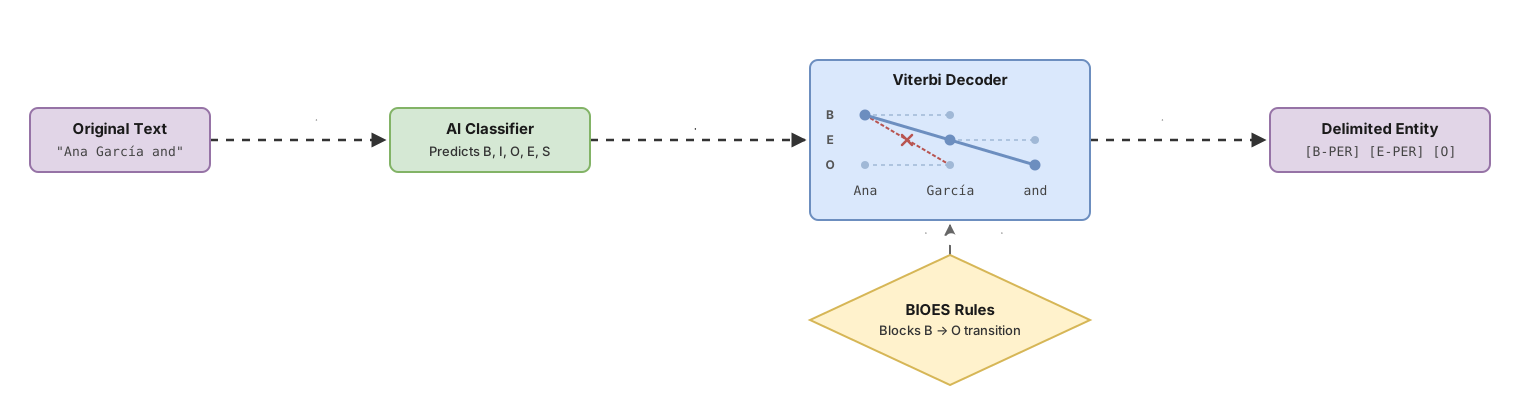
To do that marking with precision, the model uses two techniques worth understanding in a sentence each:
BIOES is a labeling system that indicates exactly where a piece of sensitive data starts and ends. If the model detects “Ana García” as a name, it doesn’t just say “this is a name”. It says: “Ana” is the beginning (Begin), “García” is the end (End). If the name had three or more words, like “Ana María García”, “Ana” would be B (Begin), “María” would be I (Inside), and “García” would be E (End). If it were just “Ana”, it would use the single tag (Single). Everything else is outside (Outside). This prevents detecting only “Ana” and leaving “García” unmarked.
Viterbi is an algorithm that evaluates whether the sequence of labels has global coherence, not just piece by piece. It works like a puzzle: if “Ana” was marked as the beginning of a name, what comes next has to be the interior or end of that same name, not the beginning of something else. The algorithm reviews the entire sentence before confirming labels, which prevents it from detecting only half of an email address and leaving the other half visible.
How to use it in your project
First install the Hugging Face library:
# Hugging Face Transformers is the library that loads the model
npm install @huggingface/transformers
Then, three lines of Python are enough to get started:
import { pipeline } from "@huggingface/transformers";  // library to load AI models

// Load the model from Hugging Face
// The first time it downloads the model weights: be patient
const detector = await pipeline(
    "token-classification",    // task: label parts of the text
    "openai/privacy-filter",  // model name on Hugging Face
   { aggregation_strategy: "simple" }  // groups subwords into complete entities
);

// Pass the text we want to analyze
const result = await detector("My name is Ana García and my email is ana@gmail.com");

// result includes the already processed text
console.log(result)

// Expected output:
// [
//   {'entity_group': 'private_person', 'score': 0.998, 'word': 'Ana García',   'start': 13, 'end': 23},
//   {'entity_group': 'private_email',  'score': 0.995, 'word': 'ana@gmail.com', 'start': 37, 'end': 50}
// ]
The model not only detects the fragments and their category (such as private_person or private_email), but it also makes your job easier by directly returning the already anonymized text in the redacted_text property. This way, sensitive parts are automatically replaced by their corresponding tags, and you save yourself from having to calculate positions or replace strings manually before sending the text to another service.
console.log(result.redacted_text);
// Expected output:
// "<PRIVATE_PERSON> and my email is <PRIVATE_EMAIL>"
A practical advantage: the model has a context window of 128,000 tokens. The context window is the maximum amount of text it can read at once, like a person’s working memory. To give you an idea, a token is roughly a short word or a syllable. With that capacity you can process a multi-page contract completely without having to split it into pieces. However, transformers applies truncation by default in many cases; if you process long documents, pass truncation=True or use max_length explicitly to prevent the model from silently ignoring the end of the text. For more detail on how to handle this well, the post on context window and best practices explains it in depth.
The model runs completely locally once downloaded. If you need extra speed, it accepts device="cuda" parameter to run on GPU. It works without GPU too, just slower. On a modern laptop expect between 10 and 30 seconds per text.
Common mistakes when using it
Treating it as a legal guarantee of anonymization
The Privacy Filter is a helper tool, not a compliance certificate. It has false negatives: it can miss an uncommon name, an unusual date format, or a password that looks like regular text. If your application works with extremely high-risk data like medical records or court documents, you need additional layers. The concept of guardrails in AI agents applies here: a single filter is never enough for critical data.
Expecting the same performance across all languages
The model was trained primarily on English text. “John Smith” it detects almost always. “İbrahim Çelik” or “Xiao-Wei Chen” might go unnoticed. In Spanish contracts, compound surnames are one of the places where I’ve seen the most false negatives: the model treats them as independent words and sometimes only marks the first one. The model card on Hugging Face includes accuracy metrics by category so you can evaluate whether the numbers fit your use case before committing. Test with real samples before assuming it works correctly with your data.
Sending it text without enough context
If you send only “García, 34 years old”, the model doesn’t know if “García” is a real person’s surname or the name of a historical character in an article. Context changes the decision. Whenever possible, send complete sentences.
Assuming it detects any sensitive data
It only knows its eight fixed categories. A license plate number, an internal employee code, or an incident ID don’t fall into any of them. The model will ignore them without warning.
Implementation checklist
-
The model runs locally or on your own server, not on external services
-
You’ve tested the model with a representative sample of your real data before deploying it
-
You’re clear that false negatives are possible and you’ve added additional review for critical cases
-
You know the limitations with non-English names and formats if your app processes those texts
-
You’ve decided what replaces detected tokens:
[NAME], an anonymous ID, or direct deletion -
The Apache 2.0 license is compatible with the use you plan to make of the model
Frequently Asked Questions
Does the model send my data to OpenAI?
No. The Privacy Filter runs completely locally. Once you download the model weights from Hugging Face, all processing happens on your machine. No data leaves your server. This is precisely the reason it exists: to filter PII without depending on third-party services. This applies as long as the execution environment is your own server or machine; if you use shared cloud environments, privacy also depends on the security of that infrastructure.
Does it work well in Spanish?
The model was trained primarily on English data, so its performance in Spanish is lower, especially with proper names and formats that aren’t typical in the English-speaking world. For Spanish text it’s worth testing with your own data before deploying to production. If you need reliable detection in Spanish, consider combining it with additional rules or exploring fine-tuning with data labeled in your language.
What are the 50M active parameters if the model has 1.5B total?
The model uses an architecture called mixture-of-experts. It’s like a team of 1,500 people where only 50 participate in each task: you don’t call everyone for each query. The result is that the model behaves like a 1.5B parameter one in terms of quality, but the cost of each calculation looks more like a 50M model. That’s why it can run on modest hardware, even on a laptop.
Can I analyze a PDF directly?
No. The model works with plain text. A PDF is a binary file with its own format; before passing it to the detector you need to extract the content. Libraries like pdfplumber or PyMuPDF do that in a few lines: you extract the text, clean up weird spaces and page breaks, and then call the detector with the resulting string.
Can I add new categories not in the eight default ones?
Yes, but it requires fine-tuning: training the model with your own labeled examples. OpenAI published the training code along with the model, so it’s technically possible. For patterns with fixed format like “EXP-12345”, a simple regular expression is sufficient, faster, and easier to maintain.
Related articles

Guardrails for AI Agents: How to Implement Them (With Code)
Implement guardrails in your AI agent step by step: input/output validation, action limits, and loop control. Real, copy-ready code examples.

Context Window and Best Practices
What a language model's context window is, how it's measured in tokens, and concrete practices to leverage it from day one.

Prompt Injection: How Hackers Hijack AI Agents
What is prompt injection, OWASP's #1 vulnerability for LLMs, how the attack works, and how to protect your app from day one.