
Prompt Chaining: How to Break Down Complex Tasks Into Simple Steps
Learn how to divide difficult tasks into sequential LLM calls. With line-by-line commented TypeScript code and no external frameworks.
Contributors: Manu Rubio, Ivan Garcia Villar

The first time I tried to do something useful with an LLM in code, I asked it to do everything at once: “analyze this review, extract the main emotions, classify it, and return the result in JSON”. The model tried, but somewhere in the process it lost the thread, mixed up steps, and the final JSON was useless. The solution wasn’t a better model. It was breaking the problem down.
Before we start: to follow this post you need to know what an LLM is (a language model like ChatGPT or Claude that generates text from instructions) and have written some TypeScript or JavaScript. That’s all you need.
The problem: asking it to do everything at once
Imagine going to the supermarket and, right as you walk through the door, someone shouts a list of 10 different things at you without giving you time to write them down. You’ll probably manage to get the bread and milk right, but you’ll end up forgetting half of it or buying the wrong product. The same thing happens to AI models.
Every time you send an instruction to a model, that’s called a prompt: it’s the text you send, the question or task you want it to solve. When a prompt mixes four different tasks, the model has to keep them all “in mind” at the same time. It usually starts well, but at some point it makes an error. And that error carries through to the end.
The solution is simple: one step, one call.
How chaining works
Prompt chaining divides a complex task into a chain of calls to the LLM. Each call solves only one part of the problem, and the response from that step becomes the input to the next.
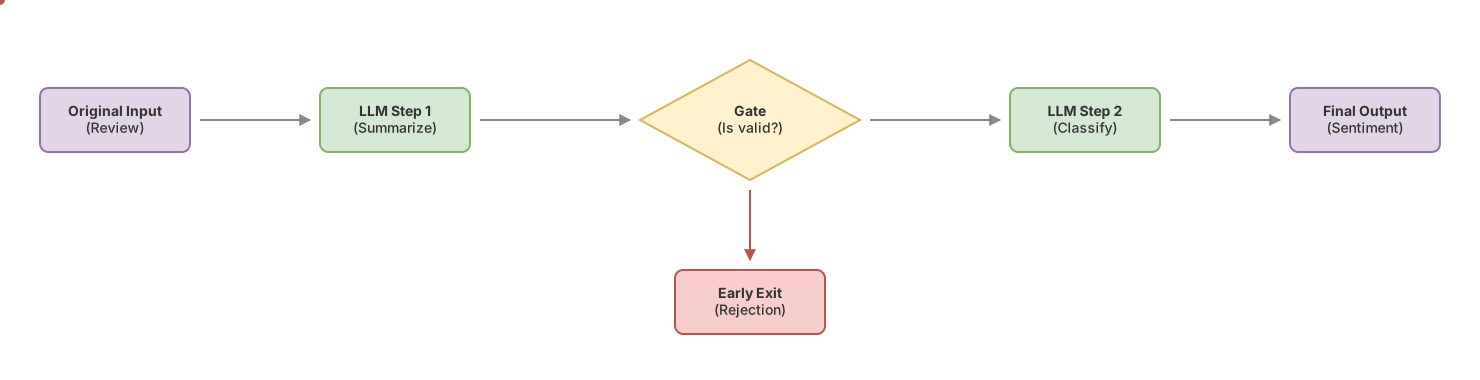
A concrete example. You want to process the resumes that arrive at your company:
-
Call 1: “Extract only the work experience from this document.”
-
Call 2: “Calculate the total years of experience based on that excerpt.”
-
Call 3: “Classify the profile as Junior, Mid, or Senior based on those years.”
-
Call 4: “Draft a follow-up email for the candidate based on that classification.”
Each call has a single responsibility. The model in step 4 doesn’t need to read the entire three-page resume: it only receives the clean label (‘Senior’) from step 3 and works with that.
This pattern has existed in classic software for decades. It’s called Pipe & Filter: data passes through a series of independent transformations, and each filter does one thing well. LLMs are simply another type of filter.
When does it make sense to use it?
It makes sense when the task has clear sequential sub-steps. Writing an SEO article is the textbook example: first you generate the outline, then you develop each section, then you review the tone. Each step depends on the previous one but does something different.
It also makes sense when you need to verify intermediate results. If step 1 extracts entities from text and the result comes back empty, there’s no point spending money on steps 2 and 3. You can stop there.
When not to use it is equally important. If the task is straightforward (“summarize this in three points”, “translate this sentence”), a single well-written prompt solves it. Adding steps only adds latency and cost. Before designing a pipeline, ask yourself: can I solve this with a single well-structured call? If the answer is yes, do it that way. The post on prompt engineering for developers covers the basic patterns for building those effective prompts.
The gate: how to prevent errors from multiplying
Between steps, you have to validate. That’s a gate: a block of code that checks if the result from the previous step is valid before continuing.
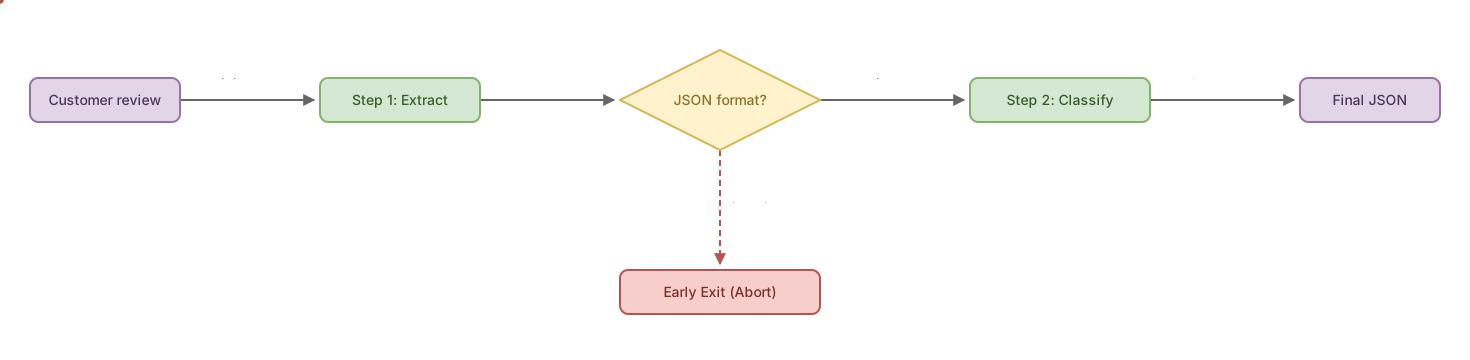
Without gates, this happens: step 1 generates text with the wrong format (what’s called a hallucination when the model invents or distorts the expected response). Step 2 receives that as input and produces something worse. Step 3 receives what step 2 made. By the time you reach the final output, the original error has multiplied and it’s impossible to know where it started.
The simplest gate is a function that returns true or false. If it returns false, you apply an early exit: you exit the pipeline before reaching the end, return a clear error message, and don’t spend more calls or money.
Guardrails in AI agents are the broader concept (the general boundaries on what the system can do), but in a sequential pipeline the gate is its most concrete and practical version.
A pipeline in TypeScript, step by step
Here’s a working example. Two steps with a gate between them, no framework, just the official Anthropic SDK:
import Anthropic from "@anthropic-ai/sdk";

// Create the client (uses the ANTHROPIC_API_KEY environment variable)
const client = new Anthropic();

// Reusable helper: send a prompt to the LLM and return the text
async function llamarLLM(prompt: string): Promise<string> {
  try {
    const respuesta = await client.messages.create({
      model: "claude-haiku-4-5-20251001", // fast model, ideal for simple steps
      max_tokens: 300,                     // maximum tokens it can generate
      messages: [{ role: "user", content: prompt }],
    });
    // Check the block type: the API can return text, images, or other types
    const bloque = respuesta.content[0];
    if (!bloque || bloque.type !== "text") {
      throw new Error("El modelo no devolvió un bloque de texto");
    }
    return bloque.text;
  } catch (error) {
    throw new Error(`Error calling the LLM: ${error instanceof Error ? error.message : String(error)}`);
  }
}

// Gate: checks that the summary has reasonable length
// This gate is deliberately simple. In production, typical gates include:
// regex to verify expected format (/^(positive|negative|neutral)$/.test(output)),
// JSON.parse() for structured outputs (try { JSON.parse(output) } catch { early exit }),
// or a second LLM call when validation requires semantic judgment.
function esResumenValido(resumen: string): boolean {
  return resumen.trim().length > 10 && resumen.length < 300;
}

async function analizarResena(resena: string) {
  // In production: validate and limit user input before interpolating it
  // Step 1: summarize the review
  const resumen = await llamarLLM(
    `Resume esta reseña de cliente en una sola frase:\n\n${resena}`
  );

  console.log("[paso 1] resumen:", resumen);

  // Gate: if the summary is invalid, early exit
  if (!esResumenValido(resumen)) {
    return { error: "No se pudo generar un resumen válido. Revisa el input." };
  }

  // Step 2: classify using ONLY the summary, not the complete review
  const clasificacion = await llamarLLM(
    `Clasifica este texto como "positivo", "negativo" o "neutral":\n\n${resumen}`
  );

  return { resumen, clasificacion };
}
Notice in step 2: we pass resumen, not resena. The classification model doesn’t need to read the complete original text. Passing less is cheaper and faster.
This is where the context window comes in (the amount of text you can send to a model in a single call, with a maximum limit). In long pipelines, if you don’t filter what you pass in each step, the cost explodes without improving results. The post on context window and best practices goes into detail on how to manage it.
Mistakes everyone will make
Too many steps for too little
A six-step pipeline for something that’s solved in two. Each extra step adds latency and a new point of failure. Always start with the minimum number of steps and add only if the result justifies it.
Passing all context to each call
The most expensive mistake. Tokens are the units that models use to measure text (sort of like word fragments). LLM APIs charge per token: both for what you send and what you receive. If in step 3 you include the complete history from steps 1 and 2, that cost multiplies by the number of steps. Pass only the clean data that step needs. The inverse tradeoff also exists: cutting too much can weaken the result of the next step. Not the entire history, but what’s necessary for that step to have enough signal.
Calls without error handling
The mistake I saw repeated most often, especially at the beginning: a pipeline without gates where step 1 fails silently and subsequent steps receive incorrect data. The system fails in cascade, you don’t know at which point the error occurred, and the user receives a generic message with no context. Gates aren’t an optimization: they’re what makes the system usable.
Unvalidated user input
If the pipeline processes text that comes from the user (a review, a form, any free field), that text gets interpolated directly into the prompt. A user can inject instructions within the content and alter the model’s behavior. In production, validate and limit input before using it in a prompt: maximum length, allowed characters, whatever makes sense for your case.
Using prompt chaining for atomic tasks
“Translate this word to English” doesn’t need a pipeline. If you find yourself adding steps to a task that’s fundamentally simple, step back and ask yourself if the real problem is in the prompt, not the architecture. Complexity has a cost: more code, more points of failure, more latency.
Implementation checklist
-
Each step of the pipeline has a single clear responsibility
-
There’s a validation gate between each pair of steps
-
The gate implements early exit with an error message that helps debug
-
Each step receives only the context it needs, not the complete history
-
The number of steps is the minimum necessary for the task
-
Results from each step are logged to facilitate debugging
Frequently Asked Questions
What’s the difference between prompt chaining and an AI agent?
An agent decides for itself what steps to take, in what order, and when to stop. Prompt chaining is a fixed sequence that you define in advance. If you know exactly what steps you need, use prompt chaining: it’s much more predictable and easier to debug when something fails.
Do I need a framework like LangChain to build a pipeline?
No. The example in this post doesn’t use any framework. For pipelines of two or four steps, adding a framework adds unnecessary dependencies and layers of abstraction. A couple of functions in TypeScript do exactly the same thing with much less complexity.
What if the model in step 1 generates an incorrect format?
That’s what the gate is for. Check the format before continuing and if the output doesn’t pass validation, the pipeline stops and returns a clear error. Without a gate, that incorrect format propagates and afterward it’s almost impossible to trace the origin of the failure.
If your step 1 returns JSON, the most direct gate is try { JSON.parse(output) } catch { return { error: "Invalid format" } }. If you expect an enumerated value (“positive” / “negative” / “neutral”), a regex is enough: /^(positive|negative|neutral)$/i.test(output). Catching the failure here, before step 2, is the difference between a clear error and 40 minutes of debugging.
Does the model in step 2 remember what step 1 did?
No, unless you explicitly pass that information to it. Each call to the LLM starts from zero. There’s no memory between calls. If you need step 2 to know something from step 1, you have to pass it yourself in the prompt. It’s one of the things that confuses people most at first, and it’s also why the design of what information passes between steps matters so much.
How many steps is too many?
In practice, more than four or five steps for a single task usually indicates you’re over-dividing the problem. Ask yourself if you can merge some steps without losing control over the intermediate results. If the answer is yes, merge them.
Related articles

Guardrails for AI Agents: How to Implement Them (With Code)
Implement guardrails in your AI agent step by step: input/output validation, action limits, and loop control. Real, copy-ready code examples.

Context Window and Best Practices
What a language model's context window is, how it's measured in tokens, and concrete practices to leverage it from day one.

Prompt Engineering for Developers: 5 Patterns With Code
The 5 prompt engineering patterns: zero-shot, few-shot, CoT, role prompting, and structured output with real TypeScript code.