
When to Automate with AI (and When Not To)
When it pays to automate with AI and when it does not: three business filters to decide without hype, on cost and risk.

Before you automate a process with AI, the useful question is not “can AI do this?”. It almost always can try. The one that really decides is another: “what happens when it gets it wrong?”. With that question the decision becomes simple: automate with AI when the error is tolerable and reversible and checking the result is cheap. If the process demands accuracy, use rule-based automation or leave it to a person. The rest of this article is how to apply that rule to your real processes without getting carried away by the hype.
What does “automating with AI” mean, and how is it different from the automation you already know?
Automating with AI is not the same as the automation you already know. Traditional automation runs on fixed rules: “if the invoice is over 1,000, send it for approval”. Given the same input it always produces the same output. It is predictable and repeatable. The technical word for this is deterministic, which in business terms means it does not improvise: it does exactly what you programmed, no more and no less.
Generative AI is a different animal. Behind it is what we call a language model (an LLM): a system that has learned from enormous amounts of text and that, when you ask it something, produces the answer it finds most probable. The key word is “probable”. It does not look up the correct answer in a database. It writes it. Most of the time it gets things right, and once in a while it makes things up with total confidence. That kind of failure is called a hallucination: the model delivers incorrect information that looks correct, with no warning that it invented it.
That difference changes everything when you decide. With rules you know in advance what will happen. With generative AI you work with probabilities, and your job as the person responsible is to decide whether that margin of error pays off or ruins the process.
The right question: what happens when it gets it wrong?
The honest starting point is to assume the AI will get something wrong at some point. Not always, but unpredictably. The decision is not about avoiding the error; it is about asking what it costs when it happens. That comes down to three filters you can apply to any task before automating it.
The three filters before you automate
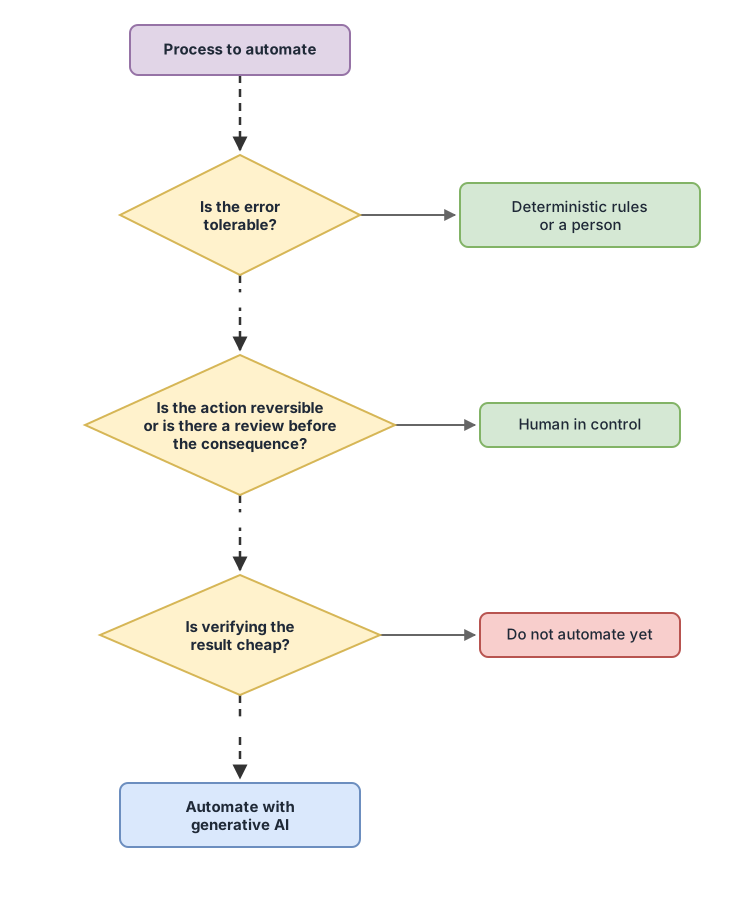
Before you put AI into a process, run it through these three filters. If all three are green, go ahead. If any of them is red, stop and think.
1. Error tolerance. What happens if the answer is bad one time in twenty? If the output is a draft email that someone will read before sending, an occasional slip is a minor nuisance. If the output is the amount on a payslip or the calculation of a tax, a single error is already a serious problem. The first task tolerates the error; the second does not.
2. Reversibility. Can you undo the action if it goes wrong? Suggesting a reply that an employee reviews is reversible: it gets corrected before it goes out. Automatically sending that message to a thousand customers, charging a payment, or deleting some data is not. The harder it is to walk it back, the more dangerous it is to let the AI act on its own.
3. Cost of verification. How much does it cost to check whether the AI got it right? If reviewing the result is quick and cheap, the AI saves you work even when it slips now and then, because a person corrects it in seconds. If checking each result costs almost as much as doing the task from scratch, the automation saves you nothing: it just adds a step.
That third filter is the one most people forget. An AI that produces convincing text but has to be verified word by word is not saving you time. It is moving it somewhere else.
When you SHOULD automate with AI
Automate with AI the tasks where a mistake is easy to spot and gets corrected before it does any harm. These are processes where the AI does the heavy lifting and a person signs off, or where an approximate answer is already useful. Some common examples in a company:
- Drafting a first version of an email, a proposal, or a product description that someone will review before publishing.
- Summarizing long documents, meetings, or message threads so you can read them in less time.
- Classifying entries by topic in an approximate way: separating support emails from sales ones, grouping reviews by subject.
- Exploring ideas, generating variants, or doing a first search when the goal is to get inspired, not to obtain the exact truth.
The common thread is simple: in all of these there is a person between the AI and the real consequence. The AI speeds things up, the human decides.
When NOT to (and what to use instead)
Do not automate with generative AI the processes that demand accuracy, that are irreversible, or that touch sensitive data without supervision. Here a mistake is not an annoyance: it is money, a lost customer, or a legal problem. Cases where it makes sense to say no:
- Calculations that have to add up to the cent: invoices, payroll, taxes, accounting. This is what the old-fashioned rules are for, and they make nothing up.
- Decisions with legal or compliance impact, where an invented answer exposes you to a fine or a claim.
- Irreversible actions with no prior review: sending mass communications, executing payments, modifying or deleting records.
- Handling personal or confidential data without clear control over where it ends up and who sees it.
For these cases the alternative is not to resign yourself to doing everything by hand, but to pick the right tool: rule-based automation when the task is exact and repeatable, and a person with AI as a copilot when judgment is needed. The AI proposes, the person decides. If you want to go deeper into the full map of risks before taking the step, the guide to AI risks for businesses pulls the rest of the pieces together.
The middle ground that almost always wins: AI with a person in charge
In most real processes what works best sits in the middle: AI with a person in charge. In practice that means the model does the laborious part and a person approves before the result has consequences. The salesperson gets a draft proposal and adjusts it. The support team gets a suggested reply and sends it or corrects it. The AI does not touch the customer directly: it goes first through someone who answers for it.
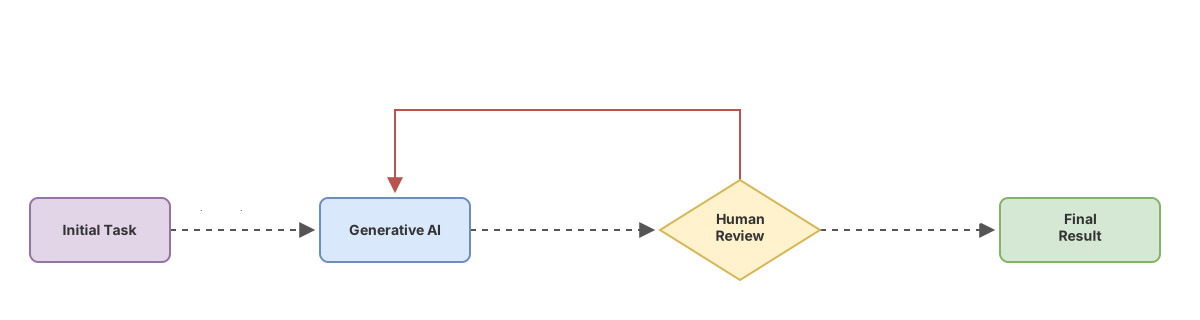
This pattern works because it goes straight at the filter that costs the most: verification. If checking the result is quick, you get the best of both worlds, the speed of the machine and the judgment of the person. If checking it is slow and expensive, even this pattern does not pay off, and that process is probably not a candidate for automation yet. This way of deciding with judgment, instead of by fashion, is exactly what you work on step by step in the AI without hype course.
A table to decide quickly
When you are unsure between the three options, this comparison sums up what each one gives you:
| Option | What it guarantees | Cost of an error | When to choose it |
|---|---|---|---|
| Rule-based automation | Exact, repeatable result | Very high if you get careless, but the system does not improvise | Calculations, compliance, anything that must add up every time |
| Generative AI on its own | Fast, plausible answer, not guaranteed | High if it acts without review | Approximate, exploratory tasks, where a slip is reversible and cheap to fix |
| AI with a person in charge | The speed of AI plus the judgment of a human | Low: the human filters before there are consequences | Most business processes with some risk |
A note on regulation (this is not legal advice)
If the process you want to automate affects people, there are two European rules worth keeping on your radar before deciding. The European Artificial Intelligence Regulation, known as the AI Act, classifies AI systems by their level of risk and requires more controls the higher that risk is, for example in uses that affect employment, credit, or people’s rights. And the GDPR, the European data-protection rule, applies whenever you handle personal data, whether an AI processes it or not.
I will not go into detail here because it depends heavily on your specific case, and this is not legal advice. The idea I do want to make clear: the “when to automate” question is not only technical or only about cost. If the process touches people, the answer also depends on the law, and there the cheap move is to ask a professional first, not after. To draw the line between what is AI and what is classic automation, this comparison between generative AI and automation helps you put each thing in its place.
Where to start
If you are deciding on your first process, pick one that comes out green on all three filters: tolerable error, reversible action, cheap verification. It is usually something internal, with no direct impact on the customer, where someone would review the result anyway. Start small, measure whether you really save time, and only then expand. Once the pattern is clear, the natural next step is to see how to automate repetitive tasks with AI without losing control.
Checklist before automating a process with AI
- I have identified what happens if the AI gets it wrong in this process
- The error is tolerable: an occasional slip does not cause serious harm
- The action is reversible, or there is a review before it has consequences
- Checking the result is quick and cheap for a person
- If the process demands accuracy, I use rules or a person, not generative AI
- If it touches personal data or decisions about people, I have checked it before automating
- I start with a small process and measure the real time saved before expanding
Frequently Asked Questions
Does AI always get things wrong, or only sometimes?
Only sometimes, but unpredictably. Most answers from a generative AI are useful, and every so often an incorrect one shows up looking perfectly correct. That is why the decision to automate is not about avoiding the error, but about making sure that, when it comes, it is cheap to spot and to fix.
Is it cheaper to automate with AI than with traditional rules?
It depends on the process. For flexible text tasks, AI is usually faster to get going than programming rules for every case. For exact, repeatable tasks, the old-fashioned rules come out cheaper and more reliable, because they do not get things wrong and you do not have to review them one by one. Before choosing, ask yourself which one fits what the process needs, not which one sounds more modern.
Can I automate customer service with AI?
Carefully, and almost never entirely on its own. Automating customer service with AI works well when the model suggests replies that your team reviews before sending, or when it answers only simple questions and hands off to a person the moment things get complicated. Letting it talk to the customer with no supervision is risky, because an invented answer can turn into a commitment you then have to honor.
Do I need a technical team to get started?
For a first, simple process, not always. Many current tools let you try things without programming. What you do need is business judgment to choose the right process and someone to review the results at the start. The hard part is rarely the technology: it is in deciding what to automate and in checking that it really saves you time.
Which process should I automate first with AI?
Pick an internal one, low risk, where someone is already reviewing the result. A good first candidate is drafting or summarizing documents: if the AI slips, the person sees it and fixes it on the spot, without it reaching the customer. Start there, measure the real time saved, and only then move on to processes with more impact.
Related articles
AI Risks at Your Company: A Guide to Not Crashing and Burning
An honest guide to AI risk in the workplace: where it can go wrong, how to contain it, and what to check before committing budget. No hype.

AI vs RPA: when to use classic automation or generative AI
Generative AI vs classic automation (RPA) explained for decision-makers: what each one does, when to pick one over the other, and when to combine them without wasting money.
Automating repetitive tasks with AI: what actually works
Which repetitive tasks AI automates well in a company, which ones are better left to people, and how to pick your first one without taking on risk.