
Automating repetitive tasks with AI: what actually works
Which repetitive tasks AI automates well in a company, which ones are better left to people, and how to pick your first one without taking on risk.
“Automate your repetitive tasks with AI” is one of those phrases that sounds just as good at a tech fair as in a salesperson’s email. The problem is that it does not distinguish. Generative AI automates one specific type of repetitive task very well, and another one quite badly. If you pick the right type, you save hours of boring work every week. If you get it wrong, you build a process that gives convincing, wrong answers, which is worse than having nothing.
So the useful question is not whether to automate repetitive tasks with AI, but which ones. This article separates the tasks that work today from the ones that look like a good idea but are not there yet, and it leaves you with a criterion to decide for yourself without depending on whoever is selling it to you.
Which repetitive tasks does AI do well?
Generative AI is good at language tasks: reading a text, understanding it, and producing another text from it. Underneath there is a language model (in English, LLM), a program trained on huge amounts of text to predict which words fit next. It does not reason like a person, nor does it consult a database of truths. It recognizes language patterns very well, and that is enough for a great deal of administrative work.
From this comes a pattern that repeats across every automation that does work. The task is text-based, it is done many times (high volume), an occasional error is cheap to fix, and there is a person who reviews the result before it has consequences. When those four conditions are met, AI takes the heavy lifting off your plate and leaves judgment where it belongs: with your team.
When one of them is missing, the problems begin. And the one missing is almost always the last.
Four automations that work today
These four are not theory. They are tasks that many companies already delegate to AI with good results, always with a person validating the output.
Classifying incoming emails and messages. A support inbox receives hundreds of emails: some are urgent incidents, others billing questions, others sales enquiries. AI reads each one and tags it so it reaches the right team. It fits because it is pure language and high volume, and because a mislabeled message is fixed in a second by moving it to another folder. The cost of an error is almost zero.
Summarizing long texts. The transcript of a one-hour meeting, a forty-page report, a dense contract. AI gives you half a page with the essentials so you can decide faster whether the original is worth your time. There is an important nuance here: the summary helps you get oriented, it does not replace reading the document when the decision is serious. To sign the contract, you read it in full or your lawyer does. To know which of the thirty contracts in the pile needs that reading, the summary is gold.
Extracting data from documents into a table. Invoices, delivery notes, forms, resumes. AI pulls the supplier name, the date, the amount, and the number from each invoice and dumps it into a tidy spreadsheet. It is one of the automations with the best return because it replaces hours of manual typing. The usual condition still holds: someone reconciles the totals, because in an amount a single wrong digit does cost money.
Drafting first versions. A first reply to a complaint, a product description, a draft sales proposal. AI gives you a starting point in seconds and the person polishes and approves it. The value is not that it writes better than your team. It is that going from a blank page to a decent text is the slow part, and that is the part it saves you.
What the four share is obvious. None of them makes the final decision. AI prepares, organizes, and proposes; the person validates and signs. That split is the reason they work.
Three automations that look like a good idea and are not (yet)
This is where the hype does harm. These three tasks sound like perfect candidates and are, precisely, the ones best not automated without direct supervision.
Deciding things with consequences. Approving or denying a loan, choosing who gets laid off, guiding a medical diagnosis. It is not a matter of AI failing to give an answer: it gives one, and with great confidence. The problem is that you cannot audit why it gave it, and when the decision affects someone’s life or money, that “I don’t know why” is unacceptable. On top of that, many of these decisions carry legal requirements that demand an identifiable human being responsible.
Giving exact figures or data as if they were facts. This is the most expensive error and the least obvious. A language model can hallucinate: generate information that sounds perfectly credible and is false. It does not lie on purpose, nor does it “fail” the way a normal program fails. It simply completes the language pattern with plausible data it has not checked. If you ask it for a customer’s exact balance, the specific clause of a law, or the price of a product, it can give you a round, convincing number it made up. For any piece of data that has to be exact, AI is not the source. The source is your system, and AI at most reads it and presents it.
Tasks that depend on context AI does not have. “Reply to the customer with what we agreed on the phone last week.” AI was not on that call. It can draft a great email about an agreement that does not exist. The more a task depends on internal, tacit, or recent knowledge that is not written down anywhere, the worse a candidate it is.
Notice the common thread: all three fail because they lack the person who validates at the right moment, or because they demand a certainty AI cannot guarantee.
Quick table: good candidate or not?
| Task | Good candidate? | Why |
|---|---|---|
| Classifying incoming emails | Yes | Language, high volume, cheap to fix an error |
| Summarizing meetings and reports | Yes, to get oriented | Saves reading time; does not replace reading what matters |
| Extracting invoice data into a table | Yes, with review | Removes hours of typing; someone reconciles the amounts |
| Drafting a first version | Yes | The blank page is the slow part; the person polishes |
| Approving a loan or a layoff | No | Decision with consequences and no clear audit trail |
| Giving an exact figure as the source | No | It can hallucinate a credible, false number |
If you had to keep a single idea from the table, it would be this: the right-hand column never talks about the task in the abstract, it talks about what happens when AI gets it wrong. That is the real criterion.
The cost nobody tells you about: review
Automating a task with AI does not remove it. It swaps the work of doing it for the work of reviewing it. And that is a calculation you have to run before building anything.
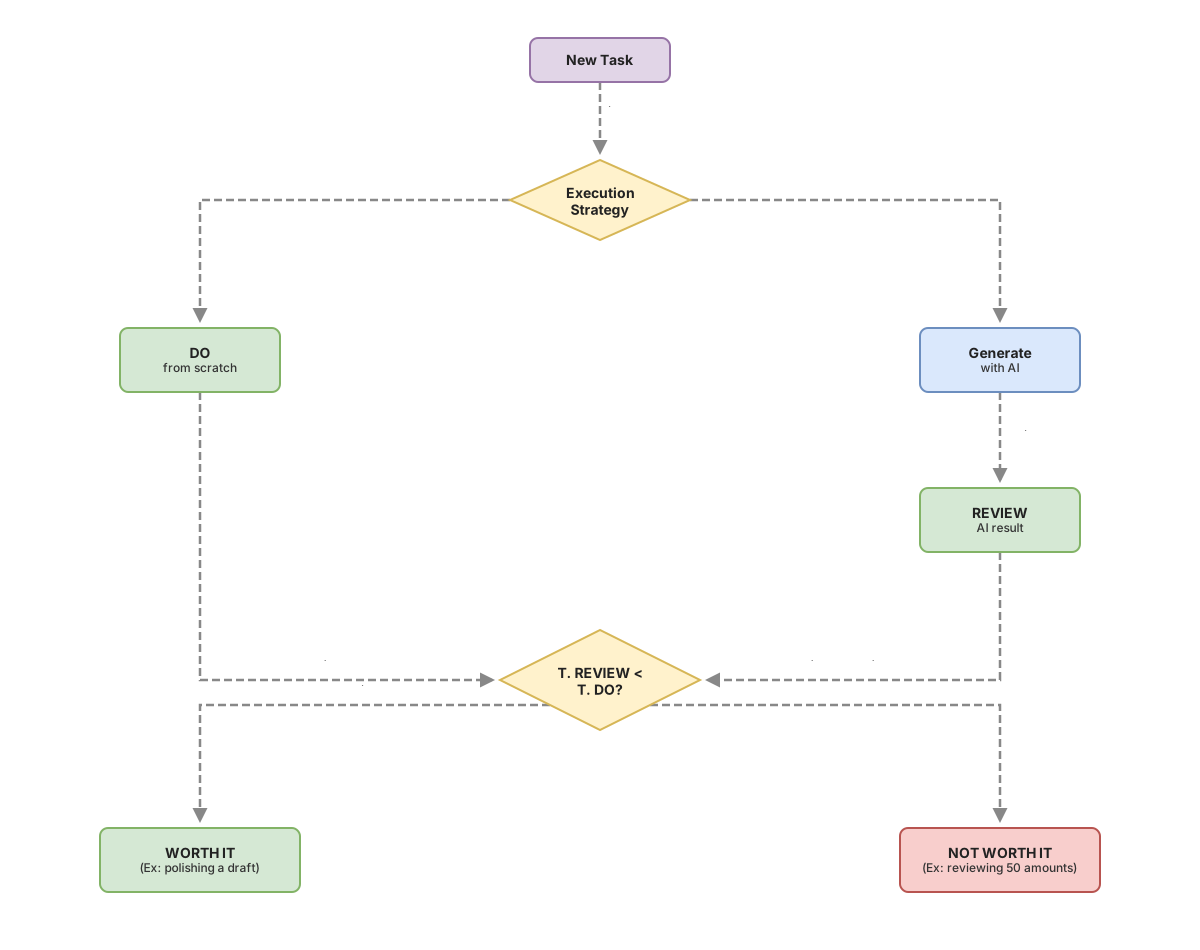
When AI drafts a text, someone reads and corrects it. When it extracts data from an invoice, someone reconciles the totals. That review time is real and has to be subtracted from the savings. Automation pays off when reviewing is clearly faster than doing the task from scratch. Reading and adjusting a draft email takes much less than writing it from scratch, so there you win. Checking fifty amounts one by one that AI extracted can take almost as long as typing them, so there the savings evaporate, unless you trust it enough to review only a sample.
There is an added trap. If the AI output is almost always good, the person reviewing relaxes and starts approving without looking. The day the rare error arrives, it slips through unfiltered. That is why the best automations do not aim for AI to be right 100% of the time, but for its errors to be easy to spot when they happen. The effect on how your team works when part of the job is done by a machine is something I develop in how AI changes a team’s productivity.
How to pick your first task without taking on risk
Do not start with the biggest task or the one that hurts most. Start with the safest, so you can learn how this behaves in your company with little at stake. Run each candidate task through these four questions.
- Is the task mostly about reading or writing text?
- Does it repeat many times (several times a day or a week)?
- Is an occasional error cheap and quick to fix?
- Is there a person who will review the result before it has consequences?
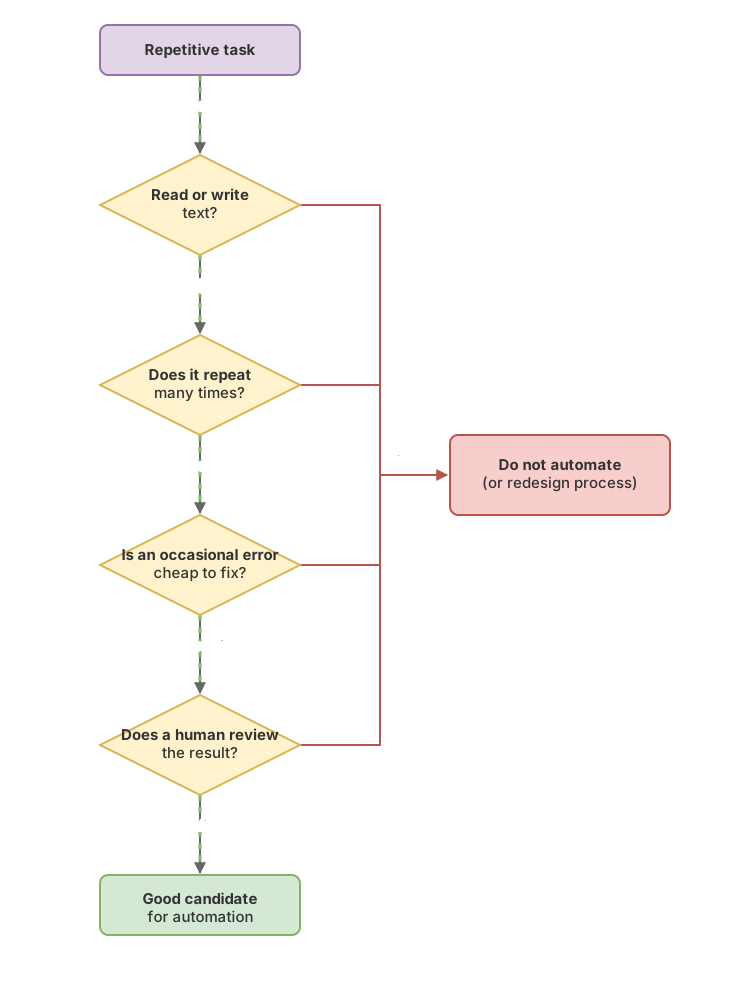
If you answer yes to all four, you have a good first candidate. If any is a no, either pick a different task or redesign the process so the person steps in where they need to. To profile a specific task in more detail, there is the guide on how to tell whether a task fits AI, and the full map of where AI adds value in a company is in the use cases of AI in companies.
This criterion, looking at what happens when AI gets it wrong before deciding whether to delegate the task, is what separates automating with your head from buying smoke. It is exactly what we work through step by step, with real company examples, in the course AI without the hype.
Frequently asked questions
Do I need programmers to automate repetitive tasks with AI?
To get started, almost never. Many of these tasks are solved today with off-the-shelf tools where you configure what you want without writing code. Programmers are needed when you want to connect AI to your internal systems or build a custom, high-volume flow, not to try out the first case.
Is it legal to use AI with my customers’ data?
It depends on which data and for what. In the European Union, processing personal data is subject to the GDPR, and depending on the use the European AI Act may also apply. Before putting customer data into an AI tool, it is worth knowing where it is processed and who stores it. This is not legal advice: for a specific case, consult someone who knows about data protection.
How much does it cost to automate a task with AI?
The cost of the tool is usually the least of it. The real cost is in the time to set up the process, review the results at first, and adjust until it is reliable. That is why it is worth starting with a small task: you measure the real savings before investing in something big.
Is AI going to replace my team?
On these tasks, no. AI removes the low-value repetitive work and leaves people the judgment, the validation, and the customer relationship, which is where they really add value. The risk is not that you will have surplus staff, it is building an automation with nobody watching it and discovering the failure once it has already reached the customer.
Related articles
AI Use Cases in Business: Which Ones to Prioritize
A framework for knowing which of your tasks are a good fit for AI and which ones are money down the drain: AI use cases in business, no hype.

Ideal tasks for AI: the profile you should look for
Not every task fits AI. There is a four-trait profile and a simple way to score yours before you spend a single euro.

AI and team productivity: where it is real and where it is hype
AI raises team productivity on specific tasks (drafts, summaries, internal search) if someone reviews the output. A no-hype guide to deciding where to use it.