
AI and team productivity: where it is real and where it is hype
AI raises team productivity on specific tasks (drafts, summaries, internal search) if someone reviews the output. A no-hype guide to deciding where to use it.
“AI multiplies your team’s productivity.” You have read it in a hundred headlines, and almost none tell you where it is true and where it is hype. The honest answer: AI does not multiply anything by magic, and it certainly does not replace your people. What it does, used well, is speed up a small set of specific tasks when a person reviews the result before signing off on it.
Outside that frame, it disappoints or creates risk. A sales draft written in ten seconds is worth nothing if no one checks that the figures are correct. A summary of a contract is dangerous if the model invents a clause that is not there. So the useful question for a manager is not “does AI increase productivity?”, but “on which tasks, with what limits, and what does my team have to review?”.
Let us get to that, with no promises of mass layoffs and no invented figures.
What “productivity” means when we talk about AI
Let us clean up the word first. Productivity is not your team typing faster. It is reaching a usable result sooner: a proposal ready to send, a report someone will read and act on, a correct answer to a customer.
Generative AI (those ChatGPT-style programs that produce text from what you ask) is good at one very specific thing: generating a reasonable first attempt, fast. It does not “know” anything in the human sense. It predicts the most plausible continuation of what you write, based on enormous amounts of text. That makes it tremendously useful for starting, and unreliable for finishing.
Think of a very fast, very well-read intern, but with no judgment of their own and no fear of getting it wrong. They hand you in a minute what would take a person half an hour. And sometimes they hand it to you wrong, with a smile. The productivity gain appears when you take the speed of that first attempt and add the judgment of someone who corrects it. Remove the reviewer and you have not gained productivity: you have moved the risk downstream, all the way to the customer.
The three tasks where AI truly delivers today
Not every office task benefits equally. Three stand out because they fit what the model does well: producing plausible text about information you give it.
Drafts. Emails, proposals, product descriptions, replies to tickets, scripts for a call. AI gives you version zero in seconds and your team edits instead of writing from a blank page. The blank page is expensive: it costs time and energy. Starting from a decent draft, even if you have to rework all of it, is usually faster.
Summarizing long documents. A sixty-page tender, the transcript of a two-hour meeting, twenty survey responses. AI extracts the main points and saves you the first full read. Here supervision matters more: someone has to confirm that the summary has not left out what matters nor added something that was not there.
Internal search. This is the least known and often the most valuable. In the jargon they call it RAG, but the business idea is simple: you connect the AI to your own documents (procedures, contracts, customer history, manuals) so it answers with your information, not with what it “remembers” from the internet. Instead of a new employee asking three times where the returns procedure is, they ask a search tool that answers by citing the internal document.
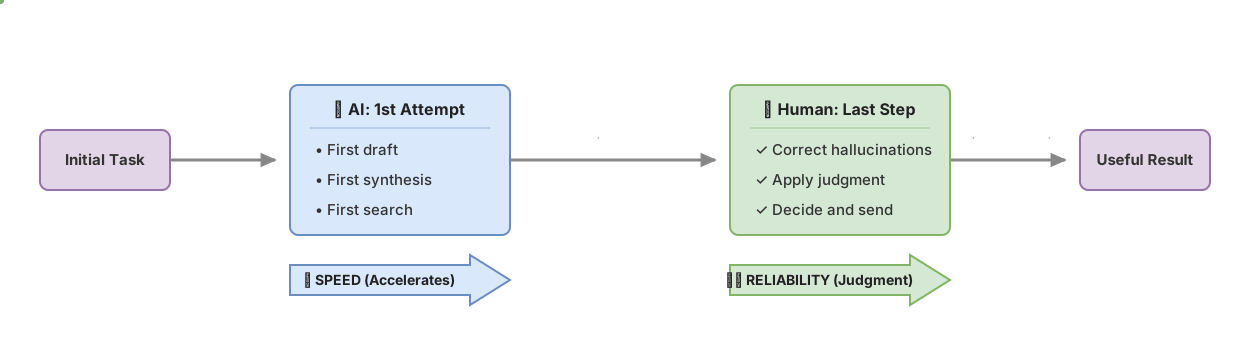
Notice the common pattern. In all three, AI speeds up the “first” of a task (the first draft, the first read, the first search) and a person keeps the “last”: the decision, the correction, the send. That split is what works.
Why a person always has to review
Here is the limit no tool vendor tells you eagerly. These models, from time to time, state false things with total confidence and clean prose. It is called a hallucination, and it is not a rare bug that has already been fixed: it is a consequence of how they work. In predicting “what sounds right”, sometimes what sounds right is not true.
The problem for a business is not that it gets things wrong. People get things wrong too. The problem is that it gets them wrong without warning and in a flawless tone. A human error usually comes with doubts, with an “I think”, with an obvious gap. AI hands you the invented fact with the same firmness as the correct one. That is why skipping the review does not really save time; it only passes the failure on to whoever is least prepared to catch it, the customer.
This changes your team’s role, it does not remove it. They move from producing every text from scratch to directing and correcting a first attempt. It takes a different skill: knowing what to look at, sensing when something does not add up, verifying the fact that matters. That skill is trained, and it is exactly what we work on in the no-hype AI course: using these tools with judgment instead of blindly.
Where it is still not worth using
As important as knowing where it delivers is marking where it does not. These are the areas where AI, today, adds more risk than productivity if you let it loose without control.
Exact figures and calculations that decide something. Budgets, invoicing, margins, order quantities. The model can give you a number that looks correct and is not. For that you already have spreadsheets and systems that calculate correctly. Using AI as a calculator is asking it for exactly what it cannot do.
Final decisions. Approving a spend, hiring, firing, accepting a contract. AI can prepare the material for you to decide. The decision, with its consequences and its responsibility, belongs to a person. Delegating the judgment is delegating the blame when something goes wrong, and that does not work legally or humanly.
Sensitive data with no clear control over where it ends up. If your team pastes customer data, medical records, or confidential information into a public tool, that information leaves your control and can end up in places you do not choose. In Europe this also has data-protection implications worth reviewing before, not after. Banning AI fixes nothing; what works is choosing tools with privacy guarantees and setting clear rules about what can and cannot be pasted. This is not legal advice; check it with whoever handles your compliance.
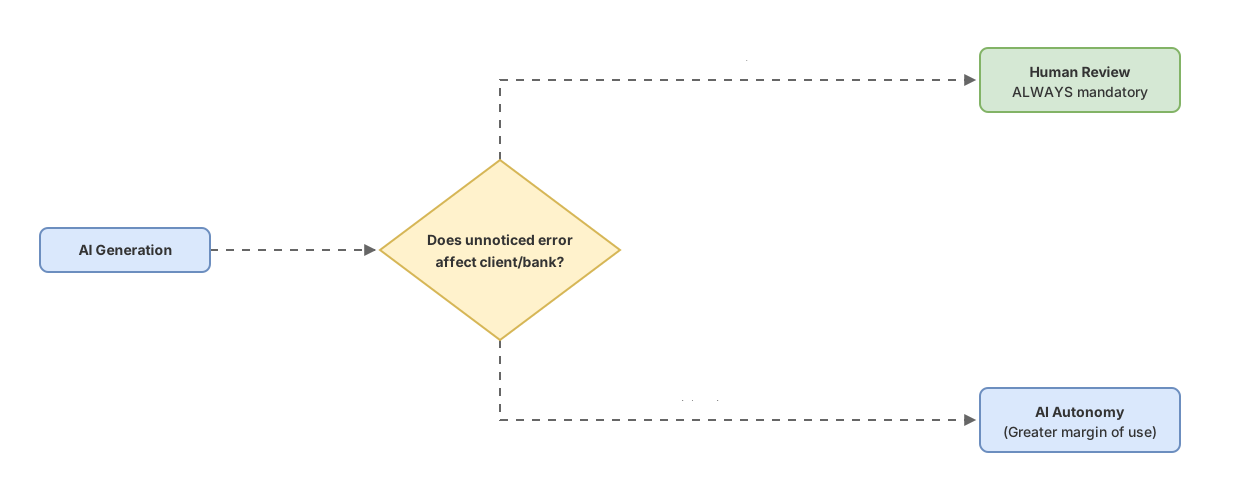
The mental rule is simple. If an error goes unnoticed and reaches a customer or a bank account, that task needs a person reviewing, no exceptions. If an error is visible and gets corrected on the spot, you can give the tool more room.
What your team needs, beyond the tool
An expensive misunderstanding: believing that buying AI licenses raises productivity on its own. It does not. The tool is the easy, cheap part. What separates a team that gains time from one that only gains noise is the judgment to use it.
A team truly benefits when it knows four things: which tasks are worth reaching for AI and which are not, how to ask it well for what it needs, what to review before signing off on anything, and when to distrust an answer that sounds too neat. None of that comes in the box. It is learned, tried, and corrected, like any new work tool.
It is worth starting with one or two tasks, not with “the whole company at once”. Pick something with volume and low risk if it fails: answering frequent emails, drafting first versions of proposals, summarizing internal meetings. Let a small group try it for a few weeks, gather what worked and what did not, and only then expand. The repetitive side of this we covered in how to automate repetitive tasks with AI, and the other pillar, training people, we develop in how to train your team in AI. Both are part of the broader map of AI use cases for companies.
How to tell whether you are actually gaining productivity
The most common self-deception is measuring usage instead of results. “The team uses AI a lot” is not an achievement. They could be spending more time fighting with the tool than they save.
Measure the result that mattered to you before AI. How long does it take from when a proposal is requested to when a sendable version comes out? How many customer tickets does the team close per week, and at what quality? How long does a new person take to find the procedure they need on their own? Compare that number before and after, on the specific tasks where you brought AI in, not on a general feeling.
And watch quality, not just speed. If drafts come out twice as fast but half of them have to be redone, you have not gained anything. Honest productivity joins the two things: sooner and well. When you only look at speed, it is easy to believe you are flying while you pile up errors that someone will pay for later.
Frequently asked questions
Is AI going to replace my team?
For the work it does reliably today, no. It replaces steps of tasks, above all the first attempt, not the people who decide and answer. What does change is the type of work: less writing from scratch, more reviewing and directing. A team that learns to do that is worth more, not less.
How much does it cost to start?
Basic tools have a moderate subscription cost per person, comparable to other office software licenses. The real cost people underestimate is not the license: it is the time to learn to use it well and to set review rules. Budget for both.
Do I need technical staff for this?
For draft and summary tasks with off-the-shelf tools, no. Anyone on your team can start. For internal search over your own documents, technical help is usually needed to connect it properly and securely. Start with the former while you assess the latter.
What about customer data privacy?
This is the point most worth resolving before scaling. Choose tools that guarantee by contract that they do not use your data to train their models, and give your team a clear rule about what information can and cannot be entered. Handle it with whoever manages your data protection; in Europe the rules are strict and the responsibility is yours, not the provider’s.
Related articles
AI Use Cases in Business: Which Ones to Prioritize
A framework for knowing which of your tasks are a good fit for AI and which ones are money down the drain: AI use cases in business, no hype.
Automating repetitive tasks with AI: what actually works
Which repetitive tasks AI automates well in a company, which ones are better left to people, and how to pick your first one without taking on risk.

Training your team in AI (without gurus): where to start
Where to start training your team in AI without getting sold hype: what each role needs to know and how to tell serious training from guru promises.