
Git merge explained: fast-forward vs 3-way merge
What git merge does under the hood, when it produces a fast-forward and when a three-way merge commit, and how to read the resulting graph.
You run git merge on two different branches on the same day. On one, a new commit shows up with the message “Merge branch…”. On the other, nothing appears: history integrates silently and you don’t even notice. Same command, different result. There’s a name for the reason: fast-forward versus three-way merge, and understanding when each happens saves you half the surprises Git gives you when integrating branches.
What does git merge actually do?
git merge other-branch takes the history of other-branch and integrates it into the branch you’re currently on. The starting point is always your current branch, the one HEAD points to. You’re not merging two branches in the abstract: you’re bringing the work from one into where you’re standing.
To decide how to do it, Git looks at one thing: where the two branches split. That commit where they shared history is called the common ancestor, or merge base. From there, only two scenarios are possible, and Git picks the right one without asking you.
If you work with branches daily but still get tripped up on when to create one or where HEAD lives, the starting point is the complete guide to Git branches. Here I’m assuming you already know how to create a branch and commit to it.
What is a fast-forward merge?
A fast-forward happens when your current branch has no new commits since the other branch split off. In that case there’s nothing to reconcile: the other branch is simply ahead on the same line of history, and Git only has to move your branch’s pointer forward until it catches up.
Imagine you create a working branch from main, make a couple of commits, and meanwhile nobody has touched main.
# You start from main and create a new branch
git switch -c feature-login

# login.js is a new file: it needs to be tracked with git add.
# git commit -am wouldn't include it, since -a only stages already-tracked files
git add login.js
git commit -m "Add login form"

# Now login.js is tracked, so -am is enough for the next commit
git commit -am "Validate email field"

# You switch back to main and merge: main hasn't changed
git switch main
git merge feature-login
The output of that last command says it explicitly:
Updating a1b2c3d..e4f5a6b
Fast-forward
 login.js | 24 ++++++++++++++++++++++++
 1 file changed, 24 insertions(+)
There’s no merge commit. main had no commits of its own that feature-login didn’t know about, so Git advances main’s pointer to the branch’s last commit. The history ends up as a straight line, as if all the work had been done directly on main.
This is what confuses a lot of people: a fast-forward doesn’t lose anything. Your two commits are still there, with their original hash and message intact. The only thing that doesn’t get created is an extra merge commit, because there was no need to reconcile two diverged histories.
What is a 3-way merge?
A three-way merge happens when both branches have moved forward since they split. You made commits on your branch, and meanwhile someone pushed commits to main. Now the two histories diverge from the common ancestor, and neither is simply ahead of the other.
Here Git can’t just move a pointer. It has to look at three commits: the common base where the branches matched, the tip of your branch, and the tip of main. It compares both versions against that base to figure out what changed on each side, combines both sets of changes, and stores the result in a new commit. That’s the merge commit, and its defining trait is that it has two parents instead of one.
git switch main
git merge feature-checkout
Merge made by the 'ort' strategy.
checkout.js | 40 ++++++++++++++++++++++++++++++
1 file changed, 40 insertions(+)The 'ort' you see there is the name of the default strategy Git has used to compute the combination since version 2.34. You don’t need to configure it or think about it. It’s just Git’s way of saying “this wasn’t a fast-forward, I had to build a union commit.”
If the changes on both sides touch different lines, Git combines them on its own and the merge commit comes out clean. If both sides edited the same lines, a conflict shows up and Git asks you to decide. That case has its own mechanics, and I cover it in how to resolve merge conflicts in Git. A three-way merge doesn’t always mean a conflict: most resolve without you having to touch anything.
When does each one happen?
The rule is short: if your current branch has no commits the other one doesn’t know about, it’s a fast-forward; if both sides moved forward on their own, it’s a three-way merge. Git decides for you based on the state of the history, but you can force its behavior with two flags.
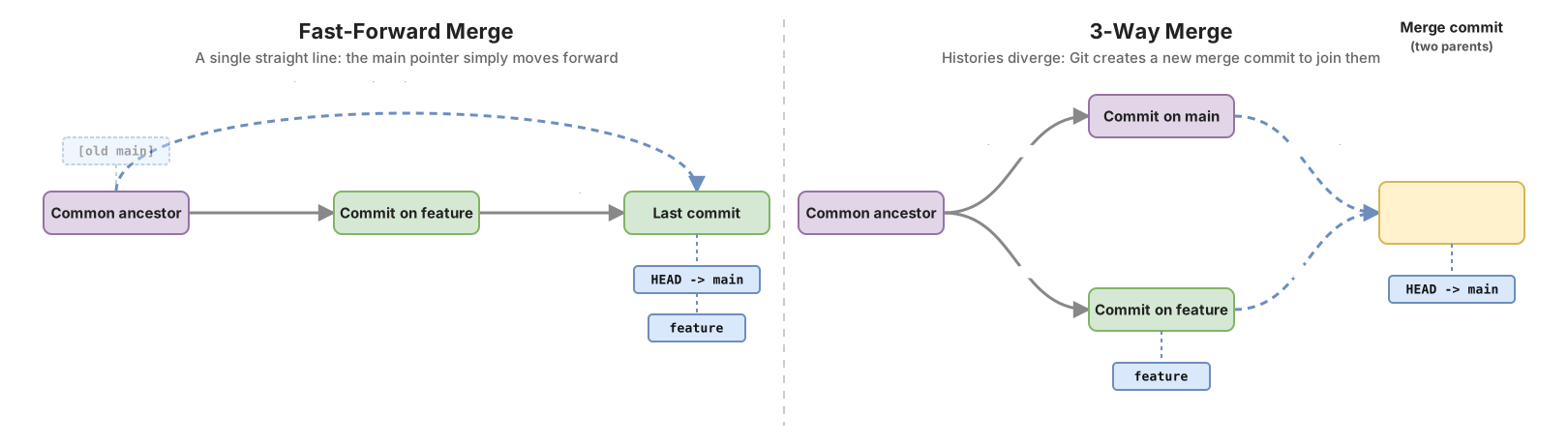
| Fast-forward | 3-way merge | |
|---|---|---|
| Creates a new commit | No | Yes, the merge commit |
| Parents of the last commit | One | Two |
| When it happens | The current branch has no commits of its own since the divergence | Both branches moved forward from the common ancestor |
| Resulting history | Straight line | A fork that joins back together |
| Conflict risk | None | Only if both sides edit the same lines |
If you want an explicit record of every integration, even when a fast-forward was possible, force the merge commit:
git merge --no-ff feature-loginWith --no-ff, Git always creates a merge commit, even when it could have just advanced the pointer. Many teams use it so every working branch leaves a visible mark on main’s history, useful for reviewing later what went in and when.
The opposite case is --ff-only, and it’s worth understanding well before putting it in a script:
git merge --ff-only feature-loginThis flag tells Git: “only do the merge if it can be a fast-forward; otherwise, do nothing and raise an error.” If main has moved forward on its own and a fast-forward is no longer possible, the command fails and exits with a non-zero code, without touching your branch. It’s the way to guarantee your history stays linear and to find out quickly when it no longer is.
How do I read the result?
The command that clears things up is git log --graph --oneline. It draws the history as a graph on the left, and you can see at a glance whether there was a fork or not.
git log --graph --onelineAfter a fast-forward you’ll see a straight column, no branching:
* e4f5a6b Validate email field
* a1b2c3d Add login form
* 9f8e7d6 Previous main commit
After a three-way merge you’ll see the merge commit and the two lines converging into it:
*   b7c8d9e Merge branch 'feature-checkout'
|\
| * c3d4e5f Add checkout button
| * f6a7b8c Wire checkout API
* | d9e0f1a Fix header on main
|/
* 9f8e7d6 Common ancestor
That commit b7c8d9e with the two lines coming in below it is a merge commit: visual proof that Git did a three-way combination. If something goes wrong mid-merge with conflicts and you want to go back to how things were without leaving a trace, git merge --abort undoes the operation and puts you right back where you started.
Common mistakes
Expecting a merge commit that never shows up. You run git merge expecting to see “Merge branch…” in the log, and instead Git says Fast-forward. That’s not a failure. Your current branch simply hadn’t moved forward, and Git preferred to move the pointer. If you need the merge commit mark, use --no-ff.
Putting --ff-only in a script with no backup plan. The flag aborts when a fast-forward isn’t possible, which is exactly its purpose. The problem is when you drop it into automation and don’t handle the failure: the pipeline stops and it’s not always clear why. If you use --ff-only, decide what happens when it fails before it fails.
Thinking a fast-forward ate your work. It’s the most common fear, and it has no basis. All your commits are still there with their original hash. The only thing that doesn’t exist is an extra merge commit, and it doesn’t exist because there were no two histories to reconcile.
Confusing a merge commit with a conflict. Seeing “Merge made by the ‘ort’ strategy” scares people expecting trouble, but that message is the happy path: it means Git combined the changes on its own. A conflict announces itself differently, with a very visible CONFLICT and files marked for you to edit.
When to choose merge and when something else
Merge is the most honest way to integrate history: it preserves the real graph of who did what and when. In exchange, the history fills up with forks that some teams find noisy. The usual alternative is rebase, which rewrites your commits on top of the other branch’s tip to keep a straight line. Each one has its cost, and I cover that underlying decision in merge vs rebase.
Understanding fast-forward versus three-way is what turns that choice from an act of faith into something you can reason about. Once you know exactly which commit moves and which one gets created, Git’s graph stops being a mystery and becomes something you can predict before you hit Enter.
All of this really clicks once you practice it with a repository in front of you and watch the pointer move. In the Git from zero to professional course you build these two scenarios by hand, trigger a fast-forward and a three-way merge on purpose, and read the graph until it becomes second nature.
Frequently Asked Questions
Does a fast-forward lose commits?
No, none at all. Your commits stay in the history with their hash and message intact; the only thing that doesn’t get created is an extra merge commit, because in a fast-forward there are no two diverged histories to reconcile.
Why didn’t my git merge create a new commit?
Because it was a fast-forward. Your current branch had no commits of its own since the other branch split off, so Git advanced the pointer instead of building a merge commit. If you want to always force a merge commit, run git merge --no-ff.
How do I always force a merge commit?
With the --no-ff flag: git merge --no-ff branch-name. It tells Git to create a merge commit even when a fast-forward was possible. It’s common among teams that want every working branch to leave a visible mark on the history.
Do git merge and git merge —no-ff produce the same history?
Only when the merge was already going to be three-way. If Git was going to do a fast-forward, git merge leaves a straight line with no merge commit, while --no-ff inserts a merge commit with two parents and creates a visible fork. When both branches diverged, the two forms produce the same merge commit.
Does a three-way merge always cause a conflict?
No, most resolve on their own. Git automatically combines the changes when each side touched different lines. A conflict only appears when both branches edited the same lines in the same file, and then Git asks you to decide which version to keep.
Related articles
Git Branches: Create, Merge, and Resolve Conflicts Without Panic
What a Git branch really is, how to create one, merge it with git merge, and resolve a conflict step by step. Plus merge vs. rebase without fear.
How to Resolve Git Merge Conflicts Without Panicking
Learn to resolve git merge conflicts step by step: what the markers mean, how to choose the right code, and how to abort if something goes wrong.
Merge vs Rebase: Which One to Use and the Rule You Can't Break
Merge vs rebase without dogma: what each one actually does to your history, the golden rule of rebase, and a team workflow you can copy on Monday.