
Merge vs Rebase: Which One to Use and the Rule You Can't Break
Merge vs rebase without dogma: what each one actually does to your history, the golden rule of rebase, and a team workflow you can copy on Monday.
Every time someone mentions rebase in a PR, people get nervous. They’ve heard “never rebase” on one side and “keep the history clean” on the other, and the two statements seem to contradict each other. They don’t. The merge vs rebase debate is almost never a question of picking a side: they’re operations that solve different problems, and a healthy team uses both. The fear comes down to a single real risk, and here it is laid out clearly so that by Monday you’ll know exactly when each one touches your history.
What does each one actually do to your history?
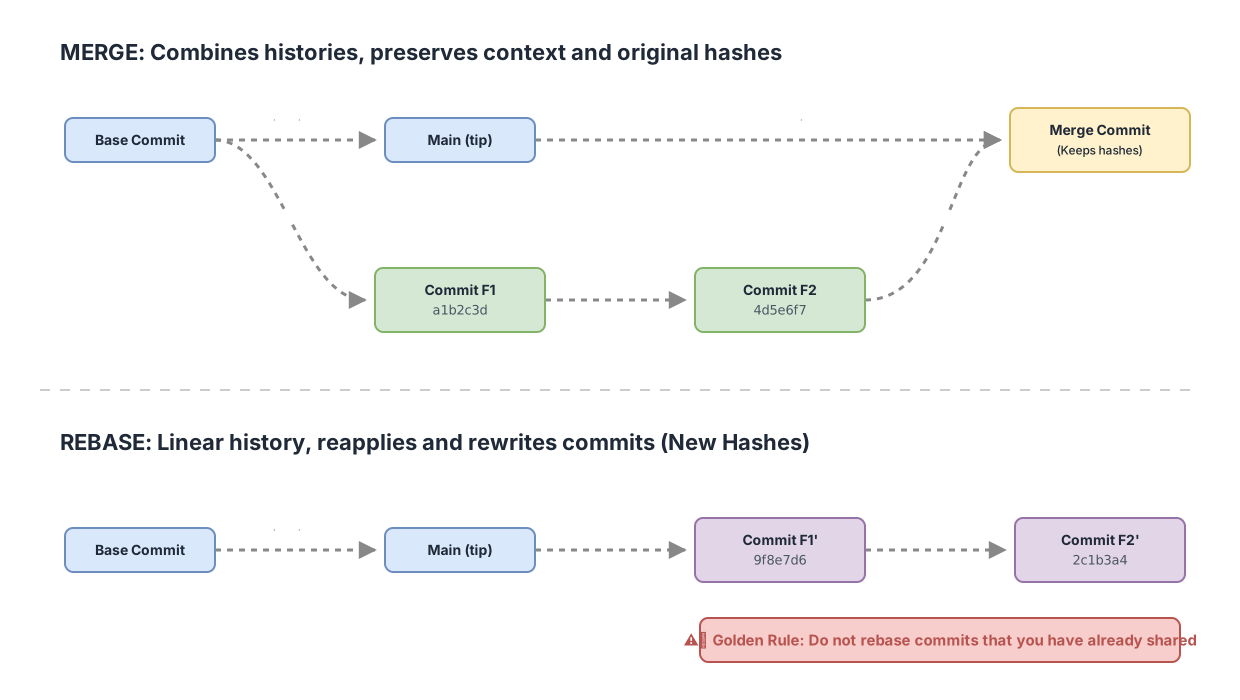
Merge creates a new commit, the merge commit, which has two parents and joins two lines of work into one. Rebase does something different: it takes your commits, temporarily removes them, and reapplies them one by one on top of a different base, generating new commits with new hashes.
That difference is all that matters. With merge, the original commits stay intact and an extra one appears that ties them together. With rebase, the original commits get replaced by rewritten copies. Same content, different hash.
Look at the sequence for a merge. You’re on feature, and you want to integrate it into main:
# Integrate feature into main with a merge commit
git switch main
git merge feature
# A new commit like "Merge branch 'feature'" appears, with two parents.
# feature's commits keep their original hashes.
I’m using git switch to change branches instead of git checkout. git switch is no longer marked experimental and it’s the dedicated command for moving between branches. checkout still works, but it does too many things at once and it’s easy to get confused.
Now the rebase of that same feature onto the latest main:
# Reapply feature's commits on top of main's current tip
git switch feature
git rebase main
# Before:  a1b2c3d -> 4d5e6f7  (your two commits on feature)
# After:   9f8e7d6 -> 2c1b3a4  (same change, NEW HASHES)
The hashes change because a commit includes its parent in the calculation of its identifier. When you change the base, the parent changes, and with it the hash of every commit that comes after. It’s the direct consequence of moving the starting point, nothing more. If you want the full breakdown of the operation, there’s the step-by-step guide to git rebase; for the other side, how git merge works under the hood.
So which one leaves a “cleaner” history?
It depends on what you mean by clean, and that’s the trap in almost every tutorial that picks a side. Rebase gives you a linear history: a single row of commits, no branching, very easy to read with git log --oneline. Merge gives you a branched history, with its merge commits, that preserves which branch and when each thing happened.
Neither is objectively better. A linear history is readable at a glance, but it erases the topology: you lose the signal of which commits belonged to the same unit of work. A history with merges tells the truth of how things actually happened, at the cost of a more tangled graph when several branches are alive at once.
| Merge | Rebase | |
|---|---|---|
| What it does to the graph | Joins two lines with a two-parent merge commit | Replays your commits onto a new base, linear history |
| Hashes | Original commits keep their hash | Generates new commits with new hashes |
| Readability | Preserves context: branch and moment of each change | Linear and easy to follow top to bottom |
| Shared branches | Safe: doesn’t rewrite what others already have | Dangerous if anyone has already pulled the branch |
| When to choose it | Integrating already-shared branches, keeping the real history | Tidying up your local work before publishing it |
The row that really settles it is shared branches. And that’s where the one rule with no room for debate comes from.
The golden rule: don’t rebase what you’ve already shared
Never rewrite commits you’ve already pushed somewhere other people may have pulled from. This is the golden rule of rebase, and it’s the one that resolves the contradiction between “never rebase” and “keep the history clean”.
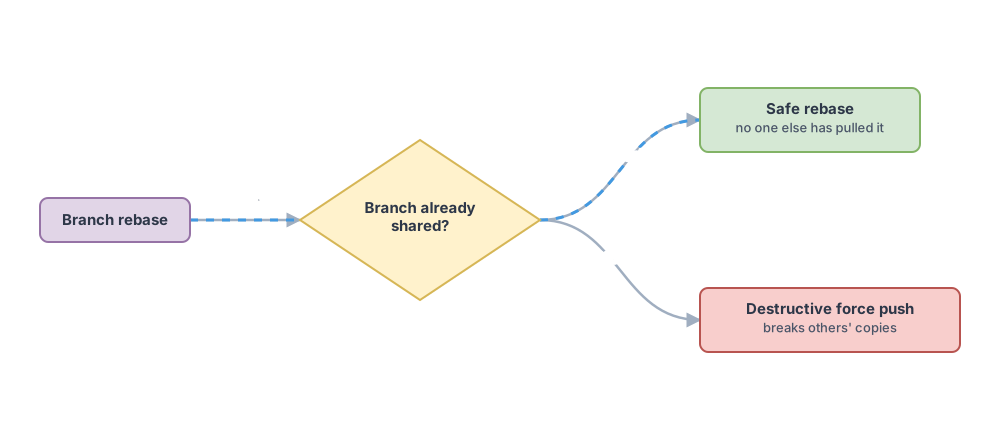
Think about the mechanism. When you rebase, you replace commits with copies that have new hashes. If those commits only ever existed on your machine, nothing happens: nobody else had them. But if you’d already shared them and a teammate has them in their clone, the remote and their copy now diverge. To publish your rewritten version you’re forced into a force push, and the moment your teammate runs git pull they’ll have two histories of the same work fighting each other. You’ve broken their copy.
That’s why the full statement isn’t “never rebase”, it’s “don’t rebase what already belongs to everyone”. Rebasing your own local branch before sharing it is perfectly safe and strongly recommended. Rebasing main because you don’t like how yesterday’s merge turned out is a fast way to get your team to stop talking to you.
What about git pull --rebase?
git pull --rebase is the safe, everyday use of rebase, because it only reorders your local work that hasn’t been published yet. A regular git pull pulls down the remote’s commits and merges them with yours, creating a merge commit when both branches have moved forward. With --rebase, instead of merging, it replays your local commits on top of what you just pulled.
# Fetch what's new from the remote and replay YOUR local commits on top
git pull --rebase
# your local commits (not yet published) get relocated on top of origin/main
git push
The result is that you avoid that “Merge branch ‘main’ of…” merge commit that shows up every time two people work on the same branch and clutters the history without adding anything. Since the commits you’re relocating are only yours and nobody has seen them yet, you’re not breaking the golden rule. It’s rebase, but the good kind.
What convention does your team use?
The merge vs rebase decision is almost never yours alone: it’s set by team convention, and your job is to stay consistent with it. When you integrate a PR on GitHub you get three buttons, and each one does something different to the history (GitLab and other platforms offer equivalent mechanisms under other names):
- Merge commit: integrates the branch with a merge commit and keeps every commit from the PR as-is, with its branching intact.
- Rebase and merge: replays the PR’s commits onto the target base without creating a merge commit, leaving a linear history.
- Squash and merge: collapses every commit in the PR into a single one before integrating it, so on
maineach PR is a single commit.
There’s no universal winner. Teams that want fine-grained traceability pick merge commits, and teams that want a readable main with one PR per line pick squash. Mixing conventions without agreeing on it is what gets expensive, because then the history stops telling a coherent story and nobody knows what to expect when reviewing. Ask which one your repo uses before you touch the button.
A concrete workflow you can copy on Monday
Here’s the workflow that combines both operations without breaking anything. Rebase locally to tidy up your own work, merge (via PR) to integrate it into main.
# 1. Work on your branch and tidy it up while it's STILL only yours
git switch -c feature/login
# ...commits...
git pull --rebase origin main   # stay current with main without junk merges

# 2. Push and open the PR; from here on the branch is "shared"
git push -u origin feature/login

# 3. The PR gets integrated per your team's convention (merge/rebase/squash)
The detail that prevents almost every scare is the order: you rebase while the branch lives only on your machine, and from the git push that opens the PR onward you stop rewriting its history. If you need to update the PR with the latest from main, many teams prefer that you merge main into your branch instead of rebasing, precisely to avoid forcing. Coordinate on it.
There’s one legitimate case where you do rebase an already-published branch: your own PR branch, when you’re truly certain nobody else has pulled that work. Then, after the rebase, you need to force push:
# Only on YOUR PR branch, when nobody else has pulled it
git push --force-with-lease
Use --force-with-lease, not plain --force. --force-with-lease aborts the push if the remote has commits you hadn’t seen yet, because it compares the remote tip against your local tracking branch. --force doesn’t check anything and steamrolls whatever is there. Being safer doesn’t make it the only safe way to force push. It’s simply the option with a safety net, and that’s why you should default to writing it.
Before you take this workflow to your team’s repo, check that you can tell at a glance which operation rewrites history and which doesn’t. Try it yourself in this interactive exercise, deciding case by case when to merge and when to rebase:
Loading exercise...
Common mistakes
Rebasing a branch someone else has already pulled. This is the number one way to break the golden rule. The moment you rewrite commits a teammate has in their clone, you’re forcing them to resolve a divergence you caused. If you’re unsure whether someone has it, assume they do.
Using --force instead of --force-with-lease. The first one steamrolls anything on the remote, including commits a teammate just pushed to your PR branch while you were rebasing. The second one stops and warns you. Switching from one to the other costs you eleven characters.
Thinking rebase “deletes” commits. It doesn’t delete them. It creates new copies and leaves the originals dangling, accessible in the reflog for a while before Git’s garbage collection cleans them up. That’s why a rebase gone wrong can almost always be undone.
Mixing conventions within the same repo. Squash one day, merge commit the next, rebase-and-merge after that, without ever agreeing on it. What makes a history unreadable is the lack of agreement, more than any single operation. Consistency matters more than picking the “correct” option.
These four mistakes share a root cause: they happen when you rewrite history that wasn’t only yours anymore. If you keep a clear line between “my local work” and “shared work”, almost none of them will happen to you. And if you want to reinforce the foundations behind all of this, the full guide to branches in Git covers the mental model of branches that merge and rebase both rest on.
Frequently Asked Questions
Does rebase delete my commits?
No. It creates new copies and leaves the originals accessible in the reflog for a while.
Can I undo a rebase?
Yes. Find the line right before the rebase with git reflog and go back to it:
git reflog                 # find the HEAD from before the rebase
git reset --hard <hash>    # recover the original state
Since the rebase didn’t delete the original commits, the reset recovers them intact as long as they’re still in the reflog.
Does git pull merge or rebase?
By default it merges: it pulls down the remote’s commits and merges them with yours, creating a merge commit if both have moved forward. If you prefer rebase, use git pull --rebase on a one-off basis, or set git config pull.rebase true to make that the default behavior in the repo.
Does squash count as merge or rebase?
It’s a separate integration option. Squash collapses every commit on a branch into a single commit when integrating it, so on main each PR shows up as one commit. It’s a third way of resolving how work enters the main branch, distinct from both the classic merge commit and rebase-and-merge.
Does the golden rule have exceptions?
Yes, one: when nobody else has truly pulled the branch. If it’s your PR branch and you’re sure no teammate has it locally, you can rebase and force push with --force-with-lease. The key is certainty. When in doubt, coordinate with whoever might be touching it before rewriting anything.
Want to master merge, rebase, and the PR workflow hands-on instead of just reading about it? The course Git from Zero to Professional walks through these decisions visually and interactively: you resolve conflicts, tidy up histories, and practice the golden rule without fear of breaking anyone’s repo.
Related articles

Git Branches: Create, Merge, and Resolve Conflicts Without Panic
What a Git branch really is, how to create one, merge it with git merge, and resolve a conflict step by step. Plus merge vs. rebase without fear.
Git merge explained: fast-forward vs 3-way merge
What git merge does under the hood, when it produces a fast-forward and when a three-way merge commit, and how to read the resulting graph.
Git Rebase Explained: What It Does and When to Use It
Git rebase replays your commits onto a new base. What it does, when to use it instead of merge, and the golden rule for not breaking your team's history.