
GitFlow vs GitHub Flow vs Trunk-Based: Which One to Choose
A senior comparison of the three branching strategies: tradeoffs, when to use each one, and how to migrate without breaking your team.

Most teams I’ve worked with didn’t choose GitFlow. They inherited it. It was the colorful diagram that circulated back in 2010, someone put it on the wiki, and ten years later the team still creates develop and release/* branches without anyone remembering why. A branching strategy is an architecture decision with daily consequences for velocity, risk, and team morale. Here I compare GitFlow, GitHub Flow, and trunk-based development on what they actually cost, and give you an axis for deciding which one fits your context. If you want the full framework for team collaboration with Git, you’ll find it in the Git and GitHub team workflow guide; this is the concrete decision that hangs off that.
What Problem Does a Branching Strategy Solve?
A branching strategy is an agreement about how long a branch lives before it merges into the main line. That’s the real axis, and everything else is a consequence.
The underlying conflict is old: the longer a branch lives separately from main, the more it diverges, and the more expensive the final merge becomes. That accumulated debt is called merge hell, and it’s not theoretical. A branch that hasn’t touched main in three weeks has watched dozens of other people’s commits pass underneath it. By the time you finally integrate it, you’re reconciling changes you don’t even remember.
The three strategies we’ll cover are three different answers to the same question: when do I integrate? GitFlow says “when the release is ready.” GitHub Flow says “when the PR passes review.” Trunk-based says “today, and if the code isn’t ready I hide it behind a flag.” The rest of their differences (number of branches, naming, ceremony) follow from that answer.
How Does GitFlow Work, and What Does It Cost?
GitFlow is Vincent Driessen’s model[1]: two permanent branches (main and develop) plus three types of temporary branches (feature/*, release/*, and hotfix/*). Features branch off develop, releases stabilize on their own branch before merging into main, and hotfixes branch directly off main for production.
In commands, starting a feature and preparing it for release looks like this:
# GitFlow: a feature lives in develop, then goes through a release branch
git switch develop
git switch -c feature/pago-stripe
# ...feature commits...
git switch develop
git merge --no-ff feature/pago-stripe

# when it's time to version, the release stabilizes separately
git switch -c release/1.4.0 develop
# ...only stabilization fixes here...
git switch main
git merge --no-ff release/1.4.0
git tag -a v1.4.0 -m "release 1.4.0"
The --no-ff flag isn’t decorative: it forces a merge commit even when a fast-forward would be possible, preserving each branch’s topology in the history. In GitFlow that matters, because the branch diagram IS the documentation of the process.
What does it cost? Long-lived branches. A release/* that stabilizes for two weeks while develop keeps moving forward creates two lines of work that have to be reconciled with cherry-picks. Multiply that by several simultaneous features and you have a team spending real time managing the tree instead of writing product. Driessen himself later added a note to his original article recommending simpler models for teams that deploy software continuously[1]. The author of GitFlow is telling you that you probably don’t need it.
Where GitFlow still shines: versioned software with several versions in support at once. If you maintain 2.3, 2.4, and 3.0 simultaneously for different customers, those long-lived branches stop being debt: they’re the map of your reality.
What Is GitHub Flow, and Why Did It Win?
GitHub Flow has a single rule to remember: main is always deployable, and everything else is short branches that start from main and return to main through a PR[2]. There’s no develop, no release/*, no versioning ceremony.
The whole cycle fits in a few commands:
# GitHub Flow: short branch from main, PR, merge, deploy
git switch main
git switch -c fix/timeout-checkout
# ...small commits...
git push -u origin fix/timeout-checkout
# open the PR, it passes CI + review, merge to main
# main is deployable => it deploys
It won for two reasons that have nothing to do with fashion. The first is that it fits continuous deployment: if you deploy whenever you want instead of on fixed dates, you don’t need a branch that represents “the next version.” The second is that the PR became the unit of work, review, and CI all at once, and GitHub put it at the center of its product. The mental model boils down to “one branch, one PR, one merge.”
The cost is hidden in its simplicity: GitHub Flow assumes your CI is reliable. If main deploys and your test suite isn’t trustworthy, every merge is a dice roll in production. GitHub Flow doesn’t protect you from that; it forces you to solve it.
What Is Trunk-Based Development?
Trunk-based development takes the idea to the extreme: everyone integrates into main several times a day, and branches, when they exist, live for less than a day[3]. The explicit goal is to eliminate divergence before it accumulates.
This raises the obvious question. If I integrate code into main daily, what happens with features that take two weeks? The answer is feature flags: the code merges into main turned off, invisible to the user, and gets switched on once it’s complete and tested.
# Trunk-based: small commits to main, the incomplete feature lives turned off
git switch main
git pull --rebase
# the new code goes in behind a flag that's off
# (in the app code, not the shell):
#   if (flags.checkoutV2) { renderCheckoutV2(); }
git commit -am "checkout v2 tras flag (off)"
git push
Trunk-based has the lowest merge debt of the three because it never lets debt accumulate. But it’s the model that demands the most from your infrastructure. Without fast, trustworthy CI, integrating into main daily means breaking everyone else daily. Without feature flags, you have no way to merge incomplete work without exposing it. It’s a high-cadence model that pays for its speed with platform discipline.
It’s worth separating two variants that people conflate. There’s trunk-based with direct commits to main, viable for small, very senior teams, and there’s trunk-based with ultra-short-lived branches and a lightweight PR, which is what most large teams that claim to do trunk-based actually practice. The practical difference is whether the PR is a mandatory gate or not.
How Do You Decide?
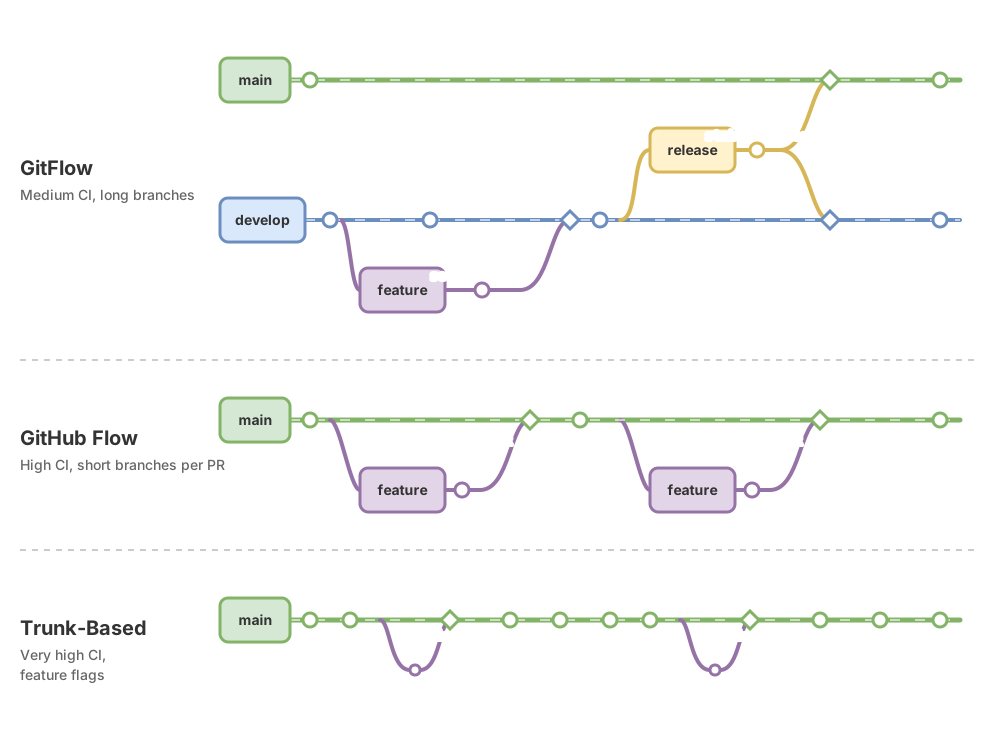
The decision comes down to three variables: how often you release, how many people touch the same repo, and how much you trust your CI. Not which model has the prettiest diagram.
| Dimension | GitFlow | GitHub Flow | Trunk-based |
|---|---|---|---|
| Long-lived branches | Yes (develop, release) | No | No |
| Release cadence | Fixed dates, versioned | Continuous, on-demand | Continuous, several times a day |
| Ideal team size | Medium-large with supported versions | Small to large | Requires maturity, not size |
| Required CI maturity | Medium | High | Very high |
| Mental complexity | High (5 branch types) | Low (one branch, one PR) | Low on rules, high on infra |
| Merge hell risk | High | Low | Minimal |
Read it as a spectrum, not three boxes. At one end you have packaged releases and a fixed calendar: GitFlow’s complexity pays off. At the other end you have continuous deployment and trustworthy CI: trunk-based gives you maximum speed. GitHub Flow is the sensible middle ground for most teams, and it’s where I’d start any new team deploying web services.
An honest shortcut: if you deploy continuously, start with GitHub Flow and evolve toward trunk-based once your CI and feature flags can handle the pace. If you have to maintain older versions in production for customers, GitFlow isn’t legacy, it’s the right tool.
How Do You Migrate Without Breaking the Team?
Don’t migrate all at once on a Monday morning. The approach that’s worked for me is reducing branch lifetime first and changing the naming later.
Start by trimming PR size. Before touching the model, set a soft limit: no PR should live more than two or three days. That change alone brings you closer to GitHub Flow without renaming anything, and it exposes whether your CI can handle frequent merges. If your test suite falls over when you increase merge frequency, that’s your real blocker, and no branching strategy fixes it.
After that, retire develop. In GitFlow, develop is the integration branch. If you’re already deploying from main continuously, develop is an intermediate layer that adds nothing and generates double merges. Merge develop into main, freeze the creation of new release/* branches, and declare main the single deployable source of truth.
The move to trunk-based is the last step and the most expensive one, because it’s not a Git change but an infrastructure change: you need real feature flags and CI you trust enough to deploy without looking. The concrete day-to-day of PRs, commits, and review once you’ve chosen a model is covered in the team Git workflow.
Common Mistakes
Adopting GitFlow by default on a continuous-deployment team. This is the most expensive and the most common one. If you deploy to production several times a week but still maintain develop and release/*, you’re paying GitFlow’s complexity without collecting its benefit, which is coordinating versioned releases. Feature branches pile up, merges snowball, and nobody knows what’s actually in production. Spot it with one question: how many versions do you support simultaneously? If the answer is “one, the production one,” you don’t need GitFlow.
Trunk-based without CI or feature flags. Trunk-based without the infrastructure that supports it breaks main daily. It’s adopting the rule (“integrate often”) without the safety net that makes it viable. If you don’t have reliable tests running on every push, or a way to hide incomplete work, integrating into main several times a day guarantees someone finds main broken every morning.
Eternal release branches that pile up cherry-picks. A release/1.4.0 that’s been open for a month has stopped being a stabilization branch. It’s now a second, parallel line of development, and every fix that lands in main has to be manually replicated with git cherry-pick. Every cherry-pick is a chance to miss one. If your release branches live for weeks, the branches aren’t the problem; you’re stabilizing too late.
GitHub Flow with giant two-week PRs. GitHub Flow with a PR that’s been open for fifteen days is GitFlow in disguise. The branch is long-lived even if it isn’t called develop, merge debt grows the same way, and on top of that you’ve lost the GitFlow ceremony that at least gave you a place to stabilize. If your PRs don’t close within days, you’re effectively maintaining long-lived branches under a different name.
Decision Checklist
- You’ve counted how many versions you maintain in production simultaneously (a single one points to GitHub Flow or trunk-based)
- You know how often you actually deploy (fixed dates point to GitFlow; continuous points to the other two)
- Your CI runs on every push and you trust its result before considering trunk-based
- You have real feature flags before merging incomplete work into main
- No team branch lives more than a few days without merging
- The chosen strategy is written down and agreed on, not inherited from a 2010 diagram
Choosing a branching strategy is an exercise in reading your own context honestly: release cadence, number of live versions, and how much you trust your CI. If you want to drill down from the strategy to the concrete commit and PR practices that apply under any of the three models, you’ll find them in Git best practices. And if you’re building that foundation from scratch, the Git from Zero to Professional course covers this same ground with exercises on real repos.
Sources
- A successful Git branching model, by Vincent Driessen. The original GitFlow article, plus the author’s later note recommending simpler models for continuous deployment.
- GitHub Flow, by Scott Chacon. The original post defining GitHub Flow and the rule of main always being deployable. GitHub’s documentation now covers the branch, PR, review, and merge flow.
- Trunk-Based Development, by Paul Hammant. The canonical reference for trunk-based development, short-lived branches, and feature flags.
FAQ
Is GitFlow dead?
No. It’s misapplied in most places where it still survives. GitFlow makes sense when you support several versions at once or release on fixed dates with a real stabilization process. For a team deploying web services continuously, it’s complexity that doesn’t pay off.
Does trunk-based require feature flags?
In practice, yes, as soon as a feature takes more than a day to be ready. Trunk-based integrates into main constantly, so you need a way to merge incomplete code without exposing it to users. Without feature flags, your only options are longer-lived branches (which stops being trunk-based) or deploying half-finished features.
Can I mix strategies?
Yes, and most teams do it without realizing it. A common case is GitHub Flow with a one-off release branch for a big launch that needs stabilization. The risk is that the mix turns into inconsistency: if every developer follows different rules, you no longer have a coherent strategy. Mix strategies by explicit decision, not by drift.
Are GitHub Flow and trunk-based the same thing?
They’re very similar and get confused for good reason, but they’re not identical. GitHub Flow makes the PR a mandatory gate: nothing enters main without review. Trunk-based in its pure form allows direct commits to main, and its emphasis is on integration frequency (several times a day) rather than the review mechanism. In large teams the line blurs, because realistic trunk-based uses ultra-short branches with a lightweight PR, which is almost accelerated GitHub Flow.
What do modern continuous-deployment teams use?
The most common combination is GitHub Flow as a starting point and trunk-based as the destination once infrastructure allows it. Both share what matters: short branches, small PRs, and trustworthy CI. GitFlow is reserved for versioned software with multi-version support, a legitimate case but an increasingly rare one in web product work.
Related articles

Working as a Team with Git and GitHub: Remotes, PRs, and Code Review
From a local commit to a shared repo: the distributed model, remotes, the push/pull/fetch cycle, Pull Requests, and code review, without stepping on anyone else's work.

Team Git Workflow: Your First Day, Step by Step
The daily team Git cycle: updating main, creating a feature branch, small commits, opening a Pull Request, passing review, and merging.

Git Best Practices in 2026: The Professional's Checklist
Atomic commits, clear messages, secrets kept out of the repo, and safe force pushes: the Git best-practices checklist for working with AI.