
Git Best Practices in 2026: The Professional's Checklist
Atomic commits, clear messages, secrets kept out of the repo, and safe force pushes: the Git best-practices checklist for working with AI.
Your Git history isn’t a personal diary. It’s the documentation your team reads when something breaks at three in the afternoon, and the documentation you read six months from now when you can’t remember why that line exists. In 2026, with an agent writing a good chunk of your diffs, that documentation fills up with changes you never typed yourself. That’s why Git best practices matter more now, not less. Here’s the checklist I use, and one you can start applying today.
Why does Git discipline matter more now that AI writes your diffs?
Because an agent produces changes faster than you can review them, and Git is the only place where there’s a record of what went in and why. When you typed every line yourself, you understood each change simply by having written it. That free understanding is gone.
Now you ask the AI to “add pagination to the invoice list” and it hands back two hundred lines spread across five files. Some of it is exactly what you wanted. Some of it touches a shared helper “along the way,” or pulls in a dependency you never asked for. If you accept the whole block and commit it with a “wip,” you’ve just put something nobody has read into the project’s history.
Git discipline is what hands control back to you. It doesn’t slow the AI down. It turns its speed into something your team can review, revert, and understand. The rest of this post is how to do that, command by command.
Atomic commits: one idea per commit
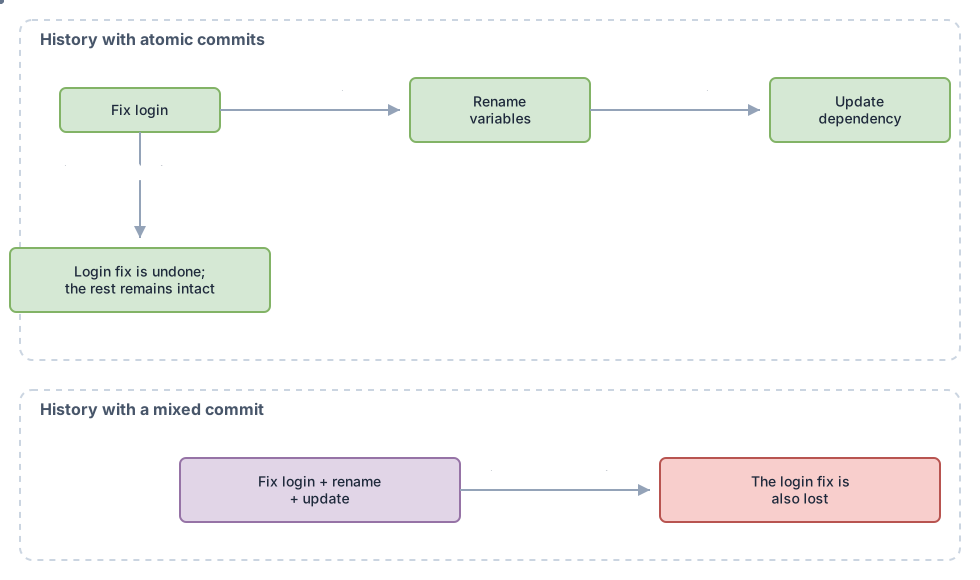
An atomic commit contains a single, complete logical change, and nothing else. If you fix a bug and, along the way, rename three variables and bump a dependency, that’s three commits, not one.
The practical test is the sentence: if describing what a commit does requires the word “and” (“fixes the login and refactors the router”), it’s almost always two commits. Split them.
Why bother? Because the day that login fix breaks production, you want to be able to git revert that fix without dragging the router refactor along with it. A commit that mixes things together can’t be partially undone. You either keep all of it or lose all of it. The granularity you put in today is the freedom you have tomorrow to revert, review, and run git bisect.
This connects directly to how you work with AI: if you ask it for one thing per session, its diffs come out nearly atomic already. If you ask for four things, you’ll have to split them apart yourself afterward. I dig into the fine-grained work of breaking a large change into commits that tell a story in the atomic commits guide; here I’ll stick to the rule: one idea, one commit.
How do you write a commit message that actually serves your team?
The subject line goes in the imperative and describes what the commit does; the body explains why. The imperative isn’t a style whim: the messages Git itself generates (“Merge branch…”, “Revert…”) are already in the imperative, so yours fits right in with the rest.
Compare these two:
# Bad: past tense, no context, useless six months from now
Fixed the VAT bug

# Good: imperative subject + body with the why
Fix VAT calculation for tax-exempt customers

The total applied 21% even though the customer had
tax_exempt=true. Now the exemption is checked before
calculating the rate. Found in invoice #482.
The bad subject tells you what happened. The good one tells you what to look for when the same bug resurfaces. That difference is what separates a history that gets read from one that gets ignored.
One detail that saves team arguments: keep the subject short (aim for around 50 characters), add a blank line, then the body. That blank line isn’t decorative. Git uses the first line as the summary in git log --oneline, in GitHub notifications, and in git blame --porcelain. Run it together with the body and you break that summary.
Keeping secrets out of the repo: the .gitignore you should have
A committed secret stays in the history even after you delete it later, so the only real defense is making sure it never gets in. And it always sneaks in through the same door: the .env with the database key or the API token you upload “by accident” along with the rest of the change.
A minimal .gitignore for any project:
# Secrets and environment: never in the repo
.env
.env.*
*.pem
config/credentials.json

# Build artifacts and dependencies
node_modules/
dist/
.DS_Store
If you’ve already committed an .env, adding it to .gitignore doesn’t remove it from history: Git keeps tracking what it was already tracking. You have to untrack it with git rm --cached .env, commit that removal, and (this is the important part) rotate the secret, because anyone with access to the history has already seen it. A leaked secret is considered burned the second it touched the repo.
With AI, this gets trickier. You ask for a deployment script and it hands you back one with a “sample” password hardcoded in, or throws in a bonus .env.production for good measure. If you accept the diff without looking, that sample secret can end up in the repo. Which is exactly why the next section matters.
Branch names: a convention your team can actually read
A well-named branch tells you at a glance what kind of change it is and what it’s about, without you having to open anything. The pattern that works best for a team is type/short-description:
# git switch is the modern, stable way to create and switch branches
git switch -c feat/export-invoices-pdf
Common prefixes: feat/ for new functionality, fix/ for corrections, chore/ for maintenance tasks, docs/ for documentation. What matters isn’t which one you pick, but that the whole team uses the same one and sticks to it. A convention only you follow isn’t a convention.
I use git switch instead of git checkout on purpose. checkout does too many different things (switches branches, restores files, moves HEAD), and that overload is a classic source of scares. git switch only switches branches, and git restore only restores files. Splitting those two operations into two commands makes it much harder to accidentally stomp on your own work. I compare how each branching convention fits into a full team workflow (Gitflow, GitHub Flow, trunk-based) in the Git workflows guide.
Never rewrite history other people already have
Rewriting a commit that’s already on a shared branch breaks the history for everyone who has it. The rule is simple: you can rewrite whatever lives only on your machine; the moment something is on main or a branch other people use, it’s public history and you don’t touch it.
The specific danger has a name: git push --force. It overwrites the remote branch no matter what, including commits a teammate pushed while you were working. It wipes them out without warning. There’s a much safer version, --force-with-lease, and here’s the difference:
| Situation | --force | --force-with-lease |
|---|---|---|
| Base behavior | Always overwrites the remote | Only overwrites if the remote is where you think it is |
| A teammate pushed commits you don’t have | Loses them without warning | Fails and aborts the push, so you find out |
| When it makes sense | Almost never | Re-pushing your own branch after a rebase |
--force-with-lease isn’t foolproof magic. It compares the remote against your local tracking branch, and some editors run git fetch in the background; if that updates your tracking reference right before the push, the “lease” no longer protects anything. To lock it down completely, Git has --force-if-includes, which additionally requires that you’ve locally integrated what’s on the remote. But the habit I want you to take away is more basic: swap --force for --force-with-lease in your muscle memory and in your team’s aliases. That one-word change prevents most disasters.
Review the AI’s diffs before committing
Accepting a generated diff without reading it is the fastest way to put a bug with your name on it in git blame. The agent signs the suggestion; you sign the commit. And Git already ships the tools to review before anything enters the history.
git add -p          # approve chunk by chunk, not the whole file
git diff --staged   # look at exactly what you're about to commit
git commit
git add -p presents the change in chunks (hunks) and asks you, for each one, whether you want it. This is where you catch the extra line the AI slipped in, the forgotten console.log, the dependency you never asked for. Instead of swallowing two hundred lines at once, you approve the ones you understand and leave out the ones you don’t.
git diff --staged is the final check before you pull the trigger: it shows exactly what’s staged for the commit, nothing more, nothing less. If you couldn’t explain what you see there in a code review, don’t commit it yet. This pair of commands turns “I trust the AI got it right” into “I’ve seen exactly what’s going in.” With an agent in the loop, that step stops being optional.

Common mistakes that ruin a history
The two-hundred-line “wip” commit. It’s the most common and the most expensive one. It mixes features, fixes, and noise into a block that’s impossible to review or partially revert. The cure is a habit, not technology: commit when you finish an idea, not whenever you happen to remember.
The “fix” or “changes” message. It documents nothing. A month from now, git log is a list of “fix, fix, changes, fix” that’s useless to everyone, starting with you.
Believing git commit -am adds new files. It doesn’t, and this misunderstanding causes real bugs. The -a flag stages modified or deleted files that Git was already tracking; new files Git has never seen stay out until you run git add[1]. You think you pushed that freshly created utils/pdf.ts, but it actually stayed on your machine. Your teammate’s build blows up on an import that doesn’t exist.
--force on a shared branch. It already has a whole section above. If you take away just one thing from this post, make it swapping this for --force-with-lease.
The professional’s checklist
- Each commit contains a single logical change (if you need “and” to describe it, split it)
- The message subject is in the imperative and the body explains why
-
.env,*.pem, and credentials are in.gitignorebefore the first commit - Branches follow a team convention like
feat/short-description - You never run
--forceon a shared branch; you use--force-with-lease - You review every AI diff with
git add -pandgit diff --stagedbefore committing - A secret that touched the repo gets rotated, not just deleted
Apply these seven points for a week and your history goes from a dumping ground to documentation your team actually appreciates. If you work on a team, the next step is agreeing on these rules together: how PRs get reviewed, who merges and when. I cover all of that in the guide to working as a team with Git and GitHub.
Reading the checklist is the first step; internalizing it comes from practicing on a real repository. If you want to build these habits from scratch, with guided exercises and corrections on real commits, we work through it step by step in the Git from Zero to Professional course.
Sources
- git commit (official Git documentation): confirms that the
-aflag only stages already-tracked files and doesn’t add new ones. - git switch (official Git documentation): the standard command for creating (
-c) and switching branches; no longer carries the experimental note. - git push (official Git documentation): describes
--force-with-leaseand how it checks the remote’s expected value before overwriting. - git blame (official Git documentation): the default format annotates hash, author, date, and line number; the commit message only shows up with
--porcelain.
Frequently Asked Questions
Does git commit -a add the new files I’ve created?
No. -a (and therefore -am) only stages changes to files Git was already tracking: the modified and deleted ones[1]. A new file you’ve never added with git add stays out of the commit no matter how many -a flags you throw at it. It’s one of the most expensive misunderstandings among people starting out with Git best practices, because the commit “looks” complete when it isn’t.
Does git blame show the commit message for each line?
In its default format, no: it gives you the abbreviated hash, the author, the date, and the line number[4]. To see the message summary associated with each line you need git blame --porcelain, which does include the summary field. If you want the full message, copy the hash blame gives you and run git show <hash>.
Is git switch still experimental?
No. It was introduced as experimental in 2019, but it’s been a stable, recommended part of Git for years now; the “experimental” note was removed from the official documentation[2]. You can use git switch and git restore with full confidence in any reasonably current version. git checkout still exists for compatibility, but for day-to-day work the two newer commands are clearer and safer.
Can I force push my own feature branch?
Yes, and it’s common. After a rebase or a commit --amend on your personal branch, you need to rewrite what you already pushed, and that’s a legitimate use of force push. Always do it with --force-with-lease instead of --force[3]: if nobody else has touched the branch, it behaves the same way; if someone did, it fails and warns you instead of erasing their work. Forcing your own branch is legitimate; forcing one others use can erase their work.
How often should I commit if I want to follow Git best practices?
Whenever you finish a complete idea, not by the clock or by line count. A commit should leave the project in a coherent state: it builds, the tests that existed still pass, and the change can be described in one sentence without “and.” That usually works out to several times a day if you’re working in small increments. If you’ve gone hours without committing, you almost certainly already have more than one logical change bottled up, waiting to be split apart.
Related articles
Working as a Team with Git and GitHub: Remotes, PRs, and Code Review
From a local commit to a shared repo: the distributed model, remotes, the push/pull/fetch cycle, Pull Requests, and code review, without stepping on anyone else's work.
Atomic Commits: Best Practices for a Clean History
What an atomic commit is, why it speeds up code review and makes revert and bisect easier, and how to split your work with git add -p step by step.
GitFlow vs GitHub Flow vs Trunk-Based: Which One to Choose
A senior comparison of the three branching strategies: tradeoffs, when to use each one, and how to migrate without breaking your team.