
AI in customer service: where it helps and where it fails
A no-hype guide to AI in customer service: what to automate safely, where it can cost you money, and why the human in the loop is non-negotiable.

Before putting AI into your customer service, the first decision isn’t which tool to buy. It’s what you let it answer on its own and what you don’t. AI in customer service genuinely helps with the repetitive first-level work, and it fails right where it hurts most: when it closes, on its own, a commitment that binds your company. This article is about that line, where to draw it and why.
I’ll use two technical terms and I’ll define them now so I don’t lean on jargon later. An LLM (a “language model”) is a system that generates the most probable text for a given question. It isn’t a database with your policies inside: it doesn’t look up a fact and return it, it drafts an answer that sounds right. And a hallucination is when that system states, with full confidence, something that isn’t true. It doesn’t flag its own doubt. It sounds just as convincing when it’s right as when it makes things up.
With those two ideas, almost everything else falls into place.
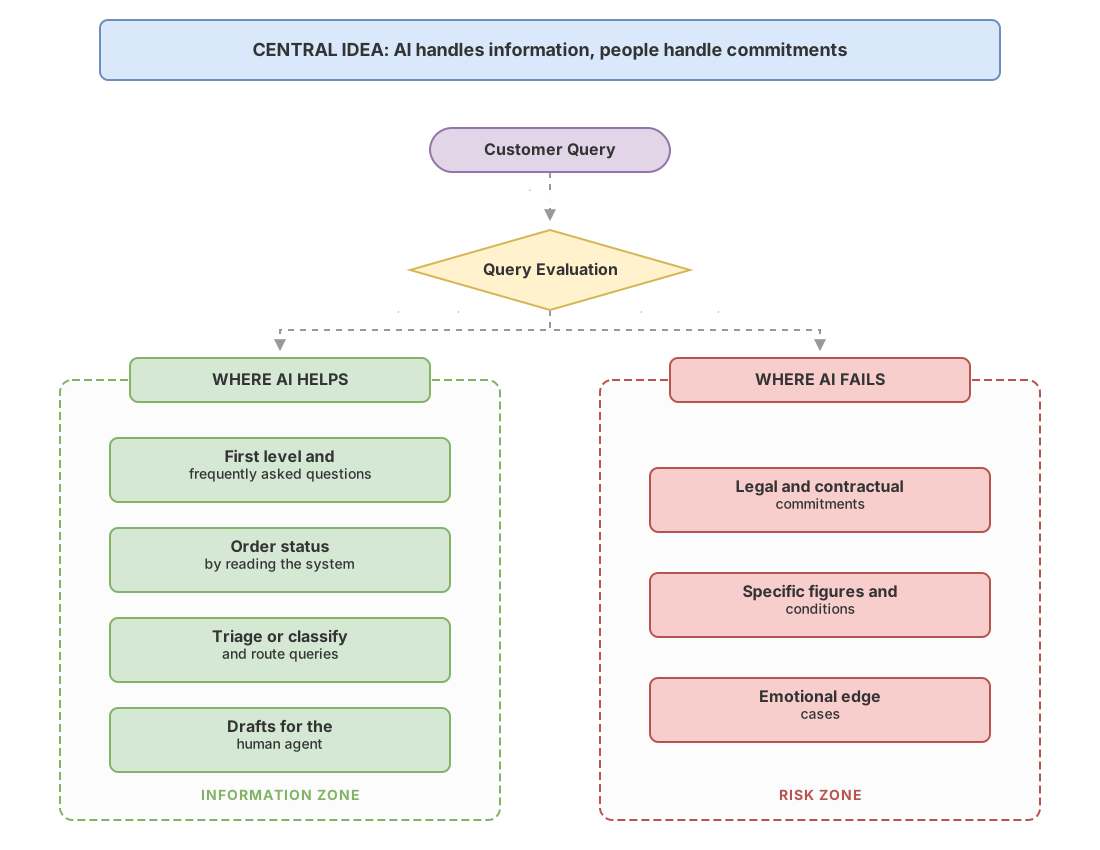
Where does AI actually help in customer service?
AI performs when the query is frequent, the answer is bounded, and the mistake is cheap to fix. That’s where a good chatbot takes volume off your plate without getting you into trouble.
Four areas where it works well:
- First level and frequently asked questions. Opening hours, how to change a password, where the invoice is, what documentation is needed. These are questions your team answers a hundred times a day and that AI can cover at any hour.
- Status of a request. “Where’s my order?”, “did you receive my application?”. If the AI checks the real system and returns the status, it adds immediate value. The key is that it reads the data, not that it guesses it.
- Triage. This means classifying every query that comes in and sending it to the right place: a technical issue to the technical team, a billing matter to admin, a serious complaint to a senior person. The AI reads the message, understands what it’s about, and routes it. It doesn’t solve the case, it places it correctly.
- Drafts for your agent. Instead of replying to the customer, the AI prepares a draft for the person who does reply. The human agent reviews it, adjusts it, and sends it. You gain time without giving up control.
The common thread across these four cases: the AI handles information, not commitments. It gives data that already exists or moves the query to the right place. When you step outside that, the problems begin. This “what to automate and what not to” framework is the same one I apply to the rest of the use cases in a company, and I develop it in the pillar article on AI use cases in companies.
Where does it fail and cost you money?
AI fails the moment its answer commits the company. An LLM drafts what sounds plausible, and “plausible” isn’t the same as “true according to your real terms”.
Three red zones:
Legal and contractual commitments. Warranty terms, the right of withdrawal, a contract clause, legal deadlines. If the model gets this wrong, you don’t have an annoyed customer, you have an obligation a court can force you to honor. We’ll see it in the Air Canada case.
Specific figures and conditions. A price, a discount, a delivery date, the amount of a compensation. The LLM tends to give a concrete figure because it sounds better than “I don’t know”, even when that figure comes from nowhere. And a figure stated through your official channel is a promise.
Emotional edge cases. An angry customer, a vulnerable person, a delicate complaint, a bereavement situation or a serious breakdown. Here it’s not accuracy that fails, it’s tact and judgment. An answer that’s correct but cold does more harm than no answer at all. This is part of a broader pattern about what AI does well and badly that’s worth being clear on before automating anything.
The classic trap: when the chatbot invents a policy
The costliest risk isn’t that the AI can’t answer. It’s that it answers something false with confidence, and your company ends up bound to honor it.
This is what happened to Air Canada. In 2024, a civil tribunal in British Columbia (Canada) resolved the case of a customer whom the airline’s chatbot had misinformed about its bereavement fare policy, giving him to understand he could request a discount after buying the ticket. That policy didn’t work that way. When the customer complained, Air Canada argued, in essence, that the chatbot was responsible for its own answers. The tribunal rejected that, held the airline responsible for what its own system said, and ordered it to compensate the customer.
The lesson for a decision-maker goes beyond “chatbots are dangerous”. It’s concrete: anything your AI says through an official channel counts as if your company said it. There’s no “the machine said it” that gets you off the hook. If you let the AI talk about terms, prices, or rights without anyone validating it, you’re signing a blank check.
And watch out for a privacy detail. If the chatbot handles your customers’ personal data, you’re in GDPR territory: you have to inform people they’re talking to an automated system and take care of what data it collects and how. This isn’t legal advice, but it is a sign that AI in customer service is not only a technical matter.
The human in the loop: what the AI decides and what you decide
The way to automate without exposing yourself is simple to state: the AI prepares and classifies, a person validates any answer that commits the company. I call this pattern the human in the loop, and it’s what separates a sensible rollout from a newspaper headline.
The idea is to split the work by type of decision, not by volume. The AI keeps what’s reversible and informative. The person keeps what binds, what costs money, or what touches someone at a bad moment. Automation doesn’t work like an all-or-nothing switch. You decide task by task who has the final word.
The split is settled with one simple question for each query that comes in:
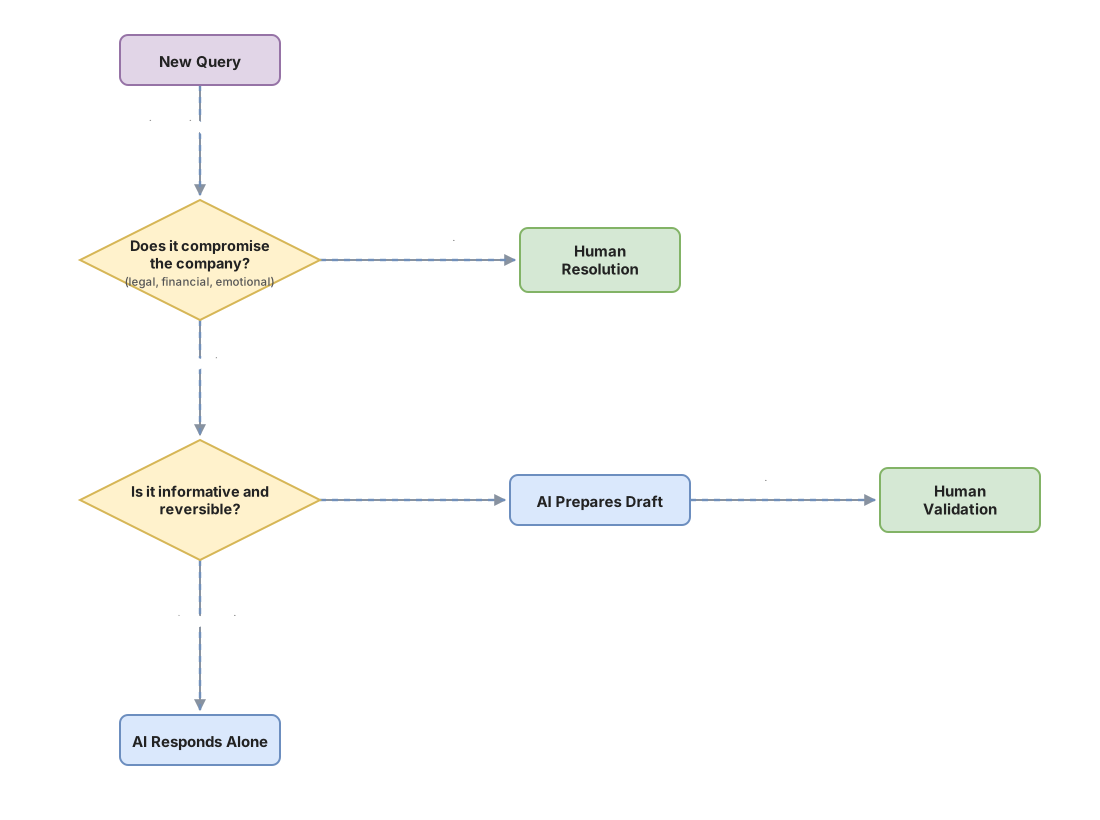
This is the table I’d use to kick off the conversation with your team:
| Support task | Who answers? | Why |
|---|---|---|
| Password recovery | AI alone | Reversible, no commitment, very frequent |
| Order status | AI alone (reading the system) | Returns real data, doesn’t invent it |
| Return policy | AI + human | The AI drafts, a person confirms before sending |
| Complaint with financial compensation | Human only | Commits money and obligations |
| Interpreting a contract clause | Human only | Direct legal risk |
| Angry customer or delicate situation | Human only | Needs judgment and tact, not accuracy |
The human in the loop deserves its own treatment, because designing “when it escalates to a person” is where the game is won or lost. I develop it in the pattern on the human in the loop.
Where do you start without shooting yourself in the foot?
Start with the boring and reversible, measure, and only then expand. The temptation is to unleash the AI to answer everything from day one. That’s exactly how you end up on the list of Air Canada cases.
A low-risk start looks like this:
- Pick two or three very frequent query types that are informative and carry no legal commitment. Start there.
- Always warn the customer they’re talking to an automated system, and leave an easy path to reach a person.
- Connect the AI to your real, up-to-date information. A chatbot fed only with old FAQs will repeat outdated data with full confidence.
- Write down which topics the AI never closes on its own and routes straight to a person.
- Measure from minute one: how many queries the AI resolves, how many it escalates, and in how many the customer ends up asking for a human anyway. That last number tells you whether the AI helps or gets in the way.
This criterion of “what I ask the AI to do and what I keep for myself” is exactly what we work through with examples in the no-hype AI course, built to help you decide without swallowing the promises of people who only sell smoke.
Common mistakes
Letting the AI close commitments. The costliest failure. If the AI gives prices, deadlines, or legal terms without human validation, every answer is a promise your company will have to keep. Spot it by reviewing which topics it can answer on its own today.
Promising “zero humans”. Selling that the AI replaces the whole team is the fast track to a furious customer with no way out. There always has to be a door to a person, and a visible one.
Not measuring. Without data on how many queries it resolves and how many it escalates, you don’t know whether the AI helps or just moves the problem around. An AI that “answers” a lot but leaves the customer unhappy is worse than not having it.
Feeding it stale information. A model with old data doesn’t hesitate: it states the old with the same confidence as the new. If your terms change and the AI doesn’t find out, you have a machine for generating convincing mistakes.
Frequently asked questions
Is AI in customer service going to replace my team?
No, and anyone who sells it that way is selling you smoke. AI absorbs the repetitive first level and frees your team for what really needs judgment: complaints, delicate cases, and decisions that commit the company. The team changes jobs, it doesn’t disappear.
Is it legal to use an AI chatbot to serve customers?
Yes, with conditions. If it handles personal data you’re in GDPR territory, so you have to inform people it’s an automated system and take care of what data it collects. And remember the Air Canada case: your company answers for whatever your chatbot says. This isn’t legal advice, consult a professional for your case.
What’s the difference between a normal chatbot and an AI one?
A classic chatbot follows a closed script: buttons and fixed answers someone programmed. An AI one generates the answer on the fly, which makes it more natural but also capable of making things up. The first is more limited and more predictable. The second is more flexible and riskier if you let it loose.
How much does putting AI into customer service cost?
It depends so much on volume and on the integration with your systems that any concrete figure would be made up. The honest approach is to start small with a low-risk case, measure how much real work it takes off your plate, and decide the investment with that data in hand instead of with a salesperson’s promise.
And if the AI gets something wrong with a customer?
That’s why the human in the loop isn’t optional for anything delicate. For informative and reversible tasks, a mistake is easy to fix. For everything that commits the company, the answer goes through a person before it leaves. The question isn’t whether the AI will make mistakes, it’s which mistake you can afford when it does.
Related articles

AI Use Cases in Business: Which Ones to Prioritize
A framework for knowing which of your tasks are a good fit for AI and which ones are money down the drain: AI use cases in business, no hype.

Human in the loop: what it is and when you need it
What 'human in the loop' means for your business, when you need human review before automating with AI, and when it is a cost you can skip.

What Generative AI Does Well and What It Does Badly
A no-hype guide to deciding which tasks in your business to hand generative AI and which to distrust. Where it shines, where it fails, and how to classify each job.