
AI for Business: When to Use It and When Not To (No Hype)
AI for business without the hype: when it actually makes sense, when it doesn't, and a clear framework for deciding where to start without gambling your business.

The right question isn’t how to use AI in your business. It’s which part of your business it actually makes sense for, and which part it’s going to cost you dearly. That distinction is the whole decision, and almost nobody frames it that way, because almost nobody makes money telling you where NOT to put AI.
Generative AI is neither magic nor hype. It’s a tool that does one specific type of task very well and another very poorly. If you learn to tell them apart, you make good investment decisions. If you don’t, you end up paying for a license to automate a process that already worked, or worse, handing off to a machine something a person should have reviewed. You won’t find a list of miracle tools here. You’ll find a framework for deciding, in your own business, when to use it and when not to.
What Generative AI Actually Is, Without the Noise
Generative AI is a system that produces new text, images, or code from a prompt you give it, predicting what best fits what it has seen before. That word — “predicting” — is the key to everything else. It’s worth defining four terms in plain business language before we go further, because they’re what separates a sound decision from a headache.
A language model (or LLM, the engine behind tools like ChatGPT) is a program that has read enormous amounts of text and learned to continue any sentence with the most probable next word. Picture your phone’s autocomplete, but trained on an entire library and capable of following whole paragraphs coherently. It doesn’t consult a database of facts. It estimates what would sound right next.
From that comes the concept that will save you the most money to understand: hallucination. A hallucination is an answer that sounds perfectly credible and turns out to be false, delivered with the same confidence as a correct one. The model isn’t lying, because lying requires knowing the truth and hiding it. It simply fills the gap with whatever is most plausible. If you ask it for the exact amount on an invoice it has never seen, it will give you a round, convincing number, and you’ll have no way of knowing it made it up unless you check yourself.
The last term is deterministic. A deterministic process always gives the same output for the same input: a spreadsheet adds 2 and 2 and returns 4 today, tomorrow, and a year from now. Generative AI is not deterministic. You can ask it the same question twice and get two different answers, both reasonable. For a conversation, that doesn’t matter. For a process where you need the result to be identical and auditable, it’s a serious problem.
With these four terms, you already have what you need to decide. If you want the mechanism underneath — how a model learns to predict and why it works so well — I cover it without jargon in how generative AI works. You won’t need it for what comes next.
Why Start With the NO?
Because the most expensive mistake isn’t failing to use AI where it would help. It’s putting it where it shouldn’t be. Starting with the NO is what saves you money, and it’s exactly the opposite of what most people are going to try to sell you.
There are four places where generative AI shouldn’t go, and it’s worth being clear on them before any success story. The first: any task that demands one-hundred-percent accuracy with nobody reviewing it. A figure in a contract, a calculation headed to the tax office, a data point a client is going to use to make their own decision. AI predicts what’s plausible, not what’s true, and what’s plausible is sometimes wrong.
The second off-limits area is any process where a made-up answer carries legal, financial, or reputational cost. If a hallucination can end up in a lawsuit, a wrongly executed transfer, or an angry customer posting about it, the time saved doesn’t compensate. The question isn’t whether the model will get it wrong. It will. The question is what happens the day it does.
And the third, the one most people overlook: processes that already work well and cheaply. If you have a workflow that costs little, fails rarely, and your team has mastered, adding AI to it isn’t modernizing it. It’s adding a new point of failure and a supervision cost you didn’t have before. AI isn’t an improvement by default. It’s a tool that wins in some places and loses in others.
The fourth is quieter, which is exactly why it slips through: processes where you later need to audit and explain why something was decided. Generative AI doesn’t leave a clear trail of why. If tomorrow a client, an auditor, or your own boss asks why the system resolved a case the way it did, you won’t have an answer that holds up.
Here’s the point I want to drive home: hallucination isn’t a bug that the next version is going to fix. It’s how a system that predicts instead of looking things up works. You can reduce it, contain it, put a person behind it who catches it. You cannot eliminate it by trusting the model to improve. Any AI strategy that ignores this is built on sand.
What It Does Well and What It Does Poorly
It does well anything that tolerates a draft someone reviews, and it does poorly anything that demands accuracy or consistency without supervision. That sentence sums up the whole table, but the table helps you see it case by case.
| Task | Does generative AI help? | Why |
|---|---|---|
| Writing a first draft (email, proposal, product description) | Yes, a lot | Tolerates review; a person corrects it before sending |
| Summarizing long documents | Yes | Saves time, and if something seems off, you go back to the original |
| Classifying or sorting incoming items (tickets, emails) | Yes, with oversight | Speeds up the bulk of it, but edge cases should be reviewed |
| Giving an exact figure for an invoice or contract | No | It can invent a number with total confidence |
| Deciding alone on something with legal or financial consequences | No | It doesn’t know what it doesn’t know, and nobody has validated it |
| Guaranteeing the same answer twice | No | It’s not deterministic: the same question can produce different answers |
Notice the pattern in the right-hand column. Where AI wins, there’s always a human afterward who can catch the mistake before it matters. Where it loses, the result goes straight to having consequences with no filter. It’s not that the model is arbitrarily good at some things and bad at others. It’s that some things allow for review and others don’t.
There’s one limitation that deserves its own sentence. Generative AI doesn’t know what it doesn’t know. An experienced professional will tell you “I’m not sure about this, let me check.” The model won’t. Faced with a question about something it doesn’t know, it fills the gap just as naturally as if it did. That absence of doubt is exactly what makes it dangerous in the hands of anyone who doesn’t review it.
So Where Does It Actually Make Sense?
It makes sense when the task tolerates a reviewable draft, when a person validates it before the result has consequences, and when the cost of an occasional error is low or contained. That’s the core of the framework. Those three criteria turn into five practical questions, two of which add the operational angle: whether the current process already works well and cheaply, and whether you can start small and measure. Everything else is detail.
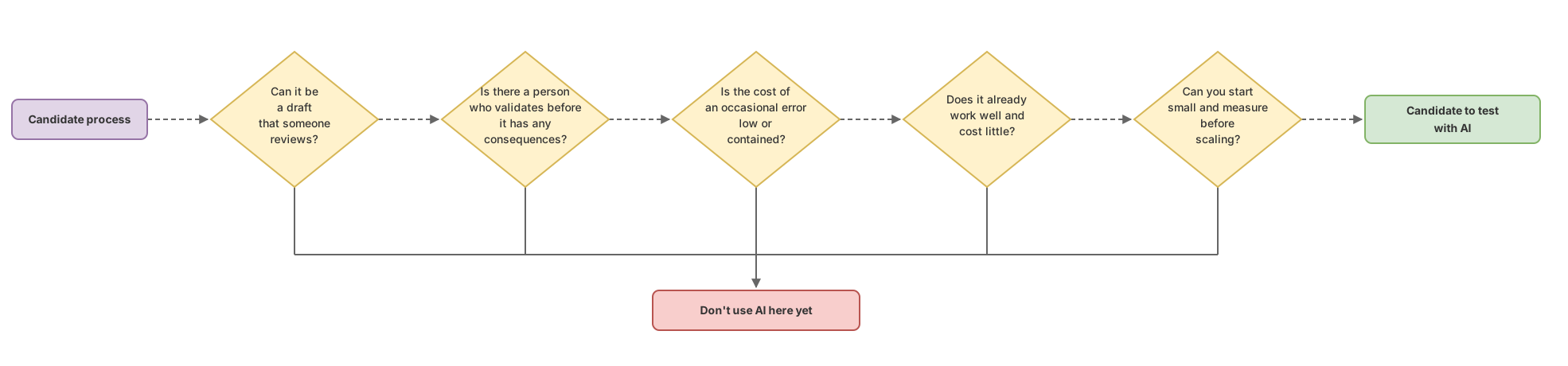
So you don’t have to rely on intuition, turn it into concrete questions. Before putting AI into any process in your business, answer these five:
- Can the output be a draft that someone reviews before using it? If not, the answer is probably already no.
- Is there an identified person who validates it before the result has consequences? If not, no.
- What exactly happens if the model gets it wrong once? If the cost of that error is high, no.
- Does the current process already work well and cheaply? If yes, don’t touch it yet.
- Can you start small and measure before scaling? If you can’t measure, wait until you can.
If a process passes all five, it’s a candidate. If it fails the second or the third, set it aside no matter how tempting it is. This filter isn’t theoretical: it’s the one used by people who put AI to work without shooting themselves in the foot. You’ll find concrete examples of which processes pass the filter, sector by sector, in real-world AI use cases for businesses. What matters to me here is that you leave with the framework, not the list.
What Is It Really Going to Cost?
The software license is the small, most visible part of the cost. The big part — the one almost nobody tells you about — is everything around that license needed for AI to actually add value instead of causing problems.
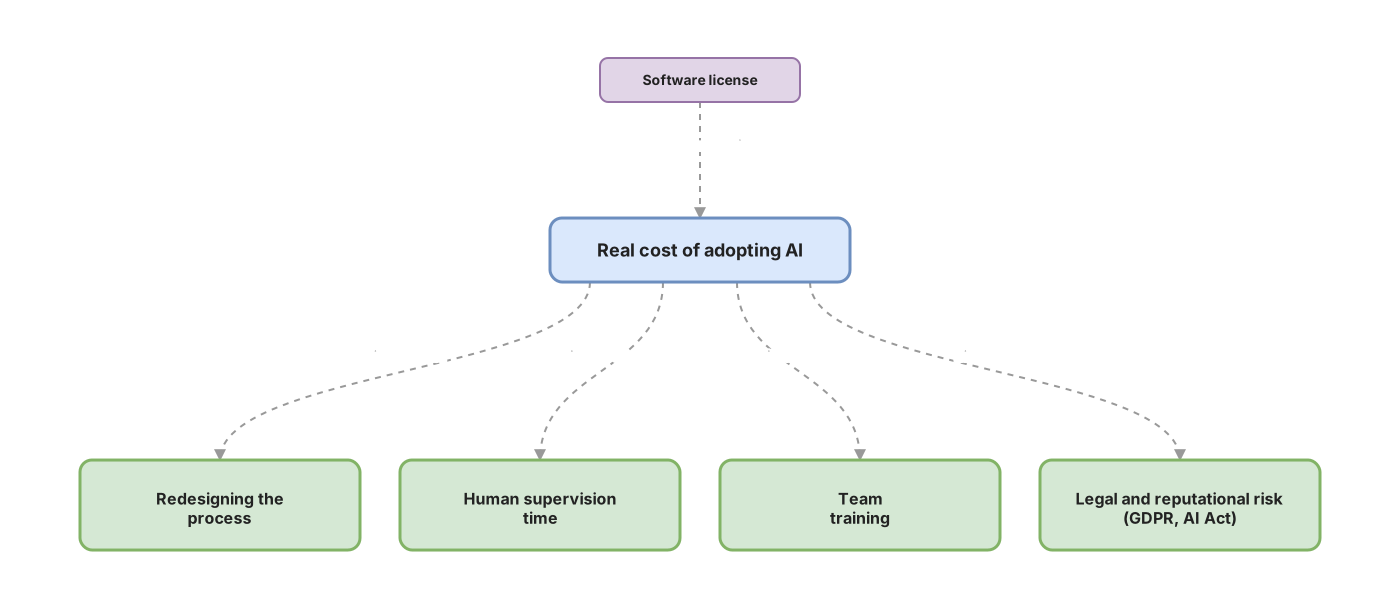
Redesigning the process costs money. Plugging AI into a workflow isn’t as simple as switching it on: you have to decide where it fits in, who reviews its output, what happens when it fails. Human supervision costs money, because the time of the person validating drafts is real work time, not zero. Training costs money, because your team has to learn to use the tool and, above all, to distrust it at the right moment. And then there’s risk, which is a cost even though it won’t show up on any invoice until the day it shows up all at once.
The risk businesses underestimate the most is around data. When you paste a document containing customer information into an AI tool, that data leaves your company and travels to an external provider. That’s where the GDPR comes in — Europe’s data protection regulation, which governs what you can do with your customers’ and employees’ personal information. The general principle is easy to understand even if the details aren’t: personal data isn’t shared with a third party lightly, and you remain responsible for it even when a machine handles the process.
In parallel, there’s the EU AI Act, whose official text is Regulation (EU) 2024/1689.[1] Its approach is to classify AI uses by risk level and require more obligations the higher the risk, with a tier of prohibited uses, another of high-risk uses with strict requirements, and most everyday uses subject to minimal or purely transparency obligations.[1] For most of the office tasks you’re thinking of (drafting, summarizing, classifying), you’ll be in the least demanding tier, but it’s worth knowing the framework exists and that it depends on what you use AI for, not on the fact that you use it.
This isn’t legal advice. It’s the bird’s-eye map so you know what to ask. Before processing personal data with AI or setting up a sensitive use case, have that conversation with whoever handles your data protection or legal counsel. The complete breakdown of the risks, what to look at for each one, and how to contain it, is in the practical guide to AI risks in business.
Where Do I Start Without Betting the Farm?
Start with a small, error-tolerant process that has a person in charge, measure it, and only then decide whether to scale. That’s the complete order, and there’s no shortcut worth taking.
In practice, this means: pick a process that passes the five-question filter and whose failure won’t cost you anything serious — the first draft of support replies, or a draft of product descriptions. Assign a human owner to review every output for the first few weeks. Track how much time you’re actually saving and how many errors your reviewer catches. With those two data points, you stop deciding based on pressure or fashion. You decide with evidence from your own business.
The AI Without Hype course is built on exactly this: training your decision-making judgment with real cases, so you can look at any process in your business and answer for yourself, without depending on whatever a vendor is selling you. It doesn’t teach tools, which change every month. It teaches you to decide, which doesn’t expire.
Before you decide for real, there are four angles worth having clear, and each has its own guide on this site. If you’re after the mechanism underneath, there’s how generative AI works. If you want to see which processes pass the filter in real businesses, there are the real-world AI use cases for businesses. If what worries you is what can go wrong, the practical risk guide breaks down each one. And this piece you’re reading is the framework that ties the four together: when to say yes, when to say no, and in what order to think about it.
Starting with the NO isn’t pessimism. It’s the cheapest way to arrive at the YES that’s actually worth it.
Sources
- Regulatory framework on AI — European Commission — official name of the regulation (Regulation (EU) 2024/1689) and its risk-tiered classification approach (prohibited, high-risk, transparency, minimal risk).
Frequently Asked Questions
Do I need a technical team to start using AI in my business?
For the most common tasks, no. Drafting emails, summarizing long documents, classifying incoming items, or preparing a first proposal can be done with off-the-shelf tools, no coding required. What you do need isn’t a technical profile, but someone with judgment who reviews the outputs and knows when to be skeptical. Real technical capability only comes into play once you want to integrate AI into your own systems or automate more deeply.
Is it legal to use generative AI with my customers’ data?
It depends on which data and how. As soon as you put personal information about customers or employees into an AI tool, that data goes to an external provider and you’re in GDPR territory, where you remain responsible for it. There are conditions to meet, not a blanket ban. This isn’t legal advice: before processing personal data with AI, check with whoever handles your data protection.
Is AI going to replace my team?
Not in the way the hype tells it. Generative AI produces drafts and first versions that someone has to review, not reliable final output without supervision. It changes how your team works: it removes time from the mechanical parts and shifts it toward reviewing, deciding, and dealing with customers. Anyone promising you massive headcount cuts thanks to AI is selling you something, not explaining how it actually works.
How much does it really cost to use AI in a business?
More than the license and less than you fear, if you start right. The cost breaks down into four items:
- Software license. The visible part, and almost always the smallest.
- Process redesign. Deciding where AI fits in, who reviews its output, and what happens when it fails.
- Human supervision. The time of the person validating each draft, which isn’t zero.
- Training and risk. Teaching the team to use it and to be skeptical at the right moment, plus the legal and reputational risk that doesn’t show up on any invoice until the day it does, all at once.
That’s why it’s worth starting with a small, measurable process: that way the cost is contained and you know what you’re saving before you spend more.
What’s the clearest sign that I should NOT use AI in a specific process?
That nobody reviews the output before it has consequences. If the AI’s result goes straight to a customer, a legal document, or a decision involving money without a person validating it, that process isn’t a candidate no matter how tempting the savings look. AI for business works when there’s a human at the right moment. Without one, every win is free and every mistake costs you in full.
Related articles
AI Risks at Your Company: A Guide to Not Crashing and Burning
An honest guide to AI risk in the workplace: where it can go wrong, how to contain it, and what to check before committing budget. No hype.
AI Use Cases in Business: Which Ones to Prioritize
A framework for knowing which of your tasks are a good fit for AI and which ones are money down the drain: AI use cases in business, no hype.

How generative AI works, explained without the jargon
Generative AI doesn't look up truths: it predicts the most plausible word. That mental model explains why it hallucinates, why it changes, and where it fails.