
Commit Messages: Best Practices with Examples
Learn to write useful commit messages: imperative-mood subject lines, the 50/72 rule, the why over the what, and Conventional Commits, with examples.

You open git log to figure out when login broke. Three months ago it worked fine. And what you find is a column of twenty lines that say “changes”, “fix”, “more changes”, “wip”. None of them tell you anything. You don’t know which commit touched login or why, so you’re stuck opening each diff blind. That’s the price of not caring about commit messages: your history stops being a source of information and turns into noise.
This post assumes you already know how to run git add, git commit, and git push, but you’ve never been quite sure what to write in the message or why it matters. If you’re still missing the Git basics, start with the Git basics guide and come back after. Here we’re getting concrete: how to write a message your future self, three months from now, will thank you for.
Why does what you write in a commit matter?
Git’s history is documentation, and the commit message is the only part you write by hand. The diff (the + and - lines showing what changed) is generated by Git on its own. So are the date and author. The only thing that depends on you is explaining what happened and why. If you leave it at “fix”, you’re throwing away half the tool’s usefulness.
Think of the message as a letter to your future self. Six months from now you won’t remember why you changed that if. Your teammate, who wasn’t even there, even less. When someone reads the history with git log to view the history, the first thing they see is your subject line. Compare these two:
# A history that says nothing
a3f0c21 changes
7bd9e14 fix
c8e2a05 more changes
d1f4b90 wip
e0a7c33 wip again
# Same work, told well
a3f0c21 Fix negative cart total when applying coupons
7bd9e14 Add email validation on signup
c8e2a05 Remove console.log calls from checkout
d1f4b90 Bump payments library to 4.2
e0a7c33 Document the password recovery flowThe second one you read top to bottom and you know exactly what happened over the last week. The first one forces you to open every commit. Writing one or the other costs the same, but the outcome for whoever reads it is the opposite.
The structure of a good message
A good message has two blocks separated by a blank line: the subject and the body. The subject is the first line, the one that sums up the change at a glance. The blank line separates them, and Git uses it to tell them apart, so don’t skip it. The body, which is optional, is where you go into detail when the change needs context.

On length, there’s a widely repeated convention, the 50/72 rule[1][3]: the subject at around 50 characters and body lines at around 72. It’s not a law or a limit Git enforces. It’s a round number that keeps the subject readable in any tool and keeps the body from running off the screen. Go a little over and nothing breaks; write a 150-character subject and it gets truncated almost everywhere.
Here’s what a complete message looks like:
Fix negative cart total when applying coupons

When a coupon exceeded the cart amount, the total went
negative and the payment terminal rejected the charge.
The total now never drops below zero.

The bug only showed up with fixed-amount coupons, which is
why it passed the first test, which used percentages.
For a simple subject, -m on one line is enough. When you need a body, it’s more comfortable to skip -m: Git opens your text editor so you can write the subject and body at your own pace[1].
# Subject on one line, quick
git commit -m "Add email validation on signup"

# Without -m: Git opens the editor to write subject + body
git commit
Why is the subject line in the imperative?
The subject is written in the imperative, like a command: “Add”, “Fix”, “Remove”, “Update”, never “Added” or “Fixed”. It’s the convention Git itself follows in the messages it generates automatically (when you do a merge, it writes “Merge branch…”, not “Merged”). Following the same convention as the tool makes the whole history read consistently.
There’s a trick to check whether your subject is right: prepend “If applied, this commit will…” and check that the sentence fits[3].
- “If applied, this commit will fix the negative total.” Fits.
- “If applied, this commit will fixing the total.” Doesn’t fit.
The imperative can feel a bit stiff at first (“Add”, “Fix”), but it’s the shortest and most consistent form. Pick one and stick with it across the whole project. The worst outcome is mixing “Add”, “Added”, and “Adding” on the same screen.
The diff already says the what. Write the why
The most common mistake a junior makes isn’t writing badly, it’s writing what’s already visible. If your commit changes price > 0 to price >= 0, don’t write “Change > to >=”. The diff already tells you that. What the diff can’t tell you is why: “Allow free products in the catalog”.
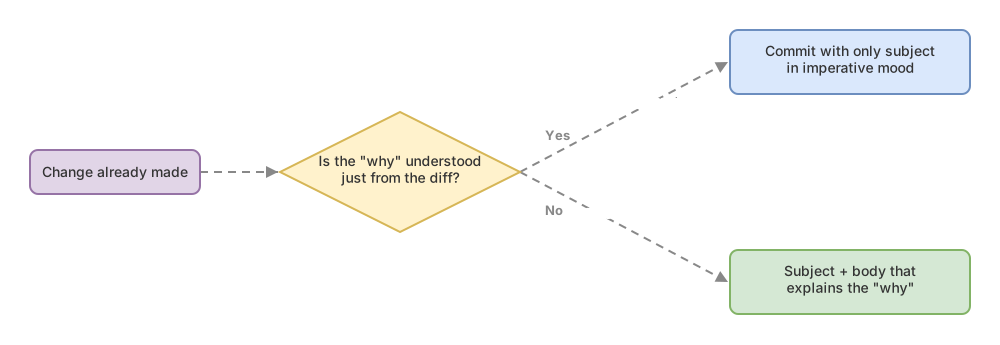
The subject says what changed in one line. The body says why, and you only need it when the why isn’t obvious. Renaming a variable doesn’t need a body. A logic change that fixes a weird bug does: what was failing, under what conditions, and why this is the fix. That context is gold when someone (you included) comes back to the code six months later and wonders “why is this like this?”.
Conventional Commits: an optional convention
Conventional Commits is a convention that formats the subject: a type, an optional scope in parentheses, a colon, and the description[2]. The shape is type(scope): description.
feat(login): support Google sign-in
fix(cart): prevent negative total with coupons
docs(readme): explain how to start the local environment
The spec only defines two types with special meaning: feat for a new feature and fix for a bug fix. The rest (docs for documentation, refactor for reorganizing without changing behavior, test, chore, and so on) are common types the convention allows but doesn’t mandate[2]. The scope in parentheses is optional and signals which part of the codebase you touched: login, cart, api, payments.
What’s the point of so many prefixes? Making the history machine-readable, not just human-readable. Some tools read the types and generate the changelog or bump the version number automatically. Even if you don’t use those tools, a subject starting with fix(cart): tells you at a glance what kind of change it is and where. It’s not mandatory, but it’s so widespread you’ll see it in almost any serious project.
Examples: from bad to good
The fastest way to train your eye is to see real messages before and after. This is the table I run through mentally in any code review, line by line:
| Bad message | Why it fails | Improved version |
|---|---|---|
fix | Doesn’t say what was fixed or where. A month from now it’s indistinguishable from the other ten “fix”es | Fix VAT rounding on invoices |
login changes | Vague and in descriptive present tense, not imperative. “Changes” could be anything | Add lockout after five failed login attempts |
Added test | Past tense instead of imperative, and doesn’t say which test | Add test for free-shipping calculation |
Update | Generic, no context | Update the checkout button copy |
fixed a bunch of checkout stuff and tweaked the header while I was at it | One message for two unrelated changes | Two separate commits, one per change |
Look at the last row. There’s no fixing that message, because the problem is in the commit itself: it bundles too much together. And that brings us to the mistake words alone can’t solve.
Common junior mistakes
Vague messages. “changes”, “fix”, “wip”, “more stuff”. They’re easy to write and cost nothing in the moment. The bill arrives later, when you search the history for something and find nothing.
The junk-drawer commit. You bundle the checkout fix, a style change, and a README typo into a single commit. It doesn’t matter how well you write the subject: no message can summarize three unrelated things. The bad message here is just the symptom. The cure is smaller commits, one per change with its own purpose. That’s an atomic commit, and it has its own guide at how to make atomic commits.
Writing in the past tense. “Added X”, “Fixed Y”. Not a big deal, but it breaks consistency with the rest of the history and with what Git itself generates. Switch to the imperative and you’re done.
Stating the what when the why isn’t obvious. We already saw this: “Change the value to 0” adds nothing; “Allow empty carts after removing the last item” does.
A mile-long subject with no body. Cramming the whole explanation into the first line until it hits 200 characters. If you need that much explanation, it belongs in the body. The subject summarizes; the body details.
Checklist for your next commit
- The subject is in the imperative (“Add”, “Fix”) and is around 50 characters.
- The subject passes the “If applied, this commit will…” test.
- If the why isn’t obvious, there’s a blank line and a body that explains it.
- The body gives the why and the context, without repeating what the diff already shows.
- The commit does exactly one thing with its own purpose (if not, split it).
- If your team uses Conventional Commits, the subject starts with its type (
feat,fix,docs…).
Practice with real commits
Reading about good commits is fine, but the habit comes from writing them. If you want to go from “wip” to a history your team will thank you for, the Git from zero to professional course walks you through the full workflow with real exercises, not just theory.
Sources
- Official
git commitdocumentation (git-scm.com): confirms that without-mthe editor opens, that-mpasses the message inline, and that--amendrewrites the last commit. - Conventional Commits v1.0.0 (conventionalcommits.org): the
type(scope): descriptionformat, withfeatandfixcarrying special meaning and the rest as optional. - How to Write a Git Commit Message, by Chris Beams: the popular origin of the 50/72 rule and the imperative-mood trick.
Frequently Asked Questions
What language should I write commit messages in?
Whatever language your team uses, and consistently. If the project is internal and everyone speaks the same language, write in that language. In open source projects and international teams, English is the norm. What really matters is consistency: not mixing the two languages in the same history.
How long should the subject be?
Around 50 characters is the usual reference point (the 50/72 rule). It’s not a strict limit: going a bit over doesn’t break anything. Only exceed it when you truly can’t summarize the change any shorter, and never write a 200-character subject to cram the whole explanation in there.
Do I have to use Conventional Commits?
No. It’s an optional convention, widely used but not mandatory. Use it if your team or project follows it, since keeping the format then helps changelog and versioning tools. If nobody around you uses it, good imperative-mood commit messages already get you most of the way there.
Can I fix the message of my last commit?
Yes, with git commit --amend. It rewrites the last commit and lets you edit the message. One caveat: if you already ran git push, --amend changes history that others may already have, so avoid it on commits that are already shared unless you know what you’re doing.
Does git blame show me the commit message?
No. git blame shows, for each line, the abbreviated commit hash, the author, the date, and the line number, but not the message. To read the message, copy that hash and pass it to git show <hash>, or look it up in the history with git log. That’s where your good messages end up paying off.
Related articles

Git from scratch: what it is, why it exists, and how to make your first commit
Git is a mental model before it's a list of commands you memorize. This guide covers everything from the why to your first commit, assuming zero prior knowledge.

Atomic Commits: Best Practices for a Clean History
What an atomic commit is, why it speeds up code review and makes revert and bisect easier, and how to split your work with git add -p step by step.

git log: how to view and navigate your commit history
Learn to read your commit history with git log: the anatomy of a commit, the --oneline view, what HEAD is, and how to exit the pager without panicking.