
Agent vs subagent in Claude Code: what sets them apart
A subagent is an agent another agent launches to hand off a task with its own context. How it differs from the agent and when to use one in Claude Code.
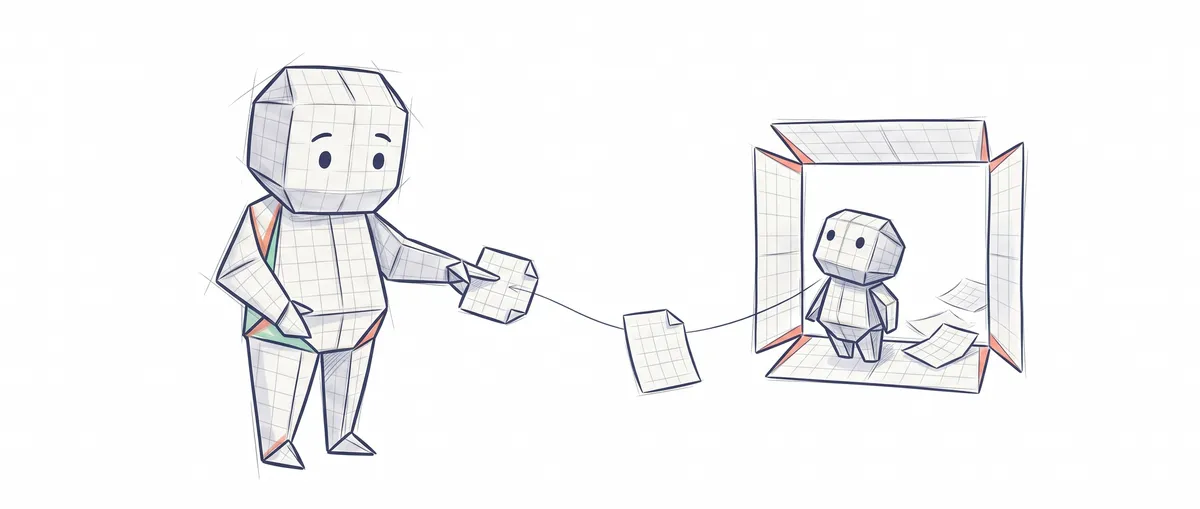
An agent is the system that works for you: a model that decides, tools it executes, and a loop that repeats until the job is done. A subagent is an agent that another agent launches to hand off a subtask, with its own context window, and that returns only a summary. In Claude Code, your main conversation is the agent, and subagents are the helpers it passes work to.
To follow the rest you need two ideas. The first is what an agent is, which I explain from scratch in what an AI agent is and how it differs from a chatbot. The second is the context window: all the text the model has in front of it at any moment, meaning your messages, its replies, the files it has read, and the output of every command it has run. It has a limited size, and when it fills up with noise the model does worse work. If you want to dig deeper, I cover it in context windows and good practices.
Agent vs subagent, side by side
| Agent (your main conversation) | Subagent | |
|---|---|---|
| What it is | The system you talk to: model, tools, loop, and stop condition | An agent the main one launches for a specific task |
| Who starts it | You, when you open Claude Code | The main agent, because the task matches the subagent’s description or because you ask for it |
| What it sees at the start | Your whole conversation | A fresh window with the brief Claude writes for it, its own system prompt, and your CLAUDE.md files. Not your history |
| What it returns | Answers and changes, turn by turn | A final summary to the main agent |
| Tools | Whatever your session has | Whatever you allow in its definition (if you don’t restrict anything, it inherits the available ones) |
| Where it comes from | Built in | Built-in ones (Explore, Plan, general-purpose) or a Markdown file of your own in .claude/agents/ |
The row that matters is what it sees at the start. Think of asking a colleague to read through forty log files and tell you only which test failed. You don’t want forty files on your desk, you want the conclusion. But your colleague wasn’t in this morning’s meeting either, so they only know what you put in the brief.
That trade-off is the whole mechanism: you get a clean main conversation and you pay for it with a helper that starts knowing nothing about what you’ve discussed.
What a subagent is in Claude Code
A Claude Code subagent is a specialized assistant that works in its own context window, with its own system prompt (the fixed instructions that define its role), its own tools, and its own permissions [1]. Claude reads the description of every available subagent and, when a task fits, delegates it. The subagent does the work on its own and returns the result.
If you use Claude Code, you’ve probably already seen one at work without asking for it, because it ships with several built-in ones and Claude reaches for them when it sees fit [1]:
- Explore and Plan are read-only. Explore searches and understands code without touching anything; Plan does that same research when you’re in plan mode, the mode where Claude studies the code and proposes a plan before changing anything.
- general-purpose is for multi-step tasks that need to explore and also modify files.
And then there are your own.
Example: your own subagent, in a file
A custom subagent is a Markdown file with a YAML header. If you save it in .claude/agents/ inside the project, you can commit it to the repository and the whole team uses it; if you save it in ~/.claude/agents/, you have it in all your projects [1]. This one checks the tests and can’t fix anything:
---
name: test-runner
description: Ejecuta los tests y resume solo los que fallan. Úsalo después de cambiar código.
tools: Read, Grep, Glob, Bash
model: haiku
---

Ejecuta la suite de tests del proyecto. Devuelve solo los tests que fallan,
con su mensaje de error y el archivo afectado. No intentes arreglar nada.
Line by line: name is its identifier and description tells Claude when to delegate to it (here: run the tests and summarize only the failing ones). Those are the only two required fields [1]. tools is the list of tools it can use; if you omit it, it inherits every available one. model picks the model it works with, and a cheaper one is enough here to read test output. The text below the header is its system prompt, which in this case asks it to report failing tests with their error and file, and not to try to fix anything.
Notice the difference between the last sentence of the prompt and the tools line. “Don’t try to fix anything” is a request the model will almost always respect. The tool list is a limit: without Edit or Write, even if it wanted to edit a file it would have nothing to do it with.
To use it, Claude can delegate to it on its own, or you ask for it: just name it (“use the test-runner subagent to check the tests”) or mention it with @ (picking it from the list that appears, or typing @agent-test-runner), which guarantees that this subagent runs and not another one [1]. If you read older tutorials that talk about the Task tool, it’s the same thing: in version 2.1.63 it was renamed Agent, and the old references still work as aliases [1].
When to use a subagent and when to stay in the main conversation
A subagent pays off when the work generates a lot of noise and you only care about the conclusion. The official documentation boils it down to three cases: verbose output you don’t need in your context, tools or permissions you want to restrict, and self-contained work that fits in a summary [1]. Turned into concrete examples:
| Situation | Best option |
|---|---|
| Run the tests and keep only the failing ones | A subagent: the output is long and the summary is all you need |
| Research several modules that don’t depend on each other | Several subagents in parallel, one per module |
| A code review that must not be able to touch files | A subagent with read-only tools |
| Iterate on a design with you, with lots of back-and-forth | The main conversation |
| A small change in a file you’re both already looking at | The main conversation. A subagent starts from scratch and would take a while to catch up |
| A procedure you repeat that needs to see your conversation | A skill, which loads into the main conversation instead of running in isolation |
The price of delegating is in the handoff. Since the subagent doesn’t see your history, the only thing it knows about the task is the message Claude writes when delegating. Your CLAUDE.md files do reach it, but whatever you agreed on in the conversation doesn’t: if you told Claude twenty messages ago not to touch the vendor/ folder, repeat it when you ask it to delegate, because the subagent never read it. And there’s a second cost people forget: each subagent spends its own tokens (the chunks of text the model reads and writes, which is how usage is measured), and all those results come back to your main conversation, so launching many that return long reports ends up filling exactly the window you wanted to protect [1].
When it really pays to split a task across several agents in parallel, and when they end up making decisions that clash with each other, is a debate with data on both sides that I go through in context engineering.
Delegating to a subagent is a specific case of a more general pattern: one agent that coordinates and hands work out to other, specialized ones. That pattern, and the ones around it, are what I work through with exercises in the course Design Patterns for AI Agents.
My rule of thumb is simple: if the answer I need fits in a paragraph but the work to get it fills screens of output, I hand it to a subagent. If I’m going to have to correct its course every couple of messages, I keep it in the main conversation.
Sources
- Create custom subagents, official Claude Code documentation (Anthropic): definition of a subagent, isolated context at startup, built-in subagents, file format and fields, ways to invoke them, when to use subagents vs the main conversation, nesting, and the rename from
TasktoAgent.
Frequently Asked Questions
What’s the difference between an agent and a subagent?
An agent is the complete system that works for you: a language model that decides what to do, tools to do it with, a loop that repeats, and a stop condition that tells it when it’s done. A subagent is an agent that another agent launches to hand off part of the work. It starts with its own context window, without seeing the conversation of whoever launched it, and when it finishes it returns only a summary of the result.
Does a Claude Code subagent see what I’ve discussed in the conversation?
No. A regular subagent starts with a fresh context: it gets the brief Claude writes for it, its own system prompt and, except for Explore and Plan, your CLAUDE.md files, but not your history or the files Claude has already read. The exception is a fork, a type of subagent that inherits the full conversation precisely so you don’t have to explain anything to it.
Can a subagent launch its own subagents?
Yes, in current versions of Claude Code, up to three levels below the main conversation by default, and you change the limit with the CLAUDE_CODE_MAX_SUBAGENT_SPAWN_DEPTH environment variable. This behavior has changed several times between versions, so if you depend on it, check the documentation for the version you’re running.
What’s the difference between a subagent and a skill?
A skill is a set of reusable instructions that loads inside your main conversation and works with everything already in it. A subagent works separately, in its own context window, and only hands you back the result. If you want the procedure to see what you’re doing, use a skill; if you want the noise of the work to stay out, use a subagent.
Do subagents (or sub-agents) cost more?
Each subagent makes its own requests to the model, and those requests count toward the same usage limits as your main conversation. What you gain is a cleaner main conversation, not free work.
Related articles

Why AI Agrees with You: Probability, Not Correctness
Why AI agrees with you even when you're wrong: how it predicts the next token, why your question changes the answer, and how to ask better.
Context Engineering: The Skill That Replaced Prompt Engineering
Context engineering means governing what the model sees at every step, not polishing the prompt. Techniques, cache costs, and trade-offs, backed by verified data.

What is a Skill?
A skill is a reusable capability you add to an AI assistant for a specific task. How it differs from a prompt, an agent, and an MCP.