
Checklist before launching an AI project (7 checks)
A no-hype checklist to decide on an AI project: use case, real cost, risk, mitigations, metric, stopping criteria and owner.

Most AI projects don’t fail because of the technology. They fail because nobody wrote down, before spending, what problem they solved, what they really cost, who would answer if it went wrong, and when to pull the plug. This is the checklist of seven checks I use to answer those questions before signing off on a budget. If you can’t answer all seven, you don’t have a project yet: you have an idea with enthusiasm around it.
It’s written for the person who decides, not the person who codes. You don’t need a technical background. Every technical term is explained the moment it shows up.
What is a checklist before an AI project for?
It turns enthusiasm into a decision you can revisit later. AI creates a strange pressure inside companies: everyone feels they have to do “something with AI” right now, and that rush is exactly what gets projects approved that no one has thought through. The checklist adds a short pause. Not to say no to everything, but to start from no and make the idea earn its yes.
The seven checks follow the order in which real projects fail. You start with the problem and end with the person who answers for it. If a check comes back blank, that empty box is your biggest risk.
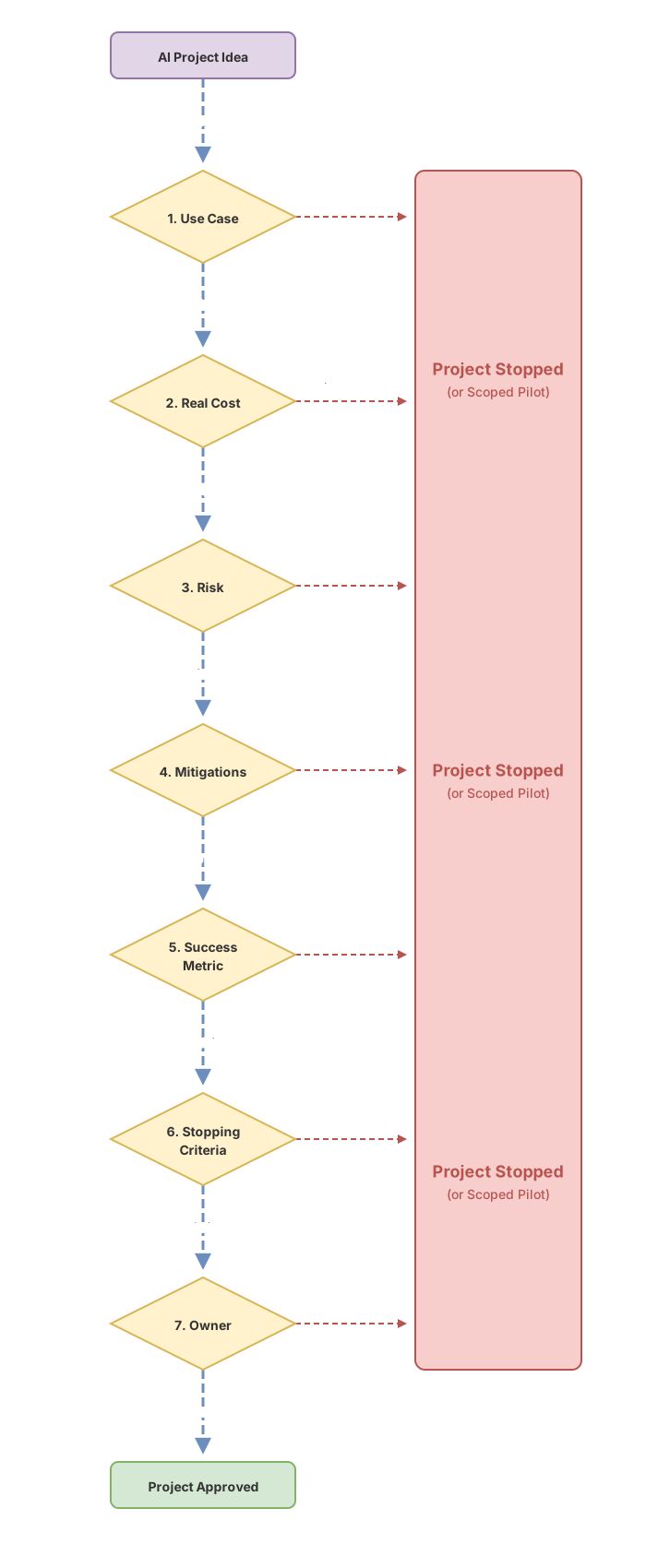
1. The use case: what specific problem does it solve?
Name the task, not the technology. “We want to use AI” is not a use case. “We want the customer service team to stop manually copying the data from each email into the order system” is one. The first is a wish; the second is a problem with an owner, with measurable hours, and with a clear before and after.
The warning sign is easy to spot. If, when you ask what for, the answer starts with the tool (“to add a chatbot”, “to use an LLM”), there’s no use case yet. An LLM is a language model, a program that generates likely text from what you ask it. It’s a means. The business problem comes first, always. If you’re unsure where AI actually fits in your company, that map is in the guide to AI use cases in companies.
2. The real cost: what does it actually cost?
The real cost of an AI project is almost never the license. The vendor’s license is usually the small part and the easiest to see. Underneath it there are others that get ignored in the first meeting and show up together in the third.
You have to budget the integration with your current systems, the preparation of the data the AI will use (which is almost never as clean as you think), the maintenance when the vendor changes the model, and the human oversight you’ll need for months. And there’s a cost that throws off anyone coming from traditional software: many AI services charge per use. Each query costs a little. If the project works and volume takes off, the bill rises with it. That’s good for the business, and it belongs in the budget from the start, not as a surprise.
You don’t need the exact figure today. You do need to know these line items exist and to ask about each one. A budget that only covers the license is underestimating the project, probably by one or two orders of magnitude.
3. The risk: what happens when it gets it wrong?
The question isn’t whether the AI will get it wrong, but what happens when it does. And it will get it wrong. Two words are worth understanding before we go on.
Generative AI is not deterministic. A normal program, given the same input, always returns the same output: two plus two, four, today and tomorrow. A language model, given the same question, can give you different answers on two tries. And it can hallucinate: invent a fact, a figure or a reference that looks perfectly credible, stated with total confidence. This isn’t a bug that a software update fixes. It’s how the technology works.
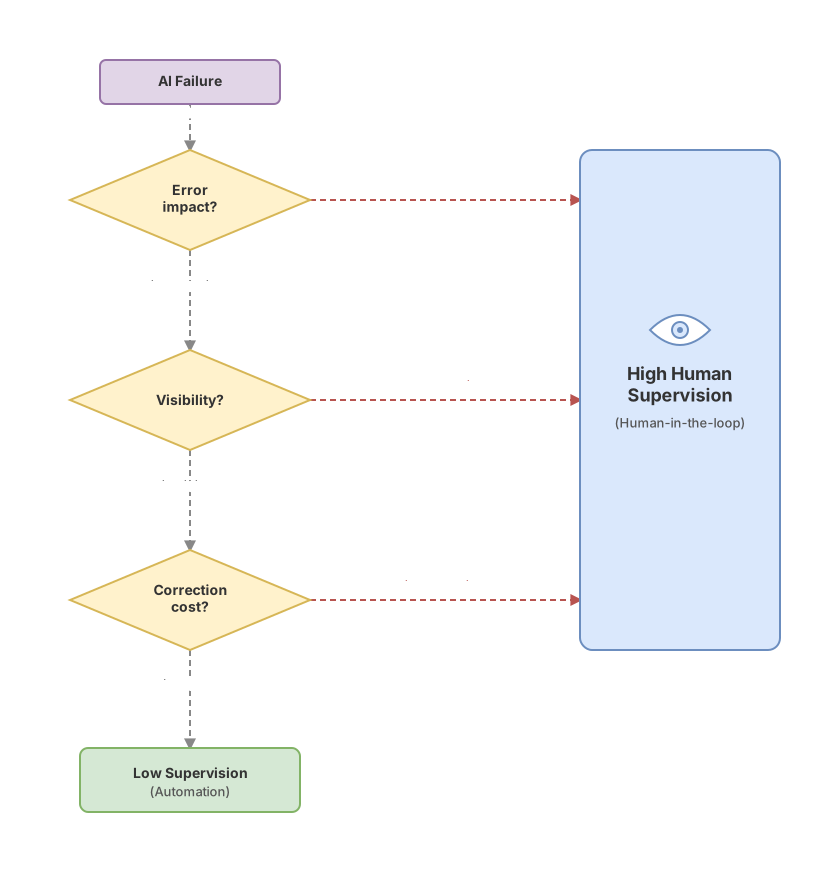
So the risk is measured with three questions about the error. Is it reversible or does it leave permanent damage? Is it visible before it reaches the customer, or does it slip through unseen? Is it cheap to correct or expensive? Drafting an internal document that a human reviews is low risk. Sending automated replies to customers that nobody looks at is high risk. The same technology, two completely different projects. I work through these risk questions one by one in the four questions before using AI.
4. The mitigations: how do we reduce the damage from an error?
A mitigation is any measure that reduces the damage when the AI fails. Since the error is inevitable, this point is not optional: if a project has no mitigations, it’s not ready to ship.
The ones that work best are simple. Putting a person to review before the output reaches the customer, what’s known as keeping a human in the loop. Narrowing the scope so the AI touches only a small, well-defined task instead of an entire process. Always showing the source so whoever receives the answer can check it. And a decision worth making early: which data goes in and which data doesn’t. Feeding personal or confidential information into an external service without thinking is where the serious problems begin, legal ones included.
A note of caution here. In the European Union, the processing of personal data is governed by the GDPR, and the use of AI systems by a specific European regulation that sets obligations according to the system’s level of risk. I won’t cite articles or specific dates, because this is not legal advice and every case is different. The check for the checklist is simpler: before launching, someone with legal judgment must have looked at what data the project uses and what obligations it falls under.
5. The success metric: how do we know if it works?
Define the measure of success before you start, not after. This is the point where the most projects fool themselves, because AI is spectacular in demos. A fifteen-minute demonstration leaves everyone impressed. That means nothing for the business.
The metric has to be a number you already cared about before AI existed: the hours your team spends on a repetitive task, the response time to a customer, transcription errors per month, or the complaints that come from a piece of data copied wrong. If the project moves that number in the right direction, it works. If it just “looks very advanced” but the number doesn’t move, it doesn’t work, no matter how well it plays in the board meeting. Write down the metric and its starting value on day one. Without that starting value you won’t be able to prove any improvement, for or against.
6. The stopping criteria: when do we cancel it?
Decide in advance what result would make you cancel the project, and put a date on it. This is the check almost nobody does, and the one that saves the most money. Without a stopping criterion, a project with no results doesn’t get cancelled: it sits in limbo, consuming budget and attention month after month because nobody dares to say it hasn’t worked.
The criterion combines two things: a threshold and a deadline. “If in three months the metric hasn’t improved at least this far, we stop and take stock.” This doesn’t make you a pessimist. It lets you take the risk calmly, because you know the maximum loss is capped. A project with a stopping criterion is a controlled experiment. One without a stopping criterion is an open-ended bet that can bleed for a year.
7. The owner: who answers for this?
There has to be one person, with a first and last name, who answers for the project. Not a committee, not a department, not “the innovation team”. When responsibility belongs to everyone, in practice it belongs to no one, and that shows the day something fails and a fast decision is needed.
The owner doesn’t have to be the one who codes or who understands the model from the inside. It has to be the one who can stop the project, who checks the metric every week, and who faces the customer when the AI gets it wrong. If no one wants that role, that’s the most honest information you’ll get about how much appetite there really is to make this happen.
The one-page checklist
This is the version to take to the meeting. One question per row and, next to it, the warning sign that tells you the box isn’t resolved yet.
| Check | Question | Warning sign |
|---|---|---|
| Use case | Which specific task does it improve? | The answer starts with the tool, not the problem |
| Real cost | What does it cost beyond the license? | The budget has only one line |
| Risk | What happens when it gets it wrong? | ”It won’t get it wrong” |
| Mitigations | How do we reduce the damage from a failure? | Nobody reviews before it reaches the customer |
| Metric | Which business number moves? | ”It’s impressive in the demo” |
| Stopping criteria | When do we cancel it? | No threshold and no date |
| Owner | Who answers for this? | ”It’s the team’s job” |
Each of these seven checks is a topic with its own judgment call, and working through them with your head on is exactly what the no-hype AI course teaches, question by question. And once you have a pilot that does pass the checklist, the next step, taking it from a trial to something the whole company uses, is what I cover in the plan for adopting AI in a company.
Mistakes everyone repeats
Starting with the tool. Someone saw a demo, wants “a chatbot”, and goes looking for the problem afterwards. The right order is the reverse: the problem is in charge and decides whether AI is even the answer.
Budgeting only the license. It’s the most expensive cost mistake, because you discover the other line items once you’ve already started and it’s too late to back out gracefully.
Confusing the demo with the result. An impressive demo and a business number that improves are different things, and the gap between them is where the projects that “looked so promising” die.
Not setting a stopping criterion. That’s how the zombie project is born: it neither works nor gets cancelled, it just consumes. A threshold and a date written down on day one prevent it.
Diluting responsibility. “It’s everyone’s job” is the polite way of saying it’s no one’s. On the day of the failure, that sentence costs dearly.
Frequently asked questions
Do I need a technical background to use this AI project checklist?
No. It’s designed for the opposite: so that a person who decides, with no technical background, can interrogate an AI project without depending on the vendor to translate it for them. The seven questions are about business, not engineering. If the technical team can’t answer them in plain language, that’s already a sign.
How much should a first AI project cost?
It depends so much on the case that any concrete figure would be a lie. The healthy rule is a different one: start with a small, scoped, cheap pilot, with its stopping criterion, before committing a large budget. The first project isn’t there to transform the company. It’s there to learn whether this works for you, spending the minimum to find out.
What if the vendor tells me their AI doesn’t get things wrong?
It’s the biggest warning sign on the whole list. Any generative AI can get things wrong and can hallucinate, and whoever sells you the opposite either doesn’t understand the technology or would rather you didn’t. A good vendor talks to you about the errors and how they mitigate them, not about how they don’t exist.
Does this apply to a small business or only to large companies?
It applies to any size, and a small business needs it even more. A large company can absorb a failed project; a small business feels every euro spent badly. The stopping criterion and the scoped pilot protect precisely the ones with the least room to get it wrong, so calling them big-company bureaucracy is getting them backwards.
What do I do with the checklist once it’s filled in?
Don’t file it away. It’s a living document that gets revisited on the day the stopping criterion comes due. That’s when you compare what you wrote at the start with what actually happened: whether the metric moved, whether the cost was what you expected, whether the owner is still watching. That honest review, done in time, is what decides whether you continue, adjust or stop.
Related articles

AI Use Cases in Business: Which Ones to Prioritize
A framework for knowing which of your tasks are a good fit for AI and which ones are money down the drain: AI use cases in business, no hype.

An AI adoption plan for your company: the step-by-step roadmap
How to adopt AI in your company without burning through the budget: six ordered steps, from building judgment to scaling. A realistic roadmap, with no guru promises.

4 questions before rolling out AI in your company
The 4-question framework to approve, condition, or reject an AI project without being technical. Cost of error, control, return, and accountability.