
Claude Code permissions: the rules you should already be writing
On August 14, 2026, auto mode becomes the default mode. The six modes, the deny → ask → allow precedence, and what each lever actually guarantees.

You’ve spent months hitting “yes, go ahead” without reading the dialog. On August 14, 2026, that dialog stops showing up on its own: new Claude Code sessions on Pro, Max, and Team that haven’t manually set a mode will start in auto mode, where a classifier decides on your behalf [1]. The classifier is a real layer and it works. But the physical place where your judgment used to live, that confirmation prompt you half-read, disappears; and if your judgment isn’t written down anywhere, from that date on it stops existing.
The good news is that Claude Code has a fairly fine-grained permission system, with rules that get evaluated before the classifier and that almost nobody uses. Here are the levers, which file each one lives in, and which is a hard guarantee versus which is just a suggestion.
What changes on August 14, 2026
Two things, on different dates. The first is already in effect: as of August 7, 2026, Anthropic stopped charging Pro, Max, and Team users for the classifier’s cost [1]. That cost was never billed against your model, and it’s worth understanding why: the classifier runs on Claude Sonnet 5 by default, not whatever you have selected with /model [2]. Where it’s still billed, which is Enterprise, the Claude API, and the clouds, every check spends tokens from that separate model. The second is the headline: starting August 14, new sessions on those same three plans start in auto mode.
Still excluded for now are Claude Enterprise, the Claude API, Claude Platform on AWS, Amazon Bedrock, Google Cloud Agent Platform, and Microsoft Foundry, where auto mode remains opt-in [1]. But it’s a “for now” with a rough date attached: Anthropic says that within the following month, working with its cloud partners, it plans to make it default there too and stop charging for the classifier’s cost [1]. If you’re reading this in September, assume the list has moved and check. If you already had a defaultMode set by hand, it stays as-is unless you accept the one-time notice about the change; if your organization manages it, it doesn’t move either [2].
And it’s worth pinning down what the documentation itself says: auto mode reduces permission prompts, it does not guarantee safety [2]. It’s a review layer, not a guardrail. The guardrail is the one you write, in JSON.
The six modes, and which one you’re using without knowing it
The mode sets the floor: what runs without asking when none of your rules have matched. Rules go first, and the mode decides what’s left [2].
| Mode | What runs without asking | What it’s for |
|---|---|---|
default | Reads only | The most supervised mode. In the CLI, in claude --help, and in extensions it’s called Manual, and it accepts the manual alias since v2.1.200 |
acceptEdits | Reads, file edits, and common filesystem commands (mkdir, touch, rm, rmdir, mv, cp, sed) inside the working directory or additionalDirectories | Iterating on code you review afterward with git diff |
plan | Reads, plus whatever the classifier approves if auto mode is available and useAutoModeDuringPlan is still on, which it is by default | Exploring before touching anything |
auto | Everything, with the classifier reviewing behind the scenes | Long-running tasks |
dontAsk | Only your allow rules, the built-in read commands, and whatever a PreToolUse hook approves | CI. Denies instead of asking |
bypassPermissions | Everything, except your explicit deny and ask rules and the circuit breaker on rm -rf / and rm -rf ~ | Isolated containers and VMs |
dontAsk never appears in the Shift+Tab cycle: you enable it with --permission-mode dontAsk at startup, or by fixing it with defaultMode: "dontAsk" in settings [2].
bypassPermissions is sneakier than it looks. It doesn’t enter the cycle unless you’ve enabled it, but enabling it once is all it takes: starting with --permission-mode bypassPermissions, with --dangerously-skip-permissions, with permissions.defaultMode: "bypassPermissions", or even with --allow-dangerously-skip-permissions, which adds the mode to the cycle without activating it, puts it into the Shift+Tab rotation for the rest of the session [2]. Optional modes are placed behind plan, with bypassPermissions first and auto last, so if you have both enabled you pass over bypass every time you cycle toward auto. In other words: in the most common configuration for someone who turns it on, you can end up there just by hitting keys.
The one that actually matters is where the default gets set:
{
  "permissions": {
    "defaultMode": "auto"
  }
}
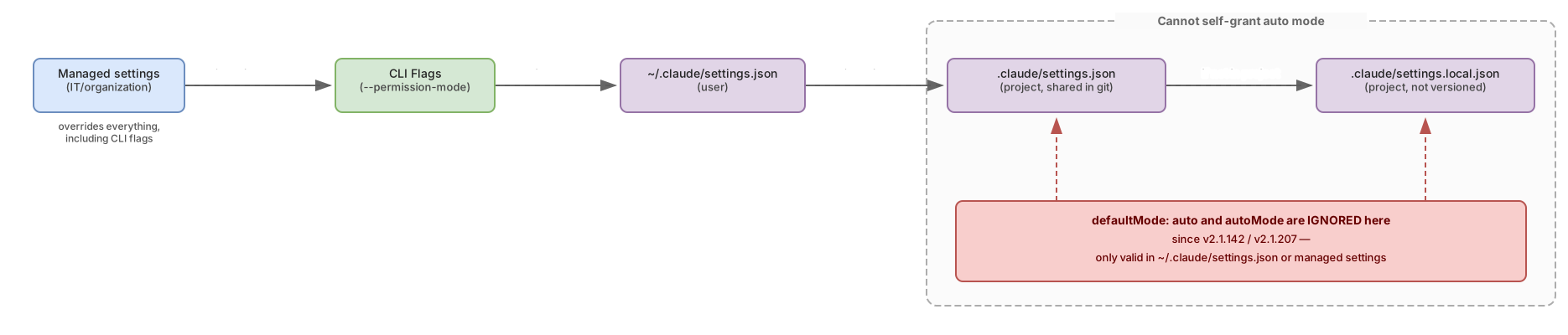
That block has to live in ~/.claude/settings.json. Since v2.1.142, Claude Code ignores defaultMode: "auto" when it comes from .claude/settings.json or .claude/settings.local.json, precisely so a repository you clone can’t grant itself the mode without friction [2]. If you put auto there and the session starts in Manual without telling you, now you know why.
deny → ask → allow: the order that breaks your rules
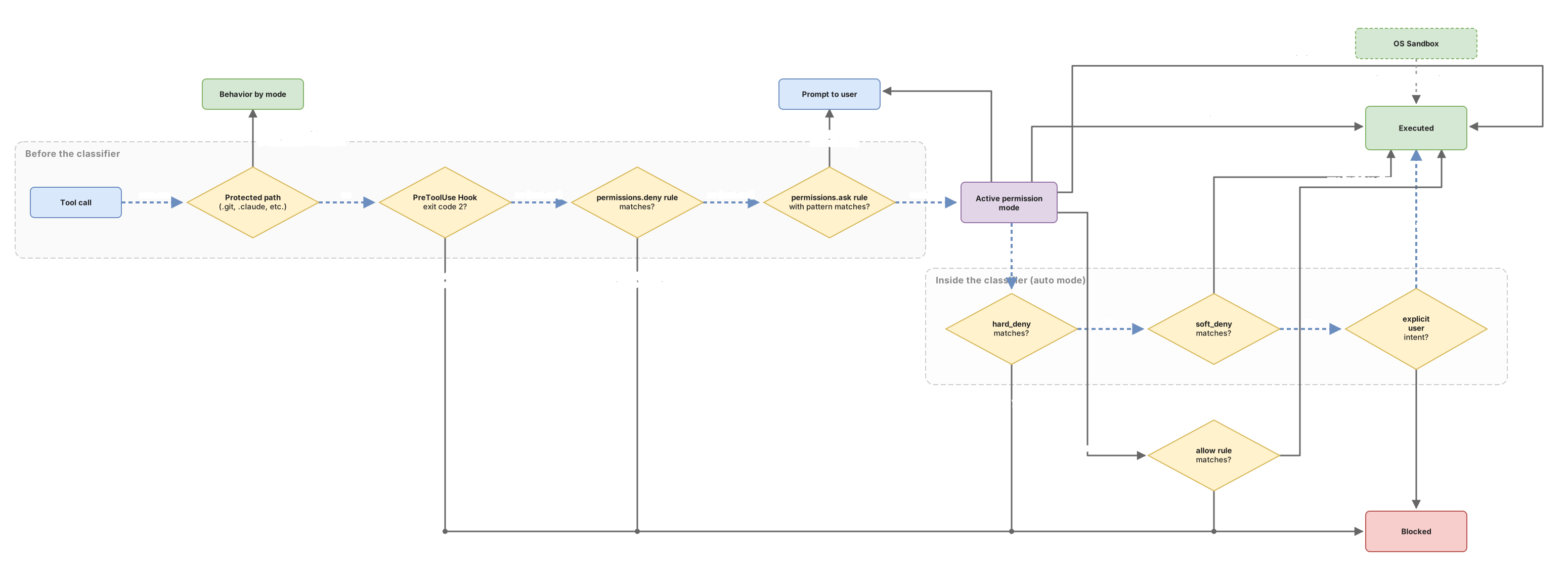
Rules are evaluated in three passes, deny first, then ask, then allow, and the first one that matches wins. Rule specificity doesn’t change that order [3].
That breaks the intuition anyone coming from firewalls or IAM already has: a broad deny doesn’t admit exceptions. If you have Bash(aws *) in deny and Bash(aws s3 ls) in allow, the S3 listing is blocked. The specific rule doesn’t win, because it never gets evaluated. The only way to leave a gap is to not deny that broadly.
And there are two ways to deny that do different things. A bare name like "Bash" removes the tool from the model’s context entirely: Claude never even sees it. A pattern like "Bash(rm *)" leaves it available and blocks the call when Claude tries to make it [3]. The second one is what you want almost always, because an agent without Bash is little more than a file reader.
Rule syntax almost nobody uses
The Tool(thing) pattern gives you a lot more than Bash(npm test).
Parameter matching. Deny and ask rules can match against a specific parameter of the call: Agent(model:opus) matches subagent invocations requesting the Opus tier, and Bash(run_in_background:true) matches commands launched in the background [3]. Each rule names one parameter, so closing two means writing two rules. What you can’t do is match against the main content field: Bash(command:rm *) gets ignored with a startup warning, because a compound command would trivially dodge it.
Globs in the tool-name position. In deny and ask, "mcp__*" matches every MCP tool from every server at once [3]. That’s not valid in allow: there, a glob is only accepted after a literal mcp__<server>__ prefix, so the rule names a server you actually configured.
Wildcard in the middle. Bash(git * main) matches git checkout main, git merge main, and git push origin main, because a single * spans multiple arguments, spaces included [3].
The space before the asterisk. Bash(ls *) requires a word boundary: it matches ls -la but not lsof. Bash(ls*), without the space, matches both [3]. That invisible character is the difference between a rule that does what you think and one that opens a hole.
Cd(...) and Agent(...). A bare deny on Cd disables /cd entirely; with a pattern, it restricts where the session can relocate to. Agent(Explore) shuts off that subagent. And WebFetch(domain:*.example.com) matches any subdomain at any depth, but not example.com on its own [3].
Three traps that leave your rule protecting nothing
The wrappers that don’t get stripped. Before comparing a Bash rule, Claude Code strips a fixed set of wrappers: timeout, time, nice, nohup, stdbuf, the command and builtin builtins, zsh’s noglob, and xargs when called without flags. That’s why Bash(npm test *) also covers timeout 30 npm test [3]. The list isn’t configurable and doesn’t include environment runners: npx, docker exec, devbox run, mise exec, direnv exec. Since those execute whatever you hand them, a rule like Bash(devbox run *) effectively authorizes devbox run rm -rf .; the right approach is one rule per inner command, Bash(devbox run npm test). And watch, setsid, ionice, flock, and find with -exec or -delete are never auto-approved by a prefix rule.
Path anchoring. Read and Edit use gitignore-style semantics: //path is absolute from the filesystem root, while /path anchors to the origin of the settings file that defines it [3]. A Read(/secrets/**) written in ~/.claude/settings.json protects ~/.claude/secrets/**, not your project’s secrets directory. It’s the costliest trap because it doesn’t fail loudly: the rule exists, it loads, and it covers none of what you thought. There’s a third anchor that solves the case, ~/path, which starts from your home directory no matter where the settings file lives: Read(~/.ssh/**) is what you actually want to write, and Read(~/.zshrc) reads the one in your home. For a user-level rule that should apply inside any project, use // or ~/, never a bare /.
The wrong tool. Claude Code checks file permissions against Edit(path) and Read(path) rules, and only those. If you write it against Write(...), NotebookEdit(...), Glob(...), or the legacy MultiEdit(...), it accepts the rule, warns you at startup, and never consults it again. Edit(docs/**) covers all writes, Read(docs/**) covers all reads. The warning only fires for rules that carry a path: a bare Write in deny doesn’t warn about anything and does apply, but at the whole-tool level [3].
A fourth detail: what happens with symlinks
When Claude touches a symbolic link, rules are checked against two paths, the link and its target, and allow and deny behave differently. An allow rule requires both to match; if the link lives in an allowed directory but points elsewhere, it asks you anyway. A deny rule blocks if either path matches [3].
How you put limits on a classifier
Inside auto mode there are two ways to say “not this, or at least ask me first,” and only one of them holds.
The first is saying it in chat. The classifier reads the conversation, so “don’t push until I review it” does genuinely block matching actions, and the limit holds until you lift it. But it isn’t stored as a rule: the classifier re-reads it from the transcript on every check, and if context compaction drops the message that stated it, the limit evaporates [2].
The second is a patterned ask rule, which is evaluated before the classifier and always forces the prompt, even in auto mode [4]:
{
  "permissions": {
    "ask": [
      "Bash(git push *)",
      "Bash(gh pr create *)"
    ],
    "deny": [
      "Bash(terraform destroy *)",
      "Read(//**/.ssh/**)"
    ]
  }
}
That block is the pattern you want if you’re going to live in auto mode: the agent works uninterrupted, and you get control back at the two points where the work leaves your machine.
Underneath, the classifier has its own configuration in the autoMode block, with four lists. environment describes what infrastructure is yours and therefore trustworthy; the details on how to fill in its slots are in the guide on how to describe your infrastructure to the classifier. The other three, hard_deny, soft_deny, and allow, redefine the judgment call, and they’re written in prose: the classifier reads them as natural-language rules [4].
Its internal precedence has four tiers. hard_deny blocks without exception. soft_deny blocks after that. allow acts as an exception on top of soft_deny. And the user’s explicit intent lifts any remaining soft_deny, with a nuance worth memorizing: a general request doesn’t count. Asking to “clean up the repo” doesn’t authorize a force push; asking to “force push this branch” does [4].
Here’s the trap that catches the most people. These lists don’t merge with the built-in ones: if you write an array without the literal token "$defaults", you replace that section’s entire list.
{
  "autoMode": {
    "soft_deny": [
      "$defaults",
      "Never modify files under infra/terraform/prod/: production infrastructure changes go through the review workflow"
    ]
  }
}
That "$defaults" splices the built-in rules in at that position, so yours can go before or after and you still inherit whatever updates Anthropic ships [4]. Without it:
{
  "autoMode": {
    "soft_deny": ["Never modify files under infra/terraform/prod/"]
  }
}
That just erased every built-in block in that list, including the ones on force pushes, curl | bash, production deploys, and the one that stops Claude from disabling its own oversight [4]. The file went from tightening the configuration to loosening it, with no error shown anywhere. claude auto-mode config prints what the classifier actually uses, with "$defaults" already expanded, and claude auto-mode critique reviews your own rules and flags the ambiguous ones.
There’s one more lever. By default, a narrow allow rule like Bash(npm test) survives in auto mode and resolves before the classifier ever sees the call, so a destructive argument your prefix didn’t anticipate can slip through. autoMode.classifyAllShell: true suspends every Bash allow rule, plus PowerShell’s, while auto mode is active [4]. It costs latency and an extra call per command; on a machine with broad permissions, it’s worth it.
| Mechanism | What it does | When it’s evaluated | Can user intent override it? |
|---|---|---|---|
| Limit stated in conversation | Classifier blocks matching actions | Inside the classifier, re-reading the transcript | Lost if compaction drops the message |
Patterned permissions.ask | Forces a prompt in every mode except dontAsk, where it denies instead of asking | Before the classifier | No. The classifier can’t auto-approve it |
permissions.deny | Blocks outright | Before the classifier | No |
autoMode.soft_deny | Blocks destructive actions | Inside the classifier, second tier | Yes: with an explicit, specific request, and also with an allow a developer sets in their personal settings |
autoMode.hard_deny | Blocks unconditionally | Inside the classifier, first tier | No |
PreToolUse hook with exit 2 | Cuts off the tool call | Before allow rules are evaluated | No |
| Operating system sandbox | Restricts process files and network | At the kernel level, outside Claude Code | No |
The layers permission rules don’t cover
There’s a set of paths that never auto-approve, no matter what your allow rules say: .git, .config/git, .claude (except .claude/worktrees, where Claude stores its own worktrees), .vscode, .idea, .husky, .devcontainer, .cargo, .yarn, .mvn, and standalone files like .gitconfig, .zshrc, .npmrc, or .mcp.json [2]. Your allow rules don’t pre-approve them: the check runs before rules are evaluated, so an Edit(.claude/**) in your settings changes nothing. In auto mode those writes go to the classifier, in dontAsk they’re denied, and in bypassPermissions they pass through.
PreToolUse hooks are the deterministic layer. They run before the permission prompt, and one that exits with code 2 cuts off the call before allow rules are ever evaluated [3]. That enables a pattern rules alone can’t give you: "Bash" in allow so everything runs friction-free, plus a hook that rejects the short list of commands you actually care about. It can’t loosen anything: if a deny rule matches, the call is blocked even if the hook returns "allow".
With an important warning, and it’s the one that’s going to hurt the most starting August 14: that pattern doesn’t survive inside auto mode. On entry, Claude Code suspends broad allow rules that grant arbitrary code execution, and that catches Bash(*) and its bare "Bash" equivalent, PowerShell(*), wildcarded interpreters like Bash(python*), package-manager run commands, and allow rules on Agent [2]. Narrow ones, Bash(npm test), do pass through, and the suspended ones come back the moment you leave the mode. You won’t see any error: you write the rule, the hook becomes decoration, and you keep the friction without understanding why. So the pattern holds outside auto mode, or inside it with narrow rules.
And then there’s the sandbox, the only layer that actually stops a script. Deny rules on Read and Edit apply to Claude’s file tools and to the file commands Claude Code recognizes inside Bash, like cat, head, or sed. They don’t apply to a subprocess that opens files on its own, meaning any Python or Node script Claude writes and runs [3]. For a denied Read(**/.env) to actually mean something against an open('.env') inside that script, you need the operating system sandbox, which does combine your file rules with its own boundary.
If this is going out to a team, managed settings outrank everything else, including CLI flags. permissions.disableAutoMode: "disable" removes auto mode from the cycle and rejects --permission-mode auto at startup, and permissions.disableBypassPermissionsMode does the same for the no-checks mode. There are also keys that only get read from there, like allowManagedPermissionRulesOnly (user and project settings can no longer define rules), allowManagedHooksOnly, or strictPluginOnlyCustomization [3].
{
  "permissions": {
    "disableBypassPermissionsMode": "disable",
    "deny": ["Bash(kubectl * --context prod*)"]
  },
  "allowManagedPermissionRulesOnly": true,
  "allowManagedHooksOnly": true
}
And one thing worth understanding clearly before rolling out corporate policy via autoMode: entries from each scope get combined, a developer can’t remove ones that come from managed settings, but because allow entries act inside the classifier as exceptions to soft blocks, an allow set in someone’s personal settings can lift an organization’s soft_deny. It’s additive, not a policy boundary [4]. For anything that must never run, the documentation itself recommends permissions.deny in managed settings, which is evaluated before the classifier and nobody can override [4].
One detail that surprises anyone rolling out per-repo configuration: allow rules in a .claude/settings.json don’t take effect until you accept that workspace’s trust dialog, because they grant capability. deny and ask rules apply from the start, because they only restrict [3].
When auto mode gives up
The classifier also keeps a running count of its own blocks. If it stops three actions in a row, or twenty total within the same session, auto mode pauses and Claude Code goes back to asking you like in Manual [2]. You approve whatever prompt comes up and auto mode resumes. Both thresholds are fixed and not configurable: any allowed action resets the streak counter to zero, while the count of twenty carries across the session and only resets once it hits its own limit and triggers the pause [2].
That’s in interactive mode. In non-interactive mode with -p there’s nobody to ask, so repeated blocks abort the session [2]. If you’re planning to run Claude Code in CI inside auto mode, that’s the failure you’ll see: not a warning, a job dying halfway through.
Every denial gets logged. /permissions has a “Recently denied” tab with the blocked call as-is, and pressing r on one flags it for retry: on exiting the dialog, Claude Code tells the model it can try again and the conversation continues [4]. When the same denial keeps repeating, it’s almost always that the classifier is missing context about your infrastructure, and that gets fixed in autoMode.environment, not by insisting.
And if you’d rather react to blocks in code instead of by hand, there’s a PermissionDenied hook [4].
Common mistakes
Putting autoMode or defaultMode: "auto" in the repo’s settings. The classifier doesn’t read autoMode from .claude/settings.json, and since v2.1.207 it doesn’t read it from .claude/settings.local.json either, which it used to [4]. The three scopes it does read are ~/.claude/settings.json, managed settings, and whatever JSON you pass with --settings. If the block is yours, move it to ~/.claude/settings.json; if it belongs to the organization, move it to managed settings, which is where it belongs.
Defining soft_deny without "$defaults". The costliest mistake on the list, because the file looks stricter and ends up looser.
Expecting a specific allow to beat a broad deny. It doesn’t. It never gets evaluated.
Writing the rule against Write(...) or Glob(...). It’s accepted, it warns at startup, and it’s never consulted. If your file policy isn’t on Edit(...) and Read(...), it isn’t in effect.
Trusting the sentence in chat. “Don’t touch production until I review it” works as long as that message stays in the context window. In a long session, with compaction in the mix, it isn’t a guarantee; it’s a preference with an expiration date it won’t warn you about.
Configuration checklist
-
permissions.defaultModelives in~/.claude/settings.json, not in the repo’s settings - Patterned
askrules exist for actions that send work outside your machine (Bash(git push *),Bash(gh pr create *)) - File rules are written against
Edit(...)andRead(...), and user-level paths use//or~/instead of/ - Every
autoModelist you’ve customized contains"$defaults", verified withclaude auto-mode config - There are no
allowrules on environment runners likeBash(npx *)orBash(docker exec *) - Anything that must never run lives in
permissions.deny, not described inautoMode.soft_denyor said in chat - If there’s data no process should read, the sandbox is enabled in addition to the Read rules
With those seven lines written, August 14 won’t change anything for you that you didn’t decide yourself. And if you’re setting up the whole environment and not just permissions, the rest of the setup is in the practical guide to Claude projects.
Sources
- Auto mode becomes the default in Claude Code — Anthropic — the August 14, 2026 date, plan-level scope, the end of classifier billing effective August 7, and the opt-in status of Enterprise, the API, and the clouds.
- Choose a permission mode — Claude Code Docs — the table of six modes, the ignoring of
defaultMode: "auto"since v2.1.142, the warning that auto mode doesn’t guarantee safety, conversation-stated limits, and the list of protected paths. - Configure permissions — Claude Code Docs — the deny → ask → allow precedence, rule syntax, wrapper stripping, Read and Edit path anchoring, rules on
Write/Glob,PreToolUsehooks, and managed settings. - Configure auto mode — Claude Code Docs — the
autoModelists, the"$defaults"token, the classifier’s internal precedence,classifyAllShell, and theclaude auto-modesubcommands.
Frequently Asked Questions
Do I need to do anything before August 14, 2026?
If you already have a permissions.defaultMode set by hand, it’s respected and won’t change unless you accept the one-time notice. If you’ve never touched it and you’re on Pro, Max, or Team, new sessions will start in auto mode from that date on, so it’s worth spending ten minutes writing the ask and deny rules that today you replace by reading the dialogs yourself.
Why isn’t auto mode showing up for me?
It’s almost always the model. On the Claude API and Claude Platform on AWS you need Opus 4.6 or later, Sonnet 4.6 or later, or Fable 5. On Amazon Bedrock, Google Cloud Agent Platform, Microsoft Foundry, and signed-in sessions through the Claude apps gateway the bar is higher: only Sonnet 5, Opus 4.7 or later, and Fable 5 qualify. Sonnet 4.5, Opus 4.5, any Haiku, and the claude-3 models are excluded on every provider [2]. If the model qualifies, check whether your organization has turned it off with permissions.disableAutoMode in managed settings. And if it’s still not showing up, it isn’t a temporary glitch: it’s an unmet requirement [2].
How do I leave Claude Code the way it was, asking about everything?
By setting "permissions": {"defaultMode": "default"} in ~/.claude/settings.json. That’s the mode the CLI shows as Manual, and since v2.1.200 it also accepts the manual alias. You can switch back to it at any point during a session with Shift+Tab.
How do I force it to ask me before a git push without leaving auto mode?
With an ask rule that carries a pattern, not the bare tool name:
{ "permissions": { "ask": ["Bash(git push *)"] } }Patterned ask rules are evaluated before the classifier and always force the prompt, so the classifier can’t auto-approve a push even while the rest of the session runs uninterrupted.
Can I turn off auto mode for my whole team?
Yes, with permissions.disableAutoMode set to "disable" inside managed settings. That removes auto from the Shift+Tab cycle and rejects --permission-mode auto at startup. Managed settings outrank user settings, project settings, and command-line flags, so a developer can’t revert it from their own machine.
Does auto mode protect me from a prompt injection?
It helps, but it isn’t complete protection, and the documentation says so plainly: it reduces permission prompts, it doesn’t guarantee safety. The classifier sees your messages, tool calls, and your CLAUDE.md, but tool results are stripped out before it sees them, so hostile content in a file or a web page can’t manipulate it directly. Against a prompt injection that gets Claude to attempt something destructive, the hard guarantee is a deny rule in managed settings or the operating system sandbox.
Related articles
Claude Code Auto Mode: Configure autoMode.environment
Set up autoMode.environment so the classifier understands your infrastructure and stops interrupting you with false positives.

Guardrails for AI Agents: How to Implement Them (With Code)
Implement guardrails in your AI agent step by step: input/output validation, action limits, and loop control. Real, copy-ready code examples.

How to Create a Claude Project: Step-by-Step Guide (2026)
Set up a Claude Project from scratch: custom instructions, knowledge files, and ready-to-copy examples. A practical visual guide for any workflow.