What Is Docling and How Does It Prepare Documents for RAG?
What Docling is, how it structures documents, and where it fits into RAG. A Python example and criteria for evaluating text, tables, and sources.
Have you ever copied a table from a PDF only to find the figures separated from their headers? The document looks fine, but the text our application receives may have lost what each number means. Docling helps convert that document into organized content, with a structure we can inspect before using it in a search engine.
You only need to understand files and functions to follow the example; the code uses Python. I would start with this distinction: reading a document’s words and reconstructing their relationships are different tasks. A table needs to preserve which figure belongs to each row and column.
What is Docling?
Docling is an open-source toolkit that converts documents into a structured representation. It supports several formats, including PDF, DOCX, and HTML, and offers features for interpreting page layout, tables, and text in scanned documents. The specific capabilities depend on the format and configuration you choose. [1]
Imagine a fictional report containing this table:
| Company size | Companies that increased their training budget |
|---|---|
| Up to 500 employees | 18 % |
| More than 500 employees | 35 % |
Below it is a note: “Data for 2025.” If we save only 18 % 35 %, the extraction contains the figures, but we have lost the variable and the population. We do not know the time period either. We need to reconstruct enough structure to check what the report actually says.
Why a PDF needs more than text extraction
A PDF’s visual layout communicates relationships that text extraction can lose. A header above two columns, a small note, or the order of text blocks can change how we interpret a figure.
Structural analysis, also called parsing, identifies elements and relationships within the file. In a PDF with digital text, we can recover characters, but we still need to determine their order and how they are grouped. On a scanned page, by contrast, the words are part of an image.
OCR, or optical character recognition, turns those images into text. Docling provides configurable OCR engines for this stage. [2] Recognizing “35 %” correctly still does not establish that the figure belongs to the row for large companies: we need to check the table as well as the characters.
I would separate the two checks. First, have we read what appears on the page? Then, have we preserved the relationship between the figure, its header, and its note? This separation lets us correct a misread symbol without confusing it with a structural error.
The central output: DoclingDocument
DoclingDocument is the common representation of the converted document: it organizes content, hierarchy, and provenance where available. It includes elements such as text, tables, and images, along with relationships between them and a distinction between the main body and elements such as headers or footers. [3]
Provenance tells us where an element came from. In a PDF, it can include a page and region: the rectangular area where the element was located. This information helps us trace extracted content back to the original, although not every format or conversion provides the same level of detail.
Markdown makes the result easy to read: it expresses headings, paragraphs, and tables using a simple text syntax. JSON lets us save the structured representation for processing in code. Docling offers these exports, among others. [1] A readable Markdown table can hide the fact that we discarded location information, so I would choose the output based on what I need to check later.
For our report, I would keep the original file and a structured export. I would add a stable identifier and file version in the application, so we can distinguish two editions even if they have the same filename. This is an ingestion decision, rather than something we should assume the converter handles for us.
Converting a local file with Python
DocumentConverter converts a file path or URL and returns a result containing the converted document. The documentation’s basic example uses its document attribute and the export_to_markdown() method. [4]
In a Python environment with Docling installed, this example reads an informe.pdf file in the working directory:
from docling.document_converter import DocumentConverter  # Importa el convertidor.

converter = DocumentConverter()  # Usa la configuración predeterminada.
result = converter.convert("informe.pdf")  # Convierte el archivo local.
document = result.document  # Obtiene su representación estructurada.
print(document.export_to_markdown())  # Muestra una exportación legible.
structured = document.export_to_dict()  # Obtiene un diccionario para procesarlo.
structured contains the representation exported as a dictionary, rather than a business record with a “percentage of companies” field. export_to_dict() is a DoclingDocument method; extracting that specific information requires subsequent logic. [5]
The first run may download models. To work offline, you need to prepare them beforehand and configure their location. Docling also supports stages that use remote services, which must be explicitly enabled and may send content outside your machine. [2] Running a local conversion and using a remote API are different decisions about where documents are processed.
From a structured document to facts
Extracting facts means turning evidence into statements with fields we can query and verify. It is an additional step beyond recognizing a table or exporting a document to JSON: we need to interpret what each cell represents.
In our example, the fact brings together a variable, “companies that increased their training budget”; the value 35; the unit, “percent”; the population, “more than 500 employees”; and the period, 2025. I would also save the evidence and its location. This helps us avoid confusing the percentage of companies with the percentage increase in their budgets.
We can build this extraction using rules or a model, depending on the documents. In both cases, we need to verify that the source supports the fields and leave missing information unknown. Basic Docling conversion does not automatically produce this business-specific data contract: the structure helps us prepare it, but the statement still needs validation.
Where Docling fits into RAG
RAG, retrieval-augmented generation, combines information retrieval and response generation: we find evidence and give it to a language model. Docling can prepare the documents we will search, but conversion alone does not create the search engine or answer questions.
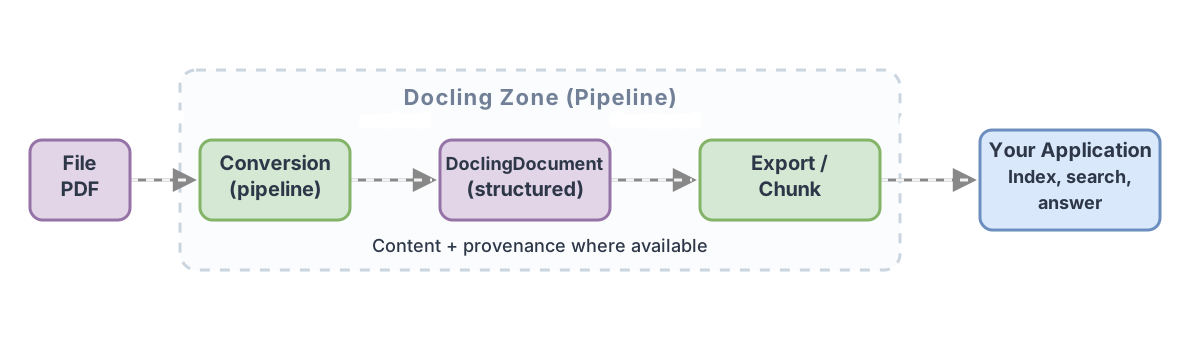
After conversion, we usually split the document into chunks. This chunking lets us search manageable pieces instead of supplying an entire report for every query. The challenge is deciding what we can separate without losing meaning.
If we split our table by length, we could leave 35 % in one chunk and the header in another. I would check that the text prepared for search retains the variable and population, and keep a reference to the source element. The note specifying the period may need an additional association; we should not assume every chunker will understand its scope.
Docling can chunk the DoclingDocument directly. HybridChunker combines document structure with limits measured using a tokenizer, the component that splits text into the units a model processes. Its configuration needs to account for the model that will consume the chunks. [6]
We can then compute embeddings, numerical representations of text that help compare similarity, and store them in a search index. The application retrieves candidates and decides which evidence the answering model receives. It also needs to retain source locators and build references.
RAG ingestion engineering covers these controls: validating extraction, maintaining context, and evaluating a new corpus version before activating it. Docling handles one stage of this chain; errors in later stages need their own controls.
How to decide whether it fits your documents
I would evaluate Docling by comparing its results with specific pages from the material we plan to process. A simple example shows how to use the API, but it does not necessarily represent our reports.
I would prepare a sample containing two-column documents, tables with merged cells, notes, and scanned pages. For each case, I would save the expected result and check for both errors and omissions. In our fictional table, accepting a figure requires preserving its row, variable, and period.
| Need | What I would check |
|---|---|
| Reading simple documentation | Whether simpler extraction already solves the problem at a lower cost |
| Recovering tables from reports | Headers, rows, units, and relevant notes |
| Processing scanned documents | Recognized text, symbols, and reading order |
| Citing evidence | Whether the application retains the link to the file and available source locators |
Charts deserve a separate test. Recognizing an image or generating a description does not establish that its values were extracted correctly. If we need exact figures, we must check them against the chart and distinguish them from visual estimates.
I would also measure runtime and resource use in our environment. If we change the pipeline or model, I would compare the sample again: an improvement on scanned pages could introduce errors in tables that previously worked. Docling’s code is MIT-licensed, while the models have their own licenses. [1]
My acceptance criterion would be concrete: we can return to the original and verify what the application claims. If a conversion produces clean text but separates 35 % from its population, we still do not have a reliable basis for answering questions.
Sources
- Official Docling repository: definition, capabilities, exports, and licenses.
- Docling advanced options: OCR configuration, local models, and remote services.
- DoclingDocument model: content, hierarchy, and provenance.
- Docling quickstart: using
DocumentConverterand exporting Markdown. - DoclingDocument reference: the
export_to_dict()method. - Chunking in Docling: chunks based on the structured document and
HybridChunker.
Frequently Asked Questions
Is Docling a language model?
Docling is a document-processing toolkit. It can use models at specific stages, but choosing Docling does not mean choosing a single language model.
Can Docling process a scanned PDF?
Yes, it provides OCR to recover text from scanned pages. The engine and its configuration affect the result, and you need to check symbols, figures, and structure in representative documents.
Does converting a PDF with Docling prevent hallucinations?
No. Conversion preserves information that can help ground answers, but it can still contain errors. We also need to check extraction, retrieval, and whether the evidence supports the generated statements.
Should I save Markdown or JSON?
Markdown makes converted content easier to read. If we need to inspect elements and retain the structured representation, JSON is more appropriate. We can save both and also keep the original to check the extraction.