
Git cherry-pick vs merge vs rebase: when to bring over just one commit
Cherry-pick copies one specific commit; merge and rebase bring the whole branch. When to use each, what duplicates cherry-pick creates and how to undo it.
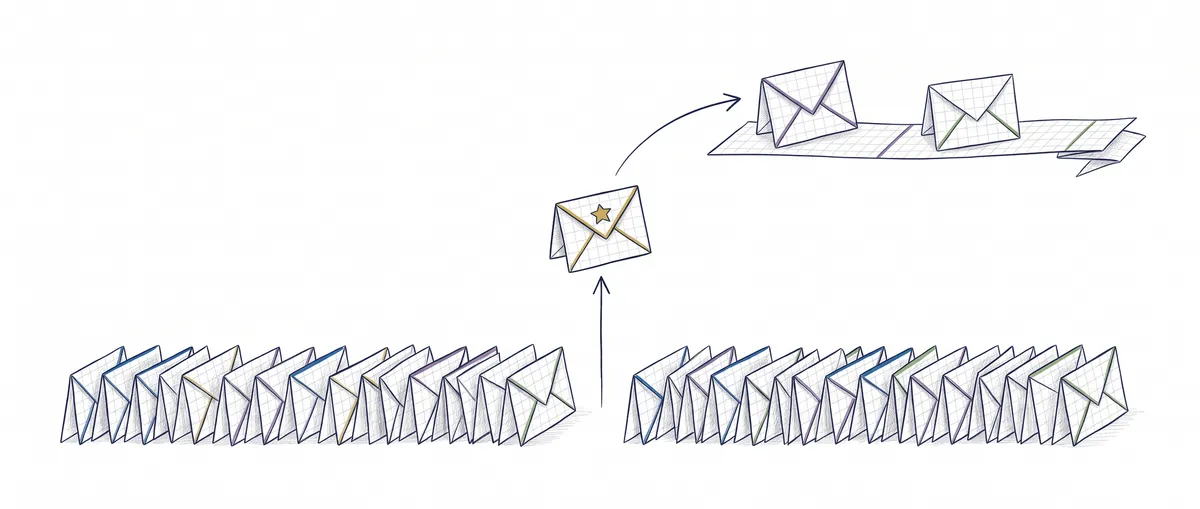
Git cherry-pick copies the change from one specific commit (or a few) onto your current branch and creates a new commit with a different hash. Merge and rebase, on the other hand, bring in the whole branch. If you need a single fix and not the rest of the work, use cherry-pick; if you want everything, use merge or rebase.
To follow along you only need to know what a commit and a branch are. The difference between merge and rebase (the shape each one leaves in the history) is already covered in the merge vs rebase comparison. The question here is a different one: how much you bring over.
| Cherry-pick | Merge | Rebase | |
|---|---|---|---|
| What it brings | The commits you pick, one by one | The whole branch | Your whole branch, replayed on a new base |
| What it creates | One new commit per copied commit, with a hash different from the original | A merge commit (or a fast-forward) | Copies of your commits with new hashes |
| Link to the original | Git doesn’t record it in the commit; it’s only written down if you use -x | The original commits come in as they are | The originals are replaced by the copies |
| Typical use | Hotfix to a release, backport, commit on the wrong branch | Integrating a finished feature | Bringing your local branch up to date before opening the PR |
What git cherry-pick does, with a real example
Cherry-pick takes the diff a commit introduced and applies it again on top of the branch you’re on. I tried it in a test repo with git 2.43 (the hashes come from that repo; yours will differ). I have a feature/pagos branch with three commits, and only one of them is a fix I need right now in release/1.0:
# From the branch that RECEIVES the change
git switch release/1.0
# Copy only the fix; -x records where it came from
git cherry-pick -x 28b1fb9
git log -1 --format='%h %s%n%b'
# 8308bb2 fix: evita crash con usuario nulo
# (cherry picked from commit 28b1fb9e897f...)
Look at the two hashes: the original is 28b1fb9 and the copy is 8308bb2. Same change, same message, different commit, because the parent is different and a commit’s hash depends on its parent. The other two commits on feature/pagos stay where they were, untouched.
The (cherry picked from commit ...) line only shows up because I used -x. Without that option, the commit keeps no note that it’s a copy, and the official git cherry-pick documentation recommends -x precisely when you copy between public branches, as in a backport.
When cherry-pick is the right tool
Cherry-pick fits when you want one specific change and you do not want the rest of the branch, neither now nor later.
Hotfix to a release branch. The fix is born on your working branch, but that branch has half-finished features that can’t reach production. You copy the fix to release/1.0 and the feature carries on as usual.
Backport. You fix a bug on main and need the same fix in an older version you still maintain. That maintenance branch will never receive all of main, so copying the commit is the only sensible option. Here -x is practically mandatory.
Commit on the wrong branch. It happens to all of us: you commit on main thinking you were on your branch. If you haven’t pushed it yet, copy it to the branch where it belonged and remove it from main:
git switch feature/registro            # the branch it should have gone to
git cherry-pick c8bbd47                # copy the misplaced commit
git switch main
git reset --hard HEAD~1                # remove the commit from main (only if you have NOT pushed it)
That reset --hard rewrites main, so it’s only valid while the commit lives on your machine. If you had already pushed it, swap the reset for git revert c8bbd47 on main: it undoes the change with a new commit without rewriting the shared branch (you’ll see it further down, in how to undo a cherry-pick).
And if the branch didn’t even exist, you don’t need cherry-pick: running git branch feature/registro before the reset already leaves it pointing at that commit.
When NOT to use cherry-pick: if you’re going to merge the whole branch
If sooner or later you’re going to integrate the full branch, cherry-pick leaves you with the same change duplicated. In my test repo, after copying the fix, I merged the whole feature/pagos into a copy of release/1.0. The merge went in without conflicts, but look at the graph:
*   2835ff8 Merge branch 'feature/pagos' into release-merge
|\
| * 1f2a68c pagos: reintentos
| * 28b1fb9 fix: evita crash con usuario nulo
| * 5ca565a añade módulo de pagos
* | 8308bb2 fix: evita crash con usuario nulo
|/
* 44c5f6f commit inicial
Two commits with the same message and different hashes. Whoever reads that history six months from now won’t know whether they’re the same change or two different attempts.
And it can get worse. If, after the cherry-pick, someone touches that same line again on the source branch, the final merge hits a conflict over a change you thought was already settled. I reproduced it by adding a commit that modified the fix’s line: CONFLICT (content): Merge conflict in app.txt. You end up resolving the same fix twice.
Rebase behaves better in this case (if the branch is yours alone): when rebasing feature/pagos onto the release, Git warned with warning: skipped previously applied commit 28b1fb9 and skipped the copy, because it detects that the change is already applied. If you want to understand why rebase replays commit by commit, see how git rebase works step by step.
The practical rule: if the whole branch is going to end up integrated, integrate it whole with git merge or rebase and forget about copying loose commits.
How to see which commits are already copied
git cherry compares two branches by the content of each change (its patch-id), not by the hash, so it recognises copies even when they have a different identifier. Careful: it only works if the change stayed identical. If you resolved a conflict while copying it, the diff is now different: git cherry reports it as pending (+) and rebase won’t skip it either. That’s where -x saves you, because the original hash stays written in the message. (The documentation says -x only annotates cherry-picks without conflicts; in my test with git 2.43 the line was kept after resolving one, but check it with git log -1.)
git cherry -v --abbrev=7 release/1.0 feature/pagos
# + 5ca565a añade módulo de pagos            (missing in release)
# - 28b1fb9 fix: evita crash con usuario nulo (already has an equivalent)
# + 1f2a68c pagos: reintentos                 (missing in release)
The - marks what’s already copied. git log --oneline --cherry-pick --left-right release/1.0...feature/pagos does the same from git log: it hides the equivalent pairs and leaves you only with what’s actually missing. Before a big backport, this check saves you from copying something twice.
How to undo a cherry-pick
It depends on where you are:
- In the middle of a conflict:
git cherry-pick --aborttakes you back to the previous state, as if you had never started. - In the middle of a range, just that commit:
git cherry-pick --skipdrops the commit that caused the conflict and carries on with the rest. - Already done, but only locally:
git reset --hard HEAD~1removes the copied commit. - Already pushed to a shared branch:
git revert <hash-of-the-copy>creates a new commit that undoes the change without rewriting history.
The difference between reset and revert, and why one is safe on shared branches and the other isn’t, is explained in git reset vs revert vs restore.
Sources
- git-cherry-pick, official Git documentation (source in the git/git repository):
-x,-mand ranges. - git-cherry, official Git documentation (source in the git/git repository): comparison by patch-id and the
+/-markers.
Frequently Asked Questions
Does git cherry-pick move the commit or copy it?
It copies it. The original commit stays on its branch, and a new one with the same change and a different hash appears on yours.
Can I cherry-pick several commits at once?
Yes. You can pass several hashes in a row (git cherry-pick a1b2c3d e4f5a6b) or a range. Watch out with ranges: A..B does not include A, just like in git log. In my test, git cherry-pick 5ca565a..1f2a68c skipped the first commit and the last one failed because it depended on it. To include A, write A^..B.
git cherry-pick 5ca565a^..1f2a68c # includes 5ca565a and everything up to 1f2a68cWhat’s the difference between git merge and cherry-pick if I only want one fix?
Merge brings in every commit from the branch that you don’t have yet, not just the fix. If the branch carries half-finished work, that work comes in too. Cherry-pick copies only the commit you choose, at the cost of duplicating it if you ever merge the full branch.
Can you cherry-pick a merge commit?
Not without -m: Git rejects it with error: commit … is a merge but no -m option was given, because it doesn’t know which of the two parents to compute the change against. The -m option tells it which parent to treat as the mainline (-m 1 is usually the branch the merge was made on). If you find yourself doing this often, what you probably want is to merge that branch.
What’s the difference between git rebase and cherry pick?
In practice, rebase does a cherry-pick of every commit on your branch onto the new base, all at once, and moves the branch. Cherry-pick does the same with the commits you pick and leaves your branch where it was. That’s why rebase is for bringing a whole branch up to date and cherry-pick is for taking a single change with you.
Choosing between cherry-pick, merge and rebase is a judgment call, not a matter of memorising flags, and you learn it better by working in a repo than by reading. In Git: From Zero to Professional you practise branches, integrations and undoing mistakes visually, with no fear of breaking anything.
Related articles
Merge vs Rebase: Which One to Use and the Rule You Can't Break
Merge vs rebase without dogma: what each one actually does to your history, the golden rule of rebase, and a team workflow you can copy on Monday.

Git Rebase Explained: What It Does and When to Use It
Git rebase replays your commits onto a new base. What it does, when to use it instead of merge, and the golden rule for not breaking your team's history.
Git merge explained: fast-forward vs 3-way merge
What git merge does under the hood, when it produces a fast-forward and when a three-way merge commit, and how to read the resulting graph.